

- Posts: 490
- Thank you received: 2
Where and how to switch positions?
10 years 4 months ago #246130
by ronron
Where and how to switch positions? was created by ronron
-- HikaShop version -- : 2.6.3
-- Joomla version -- : 3.4.3
-- PHP version -- : 5.5
-- Error-message(debug-mod must be tuned on) -- : none
hi
i would like to switch the position of hikashop_small_cart_checkout_link and the hikashop_cart_button. The text is "proceed to checkout".
Also would it be ok to do so?
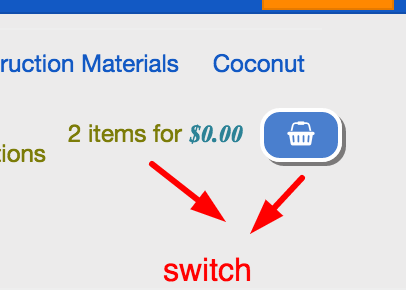
thanks
-- Joomla version -- : 3.4.3
-- PHP version -- : 5.5
-- Error-message(debug-mod must be tuned on) -- : none
hi
i would like to switch the position of hikashop_small_cart_checkout_link and the hikashop_cart_button. The text is "proceed to checkout".
Also would it be ok to do so?
thanks
Please Log in or Create an account to join the conversation.

10 years 4 months ago #246133
by lousyfool
Need help with customisations of layouts, style or other site development? PM me!
(Don't forget to turn on "E-mail notification of new messages" )
Replied by lousyfool on topic Where and how to switch positions?
Hi,
You should find these elements in the view "product / cart" for your frontend template. It must be an override of the original view because the button is not standard in HikaShop.
Since swapping the positions of these elements is merely a small layout change, it would be ok to do so and not affect the functionality, of course.
Need help with customisations of layouts, style or other site development? PM me!
(Don't forget to turn on "E-mail notification of new messages" )
Please Log in or Create an account to join the conversation.
Time to create page: 0.066 seconds