
- Posts: 31
- Thank you received: 0
Cannot insert text to the login before checkout
- chwebmedia
-
 Topic Author
- Offline
Less
More
10 years 2 months ago #248695
by chwebmedia
Cannot insert text to the login before checkout was created by chwebmedia
-- url of the page with the problem -- :
barberfanatics.com/index.php/barber-shop...out/task-step/step-1
-- HikaShop version -- : 2.6.3
-- Joomla version -- : 3.6.2
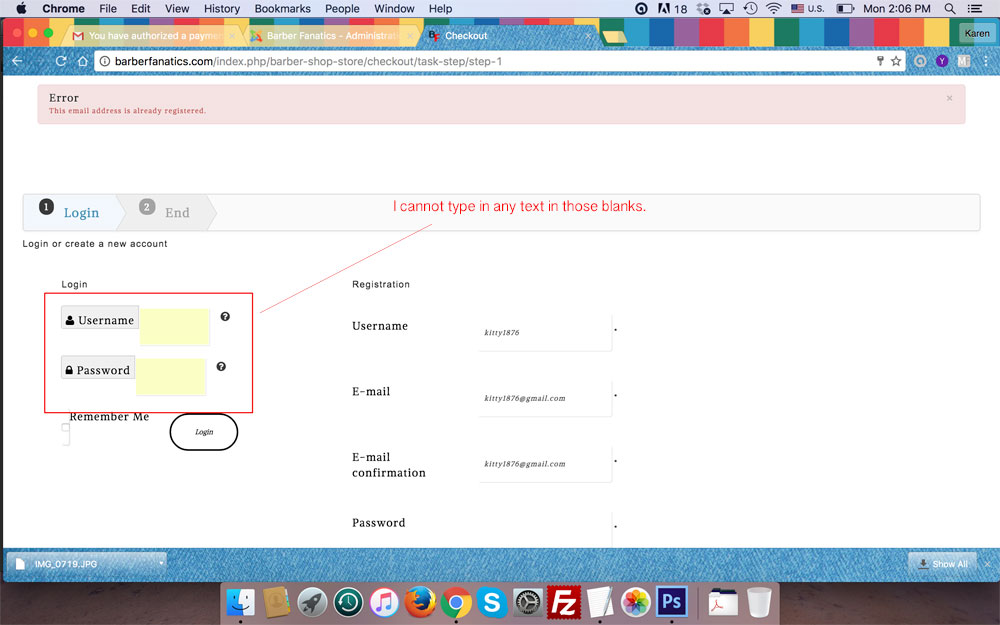
Hi, I was testing the checkout page and found out that I am not able to type anything to log in to the site before checkout. Can you help?
barberfanatics.com/index.php/barber-shop...out/task-step/step-1
Thanks,
Karen
-- HikaShop version -- : 2.6.3
-- Joomla version -- : 3.6.2
Hi, I was testing the checkout page and found out that I am not able to type anything to log in to the site before checkout. Can you help?
barberfanatics.com/index.php/barber-shop...out/task-step/step-1
Thanks,
Karen
Please Log in or Create an account to join the conversation.

10 years 2 months ago #248732
by nicolas
Replied by nicolas on topic Cannot insert text to the login before checkout
Hi,
It's not that you can insert text. The text can be written in it. The problem is that you just don't see it because of the CSS of your template which is not correct.
Remove the code:
font-size: 0.9em;
in the CSS code:
of your Joomla template file
barberfanatics.com/templates/samba_spa/css/template.css
and that will fix the problem.
I would recommend to contact your template provider to notify them of the problem.
It's not that you can insert text. The text can be written in it. The problem is that you just don't see it because of the CSS of your template which is not correct.
Remove the code:
font-size: 0.9em;
in the CSS code:
Code:
.inputbox, .registration input, .login input, .contact-form input, #jform_contact_message, input, textarea, .validate, select, textarea, input[type="text"], input[type="password"], input[type="datetime"], input[type="datetime-local"], input[type="date"], input[type="month"], input[type="time"], input[type="week"], input[type="number"], input[type="email"], input[type="url"], input[type="search"], input[type="tel"], input[type="color"], .uneditable-input {
background: #ffffff none repeat scroll 0 0;
border:none;
-webkit-box-shadow:1px 1px 0px 0px rgba(0, 0, 0, 0.1);
-moz-box-shadow:1px 1px 0px 0px rgba(0, 0, 0, 0.1);
box-shadow: 1px 1px 0px 0px rgba(0, 0, 0, 0.1);
color: #363535;
font-size: 0.9em;
font-weight: 300;
font-style:italic;
border-style: solid;
letter-spacing: 1px;
border-width: 1px;
border-color: #fff;
}
I would recommend to contact your template provider to notify them of the problem.
Please Log in or Create an account to join the conversation.
- chwebmedia
-
Topic Author
- Offline
Less
More
- Posts: 31
- Thank you received: 0
10 years 2 months ago #248793
by chwebmedia
Replied by chwebmedia on topic Cannot insert text to the login before checkout
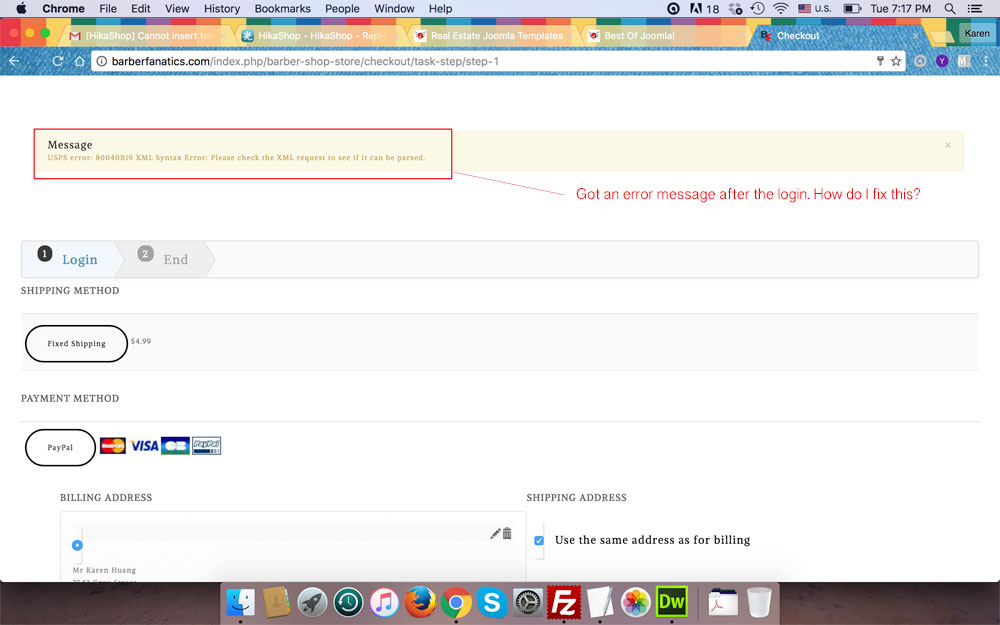
Thanks I was able to see the text inside the login boxes, but is there a way I can make the blank space longer so I can see all the text I typed in the space? Is this something to do with the UPS shipping method setup?
Please Log in or Create an account to join the conversation.

Less
More
- Posts: 12953
- Thank you received: 1778
10 years 2 months ago #248815
by Mohamed Thelji
Replied by Mohamed Thelji on topic Cannot insert text to the login before checkout
Hello,
1. Using that kind of CSS code will probably do the job :
2. You're actually having an issue with your USPS shipping method, can you show us a screenshot of how you configured it ?
Thank you.
1. Using that kind of CSS code will probably do the job :
Code:
input#modlgn-username, input#modlgn-passwd {
width: 150px;
}
2. You're actually having an issue with your USPS shipping method, can you show us a screenshot of how you configured it ?
Thank you.
Please Log in or Create an account to join the conversation.
Time to create page: 0.070 seconds