

- Posts: 18
- Thank you received: 0
time stamp not correct
10 years 1 month ago - 10 years 1 month ago #252027
by Jes01
time stamp not correct was created by Jes01
In the mail message order-creation-notification the time stamp of the mail header does not correspond with the time in the message. Difference is 2 hours. The mail header is correct.
How to fix it?
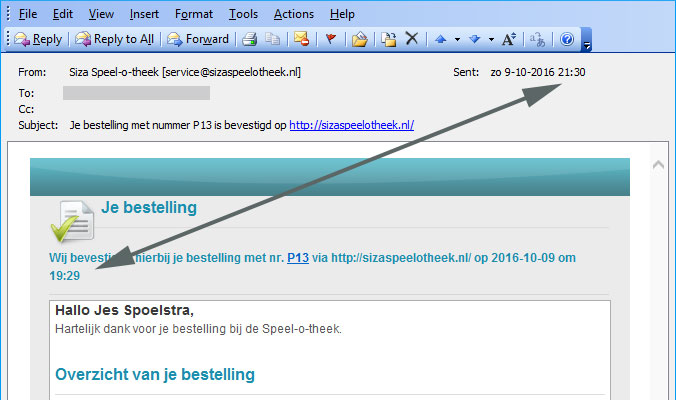
How to fix it?
Last edit: 10 years 1 month ago by Jes01.
Please Log in or Create an account to join the conversation.

Less
More
- Posts: 12953
- Thank you received: 1778
10 years 1 month ago #252035
by Mohamed Thelji
Replied by Mohamed Thelji on topic time stamp not correct
Hello,
You'll probably find a solution through that thread : www.hikashop.com/forum/4-how-to/8885-email-time-adjustment.html
You'll probably find a solution through that thread : www.hikashop.com/forum/4-how-to/8885-email-time-adjustment.html
Hi,
The time displayed in the email should be offset using your joomla configuration's timezone option.
You can always edit the emails via the menu System->Emails (in the Business edition) and change the time display function from:
hikashop::getDate(time(),'%d %B %Y')
to:
hikashop::getDate((time()+XX),'%d %B %Y')
where XX is the number of seconds of the offset you want.
Please Log in or Create an account to join the conversation.
10 years 1 month ago #252158
by Jes01
Replied by Jes01 on topic time stamp not correct
I am using the Basic version and tried to modify the order_creation_notification.preload file but without result.
It seems to me that the instruction you mentioned is about day, month and year.
I also tried to modify hikashop_getDate(time(),'%H:%M')) to hikashop_getDate((time()+7200),'%H:%M')) but also no result.
Am I looking in the right file?
It seems to me that the instruction you mentioned is about day, month and year.
I also tried to modify hikashop_getDate(time(),'%H:%M')) to hikashop_getDate((time()+7200),'%H:%M')) but also no result.
Am I looking in the right file?
Please Log in or Create an account to join the conversation.

10 years 1 month ago #252167
by nicolas
Replied by nicolas on topic time stamp not correct
Hi,
It's the correct file.
Note however that the time in the email correspond to the time of your server -/+ the time offsets that you configured in the settings of your server, the settings of your Joomla website and the settings of the user account of the customer.
So it might be different from the time on your receiving email server because of these.
Please Log in or Create an account to join the conversation.
10 years 1 month ago #252236
by Jes01
Replied by Jes01 on topic time stamp not correct
I fixed it.
In the order_creation_notification.preload file I had to modify hikashop_getDate(time(),'%H:%M')) to hikashop_getDate((time()+7200),'%H:%M'))
Many thanks
In the order_creation_notification.preload file I had to modify hikashop_getDate(time(),'%H:%M')) to hikashop_getDate((time()+7200),'%H:%M'))
Many thanks
Please Log in or Create an account to join the conversation.
Time to create page: 0.064 seconds