
- Posts: 88
- Thank you received: 0
Created a sales condition article, set it up but not shown
10 years 3 weeks ago #254469
by steph3838
-- HikaShop version -- : 2.6.4
Hi,
I've setup the sales condition page, created it in joomla! but the page is not shown when I click on the checkout page link.
What am I doing wrong ?
Thanks in advance for your help and advise,
Best regards,
Stéphane
Hi,
I've setup the sales condition page, created it in joomla! but the page is not shown when I click on the checkout page link.
What am I doing wrong ?
Thanks in advance for your help and advise,
Best regards,
Stéphane
Please Log in or Create an account to join the conversation.

10 years 3 weeks ago #254481
by Jerome
Jerome - Obsidev.com
HikaMarket & HikaSerial developer / HikaShop core dev team.
Replied by Jerome on topic Created a sales condition article, set it up but not shown
Hi,
The link open a popup.
So if you do not see the popup ; you have a template which does not support your current popup mode :
www.hikashop.com/support/documentation/5...html#display_general
Regards;
The link open a popup.
So if you do not see the popup ; you have a template which does not support your current popup mode :
www.hikashop.com/support/documentation/5...html#display_general
Regards;
Jerome - Obsidev.com
HikaMarket & HikaSerial developer / HikaShop core dev team.
Please Log in or Create an account to join the conversation.
10 years 3 weeks ago #254528
by steph3838
The popup pops up ! but empty...
Replied by steph3838 on topic Created a sales condition article, set it up but not shown
Hi Jerome,Jerome wrote: Hi,
The link open a popup.
So if you do not see the popup ; you have a template which does not support your current popup mode :
www.hikashop.com/support/documentation/5...html#display_general
Regards;
The popup pops up ! but empty...
Please Log in or Create an account to join the conversation.
10 years 3 weeks ago #254565
by Jerome
Jerome - Obsidev.com
HikaMarket & HikaSerial developer / HikaShop core dev team.
Replied by Jerome on topic Created a sales condition article, set it up but not shown
Hi,
Please provide details about your settings about the "terms & condition" in your HIkaShop configuration.
You gave us a link to your checkout but we do not have any account or any direct access to a product lsiting ; so it is hard for us to see the problem directly if we can't have products in the cart and then access to the checkout.
Regards,
Jerome - Obsidev.com
HikaMarket & HikaSerial developer / HikaShop core dev team.
Please Log in or Create an account to join the conversation.
10 years 3 weeks ago - 10 years 3 weeks ago #254605
by steph3838
Replied by steph3838 on topic Created a sales condition article, set it up but not shown
Hi Jerome,
You can enter a product into the basket and go to the checkout under "Permis de construire" menu you'll find the "Commander" entry that lids you to the checkout.
Just use the pay per check not the paypal that isn't setup yet !
We are in test mode, all orders are not real orders for the moment being.
Thanks for your help and advise,
Best regards
Stéphane
This message contains confidential information
You can enter a product into the basket and go to the checkout under "Permis de construire" menu you'll find the "Commander" entry that lids you to the checkout.
Just use the pay per check not the paypal that isn't setup yet !
We are in test mode, all orders are not real orders for the moment being.
Thanks for your help and advise,
Best regards
Stéphane
Last edit: 10 years 3 weeks ago by steph3838.
Please Log in or Create an account to join the conversation.

10 years 3 weeks ago #254627
by nicolas
Replied by nicolas on topic Created a sales condition article, set it up but not shown
Hi,
I don't see the popup at all on your checkout. When I click on the link, the page changes to black.
But anyway, try to change the "popup mode" setting of the HikaShop configuration.
At least one of them should work with your template.
I don't see the popup at all on your checkout. When I click on the link, the page changes to black.
But anyway, try to change the "popup mode" setting of the HikaShop configuration.
At least one of them should work with your template.
Please Log in or Create an account to join the conversation.
10 years 3 weeks ago #254669
by steph3838
Replied by steph3838 on topic Created a sales condition article, set it up but not shown
I do not know why but it worked with mootools.
I've tried before writing this thread and none of them worked... Strange, but solved !
Thanks Nicolas!
Regards,
Stéphane
I've tried before writing this thread and none of them worked... Strange, but solved !
Thanks Nicolas!
Regards,
Stéphane
Please Log in or Create an account to join the conversation.
10 years 3 weeks ago #254671
by steph3838
Replied by steph3838 on topic Created a sales condition article, set it up but not shown
Hi Nicolas,
The sales conditions are shown.
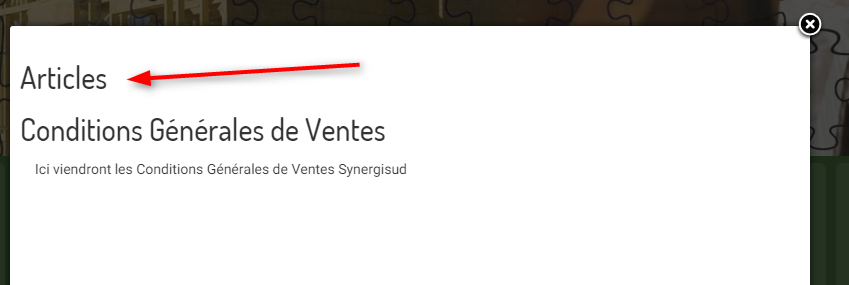
But I am not able to remove the Articles mention...
How could I remove it ? I've tried inside Joomla! how this article should be shown also in the menu where this article is connected without any
success.
Thanks in advance for your help and advice,
Regards,
Stéphane
The sales conditions are shown.
But I am not able to remove the Articles mention...
How could I remove it ? I've tried inside Joomla! how this article should be shown also in the menu where this article is connected without any
success.
Thanks in advance for your help and advice,
Regards,
Stéphane
Please Log in or Create an account to join the conversation.
10 years 3 weeks ago #254712
by nicolas
Replied by nicolas on topic Created a sales condition article, set it up but not shown
Bonjour,
Vous pouvez ajouter ce CSS dans le CSS de votre template pour ne pas avoir cela:
.bd-container-inner h2{ display:none; }
Vous pouvez ajouter ce CSS dans le CSS de votre template pour ne pas avoir cela:
.bd-container-inner h2{ display:none; }
The following user(s) said Thank You: steph3838
Please Log in or Create an account to join the conversation.
Time to create page: 0.080 seconds