
- Posts: 47
- Thank you received: 0
Shopping cart pop-up upon first add notifies that shopping cart is empty
- brendanlanza
-
 Topic Author
- Offline
Less
More
9 years 11 months ago #256808
by brendanlanza
Shopping cart pop-up upon first add notifies that shopping cart is empty was created by brendanlanza
-- url of the page with the problem -- :
unicommsemall.com
-- HikaShop version -- : 2.6.4 Business
Hi,
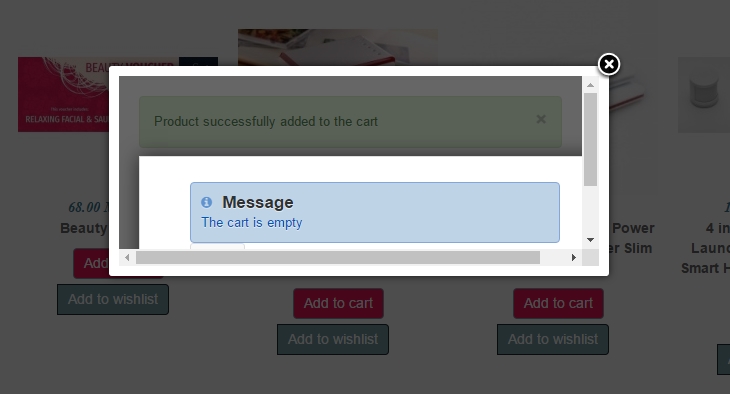
We have a funny situation. When customer adds a product to the shopping cart, we have configured for the popup to display. Now the strange thing is that, if the shopping cart is empty, the popup says "Your shopping cart is empty".
1. Customer adds something to shopping cart for the first time
2. Popup says the cart is empty (instead of displaying "continue shopping" and "proceed to checkout" buttons
3. But product nevertheless is added to the cart
When there are already products in the cart, and customer adds more products, the buttons are correctly displayed.
Can you guys help us resolve this annoying bug. Maybe this started after installation of Hikamarket over Hikashop Business - maybe, not sure if that is the cause.
You can try it by adding a product into an empty cart on our website.
Thanks.
-- HikaShop version -- : 2.6.4 Business
Hi,
We have a funny situation. When customer adds a product to the shopping cart, we have configured for the popup to display. Now the strange thing is that, if the shopping cart is empty, the popup says "Your shopping cart is empty".
1. Customer adds something to shopping cart for the first time
2. Popup says the cart is empty (instead of displaying "continue shopping" and "proceed to checkout" buttons
3. But product nevertheless is added to the cart
When there are already products in the cart, and customer adds more products, the buttons are correctly displayed.
Can you guys help us resolve this annoying bug. Maybe this started after installation of Hikamarket over Hikashop Business - maybe, not sure if that is the cause.
You can try it by adding a product into an empty cart on our website.
Thanks.
Please Log in or Create an account to join the conversation.
- brendanlanza
-
Topic Author
- Offline
Less
More
- Posts: 47
- Thank you received: 0
9 years 11 months ago #256809
by brendanlanza
Replied by brendanlanza on topic Shopping cart pop-up upon first add notifies that shopping cart is empty
We have also noticed that this
1. Does not happen - to an unregistered user (users are only forced to register upon checkout)
2. Does no happen - the first time a registered purchases something after logging in
3. Does happen - when a registered user completes a purchase and the cart is emptied, and then the user makes a new purchase
Hope this service helps you to debug the software.
Thanks.
Please Log in or Create an account to join the conversation.
- brendanlanza
-
Topic Author
- Offline
Less
More
- Posts: 47
- Thank you received: 0
9 years 11 months ago #256810
by brendanlanza
Replied by brendanlanza on topic Shopping cart pop-up upon first add notifies that shopping cart is empty
Another observation
The Add To Wishlist button on
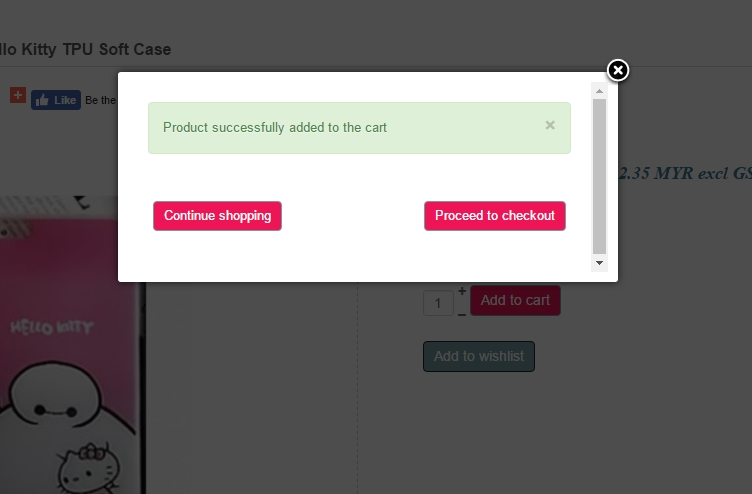
1. Product Pages - are incorrectly showing the Added To Cart popup instead of the Added To Wishlist popup (click on a product to view the product page, then on the product page click on the Add To Wishlist button)
2. Hikashop Content Modules - are correctly showing the Added To Wishlist popup (click onAdd To Wishlist button on any of the Hikashop Content Modules eg Best Sellers or Recent Promotions)
Boy, am I going to be in trouble with my bosses for recommending this path... it's Saturday past midnight and I have been stuck at work for over 24 hours with this shop.
Please head over to our website and give it a try.
The Add To Wishlist button on
1. Product Pages - are incorrectly showing the Added To Cart popup instead of the Added To Wishlist popup (click on a product to view the product page, then on the product page click on the Add To Wishlist button)
2. Hikashop Content Modules - are correctly showing the Added To Wishlist popup (click onAdd To Wishlist button on any of the Hikashop Content Modules eg Best Sellers or Recent Promotions)
Boy, am I going to be in trouble with my bosses for recommending this path... it's Saturday past midnight and I have been stuck at work for over 24 hours with this shop.
Please head over to our website and give it a try.
Please Log in or Create an account to join the conversation.

9 years 11 months ago #256816
by nicolas
Replied by nicolas on topic Shopping cart pop-up upon first add notifies that shopping cart is empty
Hi,
1. I don't see why that would happen. But an easy solution is to edit the file templates/YOUR_TEMPLATE/component.php and remove the line:
<jdoc:include type="message" />
2. That's an old bug of the wishlist system. It might be because you have an old version of a view file used for a view override in your template. Try renaming the files in templates/YOUR_TEMPLATE/html/com_hikashop/product/ one by one and see if that helps each time in order to determine which one would cause that problem.
Please Log in or Create an account to join the conversation.
Time to create page: 0.060 seconds