

- Posts: 252
- Thank you received: 1
User points don't work
9 years 10 months ago #259514
by twscott
User points don't work was created by twscott
-- HikaShop version -- : 2.6.4
-- Joomla version -- : 3.5
-- PHP version -- : 5.5.12
Hi,
I set the user points plugin to my site, and in the check out page, it asked me that I have 100 points for 100 dollars, do I want to use the points? and I chose yes, but it actually didn't use the points. Could you tell me if any of my setting was wrong? Thanks.
attached please find some of my screenshot.
up1.png, up12.png are my setting
up2.png is the check out page
up3.png is the order page
bast regards
Please Log in or Create an account to join the conversation.

Less
More
- Posts: 12953
- Thank you received: 1778
9 years 10 months ago #259617
by Mohamed Thelji
Replied by Mohamed Thelji on topic User points don't work
Hello,
Your configuration seems to be good, but we can't understand the checkout screenshot that you sent, we can't clearly see the value of the checkout userpoint buttons.
Could you send us a more detailed screenshot and in English if possible ?
Thank you,
Best regards,
Mohamed Thelji.
Your configuration seems to be good, but we can't understand the checkout screenshot that you sent, we can't clearly see the value of the checkout userpoint buttons.
Could you send us a more detailed screenshot and in English if possible ?
Thank you,
Best regards,
Mohamed Thelji.
Please Log in or Create an account to join the conversation.
9 years 10 months ago #259733
by twscott
Replied by twscott on topic User points don't work
Hi Mohamed,
Thanks for the reply.
Please see the attachment that I translate the screenshot that I sent.
in 2t.png, it says 100 points could be use.
but in 3t.png it shows no points was applied.
This really confuse me.
By the way, in this case, user have100 points, system didn't ask him how many point to use, so the customer must use up all the points in every purchase when there are points, this is kind of inconvenient.
Thanks in advance
Best regards
Please Log in or Create an account to join the conversation.

9 years 10 months ago #259750
by nicolas
Replied by nicolas on topic User points don't work
Hi,
Could you provide a link to the shop, a backend access and a test user account with points so that we could have a look at the situation ?
www.hikashop.com/support/contact-us.html
Could you provide a link to the shop, a backend access and a test user account with points so that we could have a look at the situation ?
www.hikashop.com/support/contact-us.html
The following user(s) said Thank You: twscott
Please Log in or Create an account to join the conversation.
9 years 10 months ago - 9 years 10 months ago #259899
by twscott
Replied by twscott on topic User points don't work
Hi Nicolas,
Thanks for the reply.
I fix the previous problem, it works now, but another error occur, please see the attachment.
Issue 1. 1st.png, points discount 500 points but not show in order form.
Issue 2. 2&3.png, User had 500 points, buy product $850, points discount 500 points, but user points still 500 ponits. It should be 0.
Thanks in advance
Best regards
Thanks for the reply.
I fix the previous problem, it works now, but another error occur, please see the attachment.
Issue 1. 1st.png, points discount 500 points but not show in order form.
Issue 2. 2&3.png, User had 500 points, buy product $850, points discount 500 points, but user points still 500 ponits. It should be 0.
This message contains confidential information
Thanks in advance
Best regards
Last edit: 9 years 10 months ago by Jerome. Reason: credential removed by a moderator
Please Log in or Create an account to join the conversation.

9 years 10 months ago #259922
by Philip
Replied by Philip on topic User points don't work
Hello,
Can you provide your url please, we have now your access references but without url...
Awaiting news from you.
Regards
Can you provide your url please, we have now your access references but without url...
Awaiting news from you.
Regards
Please Log in or Create an account to join the conversation.
9 years 10 months ago #260066
by twscott
Replied by twscott on topic User points don't work
Dear Philip:
Sorry! haha! Our url:
By the way, order sent to user's mail shows correct information,
But order show in PC is not correct.
Sorry! haha! Our url:
This message contains confidential information
By the way, order sent to user's mail shows correct information,
But order show in PC is not correct.
Please Log in or Create an account to join the conversation.

9 years 10 months ago #260105
by Jerome
Jerome - Obsidev.com
HikaMarket & HikaSerial developer / HikaShop core dev team.
Replied by Jerome on topic User points don't work
Hi,
I don't think that access to your backend would be required.
Please note that if you want to show order information ; just the detail of the order in the HikaShop is able to be used as reference.
An email notification is not a usable information ; it does not provide any reliable data and we directly skip it.
Regarding your order details :
www.hikashop.com/media/kunena/attachment...pointsissue-2-01.png
You can easily see that your order do not have an invoice number.
So it means that your HikaShop is not configured correctly and that's why the points are not deducted.
You need to have an "invoice order statuses" configured in your store ; it is a real requirement. And more than that, this setting is used by the point system in order to know when the points should be deducted or not.
Regards,
I don't think that access to your backend would be required.
Please note that if you want to show order information ; just the detail of the order in the HikaShop is able to be used as reference.
An email notification is not a usable information ; it does not provide any reliable data and we directly skip it.
Regarding your order details :
www.hikashop.com/media/kunena/attachment...pointsissue-2-01.png
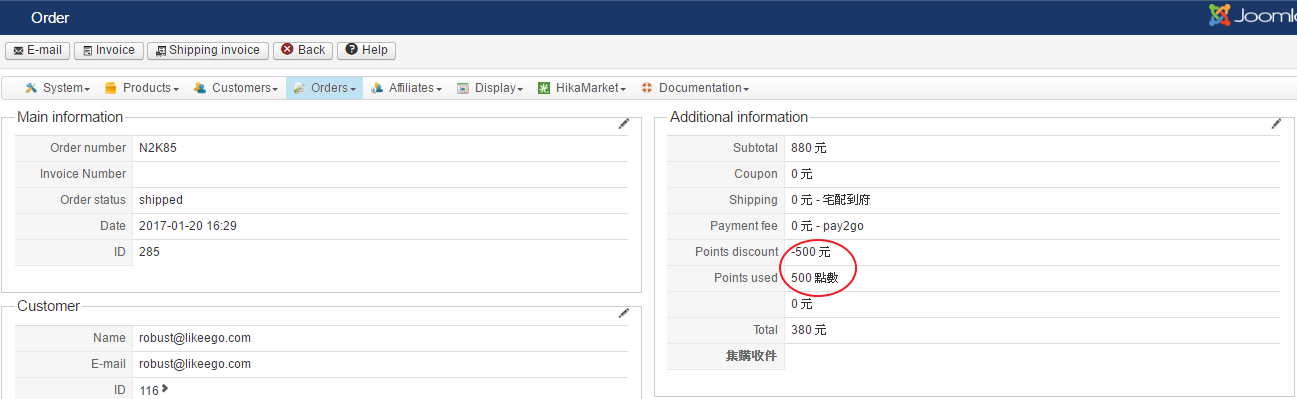
You can easily see that your order do not have an invoice number.
So it means that your HikaShop is not configured correctly and that's why the points are not deducted.
You need to have an "invoice order statuses" configured in your store ; it is a real requirement. And more than that, this setting is used by the point system in order to know when the points should be deducted or not.
Regards,
Jerome - Obsidev.com
HikaMarket & HikaSerial developer / HikaShop core dev team.
Please Log in or Create an account to join the conversation.
Time to create page: 0.112 seconds