

- Posts: 20
- Thank you received: 0
VirtualMercherchant payment method has error when trying to process credit card
9 years 9 months ago #260513
by Roym
-- HikaShop version -- : 2.6.3
-- Joomla version -- : 3.6.5
-- PHP version -- : 5.6.30
-- Browser(s) name and version -- : Firefox50.1.0
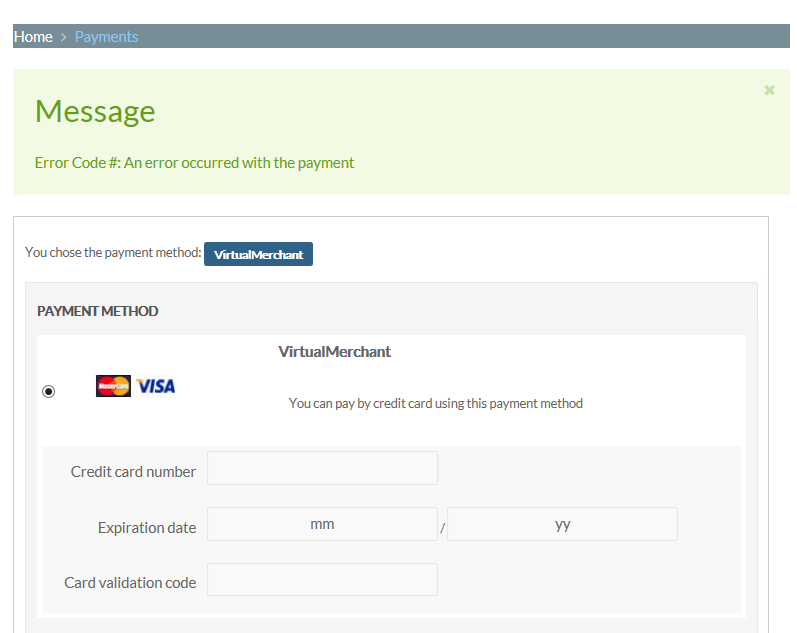
-- Error-message(debug-mod must be tuned on) -- : Error code #: An error occurred with the payment
Made it all the way through the checkout, had entered the credit card information and the transaction was ready to be finalized, when I clicked finish I get the attached screenshot back. System worked fine as of two days ago. Error message not enough to begin to know where to look. Can you advise me please.
Roy
-- Joomla version -- : 3.6.5
-- PHP version -- : 5.6.30
-- Browser(s) name and version -- : Firefox50.1.0
-- Error-message(debug-mod must be tuned on) -- : Error code #: An error occurred with the payment
Made it all the way through the checkout, had entered the credit card information and the transaction was ready to be finalized, when I clicked finish I get the attached screenshot back. System worked fine as of two days ago. Error message not enough to begin to know where to look. Can you advise me please.
Roy
Please Log in or Create an account to join the conversation.

9 years 9 months ago #260516
by nicolas
Replied by nicolas on topic VirtualMercherchant payment method has error when trying to process credit card
Hi,
That's the standard error message the plugin displays when VirtualMerchant doesn't return any error message to the plugin for the payment transaction.
If you didn't change anything on your end 2 days ago, then I can only think that something changed with your VirtualMerchant account.
There are two things you can do:
1. Turn on the debug setting of the payment method and try again. It should display some debug data there which should help understand what's going on.
2. Contact the VirtualMerchant support and check with them if something changed on their end two days ago or if there is a problem with your merchant account.
That's the standard error message the plugin displays when VirtualMerchant doesn't return any error message to the plugin for the payment transaction.
If you didn't change anything on your end 2 days ago, then I can only think that something changed with your VirtualMerchant account.
There are two things you can do:
1. Turn on the debug setting of the payment method and try again. It should display some debug data there which should help understand what's going on.
2. Contact the VirtualMerchant support and check with them if something changed on their end two days ago or if there is a problem with your merchant account.
Please Log in or Create an account to join the conversation.
Time to create page: 0.044 seconds