
- Posts: 92
- Thank you received: 0
Shopping cart not updating when "popup" dialog is used
- target4fun
-
 Topic Author
- Offline
Less
More
9 years 9 months ago - 9 years 9 months ago #262223
by target4fun
Shopping cart not updating when "popup" dialog is used was created by target4fun
-- HikaShop version -- : 3.00
-- Joomla version -- : 2.6.5
Shopping cart seems buggy when I use the feature where I can have the user stay on the page but show a dialog popup. I have 2 problems.
1. Simple issue that the popup notice box is too small to show the text you must scroll to see everything. I am sure that is a simple setting to make the popup box larger but I cant seem to find it.
2. Simple issue I would also like to increase the time the popup box is shown.
3. My major problem is that if you "Add to cart" with the feature set to "show popup notice and stay" and when dialog pops up and if you don't click anything in the dialog box your cart shows empty. I did notice that If i click add to cart then quickly click the "proceed to checkout" I am able to checkout and the cart updates correctly and works. If don't click any links in the popup notice box the shopping cart just shows empty and you have no way to checkout at all.
Because I cant afford to have my website not working I used the feature "always go to checkout" after add to cart is pressed. This works but I have many products and would be missing out on a lot of sales. So need this feature.
More info that may be related:
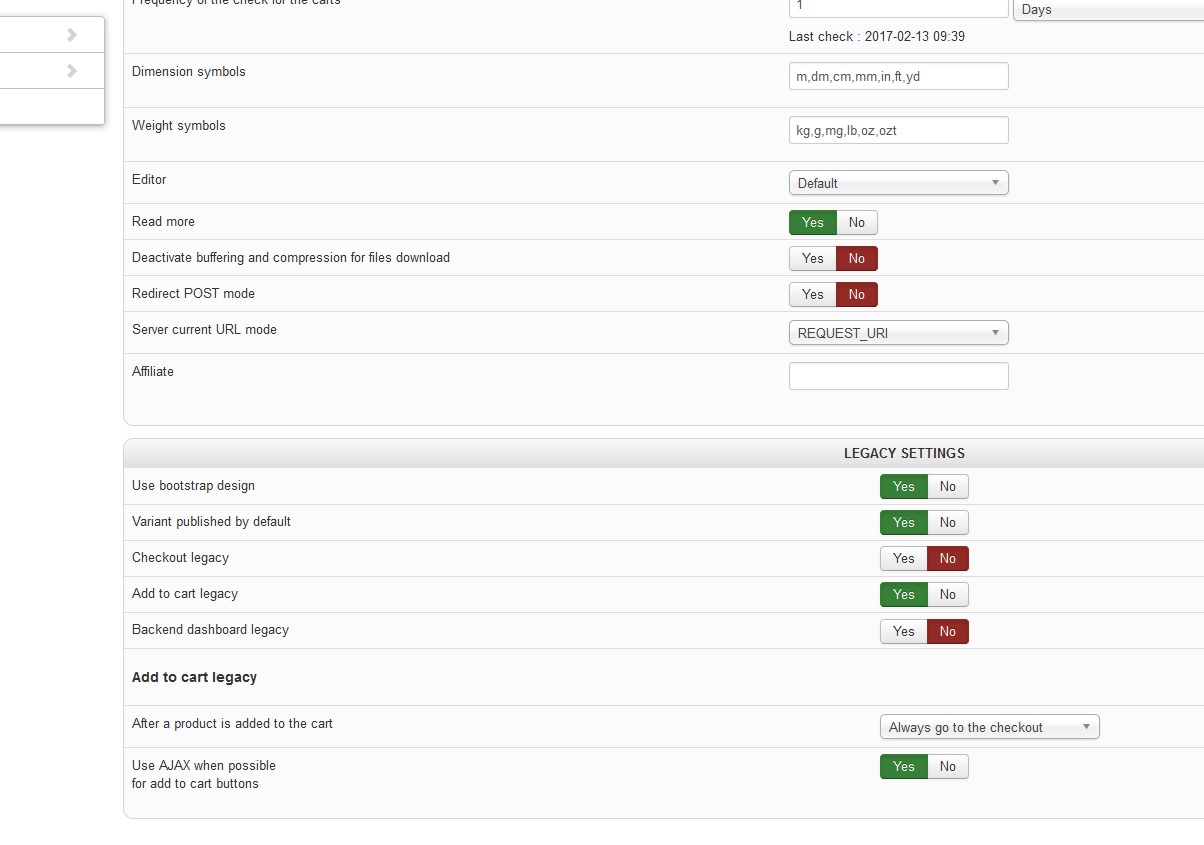
See attached picture that shows some of my settings
I just updated to Paypal Pro payment plugin and before was using Paypal Advanced plugin
I recently upgraded to 3.00
Legacy settings. I played with all of these to try to get my website working for several different features were not working correctly. Attached is a picture of my settings currently.
-- Joomla version -- : 2.6.5
Shopping cart seems buggy when I use the feature where I can have the user stay on the page but show a dialog popup. I have 2 problems.
1. Simple issue that the popup notice box is too small to show the text you must scroll to see everything. I am sure that is a simple setting to make the popup box larger but I cant seem to find it.
2. Simple issue I would also like to increase the time the popup box is shown.
3. My major problem is that if you "Add to cart" with the feature set to "show popup notice and stay" and when dialog pops up and if you don't click anything in the dialog box your cart shows empty. I did notice that If i click add to cart then quickly click the "proceed to checkout" I am able to checkout and the cart updates correctly and works. If don't click any links in the popup notice box the shopping cart just shows empty and you have no way to checkout at all.
Because I cant afford to have my website not working I used the feature "always go to checkout" after add to cart is pressed. This works but I have many products and would be missing out on a lot of sales. So need this feature.
More info that may be related:
See attached picture that shows some of my settings
I just updated to Paypal Pro payment plugin and before was using Paypal Advanced plugin
I recently upgraded to 3.00
Legacy settings. I played with all of these to try to get my website working for several different features were not working correctly. Attached is a picture of my settings currently.
Last edit: 9 years 9 months ago by target4fun.
Please Log in or Create an account to join the conversation.

9 years 9 months ago #262242
by Jerome
Jerome - Obsidev.com
HikaMarket & HikaSerial developer / HikaShop core dev team.
Replied by Jerome on topic Shopping cart not updating when "popup" dialog is used
Hi,
I see that you're using the legacy mode for the "add to cart".
Did you test the new "add to cart" system with the "cart notify" plugin ?
That plugin also provide a "popup" mode which is much nicer than the legacy popup ; and you have several settings in the plugin to tweak it.
Regards,
I see that you're using the legacy mode for the "add to cart".
Did you test the new "add to cart" system with the "cart notify" plugin ?
That plugin also provide a "popup" mode which is much nicer than the legacy popup ; and you have several settings in the plugin to tweak it.
Regards,
Jerome - Obsidev.com
HikaMarket & HikaSerial developer / HikaShop core dev team.
Please Log in or Create an account to join the conversation.
- target4fun
-
Topic Author
- Offline
Less
More
- Posts: 92
- Thank you received: 0
9 years 9 months ago - 9 years 9 months ago #262355
by target4fun
Replied by target4fun on topic Shopping cart not updating when "popup" dialog is used
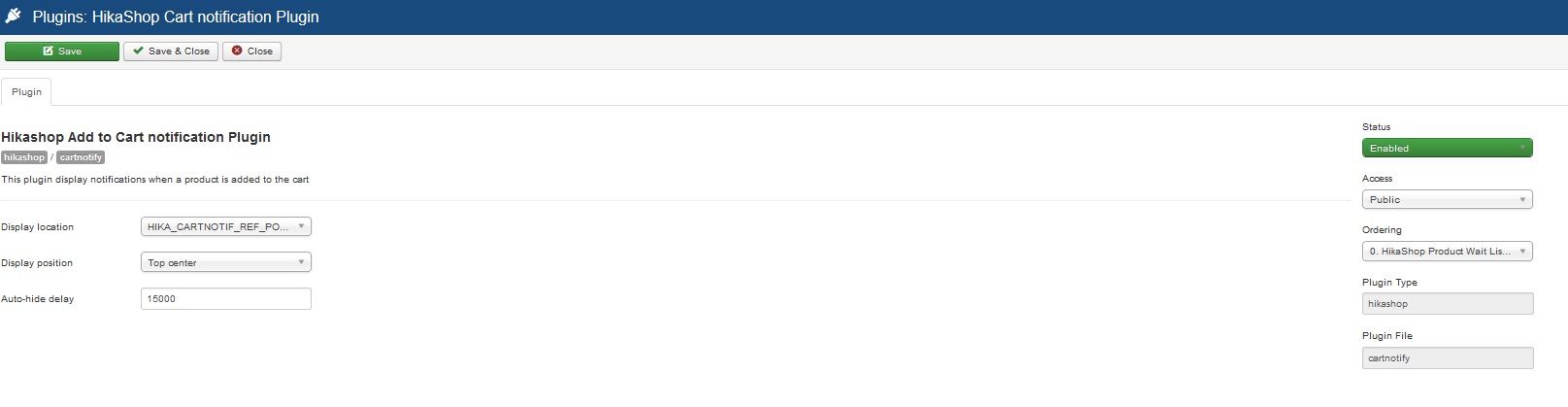
I turned off the legacy and played with the plugin but really didnt get me anywhere as I now have two problems.
1. Text for buttons "next" & "register" are super small when I turn off legacy.
2. When a product is added to cart no popup appears just takes customer directly to cart, so if they want to buy more they need to navigate away from checkout page rather than continue shopping and hit shoppting cart when done.
1. Text for buttons "next" & "register" are super small when I turn off legacy.
2. When a product is added to cart no popup appears just takes customer directly to cart, so if they want to buy more they need to navigate away from checkout page rather than continue shopping and hit shoppting cart when done.
Last edit: 9 years 9 months ago by target4fun. Reason: add pics
Please Log in or Create an account to join the conversation.
9 years 9 months ago #262360
by Jerome
Jerome - Obsidev.com
HikaMarket & HikaSerial developer / HikaShop core dev team.
Replied by Jerome on topic Shopping cart not updating when "popup" dialog is used
Hi,
Regarding your screenshot, you have an old package of HikaShop 3.0.0
The cart notify plugin have a setting to display a popup (instead of tooltip) since several weeks !
Regards
Regarding your screenshot, you have an old package of HikaShop 3.0.0
The cart notify plugin have a setting to display a popup (instead of tooltip) since several weeks !
Regards
Jerome - Obsidev.com
HikaMarket & HikaSerial developer / HikaShop core dev team.
Please Log in or Create an account to join the conversation.
- target4fun
-
Topic Author
- Offline
Less
More
- Posts: 92
- Thank you received: 0
9 years 9 months ago - 9 years 9 months ago #262458
by target4fun
Replied by target4fun on topic Shopping cart not updating when "popup" dialog is used
Ill update to the latest 3.00 version you have. I installed feb 13 two days ago. Downloaded direct from your website so not sure how it could be weeks old? I will edit this post if update doesnt fix problem.
Current build number before update: HikaShop Essential 3.0.0 [1702131905]
Did update now have: HikaShop Essential 3.0.0 [1702151248]
Even after update to latest build number still plugin shows no "tool tip" option ... Only popup. I found no where on hikashop to manually download the plugin if this is the issue. I can only update with regular package update from the "my subscription page" and download from link:
"Download the latest stable version (3.0.0) of HikaShop Essential"
What am i doing wrong? How do i fix it? Still when I hit button nothing happens Just takes customer to checkout page no popup or tooltip of any kind. Add to cart = Direct link to checkout
Last edit: 9 years 9 months ago by target4fun.
Please Log in or Create an account to join the conversation.

9 years 9 months ago #262468
by nicolas
Replied by nicolas on topic Shopping cart not updating when "popup" dialog is used
Hi,
The popup option is what you want.
And I checked on your website and when I add a product to the cart with the new add to cart buttons, I do get the popup and I'm not redirected to the checkout:
monosnap.com/file/lX0yTDcwOICfsBmsTRLJXgInIUquWV
So it seems to be working like you want.
The popup option is what you want.
And I checked on your website and when I add a product to the cart with the new add to cart buttons, I do get the popup and I'm not redirected to the checkout:
monosnap.com/file/lX0yTDcwOICfsBmsTRLJXgInIUquWV
So it seems to be working like you want.
Please Log in or Create an account to join the conversation.
- target4fun
-
Topic Author
- Offline
Less
More
- Posts: 92
- Thank you received: 0
9 years 9 months ago #262497
by target4fun
Replied by target4fun on topic Shopping cart not updating when "popup" dialog is used
Weird everything seems to be working great on the "product" page but on the home page at the bottom all of those products seem to go directly to cart when you add to cart from home page arma15.com. So that leads me to believe there is some other setting I am missing for the home page.
Thanks It is working part way and I love the new 3.00 upgrades once I get them working! Thanks so much for your help.
Thanks It is working part way and I love the new 3.00 upgrades once I get them working! Thanks so much for your help.
Please Log in or Create an account to join the conversation.
9 years 9 months ago #262501
by Jerome
Jerome - Obsidev.com
HikaMarket & HikaSerial developer / HikaShop core dev team.
Replied by Jerome on topic Shopping cart not updating when "popup" dialog is used
Hi,
In the home page, you do not have the code for the "cart notify".
Maybe it is because you just have an HikaShop module and the HikaShop plugins are not loaded ; or because it's not under the HikaShop context and the plugins might be loaded after the "onBeforeRender" trigger...
It would require some test in order to see if another trigger would do the job or if the HikaShop modules should call a new trigger to help such kind of plugin (cart notify) to initialize and add their content in the header.
Regards,
Jerome - Obsidev.com
HikaMarket & HikaSerial developer / HikaShop core dev team.
Please Log in or Create an account to join the conversation.
- target4fun
-
Topic Author
- Offline
Less
More
- Posts: 92
- Thank you received: 0
9 years 9 months ago #262624
by target4fun
Replied by target4fun on topic Shopping cart not updating when "popup" dialog is used
Part of that makes sense to me. And some of it went over my head. I am unsure of what to do to fix the issue. Can you give me a few things to try to fix it? Thanks!
Please Log in or Create an account to join the conversation.
- target4fun
-
Topic Author
- Offline
Less
More
- Posts: 92
- Thank you received: 0
9 years 9 months ago #262625
by target4fun
Replied by target4fun on topic Shopping cart not updating when "popup" dialog is used
Also I would like to add the "proceed to checkout" button on the popup. It was there in the legacy mode but now its just showing "Ok" but no button to go to "checkout" on the popup.
1. works on product page
2. Still goes to force to checkout on home page at content below. description.
Thanks
1. works on product page
2. Still goes to force to checkout on home page at content below. description.
Thanks
Please Log in or Create an account to join the conversation.
9 years 9 months ago #262711
by nicolas
Replied by nicolas on topic Shopping cart not updating when "popup" dialog is used
Hi,
Jerome wanted to say that we need to work on that basically.
Actually, I've worked on that today and found a solution. I've also added the buttons to the popup like before.
You can download the install package on our website and install it on yours in order to get the modifications and it should work like you want.
Please Log in or Create an account to join the conversation.
- target4fun
-
Topic Author
- Offline
Less
More
- Posts: 92
- Thank you received: 0
9 years 9 months ago #262715
by target4fun
Replied by target4fun on topic Shopping cart not updating when "popup" dialog is used
Okay I just wanted to report on the progress. It half worked for me.
I was having 2 problems.
This part is fixed with update! :
1. On my "product" page when you click add to cart. The shopping carts would not update but the popup would show up but if you switched web pages the products would appear when you loaded a new page.
This is not fixed with update:
2. On home page I have a Hika products modual and when you hit add to cart it shows no popup of any kind just takes you straight to checkout. This being said my "force to checkout" is turned off. No where else does it "force to checkout" but on home page. This problem still remains an issue after the update. Maybe they were unrelated issues?
Please Log in or Create an account to join the conversation.
9 years 9 months ago #262717
by Jerome
Jerome - Obsidev.com
HikaMarket & HikaSerial developer / HikaShop core dev team.
Replied by Jerome on topic Shopping cart not updating when "popup" dialog is used
Hi,
Point 2 has been fixed in the last package (when Nicolas wrote his message).
The plugin is now using another trigger and, as long as you have an HikaShop module in your page, the plugin "cart notify" will be loaded and will be able to put the JS content.
So please be sure that you right have an HikaShop module in your page and clean your website cache.
Regards,
Jerome - Obsidev.com
HikaMarket & HikaSerial developer / HikaShop core dev team.
The following user(s) said Thank You: target4fun
Please Log in or Create an account to join the conversation.
Time to create page: 0.087 seconds