

- Posts: 57
- Thank you received: 1
Changing Billing Address Fields ID
9 years 7 months ago #264551
by tariaki
Changing Billing Address Fields ID was created by tariaki
-- HikaShop version -- : 3.0
-- Joomla version -- : 3.6
-- PHP version -- : 5.6
Hey,
At the moment both billing and shipping address are using the same ID :
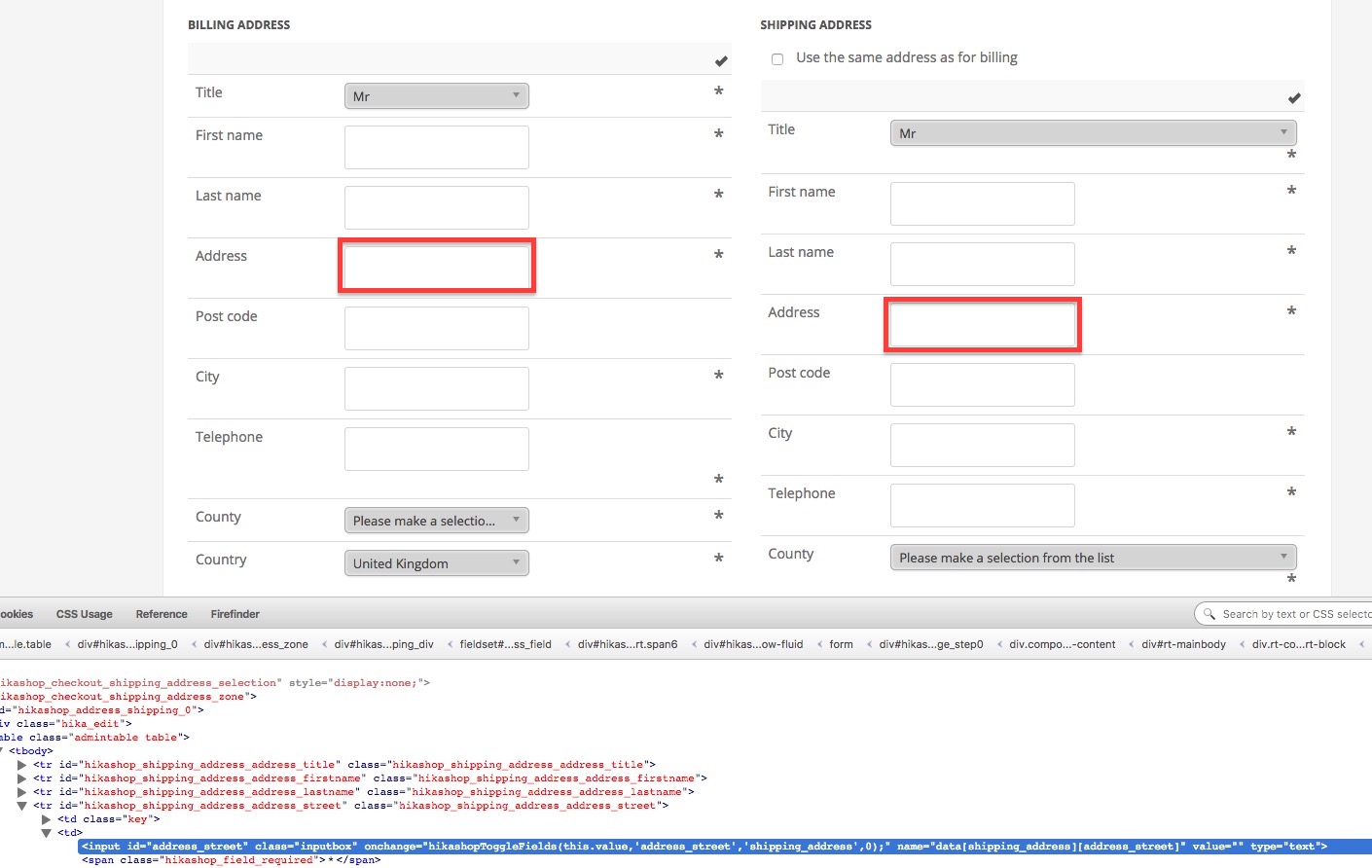
Both IDs are called 'address_street' - Is there a way to change the ID of the Billing Address fields?
This is not for CSS purposes. I know that for CSS I can use
Ideas?
Thanks
-- Joomla version -- : 3.6
-- PHP version -- : 5.6
Hey,
At the moment both billing and shipping address are using the same ID :
Both IDs are called 'address_street' - Is there a way to change the ID of the Billing Address fields?
This is not for CSS purposes. I know that for CSS I can use
Code:
hikashop_shipping_address_address_street td input#address_street
Ideas?
Thanks
Please Log in or Create an account to join the conversation.

9 years 7 months ago #264558
by nicolas
Replied by nicolas on topic Changing Billing Address Fields ID
Hi,
You would have to edit the file "custom_fields" of the view "checkout".
You could do a str_replace on the code:
Or, you could use the new checkout of HikaShop by turning off the "checkout legacy" setting.
The new checkout has a different address system and thus the fact that the fields have the same id shouldn't be a problem anymore.
You would have to edit the file "custom_fields" of the view "checkout".
You could do a str_replace on the code:
Code:
echo $this->fieldsClass->display(
$oneExtraField,
$this->$type->$fieldName,
'data['.$type.']['.$fieldName.']',
false,
' '.$onWhat.'="hikashopToggleFields(this.value,\''.$fieldName.'\',\''.$type.'\',0);"'
);
The new checkout has a different address system and thus the fact that the fields have the same id shouldn't be a problem anymore.
Please Log in or Create an account to join the conversation.
9 years 7 months ago #264627
by tariaki
Replied by tariaki on topic Changing Billing Address Fields ID
Hey Nicolas,
Thanks for your reply.
I have switched off legacy but don't understand how it solved the problem... Input fields still have same ID name...
Regarding the str_replace on the code - can you please give an example?
Thanks
Avi
Thanks for your reply.
I have switched off legacy but don't understand how it solved the problem... Input fields still have same ID name...
Regarding the str_replace on the code - can you please give an example?
Thanks
Avi
Please Log in or Create an account to join the conversation.
9 years 7 months ago #264641
by nicolas
Replied by nicolas on topic Changing Billing Address Fields ID
Hi,
When the checkout legacy is activated, you'll have only one address form on the page, never two. So you won't have a problem in CSS or in JS to target a field of the form, if that's what you want.
As we don't know what you want to do, I thought that this would be better.
A str_replace is really easy:
Note that the exact view where to do the change will vary based on how your checkout is configured (the address selector, etc) and whether the "checkout legacy" option is activated or not. It might be one of the files of the address view, or one of the files with the text "address" in it in the view "checkout".
When the checkout legacy is activated, you'll have only one address form on the page, never two. So you won't have a problem in CSS or in JS to target a field of the form, if that's what you want.
As we don't know what you want to do, I thought that this would be better.
A str_replace is really easy:
Code:
echo str_replace('STRING TO REPLACE','REPLACEMENT STRING',$this->fieldsClass->display(
$oneExtraField,
$this->$type->$fieldName,
'data['.$type.']['.$fieldName.']',
false,
' '.$onWhat.'="hikashopToggleFields(this.value,\''.$fieldName.'\',\''.$type.'\',0);"'
));
Please Log in or Create an account to join the conversation.
9 years 7 months ago #264715
by tariaki
Replied by tariaki on topic Changing Billing Address Fields ID
Hey Nicolas
Thanks for your reply.
I think maybe I'm not explaining myself correctly.
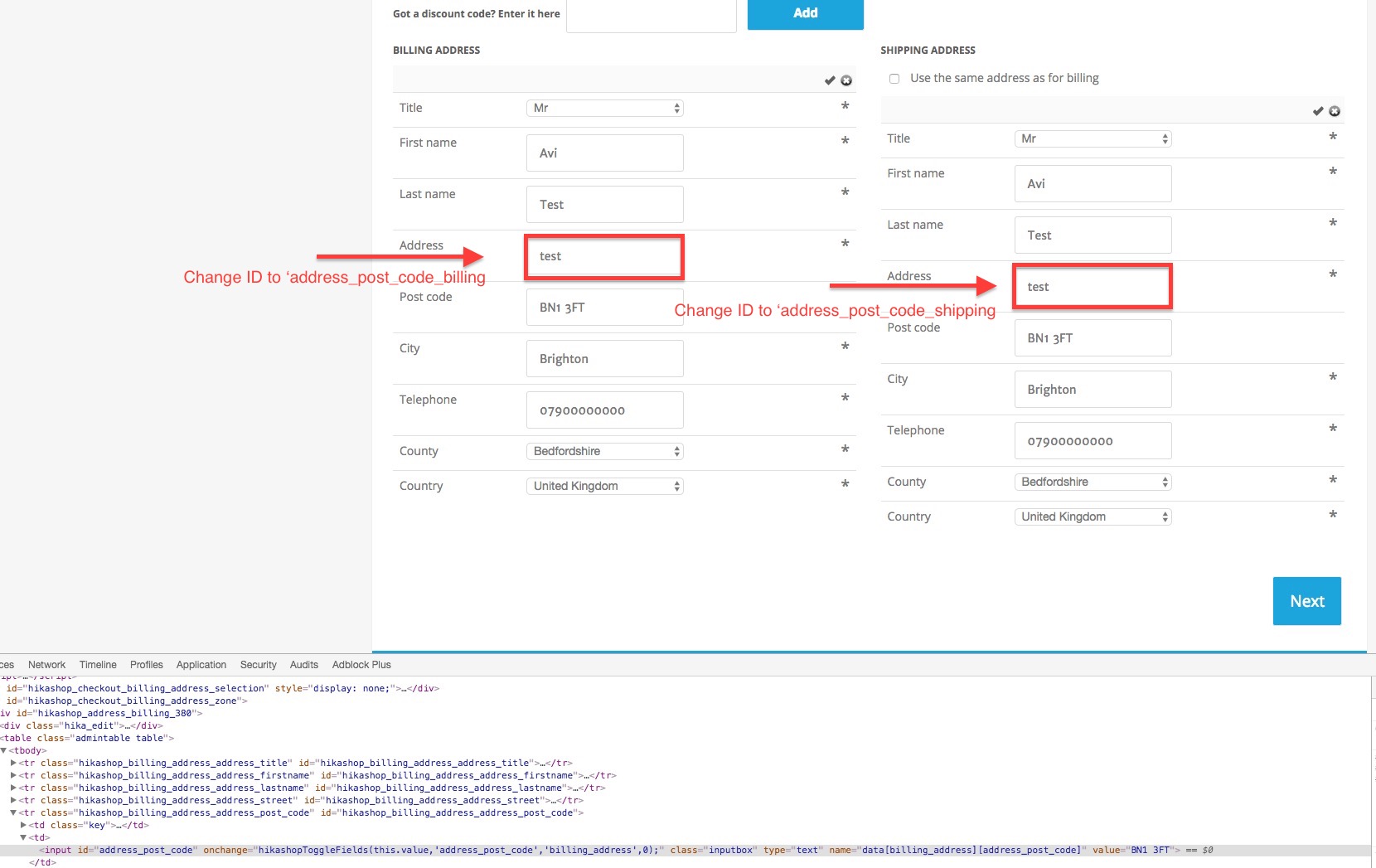
I need the input ID to be different for billing and shipping.
Ideas?
Thanks for your reply.
I think maybe I'm not explaining myself correctly.
I need the input ID to be different for billing and shipping.
Ideas?
Please Log in or Create an account to join the conversation.

9 years 7 months ago #264723
by Jerome
Jerome - Obsidev.com
HikaMarket & HikaSerial developer / HikaShop core dev team.
Replied by Jerome on topic Changing Billing Address Fields ID
Hi,
The Nicolas trick is still valid for your request.
You need to tweak it a little to check if you're editing in the shipping or billing context ; but otherwise that's the best way to override the ID of the inputs.
Regards,
The Nicolas trick is still valid for your request.
You need to tweak it a little to check if you're editing in the shipping or billing context ; but otherwise that's the best way to override the ID of the inputs.
Regards,
Jerome - Obsidev.com
HikaMarket & HikaSerial developer / HikaShop core dev team.
Please Log in or Create an account to join the conversation.
9 years 7 months ago #266156
by tariaki
Replied by tariaki on topic [SOLVED] Changing Billing Address Fields ID
Or simply go to components/com_hikashop/address/form.php and change from line 64 to :
Code:
<td><?php
$onWhat='onchange'; if($oneExtraField->field_type=='radio') $onWhat='onclick';
echo $this->fieldsClass->display(
$oneExtraField,
@$this->address->$fieldName,
'data[address]['.$fieldName.']',
false,
' '.$onWhat.'="hikashopToggleFields(this.value,\''.$fieldName.'\',\'address\',0);"',
false,
$this->extraFields['address'],
@$this->address
);
?></td>
Please Log in or Create an account to join the conversation.
Time to create page: 0.085 seconds