

- Posts: 80
- Thank you received: 0
price with and without VAT are the same
9 years 1 month ago #277547
by idimarco
price with and without VAT are the same was created by idimarco
-- HikaShop version -- : HikaShop Business: 3.1.1
-- Joomla version -- : 3.7.5
-- PHP version -- : 7.0.17
-- Browser(s) name and version -- : Firefox
Hi,
Prices with and without tax are the same in cart during checkout, which should not be. While in the email confirmation order the two prices are well computed. How can I fix the problem during the checkout?
Thanks
-- Joomla version -- : 3.7.5
-- PHP version -- : 7.0.17
-- Browser(s) name and version -- : Firefox
Hi,
Prices with and without tax are the same in cart during checkout, which should not be. While in the email confirmation order the two prices are well computed. How can I fix the problem during the checkout?
Thanks
Please Log in or Create an account to join the conversation.

9 years 1 month ago #277561
by nicolas
Replied by nicolas on topic price with and without VAT are the same
Hi,
This indicates that you have the "show taxed prices" setting activated in your HikaShop configuration.
So the prices of the products and the sub total prices include the tax.
And thus, the tax row on your screenshot is only there as an information and not to be summed to the sub total.
This indicates that you have the "show taxed prices" setting activated in your HikaShop configuration.
So the prices of the products and the sub total prices include the tax.
And thus, the tax row on your screenshot is only there as an information and not to be summed to the sub total.
The following user(s) said Thank You: idimarco
Please Log in or Create an account to join the conversation.
9 years 1 month ago - 9 years 1 month ago #277626
by idimarco
Replied by idimarco on topic price with and without VAT are the same
Following your advice, now the prices are well computed in the summary of the checkout.
However is there a way to show price with VAT in product page and keep the two different prices in the summery only?
In addition, how can I delete "each" text after price ? I did not find the span string in php of my Template
www.mangialarossa.com/index.php/en/shop/checkout
Thanks
Imma
However is there a way to show price with VAT in product page and keep the two different prices in the summery only?
In addition, how can I delete "each" text after price ? I did not find the span string in php of my Template
www.mangialarossa.com/index.php/en/shop/checkout
Thanks
Imma
Last edit: 9 years 1 month ago by idimarco.
Please Log in or Create an account to join the conversation.
9 years 1 month ago - 9 years 1 month ago #277636
by nicolas
Replied by nicolas on topic price with and without VAT are the same
Hi,
In that case, rather than changing that option, you can add at the top of the file step (or show) of the view checkout after the php tag, in the menu Display->Views, the code :
$this->params->set('price_with_tax',0); //or 1 for taxed prices
And that will force it on the checkout page regardless of that setting.
To know exactly which view file to edit and how to edit it, you can read this:
www.hikashop.com/support/documentation/1...-display.html#layout
Note : Please, don't edit your message a long time after have posted your topic, that mess our work organisation, thank you for your understanding.
In that case, rather than changing that option, you can add at the top of the file step (or show) of the view checkout after the php tag, in the menu Display->Views, the code :
$this->params->set('price_with_tax',0); //or 1 for taxed prices
And that will force it on the checkout page regardless of that setting.
To know exactly which view file to edit and how to edit it, you can read this:
www.hikashop.com/support/documentation/1...-display.html#layout
Note : Please, don't edit your message a long time after have posted your topic, that mess our work organisation, thank you for your understanding.
Last edit: 9 years 1 month ago by Philip.
Please Log in or Create an account to join the conversation.
9 years 1 month ago #277823
by idimarco
Replied by idimarco on topic price with and without VAT are the same
Thanks for your advice but I really do not understand where to add the string $this->params->set('price_with_tax',0); //or 1 for taxed prices.
I tried to add it to checkout / step.php as well as checkout / show.php but it does not work.
Any other way to see the price with tax on product page ?
www.mangialarossa.com/index.php/en/shop/product/11-miel
Thanks
I tried to add it to checkout / step.php as well as checkout / show.php but it does not work.
Any other way to see the price with tax on product page ?
www.mangialarossa.com/index.php/en/shop/product/11-miel
Thanks
Please Log in or Create an account to join the conversation.

9 years 1 month ago #277857
by Jerome
Jerome - Obsidev.com
HikaMarket & HikaSerial developer / HikaShop core dev team.
Replied by Jerome on topic price with and without VAT are the same
Hello,
As Nicolas told you :
As Nicolas told you :
Regards,
As Nicolas told you :
We do not have the required information to know the context (and the configuration) so we cannot know the view you need to edit.To know exactly which view file to edit and how to edit it, you can read this:
www.hikashop.com/support/documentation/1...-display.html#layout
As Nicolas told you :
So you can change that setting to get the price without taxes ; then you can use the previous code but in the product page (as Nicolas suggested in a way by giving you the value to force the display of taxed prices).This indicates that you have the "show taxed prices" setting activated in your HikaShop configuration.
So the prices of the products and the sub total prices include the tax.
Regards,
Jerome - Obsidev.com
HikaMarket & HikaSerial developer / HikaShop core dev team.
Please Log in or Create an account to join the conversation.
9 years 4 weeks ago #278018
by idimarco
Replied by idimarco on topic price with and without VAT are the same
Hi,
Could you please confirm my understanding?
1. First, in Taxes settings, I have to choose "no tax" in Show taxed prices
2. Then, in product/show.php page, I have to add the following string after php tag:
$this->params->set('price_with_tax',0); //or 1;
If my understanding is correct, I tried to add the above string to many lines but nothing happened. Is there a easier way to show product price with tax in product page, as well as in related products boxes?
Or could you be more precise in which line should I add the string?
Thanks
Could you please confirm my understanding?
1. First, in Taxes settings, I have to choose "no tax" in Show taxed prices
2. Then, in product/show.php page, I have to add the following string after php tag:
$this->params->set('price_with_tax',0); //or 1;
If my understanding is correct, I tried to add the above string to many lines but nothing happened. Is there a easier way to show product price with tax in product page, as well as in related products boxes?
Or could you be more precise in which line should I add the string?
Thanks
Please Log in or Create an account to join the conversation.
9 years 4 weeks ago #278055
by Jerome
Jerome - Obsidev.com
HikaMarket & HikaSerial developer / HikaShop core dev team.
Replied by Jerome on topic price with and without VAT are the same
Hello,
Please read correctly (and fully) the code given by Nicolas ; you're missing very important information.
So you misunderstood what is important :
Regards,
Please read correctly (and fully) the code given by Nicolas ; you're missing very important information.
So you misunderstood what is important :
Code:
$this->params->set('price_with_tax',0); // OR 1 FOR TAXED PRICE
Regards,
Jerome - Obsidev.com
HikaMarket & HikaSerial developer / HikaShop core dev team.
Please Log in or Create an account to join the conversation.
9 years 3 weeks ago #278212
by idimarco
Replied by idimarco on topic price with and without VAT are the same
Hi,
Thanks for your remark. I therefore added it and here below is how it looks the div (I deleted $this->params->set('price_with_tax',0); //or 1):
<div id="hikashop_product_price_<?php echo $variant_name; ?>" style="display:none;"><?php
$this->params->set('price_with_tax',0); //or 1 for taxed prices;
if((int)$this->params->get('show_price', -1) == -1) {
$this->params->set('show_price', (int)$this->config->get('show_price'));
}
if ($this->params->get('show_price')) {
$this->setLayout('listing_price');
echo $this->loadTemplate();
}
I also kept the tax option "with tax".
However, it does not work. Do I miss something ?
Thanks
Thanks for your remark. I therefore added it and here below is how it looks the div (I deleted $this->params->set('price_with_tax',0); //or 1):
<div id="hikashop_product_price_<?php echo $variant_name; ?>" style="display:none;"><?php
$this->params->set('price_with_tax',0); //or 1 for taxed prices;
if((int)$this->params->get('show_price', -1) == -1) {
$this->params->set('show_price', (int)$this->config->get('show_price'));
}
if ($this->params->get('show_price')) {
$this->setLayout('listing_price');
echo $this->loadTemplate();
}
I also kept the tax option "with tax".
However, it does not work. Do I miss something ?
Thanks
Please Log in or Create an account to join the conversation.

9 years 3 weeks ago - 9 years 3 weeks ago #278214
by Philip
Replied by Philip on topic price with and without VAT are the same
Hello,
Why not replace the parameter 0 ? As for example :
$this->params->set('price_with_tax',1);
As the comment say it, 1 is the parameter to pass in order to have what you required.
Regards
Why not replace the parameter 0 ? As for example :
$this->params->set('price_with_tax',1);
As the comment say it, 1 is the parameter to pass in order to have what you required.
Regards
Last edit: 9 years 3 weeks ago by Philip.
Please Log in or Create an account to join the conversation.
9 years 3 weeks ago #278304
by idimarco
Replied by idimarco on topic price with and without VAT are the same
Hi Philippe
Thanks for your reply but still the prices in product page are shown without tax. Attached is the printscreen of product/show.php I changes in accordance to your comment. I am a bit frustrating since it should be now easy but it doesn't. What is wrong in the code?
thanks
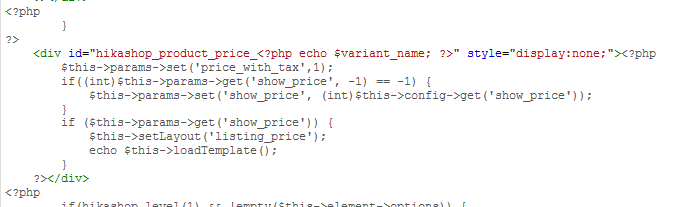
Thanks for your reply but still the prices in product page are shown without tax. Attached is the printscreen of product/show.php I changes in accordance to your comment. I am a bit frustrating since it should be now easy but it doesn't. What is wrong in the code?
thanks
Please Log in or Create an account to join the conversation.
9 years 3 weeks ago #278347
by Jerome
Jerome - Obsidev.com
HikaMarket & HikaSerial developer / HikaShop core dev team.
Replied by Jerome on topic price with and without VAT are the same
Hello,
You put the code in the view "show" and not at the beginning.
Before that, there is some code which perform the display of the product page ; since the place that you are is the display of variant prices (which also mean that it will just override how the variant prices are displayed, so you need to have products with characteristics).
Just as reminder :
Regards,
You put the code in the view "show" and not at the beginning.
Before that, there is some code which perform the display of the product page ; since the place that you are is the display of variant prices (which also mean that it will just override how the variant prices are displayed, so you need to have products with characteristics).
Just as reminder :
In that case, rather than changing that option, you can add at the top of the file step (or show)
Regards,
Jerome - Obsidev.com
HikaMarket & HikaSerial developer / HikaShop core dev team.
Please Log in or Create an account to join the conversation.
9 years 2 weeks ago #278664
by idimarco
Replied by idimarco on topic price with and without VAT are the same
Does it mean that I should add the code here?
www.mangialarossa.com/administrator/inde...block_characteristic
www.mangialarossa.com/administrator/inde...block_characteristic
Please Log in or Create an account to join the conversation.
9 years 2 weeks ago #278666
by nicolas
Replied by nicolas on topic price with and without VAT are the same
Hi,
No. It means that you were right to put it in product / show.php, but you should put it at the top of the file, just after the first line with <?php
No. It means that you were right to put it in product / show.php, but you should put it at the top of the file, just after the first line with <?php
Please Log in or Create an account to join the conversation.
9 years 3 days ago #279915
by idimarco
Replied by idimarco on topic price with and without VAT are the same
Unfortunately, no way to fix the problem.
I put the code
$this->params->set('price_with_tax',1);
at the top of the file product/show_default.php but without success.
The problem is just on the product page.
I therefore decided to set prices with no VAT in Display tab.
I put the code
$this->params->set('price_with_tax',1);
at the top of the file product/show_default.php but without success.
The problem is just on the product page.
I therefore decided to set prices with no VAT in Display tab.
Please Log in or Create an account to join the conversation.
Time to create page: 0.395 seconds