

- Posts: 9
- Thank you received: 0
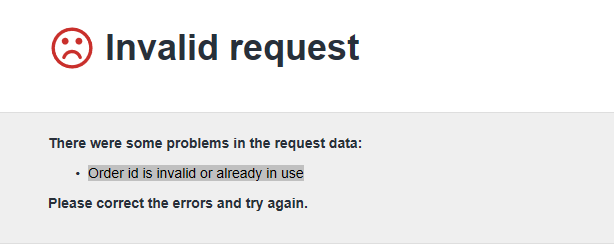
Order id is invalid or already in use
8 years 10 months ago #282428
by shane-77
Order id is invalid or already in use was created by shane-77
-- url of the page with the problem -- :
www.recoverycbd.ie/index.php/cbd-online-shop-ireland
-- HikaShop version -- : 3.2.1
-- Joomla version -- : 3.8.2
-- PHP version -- : 5.6.30
-- Browser(s) name and version -- : Chrome
I am using quickpay and I keep getting the error Order id is invalid or already in use. Quickpay said I need to go to hikashop, find where you set your order prefix. And add a 0(zero) or perhaps a letter in front in front of the order prefix. I can't find where to do that.
I have tried going to configuration - orders and I changed the Order number format to -{id size="5"}/{date format="m/y"} so it is generating a different order number but I'm still getting the same error.
I've attached a screenshot
Thanks
-- HikaShop version -- : 3.2.1
-- Joomla version -- : 3.8.2
-- PHP version -- : 5.6.30
-- Browser(s) name and version -- : Chrome
I am using quickpay and I keep getting the error Order id is invalid or already in use. Quickpay said I need to go to hikashop, find where you set your order prefix. And add a 0(zero) or perhaps a letter in front in front of the order prefix. I can't find where to do that.
I have tried going to configuration - orders and I changed the Order number format to -{id size="5"}/{date format="m/y"} so it is generating a different order number but I'm still getting the same error.
I've attached a screenshot
Thanks
Please Log in or Create an account to join the conversation.

8 years 10 months ago #282430
by nicolas
Replied by nicolas on topic Order id is invalid or already in use
Hi,
You can change the "order number format" setting of the HikaShop configuration in order to change the order number and prefix it.
However, the order id is an auto increment. You can't prefix it.
What you can do is change the value of the increment to start at 10000 for example:
www.hikashop.com/forum/4-how-to/7820-spe...at.html?lang=en#7825
You can change the "order number format" setting of the HikaShop configuration in order to change the order number and prefix it.
However, the order id is an auto increment. You can't prefix it.
What you can do is change the value of the increment to start at 10000 for example:
www.hikashop.com/forum/4-how-to/7820-spe...at.html?lang=en#7825
The following user(s) said Thank You: shane-77
Please Log in or Create an account to join the conversation.
8 years 10 months ago #282467
by shane-77
Replied by shane-77 on topic Order id is invalid or already in use
Thank you for the reply Nicolas.
So something sounds slightly amiss here. I take its not normal to have to edit the mysql code just to get the quickpay plugin working. Should that not work as normal once I enter my quickpay api details ?
Quickpay said the error is because the order id has already been used on an earlier test order but hikashop seems to be generating a new order ID for each test purchase so I don't know why I would be getting a duplicated or invalid order Id. Plus I deleted all the earlier orders but I still get the error. Is there another reason why I would be getting the the error Order id is invalid?
Could hikashop have a quick look at the backend if I send you the login details?
Thanks Shane
So something sounds slightly amiss here. I take its not normal to have to edit the mysql code just to get the quickpay plugin working. Should that not work as normal once I enter my quickpay api details ?
Quickpay said the error is because the order id has already been used on an earlier test order but hikashop seems to be generating a new order ID for each test purchase so I don't know why I would be getting a duplicated or invalid order Id. Plus I deleted all the earlier orders but I still get the error. Is there another reason why I would be getting the the error Order id is invalid?
Could hikashop have a quick look at the backend if I send you the login details?
Thanks Shane
Please Log in or Create an account to join the conversation.
8 years 10 months ago - 8 years 10 months ago #282477
by nicolas
Replied by nicolas on topic Order id is invalid or already in use
Hi,
When a HikaShop plugin sends a payment request to a payment gateway, it usually provides the id of the order for which that payment is meant so that when the payment gateway contacts it back, it gives back that id and HikaShop knows which order needs to be confirmed.
Some payment gateways have a security so that it is not possible to pay several times for the same order id.
That might be something possible based on how the ecommerce platform and/or the payment plugin is made.
So then, suppose that you use your merchant account on an ecommerce website... The id of the orders go 1, 2, 3, etc until you decide to switch to HikaShop. With HikaShop, the id of the orders also starts at 1 and then goes 2, 3, etc.
However, because of that security, the payment gateway refuses the payments from HikaShop.
That would also happen if you reset the increment to 0 for the order id after deleting the orders even if you don't change your ecommerce solution.
That however doesn't mean that there is a problem in HikaShop, or that we can do something in the code of HikaShop to avoid that.
Altering the order id to start at 10000 it just a way to bypass the security feature of your payment gateway.
And actually, usually, payment gateways, like PayPal, have an option to turn off that security check.
When a HikaShop plugin sends a payment request to a payment gateway, it usually provides the id of the order for which that payment is meant so that when the payment gateway contacts it back, it gives back that id and HikaShop knows which order needs to be confirmed.
Some payment gateways have a security so that it is not possible to pay several times for the same order id.
That might be something possible based on how the ecommerce platform and/or the payment plugin is made.
So then, suppose that you use your merchant account on an ecommerce website... The id of the orders go 1, 2, 3, etc until you decide to switch to HikaShop. With HikaShop, the id of the orders also starts at 1 and then goes 2, 3, etc.
However, because of that security, the payment gateway refuses the payments from HikaShop.
That would also happen if you reset the increment to 0 for the order id after deleting the orders even if you don't change your ecommerce solution.
That however doesn't mean that there is a problem in HikaShop, or that we can do something in the code of HikaShop to avoid that.
Altering the order id to start at 10000 it just a way to bypass the security feature of your payment gateway.
And actually, usually, payment gateways, like PayPal, have an option to turn off that security check.
Last edit: 8 years 10 months ago by nicolas.
The following user(s) said Thank You: shane-77
Please Log in or Create an account to join the conversation.
8 years 10 months ago #282493
by shane-77
Replied by shane-77 on topic Order id is invalid or already in use
Hi
That's what I can't figure out. Its only a new shop and a new merchant account. There have never been any transactions to quickpay from hikashop or any other ecommerce platforms so it makes no sense why I am getting the duplicate order ID. The quickpay account was only activated on Saturday.
Quickpay suggested I make a new merchant account and that would correct the problem. I created the new merchant account and I still get the error
I guess Ill have to try to change the mysql code and see if that corrects it
Thanks Shane
That's what I can't figure out. Its only a new shop and a new merchant account. There have never been any transactions to quickpay from hikashop or any other ecommerce platforms so it makes no sense why I am getting the duplicate order ID. The quickpay account was only activated on Saturday.
Quickpay suggested I make a new merchant account and that would correct the problem. I created the new merchant account and I still get the error
I guess Ill have to try to change the mysql code and see if that corrects it
Thanks Shane
Please Log in or Create an account to join the conversation.
8 years 10 months ago #282514
by shane-77
Replied by shane-77 on topic Order id is invalid or already in use
This issue has now been resolved. Turns out it was the format that was causing the problem. Using the default {automatic_code} results in a 3 digit order number and quickpay requires minimum 4 and maximum 20. When I changed it to {id size="5"}/{date format="m/y"} the dash (-) at the start of the code was causing it to fail.
So I changed the format to {id size="5"} and it is now working fine
So I changed the format to {id size="5"} and it is now working fine
Please Log in or Create an account to join the conversation.
Time to create page: 0.195 seconds