

- Posts: 637
- Thank you received: 26
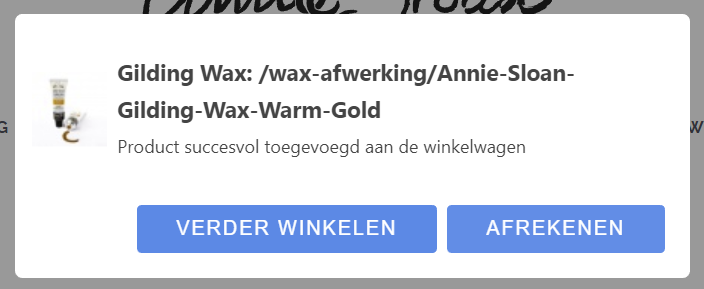
How to change the buttons from the cart notification pop-up
8 years 10 months ago - 8 years 10 months ago #282589
by Lumiga
Kind regards,
Lumiga
-- HikaShop version -- : 3.2.1
-- Joomla version -- : 3.8.2
-- PHP version -- : 7
Hi Support team,
I found out that the code for the vex-content is here:
plugins/hikashop/cartnotify/cartnotify.php
But when I look at the code I see only one class vex-dialog-button-primary which I can replace.
But when I inspect the code I see also the class vex-dialog-button but I can't find that class in the code above.
Hope you can help me.
Kind regards,
Lumiga
-- Joomla version -- : 3.8.2
-- PHP version -- : 7
Hi Support team,
I found out that the code for the vex-content is here:
plugins/hikashop/cartnotify/cartnotify.php
But when I look at the code I see only one class vex-dialog-button-primary which I can replace.
Code:
window.cartNotifyParams.cart_params = {buttons:[
{text:"'.JText::_('PROCEED_TO_CHECKOUT', true).'",type:"button",className:"vex-dialog-button-primary",click:function proceedClick(){window.location="'.$url_checkout.'";}},
{text:"'.JText::_('CONTINUE_SHOPPING', true).'",type:"submit",className:"vex-dialog-button-primary",click:function continueClick(){}}
]};';
But when I inspect the code I see also the class vex-dialog-button but I can't find that class in the code above.
Hope you can help me.
Kind regards,
Lumiga
Kind regards,
Lumiga
Last edit: 8 years 10 months ago by Lumiga.
Please Log in or Create an account to join the conversation.

8 years 10 months ago - 8 years 10 months ago #282593
by nicolas
Replied by nicolas on topic How to change the buttons from the cart notification pop-up
Hi,
The HTML is located in the media/com_hikashop/js/vex.min.js javascript file.
So rather than removing/changing that vex-dialog-button class from the HTML, it would be way better to add CSS to counteract the CSS applied to that class if you want to customize the display of the buttons.
The HTML is located in the media/com_hikashop/js/vex.min.js javascript file.
So rather than removing/changing that vex-dialog-button class from the HTML, it would be way better to add CSS to counteract the CSS applied to that class if you want to customize the display of the buttons.
Last edit: 8 years 10 months ago by nicolas.
The following user(s) said Thank You: Lumiga
Please Log in or Create an account to join the conversation.
8 years 10 months ago #282644
by Lumiga
Kind regards,
Lumiga
Replied by Lumiga on topic How to change the buttons from the cart notification pop-up
Thanks! That's maeby a better idea 
Kind regards,
Lumiga
Please Log in or Create an account to join the conversation.
Time to create page: 0.185 seconds