
- Posts: 92
- Thank you received: 0
Guest unable to checkout after update and upgrade to business hikashop
- target4fun
-
 Topic Author
- Offline
Less
More
8 years 9 months ago #286295
by target4fun
-- HikaShop version -- : 3.2.2
-- Joomla version -- : 3.8.3
So website has been working fine for over a year with no issues with guest checkout recently. I needed to add a drop down menu with options I made the new options and have done so on other items in the past with out the error I am getting now. I did also recently update and upgrade to hikashop latest edition and as well as went to the business edition.
Currently site isnt allowing any customers to check out at all. The error they get is:
Unable to checkout as a guest with this item in the cart, then it tells them to register.
I had all the settings setup for guest checkout and I assume an update wouldn't change my settings? Can you point me at somethings to look at screen shot or what ever needs to be done to get it operational again, every hour its down I am losing money on this, so any help would be greatly appreciated.
Chris S
-- Joomla version -- : 3.8.3
So website has been working fine for over a year with no issues with guest checkout recently. I needed to add a drop down menu with options I made the new options and have done so on other items in the past with out the error I am getting now. I did also recently update and upgrade to hikashop latest edition and as well as went to the business edition.
Currently site isnt allowing any customers to check out at all. The error they get is:
Unable to checkout as a guest with this item in the cart, then it tells them to register.
I had all the settings setup for guest checkout and I assume an update wouldn't change my settings? Can you point me at somethings to look at screen shot or what ever needs to be done to get it operational again, every hour its down I am losing money on this, so any help would be greatly appreciated.
Chris S
Please Log in or Create an account to join the conversation.
- target4fun
-
Topic Author
- Offline
Less
More
- Posts: 92
- Thank you received: 0
8 years 9 months ago #286296
by target4fun
Replied by target4fun on topic Guest unable to checkout after update and upgrade to business hikashop
Not sure if this is related? When I go to control panel I am seeing:
0 Error refreshing the OAuth2 token, message: '{ "error" : "invalid_grant" }'
/home7/alamode1/public_html/arma15/administrator/modules/mod_ga_dash/src/auth/Google_OAuth2.php:279
I have seen this for some time not sure what it means but was working before the hikashop update/upgrade so I wasnt sure if it was related but wanted to let you know so we can possibly find the root cause of whats going on.
0 Error refreshing the OAuth2 token, message: '{ "error" : "invalid_grant" }'
/home7/alamode1/public_html/arma15/administrator/modules/mod_ga_dash/src/auth/Google_OAuth2.php:279
I have seen this for some time not sure what it means but was working before the hikashop update/upgrade so I wasnt sure if it was related but wanted to let you know so we can possibly find the root cause of whats going on.
Please Log in or Create an account to join the conversation.
- target4fun
-
Topic Author
- Offline
Less
More
- Posts: 92
- Thank you received: 0
8 years 9 months ago #286298
by target4fun
Replied by target4fun on topic Guest unable to checkout after update and upgrade to business hikashop
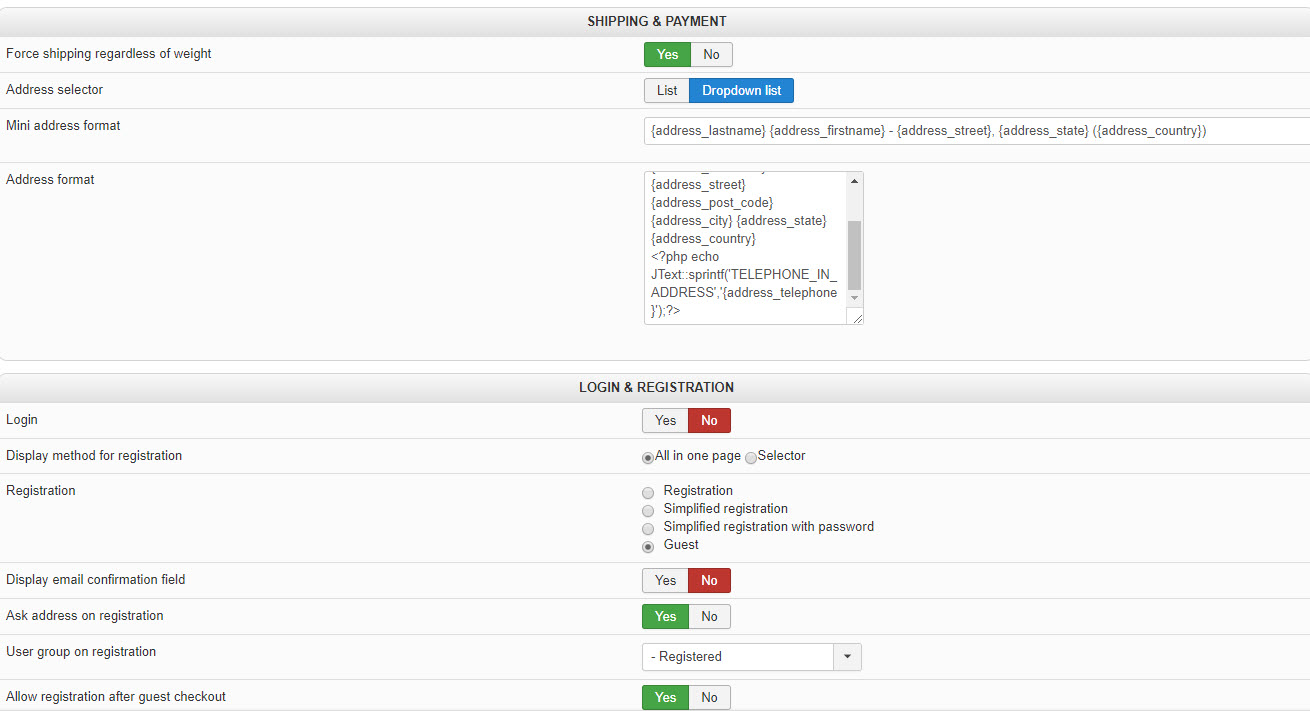
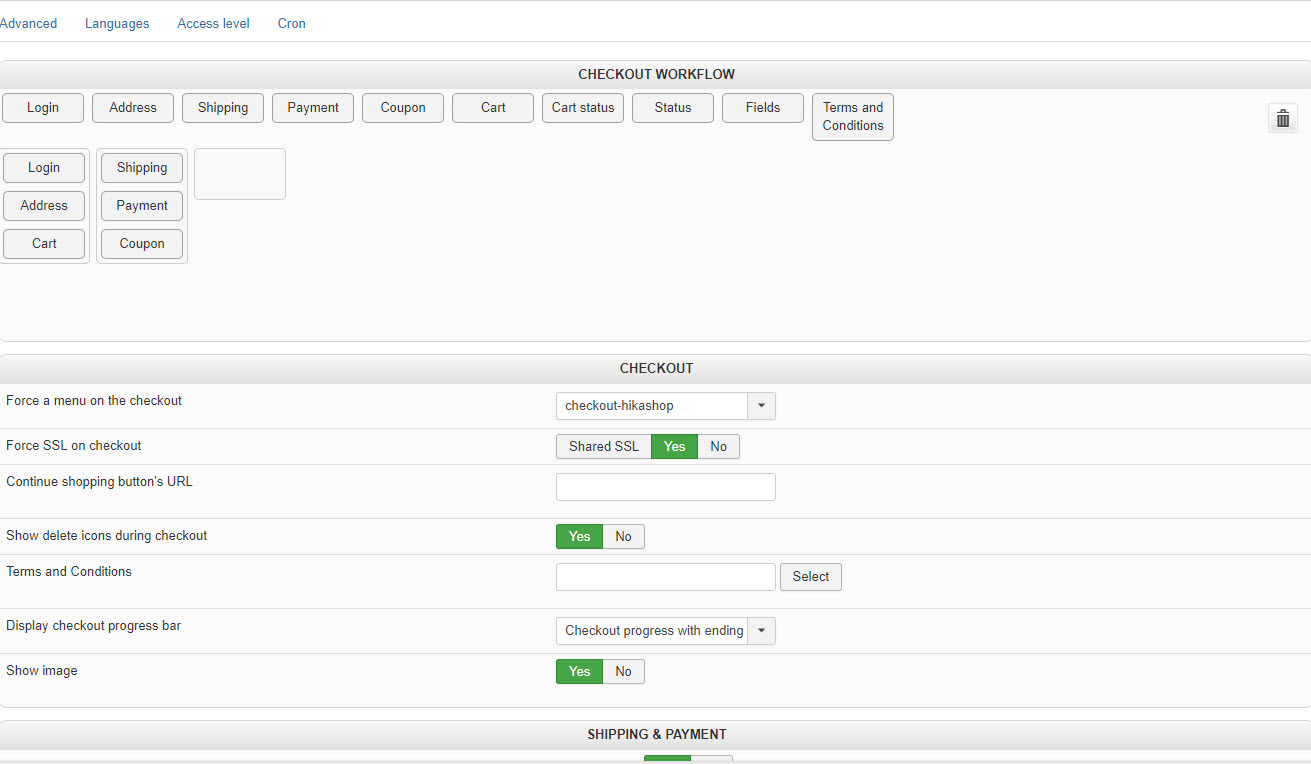
Attached are images of the hikashop checkout backend settings
Please Log in or Create an account to join the conversation.

8 years 9 months ago #286302
by nicolas
Replied by nicolas on topic Guest unable to checkout after update and upgrade to business hikashop
Hi,
This means that you've set an "user group after purchase" in the settings of your product/variant and that you've the "Hikashop group plugin" activated in the Joomla plugins manager.
Because of that, the system requires that the user is logged in to purchase that product.
So you can either remove what you selected in the "user group after purchase" setting of your products, or you can simply disable the "hikashop group plugin" via the Joomla plugins manager.
This means that you've set an "user group after purchase" in the settings of your product/variant and that you've the "Hikashop group plugin" activated in the Joomla plugins manager.
Because of that, the system requires that the user is logged in to purchase that product.
So you can either remove what you selected in the "user group after purchase" setting of your products, or you can simply disable the "hikashop group plugin" via the Joomla plugins manager.
Please Log in or Create an account to join the conversation.
- target4fun
-
Topic Author
- Offline
Less
More
- Posts: 92
- Thank you received: 0
8 years 9 months ago #286326
by target4fun
Replied by target4fun on topic Guest unable to checkout after update and upgrade to business hikashop
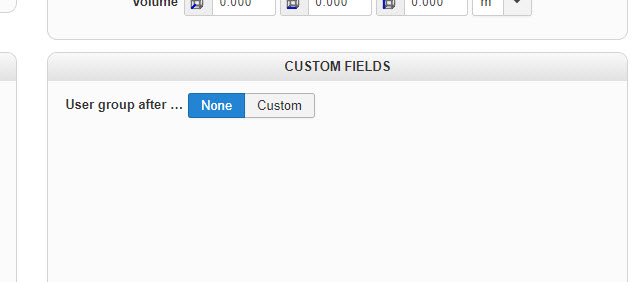
What does this "user group" feature do? I dont understand it or know what it does? I did see it under custom fields and I looked to see what it was set at and the product and all variants were set to "None" see attached image all looked exactly like that I check both product and all variants, made no changes and it was already set to none. Should it be something else or is this feature not working properly. I will disable it for now but I would like to find out more about it what it does and how it works. Thanks for helping I will test to see if I can checkout with this plugin disabled and report back one way or another. Thanks!
Please Log in or Create an account to join the conversation.
8 years 9 months ago #286350
by nicolas
Replied by nicolas on topic Guest unable to checkout after update and upgrade to business hikashop
Hi,
This feature will add a user group to the user account of the customer after the purchase of the product.
If you select a group in it, then it requires the customer to have a user account on the website... otherwise it can't add the user group to the user account.
With old versions of HikaShop, there was no check that the customer had a user account and thus it it was possible for customers to purchase something they couldn't use if they were checking as guest.
So your problem is a mis configuration which was brought to light due to an improvement we made with the new version.
This feature will add a user group to the user account of the customer after the purchase of the product.
If you select a group in it, then it requires the customer to have a user account on the website... otherwise it can't add the user group to the user account.
With old versions of HikaShop, there was no check that the customer had a user account and thus it it was possible for customers to purchase something they couldn't use if they were checking as guest.
So your problem is a mis configuration which was brought to light due to an improvement we made with the new version.
Please Log in or Create an account to join the conversation.

Less
More
- Posts: 212
- Thank you received: 17
8 years 7 months ago - 8 years 7 months ago #289596
by smithshop123
Hi,
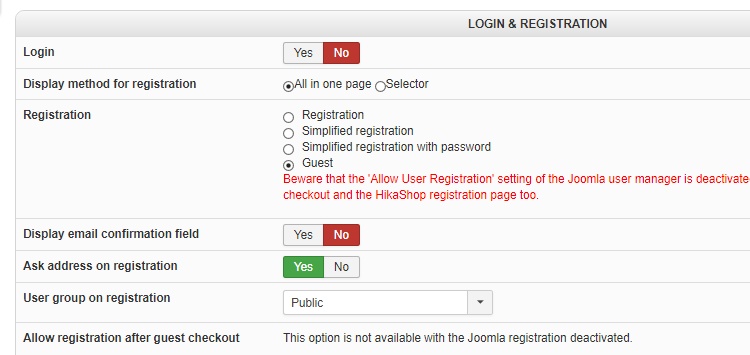
we're trying to let anyone go through as 'guest' to purchase any product but we still need their address details to know how to make contact and where to send items. Unfortunately, even though we've turned off registration, we get this message when the address of a new user is added and the 'Next' button is pressed;
Message
You cannot proceed to a guest checkout as some of the products in your cart require a registration to our website. Please register an account or remove these products from your cart in order to proceed.
I've attached out configuration setting so you can see if we've done anything wrong.
Regards,
Ian and Stu
Edit
I disabled the 'Group' plug-in based on another forum answer. We do have a 'product group after purchase' which we were hoping to use for a mailing list. However, after disabling the plug-in, what should we do to fix the 'product group after purchase' status of our products? For example, change them all to 'nothing', 'guest', 'public' or registered?
Thanks again,
Ian and Stu
Replied by smithshop123 on topic Guest unable to checkout after update and upgrade to business hikashop
nicolas wrote: Hi,
This feature will add a user group to the user account of the customer after the purchase of the product.
If you select a group in it, then it requires the customer to have a user account on the website... otherwise it can't add the user group to the user account.
With old versions of HikaShop, there was no check that the customer had a user account and thus it it was possible for customers to purchase something they couldn't use if they were checking as guest.
So your problem is a mis configuration which was brought to light due to an improvement we made with the new version.
Hi,
we're trying to let anyone go through as 'guest' to purchase any product but we still need their address details to know how to make contact and where to send items. Unfortunately, even though we've turned off registration, we get this message when the address of a new user is added and the 'Next' button is pressed;
Message
You cannot proceed to a guest checkout as some of the products in your cart require a registration to our website. Please register an account or remove these products from your cart in order to proceed.
I've attached out configuration setting so you can see if we've done anything wrong.
Regards,
Ian and Stu
Edit
I disabled the 'Group' plug-in based on another forum answer. We do have a 'product group after purchase' which we were hoping to use for a mailing list. However, after disabling the plug-in, what should we do to fix the 'product group after purchase' status of our products? For example, change them all to 'nothing', 'guest', 'public' or registered?
Thanks again,
Ian and Stu
Last edit: 8 years 7 months ago by smithshop123. Reason: Found temporary workaround and requested additional advice.
Please Log in or Create an account to join the conversation.
8 years 7 months ago #289603
by nicolas
Replied by nicolas on topic Guest unable to checkout after update and upgrade to business hikashop
Hi,
You have two possibilities:
- You remove the "user group after purchase" setting of your products so that the plugin doesn't have to check that the user is logged in.
- You allow registration and login on the checkout so that the customers will be logged in when finishing their checkout for the products with a "user group after purchase" filled in.
If you want to add the users to a mailing listing user group, you don't want to use the "user group after purchase" option, especially if you've configured your checkout as guest since guests don't have a user group. Only registered users have user groups.
Instead, you want to configure your newsletter extension to add the customer email address to a specific list of the newsletter extension after a purchase has been made. If you're using AcyMailing, thanks to our integration with it, you can do that using the mass action system of AcyMailing:
www.acyba.com/acymailing/148-acymailing-filter.html
You have two possibilities:
- You remove the "user group after purchase" setting of your products so that the plugin doesn't have to check that the user is logged in.
- You allow registration and login on the checkout so that the customers will be logged in when finishing their checkout for the products with a "user group after purchase" filled in.
If you want to add the users to a mailing listing user group, you don't want to use the "user group after purchase" option, especially if you've configured your checkout as guest since guests don't have a user group. Only registered users have user groups.
Instead, you want to configure your newsletter extension to add the customer email address to a specific list of the newsletter extension after a purchase has been made. If you're using AcyMailing, thanks to our integration with it, you can do that using the mass action system of AcyMailing:
www.acyba.com/acymailing/148-acymailing-filter.html
Please Log in or Create an account to join the conversation.
Less
More
- Posts: 212
- Thank you received: 17
8 years 7 months ago #289677
by smithshop123
Replied by smithshop123 on topic Guest unable to checkout after update and upgrade to business hikashop
Thanks Nicolas,
that great and will work for us!
Cheers,
Ian and Stu
that great and will work for us!
Cheers,
Ian and Stu
Please Log in or Create an account to join the conversation.
Less
More
- Posts: 212
- Thank you received: 17
8 years 7 months ago #289687
by smithshop123
Replied by smithshop123 on topic Guest unable to checkout after update and upgrade to business hikashop
This a general but related question;
How do we create a special user group for a limited number of registered users that we want to give a special discount to for certain products?
The general Joomla tutorial on this are really hard to understand.
Thanks,
Ian and Stu
How do we create a special user group for a limited number of registered users that we want to give a special discount to for certain products?
The general Joomla tutorial on this are really hard to understand.
Thanks,
Ian and Stu
Please Log in or Create an account to join the conversation.
8 years 7 months ago #289710
by nicolas
Replied by nicolas on topic Guest unable to checkout after update and upgrade to business hikashop
In the Joomla user manager, you can create new user groups. And when you edit a user in Joomla, you can select the user groups attached to that user account.
This will explain it better that what I could do:
www.cloudaccess.net/joomla-knowledgebase...oups-joomla-3-0.html
Then, when you create a discount in HikaShop, you have the "access level" setting to restrict the discount to user groups.
This will explain it better that what I could do:
www.cloudaccess.net/joomla-knowledgebase...oups-joomla-3-0.html
Then, when you create a discount in HikaShop, you have the "access level" setting to restrict the discount to user groups.
Please Log in or Create an account to join the conversation.
Less
More
- Posts: 212
- Thank you received: 17
8 years 7 months ago #289764
by smithshop123
Replied by smithshop123 on topic Guest unable to checkout after update and upgrade to business hikashop
Hi,
will selecting specific registered users (see image) from within the discount screen limit the discount to them? Or, will other registered users (i.e. not selected on the discount screen) also have access to the lower price?
I agree that creating new user groups is painful.
Regards,
Ian and Stu
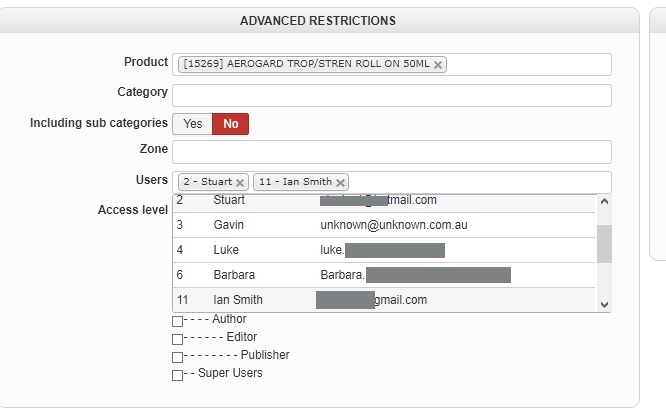
will selecting specific registered users (see image) from within the discount screen limit the discount to them? Or, will other registered users (i.e. not selected on the discount screen) also have access to the lower price?
I agree that creating new user groups is painful.
Regards,
Ian and Stu
Please Log in or Create an account to join the conversation.
8 years 7 months ago #289779
by nicolas
Replied by nicolas on topic Guest unable to checkout after update and upgrade to business hikashop
Hi,
The restrictions use the AND logic.
So if you set a user group and users, then the user needs to be among the selected users AND in at least one user group selected in the user group setting.
The restrictions use the AND logic.
So if you set a user group and users, then the user needs to be among the selected users AND in at least one user group selected in the user group setting.
The following user(s) said Thank You: smithshop123
Please Log in or Create an account to join the conversation.
Time to create page: 0.086 seconds