

- Posts: 208
- Thank you received: 10
Canadian users....STATE field disappears
8 years 6 months ago #290071
by simmiepam
Canadian users....STATE field disappears was created by simmiepam
When someone chooses the CANADIAN country in checkout...the field STATE...disappears for them.
I know they don't use STATE but PROVINCE...so maybe that's the problem?
Interesting, when someone from the UK checks out and choose the UK as their country, the field STATE stays for them!
How can I make it so that Canadian users have the field STATE to include their province?
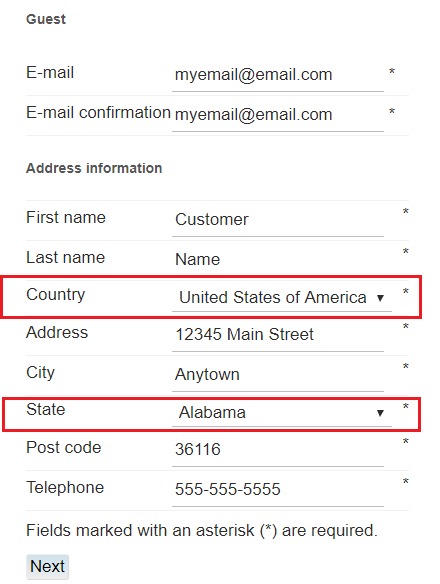
This is what it looks like when checking out with United States
Pam
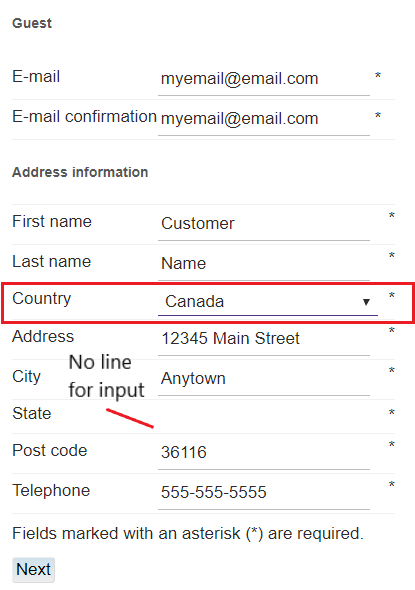
This is what it looks like checking out with Canada
No field shows up (fields are underlined)
Pam
I know they don't use STATE but PROVINCE...so maybe that's the problem?
Interesting, when someone from the UK checks out and choose the UK as their country, the field STATE stays for them!
How can I make it so that Canadian users have the field STATE to include their province?
This is what it looks like when checking out with United States
Pam
This is what it looks like checking out with Canada
No field shows up (fields are underlined)
Pam
Please Log in or Create an account to join the conversation.

8 years 6 months ago #290072
by nicolas
Replied by nicolas on topic Canadian users....STATE field disappears
Hi,
That means that the states are missing in the "sub zones" listing of the canada zone or that these states have been disabled. Please check on that in the menu System>Zones.
That means that the states are missing in the "sub zones" listing of the canada zone or that these states have been disabled. Please check on that in the menu System>Zones.
Please Log in or Create an account to join the conversation.
8 years 6 months ago #290088
by simmiepam
Replied by simmiepam on topic Canadian users....STATE field disappears
Thank you
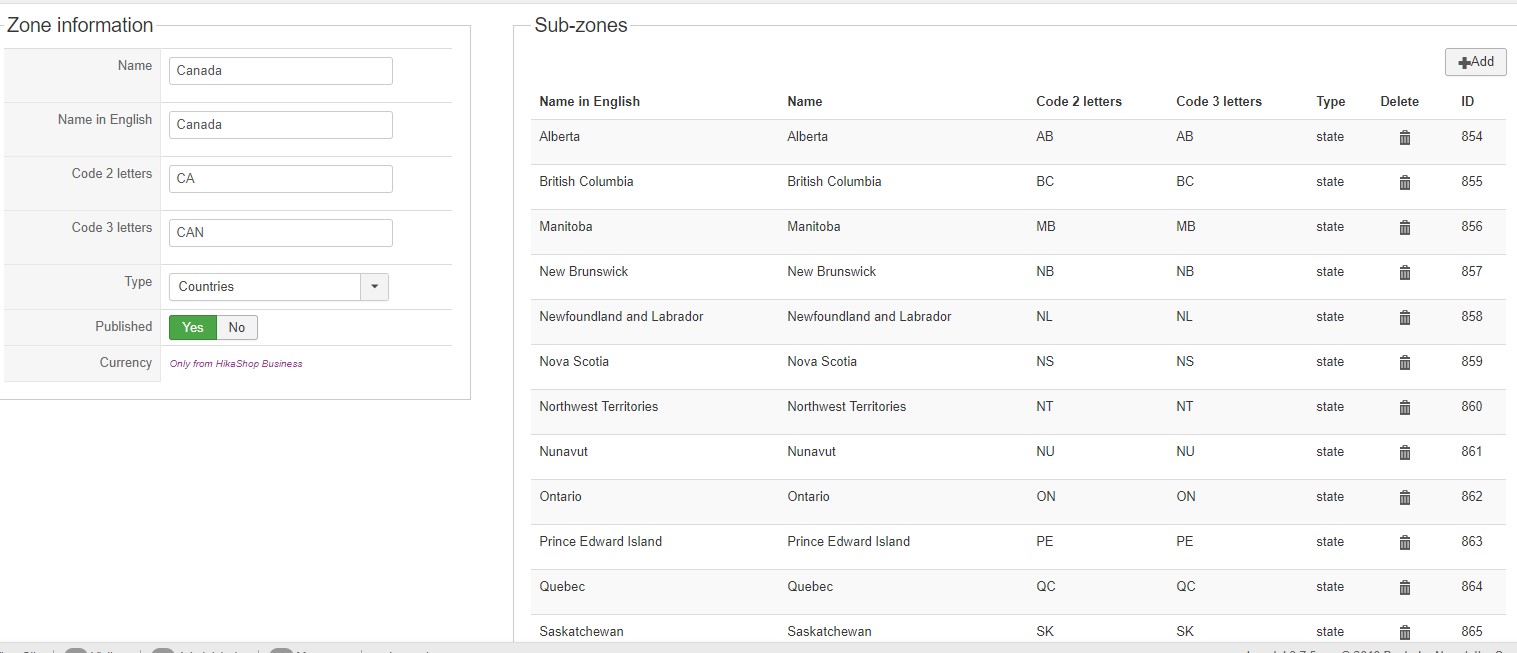
So I checked and this is what I found under ZONES for Canada
Is this correct or is there something else I should do?
Pam
So I checked and this is what I found under ZONES for Canada
Is this correct or is there something else I should do?
Pam
Please Log in or Create an account to join the conversation.
8 years 6 months ago #290096
by nicolas
Replied by nicolas on topic Canadian users....STATE field disappears
Hi,
So you've checked the first part of what I said. The states of the Canada zone are indeed in the sub zones listing of the zone.
Then, please check the second part: that these states are published. You can check that on the zones listing.
So you've checked the first part of what I said. The states of the Canada zone are indeed in the sub zones listing of the zone.
Then, please check the second part: that these states are published. You can check that on the zones listing.
Please Log in or Create an account to join the conversation.
8 years 6 months ago #290139
by simmiepam
Replied by simmiepam on topic Canadian users....STATE field disappears
Thank you.
When I look at the listing, there is no indication that they are or are not published. The only thing I see is an option to delete them.
When I look at the United States zone...all the states are listed in the same way they are for Canada. No indication that they are or are not published, but they show up on the checkout form.
Forgive me if I'm dense...but maybe I don't understand where you want me to look.
Pam
When I look at the listing, there is no indication that they are or are not published. The only thing I see is an option to delete them.
When I look at the United States zone...all the states are listed in the same way they are for Canada. No indication that they are or are not published, but they show up on the checkout form.
Forgive me if I'm dense...but maybe I don't understand where you want me to look.
Pam
Please Log in or Create an account to join the conversation.

8 years 6 months ago #290144
by lousyfool
Need help with customisations of layouts, style or other site development? PM me!
(Don't forget to turn on "E-mail notification of new messages" )
Replied by lousyfool on topic Canadian users....STATE field disappears
Hi,
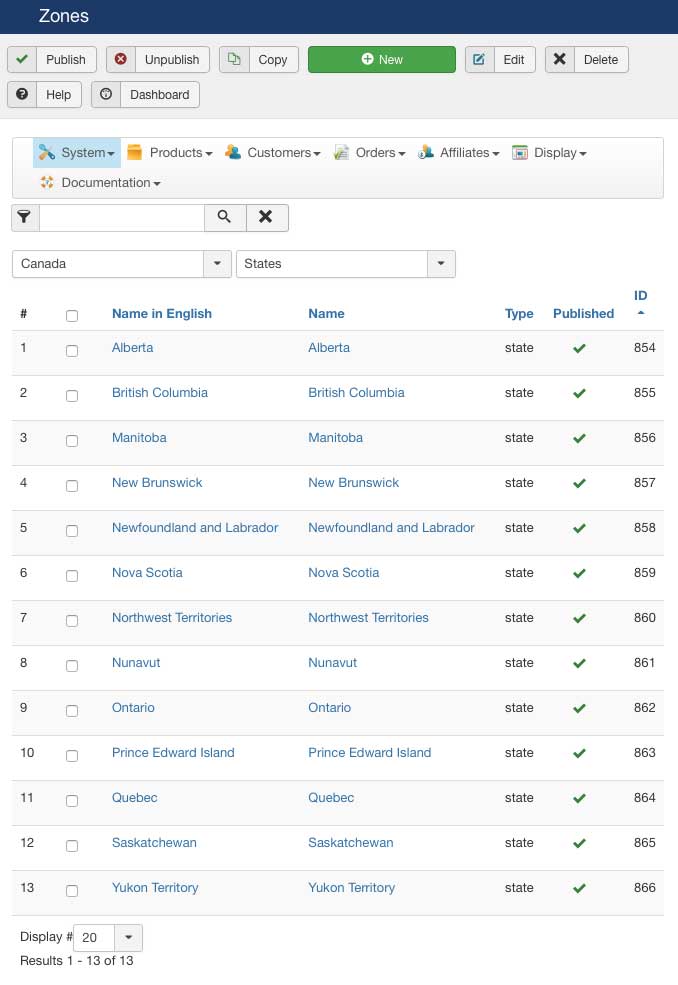
This is what you want to see:
(Below I'll explain how to get there.)
1. HikaShop backend -> System -> Zones
2. In the filter dropdown (default "All Zones") select "States"
3. In the filter dropdown which is now above this and saying "all", select "Canada"
4. What you then is the screenshot above.
5. Make sure all states have the green checkmark at the right
This is what you want to see:
(Below I'll explain how to get there.)
1. HikaShop backend -> System -> Zones
2. In the filter dropdown (default "All Zones") select "States"
3. In the filter dropdown which is now above this and saying "all", select "Canada"
4. What you then is the screenshot above.
5. Make sure all states have the green checkmark at the right
Need help with customisations of layouts, style or other site development? PM me!
(Don't forget to turn on "E-mail notification of new messages" )
Please Log in or Create an account to join the conversation.
8 years 6 months ago #290146
by simmiepam
Replied by simmiepam on topic Canadian users....STATE field disappears
When I follow your navigation...I don't see what you're posting.
All I see is this. Does that mean Canada isn't set up??

All I see is this. Does that mean Canada isn't set up??
Please Log in or Create an account to join the conversation.
8 years 6 months ago #290149
by lousyfool
Need help with customisations of layouts, style or other site development? PM me!
(Don't forget to turn on "E-mail notification of new messages" )
Replied by lousyfool on topic Canadian users....STATE field disappears
...except you didn't follow my instructions, not at all.
If you still have that same screen:
- You have "canada" in the text search field. Clear that by clicking "X"..
- Then, in the filter dropdown which says "States" now, reset it by selecting "All Zones".
- Now back to my previous instructions, beginning at #2 and doing exactly as stated.
If you still have that same screen:
- You have "canada" in the text search field. Clear that by clicking "X"..
- Then, in the filter dropdown which says "States" now, reset it by selecting "All Zones".
- Now back to my previous instructions, beginning at #2 and doing exactly as stated.
Need help with customisations of layouts, style or other site development? PM me!
(Don't forget to turn on "E-mail notification of new messages" )
The following user(s) said Thank You: Jerome
Please Log in or Create an account to join the conversation.
8 years 6 months ago #290150
by simmiepam
Replied by simmiepam on topic Canadian users....STATE field disappears
Eureka!
Thank you.
Thank you.
Please Log in or Create an account to join the conversation.
Time to create page: 0.242 seconds