
- Posts: 26
- Thank you received: 1
Responsivizer - Cart content
8 years 4 months ago #294147
by szwart
Responsivizer - Cart content was created by szwart
-- url of the page with the problem -- : houtvanappel.nl
-- HikaShop version -- : 3.4.0
-- Joomla version -- : 3.8.8
-- PHP version -- : 7.0.29
-- Browser(s) name and version -- : Safari
Hi,
Today installed Responsivizer on joomla to make my website responive, without having a responsive template.
only now on any mobile device i cannot see the products i have in my cart??
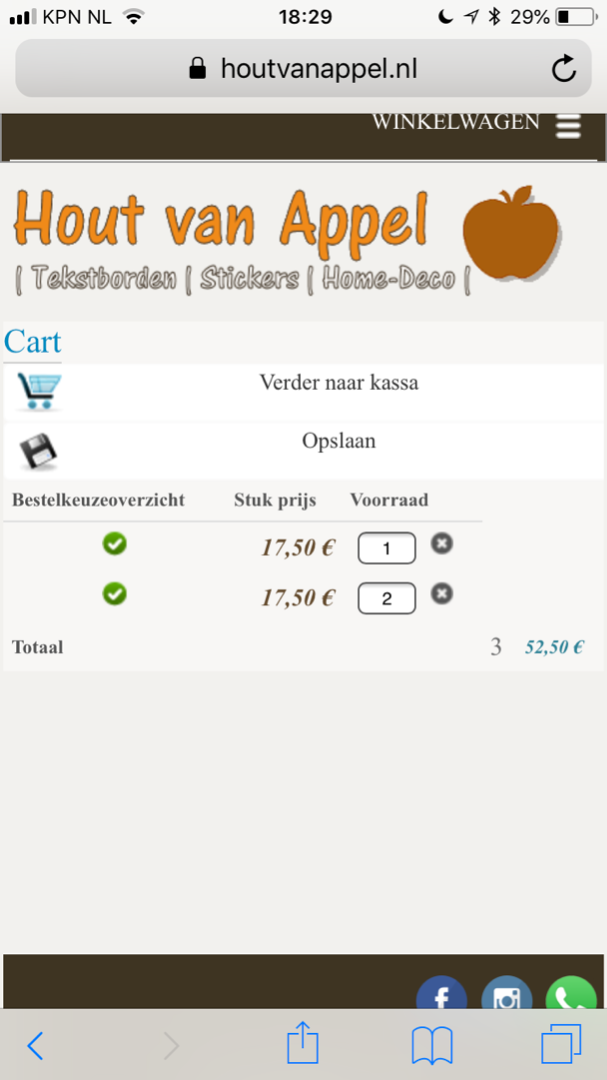
how can i change this?
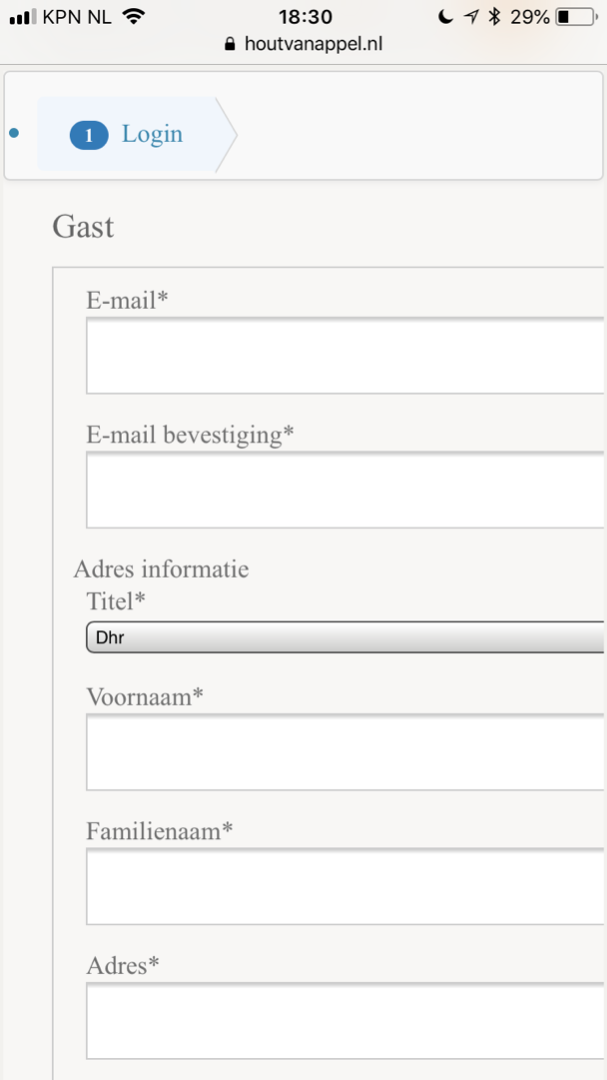
ps same with guest checkout .
-- HikaShop version -- : 3.4.0
-- Joomla version -- : 3.8.8
-- PHP version -- : 7.0.29
-- Browser(s) name and version -- : Safari
Hi,
Today installed Responsivizer on joomla to make my website responive, without having a responsive template.
only now on any mobile device i cannot see the products i have in my cart??
how can i change this?
ps same with guest checkout .
Please Log in or Create an account to join the conversation.

8 years 4 months ago - 8 years 4 months ago #294172
by Philip
Replied by Philip on topic Responsivizer - Cart content
Hello,
Several remarks, first you have to consider that you use a custom style css, in order to better start you have to know that we have to correct default HikaShop code, customisation can only be our subject to guide you.
image missing https://cdn.pbrd.co/images/HqrnaKt.png
To better understand situation and be able to help you can you define your style to "None" in your Display options and use a default template like ProtoStar ?
If that solve all your issue that means that your root issue, is in your Style custom AND/OR your template.
=> You have to correct your style custom
=> You can too, contact your template creator support.
Awaiting news from you.
Regards
Several remarks, first you have to consider that you use a custom style css, in order to better start you have to know that we have to correct default HikaShop code, customisation can only be our subject to guide you.
image missing https://cdn.pbrd.co/images/HqrnaKt.png
To better understand situation and be able to help you can you define your style to "None" in your Display options and use a default template like ProtoStar ?
If that solve all your issue that means that your root issue, is in your Style custom AND/OR your template.
=> You have to correct your style custom
=> You can too, contact your template creator support.
Awaiting news from you.
Regards
Last edit: 8 years 4 months ago by Philip.
Please Log in or Create an account to join the conversation.
8 years 4 months ago - 8 years 4 months ago #294175
by szwart
Replied by szwart on topic Responsivizer - Cart content
Hi Philippe,
It only occures on a mobile device this issue.
like ipad or iphone, then i send to a responive template.
on normal pc, it will show only desktop, and that works fine.
It only occures on a mobile device this issue.
like ipad or iphone, then i send to a responive template.
on normal pc, it will show only desktop, and that works fine.
Last edit: 8 years 4 months ago by szwart.
Please Log in or Create an account to join the conversation.

8 years 4 months ago #294182
by nicolas
Replied by nicolas on topic Responsivizer - Cart content
Hi,
We understand about that.
But that's not the subject.
The issue seems to come from the fact that you're missing some of the CSS of recent versions of HikaShop.
And we can see that you're using customized CSS for HikaShop.
If you check the Display tab of the HikaShop configuration, under the CSS section, you can see several options which are set to "custom" instead of "default".
And it's likely because of these that the carts don't display properly.
Try to put them back to default and see if that helps.
Then, you can just reapply the customization you had put in them but no using the latest version of the CSS files.
Otherwise, if you don't want to do that, you can also continue to customize the CSS files that you already have. But that's up to you to do the necessary modifications.
For example, on the cart page, you can remove that CSS form the style CSS of HikaShop to get back the products name / image:
monosnap.com/file/UYVgsNJA8XpKZznT7tCmnuPOpNXKv9
However, the page is still a bit messed up on mobiles, as it would require other CSS modifications.
But again, with the default CSS of HikaShop you wouldn't have these issues.
We understand about that.
But that's not the subject.
The issue seems to come from the fact that you're missing some of the CSS of recent versions of HikaShop.
And we can see that you're using customized CSS for HikaShop.
If you check the Display tab of the HikaShop configuration, under the CSS section, you can see several options which are set to "custom" instead of "default".
And it's likely because of these that the carts don't display properly.
Try to put them back to default and see if that helps.
Then, you can just reapply the customization you had put in them but no using the latest version of the CSS files.
Otherwise, if you don't want to do that, you can also continue to customize the CSS files that you already have. But that's up to you to do the necessary modifications.
For example, on the cart page, you can remove that CSS form the style CSS of HikaShop to get back the products name / image:
Code:
table#hikashop_order_listing tbody td:nth-child(1), table#hikashop_order_listing th:nth-child(1), table#hikashop_cart_listing td:nth-child(2), table#hikashop_cart_listing th:nth-child(2), table#hikashop_cart_listing td:nth-child(5), table#hikashop_cart_listing th:nth-child(5), table#hikashop_cart_product_listing tbody td:nth-child(1), table#hikashop_cart_product_listing th:nth-child(1), table#hikashop_cart_product_listing td:nth-child(5), table#hikashop_cart_product_listing th:nth-child(5) {
display: none;
}
However, the page is still a bit messed up on mobiles, as it would require other CSS modifications.
But again, with the default CSS of HikaShop you wouldn't have these issues.
Please Log in or Create an account to join the conversation.
Time to create page: 0.172 seconds