
- Posts: 27
- Thank you received: 1
Cart module didn't refresh after putting a product in
- Marsipulami
-
 Topic Author
- Offline
- Joomla 3.0 Newbie :)
Less
More
8 years 3 months ago - 8 years 3 months ago #296607
by Marsipulami
You have to be patient with me
Cart module didn't refresh after putting a product in was created by Marsipulami
-- HikaShop version -- : 3.5.1
-- Joomla version -- : 3.8.11
-- PHP version -- : 7.0.2
-- Browser(s) name and version -- : Chrome
-- Error-message(debug-mod must be tuned on) -- : Cart didn't refresh after putting a product in
HI Guys
I have a problem but didn't know, if it never worked or since the update
When i put a product in the cart, it didn't refresh it self. The cart module didn't show any prodcts.
When i refresh the side manually, then it shows the product in the cart module.
Can i make a refresh anywhere in the hikashop settings?
I have the mini cart as module in the sidebar.
Same Problem with IE and Chrome.....
Best wishes
Marsipulami
-- Joomla version -- : 3.8.11
-- PHP version -- : 7.0.2
-- Browser(s) name and version -- : Chrome
-- Error-message(debug-mod must be tuned on) -- : Cart didn't refresh after putting a product in
HI Guys
I have a problem but didn't know, if it never worked or since the update
When i put a product in the cart, it didn't refresh it self. The cart module didn't show any prodcts.
When i refresh the side manually, then it shows the product in the cart module.
Can i make a refresh anywhere in the hikashop settings?
I have the mini cart as module in the sidebar.
Same Problem with IE and Chrome.....
Best wishes
Marsipulami
You have to be patient with me
Last edit: 8 years 3 months ago by Marsipulami.
Please Log in or Create an account to join the conversation.
- Marsipulami
-
Topic Author
- Offline
- Joomla 3.0 Newbie :)
Less
More
- Posts: 27
- Thank you received: 1
8 years 3 months ago - 8 years 3 months ago #296609
by Marsipulami
You have to be patient with me
Replied by Marsipulami on topic Cart module didn't refresh after putting a product in
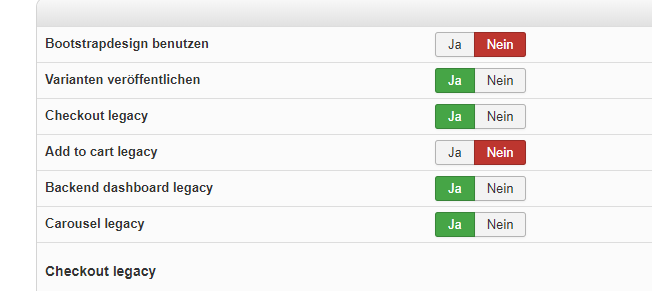
Ok afterdisabling the add to cart legacy in the settingsit works...
But there must be a problem in the legacy settings now right?
Best wishes
Marsipulami
But there must be a problem in the legacy settings now right?
Best wishes
Marsipulami
You have to be patient with me
Last edit: 8 years 3 months ago by Marsipulami.
Please Log in or Create an account to join the conversation.

8 years 3 months ago #296612
by nicolas
Replied by nicolas on topic Cart module didn't refresh after putting a product in
Hi,
It's something linked to the update yes. You've updated the cart module but still using the old add to cart buttons.
Turning off the add to cart legacy setting is a good thing to solve that issue.
In fact, you should even turn off the other legacy settings. They are only useful to keep on if you have issues when turning them on. In fact, when you install a new HikaShop, they are automatically off since you normally want to use the new systems.
It's something linked to the update yes. You've updated the cart module but still using the old add to cart buttons.
Turning off the add to cart legacy setting is a good thing to solve that issue.
In fact, you should even turn off the other legacy settings. They are only useful to keep on if you have issues when turning them on. In fact, when you install a new HikaShop, they are automatically off since you normally want to use the new systems.
Please Log in or Create an account to join the conversation.
- Marsipulami
-
Topic Author
- Offline
- Joomla 3.0 Newbie :)
Less
More
- Posts: 27
- Thank you received: 1
8 years 3 months ago #296786
by Marsipulami
You have to be patient with me
Replied by Marsipulami on topic Cart module didn't refresh after putting a product in
Thanks Nicolas
So i will turn all legacy settings of.
Best wishes
Marsi
So i will turn all legacy settings of.
Best wishes
Marsi
You have to be patient with me
Please Log in or Create an account to join the conversation.
Time to create page: 0.058 seconds