
- Posts: 59
- Thank you received: 2
Edit Billing or Shipping Address using the same button title for both buttons
- avonrivercs
-
 Topic Author
- Offline
Less
More
8 years 3 weeks ago #298923
by avonrivercs
Edit Billing or Shipping Address using the same button title for both buttons was created by avonrivercs
-- url of the page with the problem -- :
balancedequine.com.au
-- HikaShop version -- : 3.5.1
-- Joomla version -- : 3.8.12
-- PHP version -- : 7.1.22
-- Browser(s) name and version -- : Chrome 69.0.3497.100
We have an issue when trying to edit shipping & billing addresses in the checkout where the edit buttons are the same for both billing and shipping. This is confusing to our customers as they are reporting this to us. On advice earlier from this forum, we wanted to reverse the billing and shipping and have managed to get the form titles to display correctly, but when a customer tries to edit the shipping or billing address, they are presented with 2 buttons that read "Edit Shipping Address" instead of 1 button that reads "Edit Shipping Address" and the other one should read "Edit Billing Address". What can I do to fix this issue?
-- HikaShop version -- : 3.5.1
-- Joomla version -- : 3.8.12
-- PHP version -- : 7.1.22
-- Browser(s) name and version -- : Chrome 69.0.3497.100
We have an issue when trying to edit shipping & billing addresses in the checkout where the edit buttons are the same for both billing and shipping. This is confusing to our customers as they are reporting this to us. On advice earlier from this forum, we wanted to reverse the billing and shipping and have managed to get the form titles to display correctly, but when a customer tries to edit the shipping or billing address, they are presented with 2 buttons that read "Edit Shipping Address" instead of 1 button that reads "Edit Shipping Address" and the other one should read "Edit Billing Address". What can I do to fix this issue?
Please Log in or Create an account to join the conversation.

8 years 3 weeks ago #298927
by nicolas
Replied by nicolas on topic Edit Billing or Shipping Address using the same button title for both buttons
Hi,
Search for the text : <button onclick="return window.checkout.newAddress
in the show_block_address view file. You'll find two occurences. One for the new button of billing addresses and one for the new button of shipping addresses. So you must enter a different translation key for each in order to be able to have a different text for each of those two buttons.
Search for the text : <button onclick="return window.checkout.newAddress
in the show_block_address view file. You'll find two occurences. One for the new button of billing addresses and one for the new button of shipping addresses. So you must enter a different translation key for each in order to be able to have a different text for each of those two buttons.
Please Log in or Create an account to join the conversation.
- avonrivercs
-
Topic Author
- Offline
Less
More
- Posts: 59
- Thank you received: 2
8 years 3 weeks ago #298977
by avonrivercs
Replied by avonrivercs on topic Edit Billing or Shipping Address using the same button title for both buttons
Looking in the suggested view, I can only find one instance of the button which mentions Shipping, see image
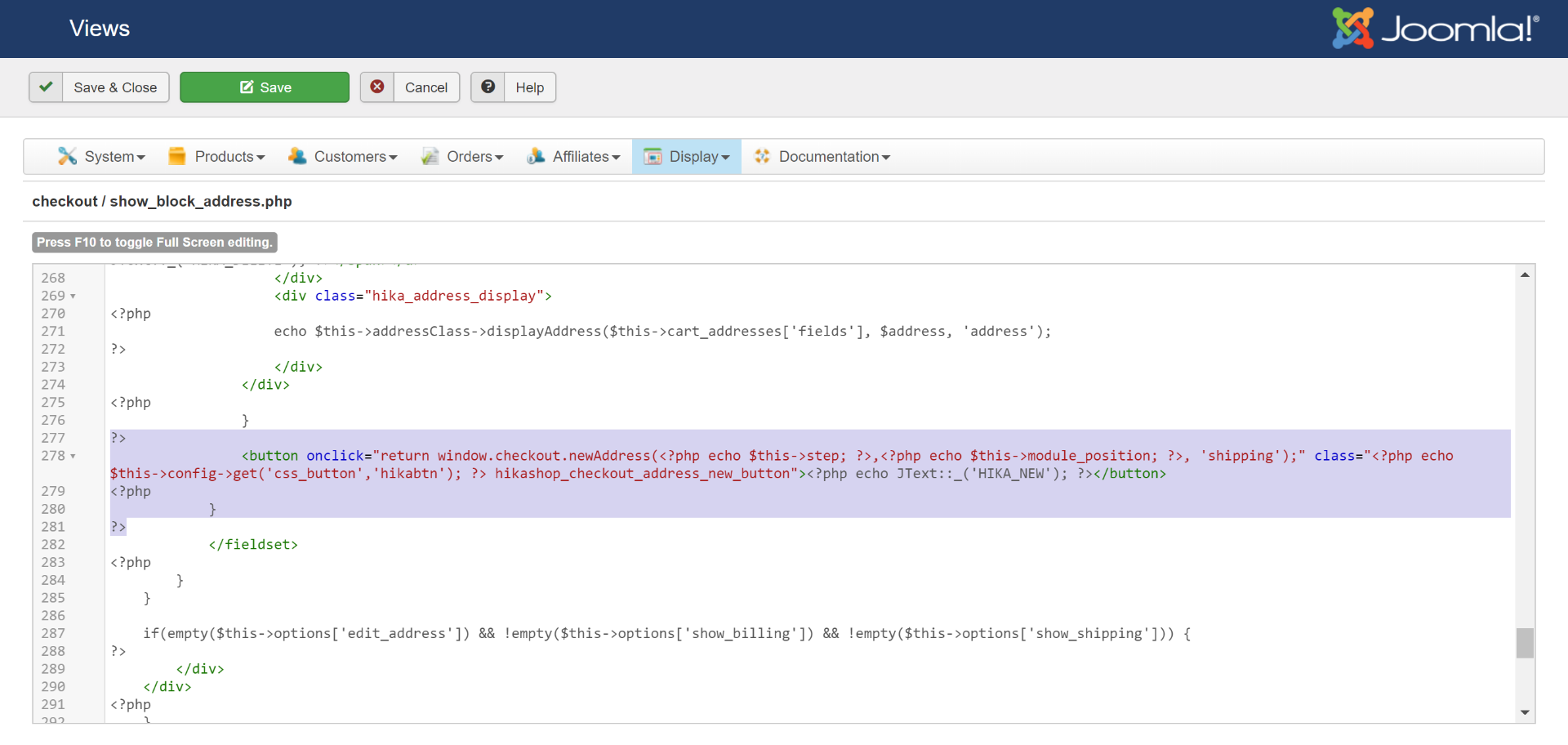
Do I need to add a second instance of this or should there already be a second instance in there already, as the reply inferred?
Do I need to add a second instance of this or should there already be a second instance in there already, as the reply inferred?
Please Log in or Create an account to join the conversation.
8 years 3 weeks ago #298979
by nicolas
Replied by nicolas on topic Edit Billing or Shipping Address using the same button title for both buttons
Hi,
There should already be a second instance.
If I search for that text in the code of the default show_block_address view file, I can find both:
and:
One for billing and one for shipping.
I don't see why you would get only one of them in that file if you get the two buttons unless you did some wild modifications in that view file.
There should already be a second instance.
If I search for that text in the code of the default show_block_address view file, I can find both:
Code:
<button onclick="return window.checkout.newAddress(<?php echo $this->step; ?>,<?php echo $this->module_position; ?>, 'billing');" class="<?php echo $this->config->get('css_button','hikabtn'); ?> hikashop_checkout_address_new_button"><?php echo JText::_('HIKA_NEW'); ?></button>
Code:
<button onclick="return window.checkout.newAddress(<?php echo $this->step; ?>,<?php echo $this->module_position; ?>, 'shipping');" class="<?php echo $this->config->get('css_button','hikabtn'); ?> hikashop_checkout_address_new_button"><?php echo JText::_('HIKA_NEW'); ?></button>
I don't see why you would get only one of them in that file if you get the two buttons unless you did some wild modifications in that view file.
Please Log in or Create an account to join the conversation.
- avonrivercs
-
Topic Author
- Offline
Less
More
- Posts: 59
- Thank you received: 2
8 years 3 weeks ago #298996
by avonrivercs
Replied by avonrivercs on topic Edit Billing or Shipping Address using the same button title for both buttons
Ok, found the 2 instances for the button at lines 192 and 278 although search finds 1 instance only.
Line 192 shows the following:-
<button onclick="return window.checkout.newAddress(<?php echo $this->step; ?>,<?php echo $this->module_position; ?>, 'billing');" class="<?php echo $this->config->get('css_button','hikabtn'); ?> hikashop_checkout_address_new_button"><?php echo JText::_('HIKA_NEW'); ?></button>
Line 278 shows the following :-
<button onclick="return window.checkout.newAddress(<?php echo $this->step; ?>,<?php echo $this->module_position; ?>, 'shipping');" class="<?php echo $this->config->get('css_button','hikabtn'); ?> hikashop_checkout_address_new_button"><?php echo JText::_('HIKA_NEW'); ?></button>
As you can see one says shipping and the other says billing. Why then does both buttons display Shipping Address, see image.
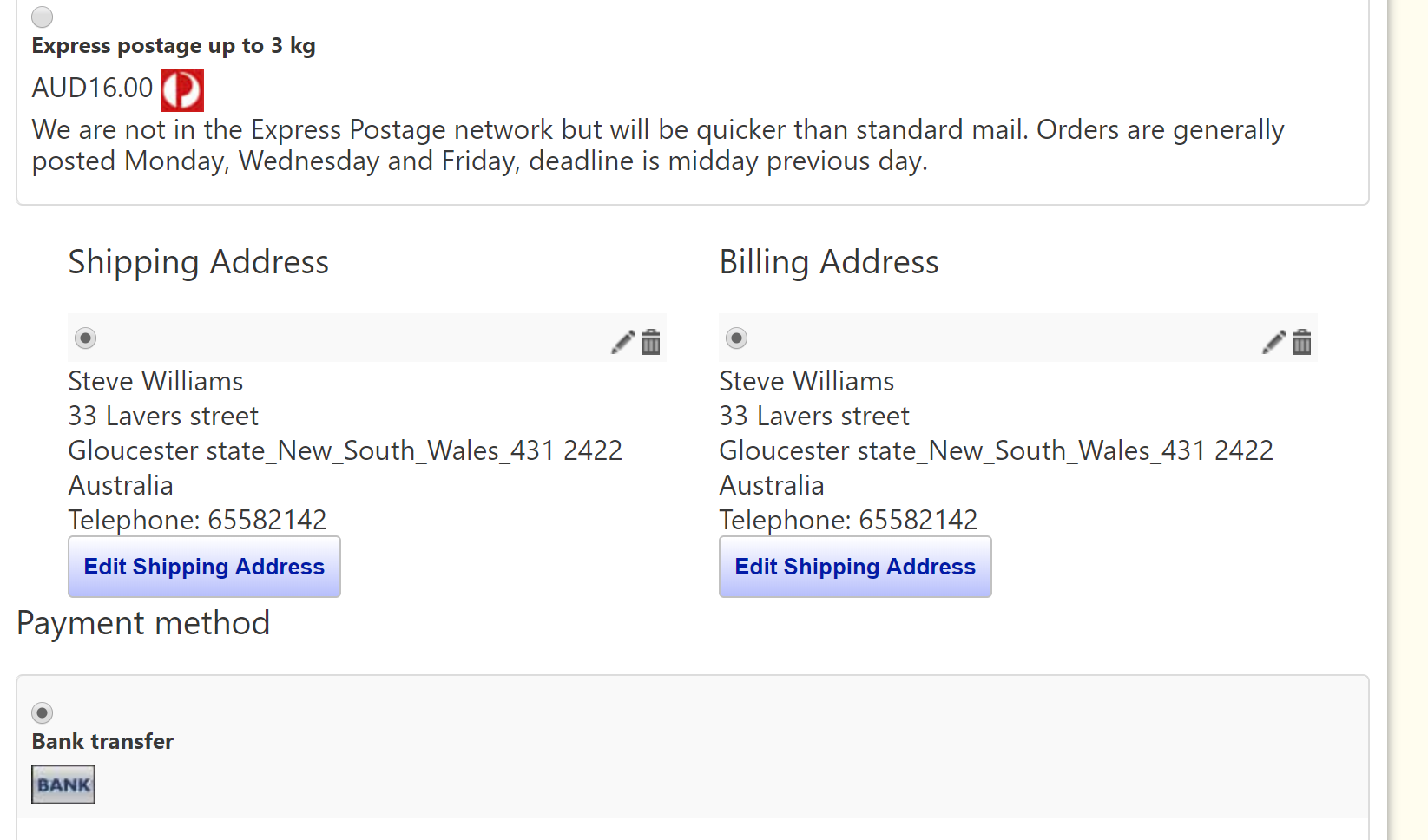
Line 192 shows the following:-
<button onclick="return window.checkout.newAddress(<?php echo $this->step; ?>,<?php echo $this->module_position; ?>, 'billing');" class="<?php echo $this->config->get('css_button','hikabtn'); ?> hikashop_checkout_address_new_button"><?php echo JText::_('HIKA_NEW'); ?></button>
Line 278 shows the following :-
<button onclick="return window.checkout.newAddress(<?php echo $this->step; ?>,<?php echo $this->module_position; ?>, 'shipping');" class="<?php echo $this->config->get('css_button','hikabtn'); ?> hikashop_checkout_address_new_button"><?php echo JText::_('HIKA_NEW'); ?></button>
As you can see one says shipping and the other says billing. Why then does both buttons display Shipping Address, see image.
Please Log in or Create an account to join the conversation.
8 years 3 weeks ago #299005
by nicolas
Replied by nicolas on topic Edit Billing or Shipping Address using the same button title for both buttons
That's because as you can see they use the same translation key "HIKA_NEW".
Change <?php echo JText::_('HIKA_NEW'); ?> in each with the text you want for each button and that's it.
Change <?php echo JText::_('HIKA_NEW'); ?> in each with the text you want for each button and that's it.
Please Log in or Create an account to join the conversation.
Time to create page: 0.102 seconds