

- Posts: 9
- Thank you received: 0
Button checkout different url
7 years 11 months ago #300900
by redcrecer
Button checkout different url was created by redcrecer
-- url of the page with the problem -- :
www.fengshuicrecer.com/tienda-feng-shui/checkout.html
-- HikaShop version -- : 4.0.1.
-- Joomla version -- : 3.930
-- PHP version -- : 7.2
Hello the checkout button of terms and conditions to accept takes a url that is not the one of the article that I have indicated.
In this case it always takes
<a href="#" id="shop_terms_and_cond" onclick="window.hikashop.openBox(this,null,true); return false;">Por favor, acepte los términos y condiciones antes de continuar</a>
My url is www.fengshuicrecer.com/condiciones-generales.html
I want you to take my url of general conditions
you can help me?
I incorporate image from the web
Regards
Please Log in or Create an account to join the conversation.
7 years 11 months ago - 7 years 11 months ago #300922
by Philip
Replied by Philip on topic Button checkout different url
Hello,
Can you provide your relative settings screenshot, like your Checkout Workflow and more especially where you have set your "Terms & Conditions" article.
Other point, do you have some customization on your checkout views ?
Awaiting news from you
Regards
Can you provide your relative settings screenshot, like your Checkout Workflow and more especially where you have set your "Terms & Conditions" article.
Other point, do you have some customization on your checkout views ?
Awaiting news from you
Regards
Last edit: 7 years 11 months ago by Philip.
Please Log in or Create an account to join the conversation.
7 years 11 months ago - 7 years 11 months ago #300940
by redcrecer
Replied by redcrecer on topic Button checkout different url
Hello
Here is the workflow of you can see the conditions and terms panel, Image as an attachment
I do not have custom checkout
Regards
Here is the workflow of you can see the conditions and terms panel, Image as an attachment
I do not have custom checkout
Regards
Last edit: 7 years 11 months ago by redcrecer.
Please Log in or Create an account to join the conversation.
7 years 11 months ago - 7 years 11 months ago #300955
by Philip
Replied by Philip on topic Button checkout different url
Hello,
2 points to check :
- First, you have in 2 step with a "the Terms & Condition" block, does this link to your issue ? Honestly, I Don't know, but process some test with only 1 block "terms and conditions", maybe who knows this will reveal an little issue that we didn't test yet ?
- Second, can you process some test with a default template (like ProtoStar) to see if that solve your issue, the point is more to collect clue with this operation.
Awaiting news from you.
regards
Last edit: 7 years 11 months ago by Philip.
Please Log in or Create an account to join the conversation.
7 years 11 months ago #301004
by redcrecer
Replied by redcrecer on topic Button checkout different url
Hello and thanks for you help
1 point
A module was added in the first step so that you can do the tests without doing the whole process. I've removed the last one and now there's only 1, the error is the same
2 Point
I have activated the protostar template for the store, the failure is the same
Regards
1 point
A module was added in the first step so that you can do the tests without doing the whole process. I've removed the last one and now there's only 1, the error is the same
2 Point
I have activated the protostar template for the store, the failure is the same
Regards
Please Log in or Create an account to join the conversation.
7 years 11 months ago #301007
by redcrecer
Replied by redcrecer on topic Button checkout different url
I have done a new test with the Protostar template and it works well
I use joomlart template and I would like to make it work on it. Can you help me?
I use joomlart template and I would like to make it work on it. Can you help me?
Please Log in or Create an account to join the conversation.

7 years 11 months ago #301015
by nicolas
Replied by nicolas on topic Button checkout different url
Hi,
Rename the file templates/YOUR_TEMPLATE/html/com_hikashop/checkout/show_block_terms.php
That will deactivate the override that your template has on the terms and conditions view file and it should then work the same as with the protostar template.
Rename the file templates/YOUR_TEMPLATE/html/com_hikashop/checkout/show_block_terms.php
That will deactivate the override that your template has on the terms and conditions view file and it should then work the same as with the protostar template.
Please Log in or Create an account to join the conversation.
7 years 11 months ago #301059
by redcrecer
Replied by redcrecer on topic Button checkout different url
Hello
That file did not exist
I have included the file copying from the component, it does not work either
I think I did it well, attached screen
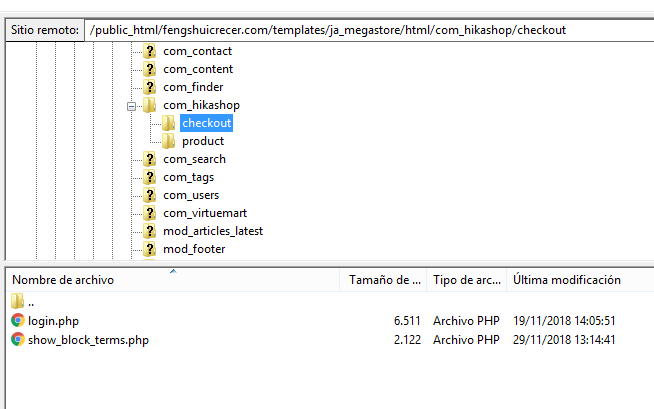
That file did not exist
I have included the file copying from the component, it does not work either
I think I did it well, attached screen
Please Log in or Create an account to join the conversation.
7 years 11 months ago #301060
by nicolas
Replied by nicolas on topic Button checkout different url
Hi,
Ok, then please check that the setting "popup mode" is set to "vex" in the HikaShop configuration.
That should fix the problem.
Ok, then please check that the setting "popup mode" is set to "vex" in the HikaShop configuration.
That should fix the problem.
Please Log in or Create an account to join the conversation.
7 years 11 months ago #301098
by redcrecer
Replied by redcrecer on topic Button checkout different url
perfect, I changed this configuration and it works. I attach the image in case it helps someone
Thanks for your help, happy day
Regards
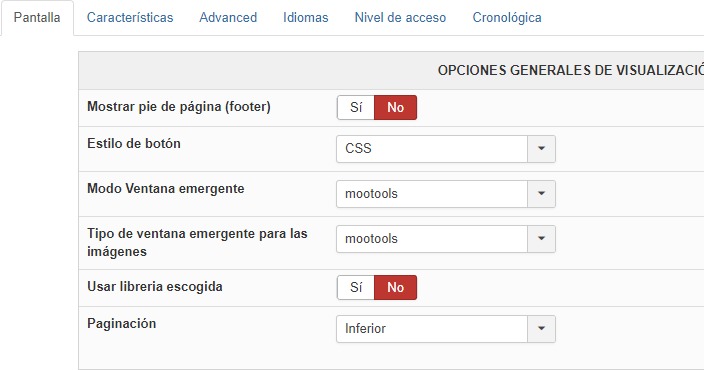
Thanks for your help, happy day
Regards
Please Log in or Create an account to join the conversation.
Time to create page: 0.073 seconds