

- Posts: 36
- Thank you received: 3
Cannot checkout- Get Page not found Confirm
7 years 10 months ago #302134
by Larion476
Cannot checkout- Get Page not found Confirm was created by Larion476
-- HikaShop version -- : 4.01
-- Joomla version -- : 3.9.1
-- PHP version -- : 7.x
-- Browser(s) name and version -- : Firefox
-- Error-message(debug-mod must be tuned on) -- : Page Not Found: Confirm
I have upgraded a site I am building for a client to HikaShop Essential.
Only Registered User can order, I have created several users an go through the ordering process.
Once I am at the Checkout I cannot submit, I get the message: Page Not Found: Confirm
Also If I try to change the quantity I get the following message:
Page Not found: Submitblock
Please see snapshots.
The site is bilingual, English/French using Falang.
Also I have 2 shipping methods; Manual And CANPAR, the CANPAR does not show as an option when ordering.
I would appreciate some help, I have been trying to change several parameters without success. I know it must have worked before because I can see 2 order placed back in August.
Thank you in advance
-- Joomla version -- : 3.9.1
-- PHP version -- : 7.x
-- Browser(s) name and version -- : Firefox
-- Error-message(debug-mod must be tuned on) -- : Page Not Found: Confirm
I have upgraded a site I am building for a client to HikaShop Essential.
Only Registered User can order, I have created several users an go through the ordering process.
Once I am at the Checkout I cannot submit, I get the message: Page Not Found: Confirm
Also If I try to change the quantity I get the following message:
Page Not found: Submitblock
Please see snapshots.
The site is bilingual, English/French using Falang.
Also I have 2 shipping methods; Manual And CANPAR, the CANPAR does not show as an option when ordering.
I would appreciate some help, I have been trying to change several parameters without success. I know it must have worked before because I can see 2 order placed back in August.
Thank you in advance
Please Log in or Create an account to join the conversation.
7 years 10 months ago #302138
by Larion476
Replied by Larion476 on topic Cannot checkout- Get Page not found Confirm
Solved the first part of my problem by entering NONE to Force menu on checkout in the Checkout configuration.
Still cannot understand why I do not get a choice for CANPAR
Still cannot understand why I do not get a choice for CANPAR
Please Log in or Create an account to join the conversation.

7 years 10 months ago #302144
by nicolas
Replied by nicolas on topic Cannot checkout- Get Page not found Confirm
Hi,
There is indeed an issue linked to the SEF, that setting and the routing of the URLs.
How did you configure the "checkout SEF name" setting in the HikaShop configuration ?
And in the "force menu on checkout" setting, what kind of menu item did you have selected ? (the best is that it is a menu item of the type "hikashop checkout").
Also, could you provide precise instructions so that we can reproduce the problem on your website ? That would help us better understand the situation than just screenshots of the checkout
There is indeed an issue linked to the SEF, that setting and the routing of the URLs.
How did you configure the "checkout SEF name" setting in the HikaShop configuration ?
And in the "force menu on checkout" setting, what kind of menu item did you have selected ? (the best is that it is a menu item of the type "hikashop checkout").
Also, could you provide precise instructions so that we can reproduce the problem on your website ? That would help us better understand the situation than just screenshots of the checkout
Please Log in or Create an account to join the conversation.
7 years 10 months ago #302155
by Larion476
Replied by Larion476 on topic Cannot checkout- Get Page not found Confirm
Thank you for your prompt reply! I have done some testing and here are my findings:
My SEF settings are SEF YES
Use URL rewrite NO (When I tried to to put it yes several pages were not available)
Add Suffix to URL NO
Now for the checkout force menu, I tried several menus, You can see some of my options in the screenshot XX.
The Choice None, Mes Commandes, Deconnexion worked but brought to the page you can see on screenshot YY .
The choice HIKASHOP.... User Control Panel is the best and takes me to the page ZZ.
I hope this is useful, if not tell me what more do you need.
On the other hand, I would really need some help with the CANPAR shipping.
Best Regards
My SEF settings are SEF YES
Use URL rewrite NO (When I tried to to put it yes several pages were not available)
Add Suffix to URL NO
Now for the checkout force menu, I tried several menus, You can see some of my options in the screenshot XX.
The Choice None, Mes Commandes, Deconnexion worked but brought to the page you can see on screenshot YY .
The choice HIKASHOP.... User Control Panel is the best and takes me to the page ZZ.
I hope this is useful, if not tell me what more do you need.
On the other hand, I would really need some help with the CANPAR shipping.
Best Regards
Please Log in or Create an account to join the conversation.
7 years 10 months ago #302159
by nicolas
Replied by nicolas on topic Cannot checkout- Get Page not found Confirm
Hi,
So, using "User control panel", does that means that the checkout is working ?
Do you have any kind of redirection system, like in your htaccess, or a SEF/SEO extension ?
Also, you didn't provide precise instructions so that we can reproduce the problem on your website. Could you do that ?
Could you provide a screenshot of the settings of the CANPAR shipping method ?
So, using "User control panel", does that means that the checkout is working ?
Do you have any kind of redirection system, like in your htaccess, or a SEF/SEO extension ?
Also, you didn't provide precise instructions so that we can reproduce the problem on your website. Could you do that ?
Could you provide a screenshot of the settings of the CANPAR shipping method ?
Please Log in or Create an account to join the conversation.
7 years 10 months ago #302180
by Larion476
Replied by Larion476 on topic Cannot checkout- Get Page not found Confirm
YES, using User Control Panel the checkout works and the user is redirected his/her control panel as is shown in the screenshot : Screenshot_2019-01-04 Compte client-ZZ attached to the previous message.
I do not have any redirection nor a SEF/SEO extension. The site is in a subdomain and the URL points to that subdomain directly.
The instructions are pretty simple since I used all the parameters in the system:
HIKASHOP Configuration
Checkout tab
Checkout workflow: kept the flow as provided by the system
Checkout
Login and Registration: kept the parameters of the system
Attached is the CANPAR plugin snapshot
I do not have any redirection nor a SEF/SEO extension. The site is in a subdomain and the URL points to that subdomain directly.
The instructions are pretty simple since I used all the parameters in the system:
HIKASHOP Configuration
Checkout tab
Checkout workflow: kept the flow as provided by the system
Checkout
- Force a menu on the checkout .......This where he problem was, I had categories
- [Force SSL on checkout .... YES
- Continue shopping button's URL ... Blank
- Display checkout progress bar ... Checkout progress with ending
Login and Registration: kept the parameters of the system
Attached is the CANPAR plugin snapshot
Please Log in or Create an account to join the conversation.

Less
More
- Posts: 12953
- Thank you received: 1778
7 years 9 months ago #302215
by Mohamed Thelji
Replied by Mohamed Thelji on topic Cannot checkout- Get Page not found Confirm
Hello,
Firstly, can you follow each points of the "Shipping methods" section of your FAQ via :
www.hikashop.com/support/faq#ship
If you're still having your issue, can you also show us screenshots of how you configured dimensions/weight of products that you used during your tests ? Thank you.
Kind regards,
Mohamed Thelji.
Firstly, can you follow each points of the "Shipping methods" section of your FAQ via :
www.hikashop.com/support/faq#ship
If you're still having your issue, can you also show us screenshots of how you configured dimensions/weight of products that you used during your tests ? Thank you.
Kind regards,
Mohamed Thelji.
Please Log in or Create an account to join the conversation.
7 years 9 months ago #302242
by Larion476
Replied by Larion476 on topic Cannot checkout- Get Page not found Confirm
I have read the Shipping document in the FAQ and I can tell you that the manual shipping method works, it shows on the checkout (see screenshot attached).
All products have weight (gm or kg) and dimensions (cm or m), These are defined in the display configuration and show in the CANPAR configuration.
I have NO RESTRICTIONS. ( I tried all sort of permutations with or without warehouse, with or without zone
)
The min and max quantities are set to 0
I am attaching the current CANPAR configuration as well as a partial view of a product and the advanced configuration showing the measurements I use
Are you aware of anybody that has used this plugin successfully?
All products have weight (gm or kg) and dimensions (cm or m), These are defined in the display configuration and show in the CANPAR configuration.
I have NO RESTRICTIONS. ( I tried all sort of permutations with or without warehouse, with or without zone
)
The min and max quantities are set to 0
I am attaching the current CANPAR configuration as well as a partial view of a product and the advanced configuration showing the measurements I use
Are you aware of anybody that has used this plugin successfully?
Please Log in or Create an account to join the conversation.
Less
More
- Posts: 12953
- Thank you received: 1778
7 years 9 months ago #302281
by Mohamed Thelji
Replied by Mohamed Thelji on topic Cannot checkout- Get Page not found Confirm
Hello,
Note that you should actually make sure that you have at least 1 row configured through the "warehouse" tab of the "Specific configuration" area.
I just tested it on my end and it worked fine, can you test it with the "Group package" option set to YES ? Thank you.
Kind regards,
Mohamed Thelji.
Note that you should actually make sure that you have at least 1 row configured through the "warehouse" tab of the "Specific configuration" area.
I just tested it on my end and it worked fine, can you test it with the "Group package" option set to YES ? Thank you.
Kind regards,
Mohamed Thelji.
Please Log in or Create an account to join the conversation.
7 years 9 months ago #302303
by Larion476
Replied by Larion476 on topic Cannot checkout- Get Page not found Confirm
Thank you for coming back to me.
I have created 2 warehouses, Berlioz & Laval .
Added Berlioz in the specific configuration .
In the restrictions I have :
Zone: Canada
Currency: CAD
Warehouse: Berlioz
See screen shot with all this

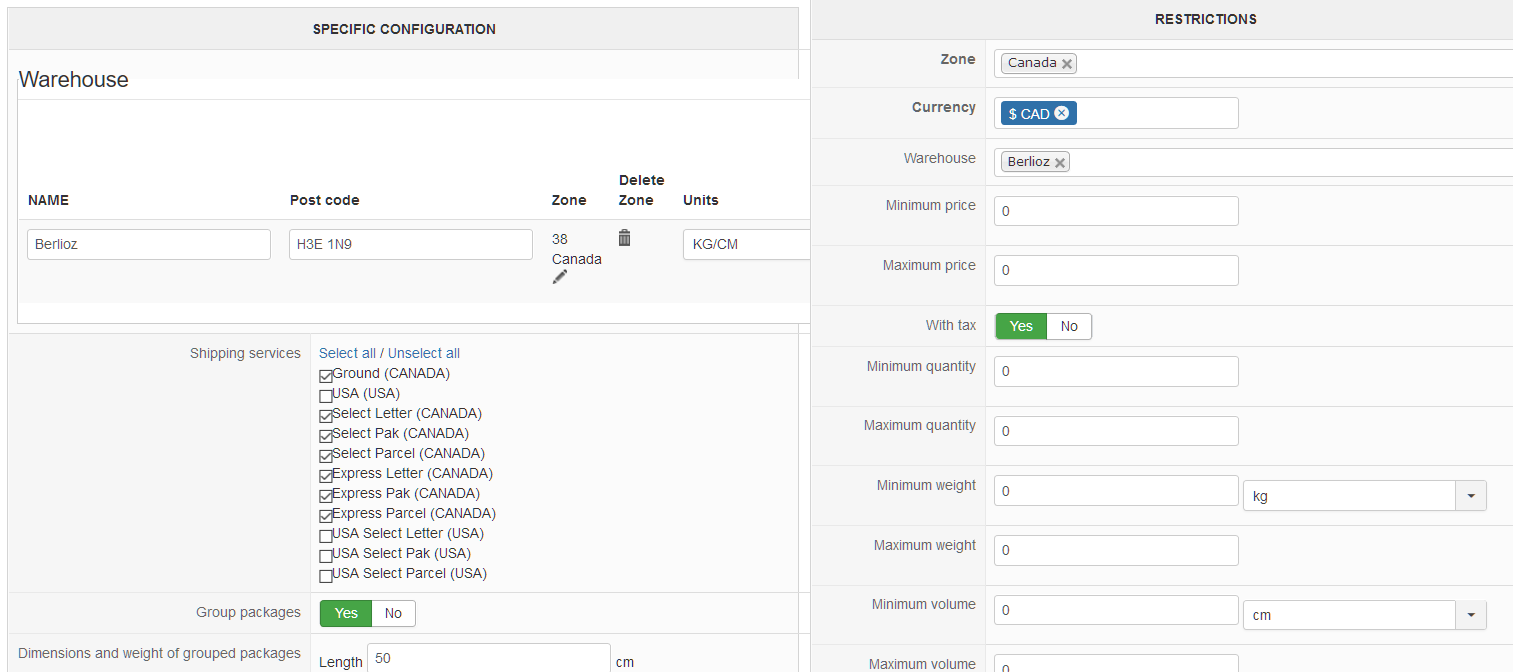
I have also put Group Packages to YES
I noticed that in the specific configuration I cannot add another warehouse and what I enter there does not seem to related to the warehouse I created.
Also the Units KG/CM are in Capital letters ( I do not know if this is relevant)
Tried it and still does not work
I have created 2 warehouses, Berlioz & Laval .
Added Berlioz in the specific configuration .
In the restrictions I have :
Zone: Canada
Currency: CAD
Warehouse: Berlioz
See screen shot with all this
I have also put Group Packages to YES
I noticed that in the specific configuration I cannot add another warehouse and what I enter there does not seem to related to the warehouse I created.
Also the Units KG/CM are in Capital letters ( I do not know if this is relevant)
Tried it and still does not work
Please Log in or Create an account to join the conversation.
Less
More
- Posts: 12953
- Thank you received: 1778
7 years 9 months ago #302349
by Mohamed Thelji
Replied by Mohamed Thelji on topic Cannot checkout- Get Page not found Confirm
Hello,
We were not able to reproduce your issue on our end, can you eventually send us a temporary back-end access to your website so that we can directly test it ?
You can send it using our contact form (please, don't forget to also specify a link to that thread on your message) :
www.hikashop.com/support/contact-us.html
Kind regards,
Mohamed Thelji.
We were not able to reproduce your issue on our end, can you eventually send us a temporary back-end access to your website so that we can directly test it ?
You can send it using our contact form (please, don't forget to also specify a link to that thread on your message) :
www.hikashop.com/support/contact-us.html
Kind regards,
Mohamed Thelji.
Please Log in or Create an account to join the conversation.
Less
More
- Posts: 12953
- Thank you received: 1778
7 years 9 months ago - 7 years 9 months ago #302419
by Mohamed Thelji
Replied by Mohamed Thelji on topic Cannot checkout- Get Page not found Confirm
Hello,
The issue in your configuration was coming from the fact that you have edited the "Canada" zone configuration and changed it to a "Shipping" zone instead of a "Country". So I just reverted your changes so that you customers will at least be able to select a Canadian shipping address to have their product shipped.
However Canpar shipping services were still not available. contacting the original developer of the CANPAR shipping plugin can be a good solution.
CF : github.com/HikaShop/hikashopshipping-canpar
Kind regards,
Mohamed Thelji.
The issue in your configuration was coming from the fact that you have edited the "Canada" zone configuration and changed it to a "Shipping" zone instead of a "Country". So I just reverted your changes so that you customers will at least be able to select a Canadian shipping address to have their product shipped.
However Canpar shipping services were still not available. contacting the original developer of the CANPAR shipping plugin can be a good solution.
CF : github.com/HikaShop/hikashopshipping-canpar
Kind regards,
Mohamed Thelji.
Last edit: 7 years 9 months ago by Mohamed Thelji.
Please Log in or Create an account to join the conversation.
7 years 9 months ago #302430
by Larion476
Replied by Larion476 on topic Cannot checkout- Get Page not found Confirm
Are you contacting him?
After all it would be in HIKASHOP interest to make sure the plugin works with the current version of Joomla and HIKASHOP. I am probably not the only one in this situation...
I noticed the plugin was created 3 years ago and had never been updated, so it would be a good idea for him to make sure it works with the current versions of PHP, Joomla and Hikashop
After all it would be in HIKASHOP interest to make sure the plugin works with the current version of Joomla and HIKASHOP. I am probably not the only one in this situation...
I noticed the plugin was created 3 years ago and had never been updated, so it would be a good idea for him to make sure it works with the current versions of PHP, Joomla and Hikashop
Please Log in or Create an account to join the conversation.
Less
More
- Posts: 12953
- Thank you received: 1778
7 years 9 months ago #302452
by Mohamed Thelji
Replied by Mohamed Thelji on topic Cannot checkout- Get Page not found Confirm
Hello,
Sure, but that old Canpar method which wasn't developed by us is actually even using an old "Canpar" API which isn't available anymore on their website so a new Canpar shipping plugin should be developed.
For more information about it :
www.canpar.ca/en/technology/api.jsp
Kind regards,
Mohamed Thelji.
I noticed the plugin was created 3 years ago and had never been updated, so it would be a good idea for him to make sure it works with the current versions of PHP, Joomla and Hikashop
Sure, but that old Canpar method which wasn't developed by us is actually even using an old "Canpar" API which isn't available anymore on their website so a new Canpar shipping plugin should be developed.
For more information about it :
www.canpar.ca/en/technology/api.jsp
Kind regards,
Mohamed Thelji.
Please Log in or Create an account to join the conversation.
7 years 9 months ago #302468
by Larion476
Replied by Larion476 on topic Cannot checkout- Get Page not found Confirm
OK, What do I do now. I have a client that is using CANPAR and unless I cannot ask him to change shipping company because the software I am using does not have what it takes.
Is there any chance that HIKASHOP of one of your partners can develop that plugin in a reasonable time??
Also maybe we should move that discussion to the SHIPPING thread of the Forum to give it more visibility. I had Creatted an entry called CANPAR plugin does not work.
Is there any chance that HIKASHOP of one of your partners can develop that plugin in a reasonable time??
Also maybe we should move that discussion to the SHIPPING thread of the Forum to give it more visibility. I had Creatted an entry called CANPAR plugin does not work.
Please Log in or Create an account to join the conversation.
Less
More
- Posts: 12953
- Thank you received: 1778
7 years 9 months ago #302478
by Mohamed Thelji
Replied by Mohamed Thelji on topic Cannot checkout- Get Page not found Confirm
Hello,
We can eventually add it on our TODO list, but if you need the help of a professional developer to quickly develop it, you can check our partners section :
www.hikashop.com/home/our-partners.html
Else if you want to develop it, checking our developer documentation will probably help you :
www.hikashop.com/support/documentation/6...r-documentation.html
Kind regards,
Mohamed Thelji.
Is there any chance that HIKASHOP of one of your partners can develop that plugin in a reasonable time??
After all it would be in HIKASHOP interest to make sure the plugin works with the current version of Joomla and HIKASHOP. I am probably not the only one in this situation...
We can eventually add it on our TODO list, but if you need the help of a professional developer to quickly develop it, you can check our partners section :
www.hikashop.com/home/our-partners.html
Else if you want to develop it, checking our developer documentation will probably help you :
www.hikashop.com/support/documentation/6...r-documentation.html
Kind regards,
Mohamed Thelji.
Please Log in or Create an account to join the conversation.
7 years 9 months ago #302517
by Larion476
Replied by Larion476 on topic Cannot checkout- Get Page not found Confirm
Something I do not understand, 3 day ago you said:
On what version of Joomla and HIKASHOP did you test it?
As you can see I have the latest versions of HIKASHOP and Joomla and using PHP 7.x
If it worked at your end under those versions, there is no reason it should work on my server.
Code:
Hello,
Note that you should actually make sure that you have at least 1 row configured through the "warehouse" tab of the "Specific configuration" area.
I just tested it on my end and it worked fine, can you test it with the "Group package" option set to YES ? Thank you.
Kind regards,
Mohamed Thelji.
On what version of Joomla and HIKASHOP did you test it?
As you can see I have the latest versions of HIKASHOP and Joomla and using PHP 7.x
If it worked at your end under those versions, there is no reason it should work on my server.
Please Log in or Create an account to join the conversation.
Less
More
- Posts: 12953
- Thank you received: 1778
7 years 9 months ago - 7 years 9 months ago #302550
by Mohamed Thelji
Replied by Mohamed Thelji on topic Cannot checkout- Get Page not found Confirm
Hello,
We also tested it with the last Hikashop version using a PHP 7.x version.
Well, a rate was displayed but wasn't updated when adding more products to my cart which is probably coming from the fact that the plugin is using the old CanPar API and not the last one :
www.canpar.ca/en/technology/api.jsp
Kind regards,
Mohamed Thelji.
We also tested it with the last Hikashop version using a PHP 7.x version.
If it worked at your end under those versions, there is no reason it should work on my server.
Well, a rate was displayed but wasn't updated when adding more products to my cart which is probably coming from the fact that the plugin is using the old CanPar API and not the last one :
www.canpar.ca/en/technology/api.jsp
Kind regards,
Mohamed Thelji.
Last edit: 7 years 9 months ago by Mohamed Thelji.
Please Log in or Create an account to join the conversation.
Time to create page: 0.174 seconds