
- Posts: 259
- Thank you received: 22
Changing Address causes Custom View to be ignored
- rodfarrell
-
 Topic Author
- Offline
Less
More
6 years 11 months ago #313489
by rodfarrell
Changing Address causes Custom View to be ignored was created by rodfarrell
Hi Guys,
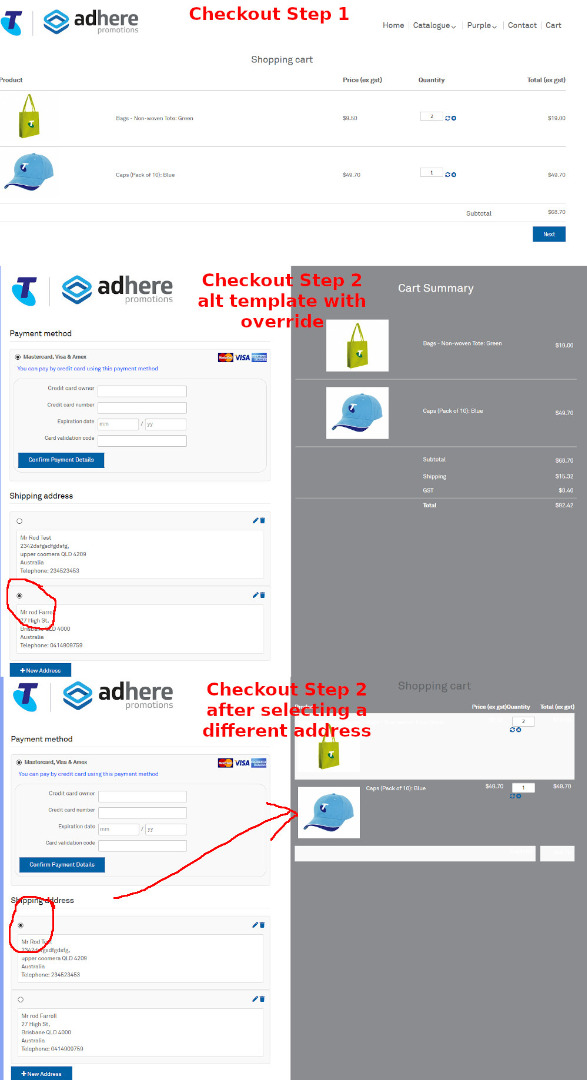
I have a custom view for show-block-cart.php however when someone chooses a different address in the checkout, the page refreshes with the original show-block-cart file. This seems to be somehow related to Ajax. If I then refresh the browser it again finds the correct file. I need to resolve this as a matter of urgency as the site is live.
I have a custom view for show-block-cart.php however when someone chooses a different address in the checkout, the page refreshes with the original show-block-cart file. This seems to be somehow related to Ajax. If I then refresh the browser it again finds the correct file. I need to resolve this as a matter of urgency as the site is live.
Please Log in or Create an account to join the conversation.

6 years 11 months ago #313495
by nicolas
Replied by nicolas on topic Changing Address causes Custom View to be ignored
Hi,
The AJAX system does support overrides.
So the only reason I can think of is that during the AJAX call to refresh the "cart" view, another template of your website is being used and this other template doesn't have the override on show_block_cart.php
So I would recommend first to do two things:
- do the override on show_block_cart.php for all your template on the frontend and see if that helps.
- if not, you could provide a link to the shop with precise instructions to reproduce the issue.
The AJAX system does support overrides.
So the only reason I can think of is that during the AJAX call to refresh the "cart" view, another template of your website is being used and this other template doesn't have the override on show_block_cart.php
So I would recommend first to do two things:
- do the override on show_block_cart.php for all your template on the frontend and see if that helps.
- if not, you could provide a link to the shop with precise instructions to reproduce the issue.
Please Log in or Create an account to join the conversation.
- rodfarrell
-
Topic Author
- Offline
Less
More
- Posts: 259
- Thank you received: 22
6 years 11 months ago - 6 years 11 months ago #313541
by rodfarrell
Replied by rodfarrell on topic Changing Address causes Custom View to be ignored
That is a concern. We do have a different template for the last step of the checkout precisely because the customer wants a cut down view of the cart in that step and for them it is non-negotiable (this is a product portal for one of Australia's biggest companies and they are not at all flexible on styling issues). The first step of checkout is the full cart display. The site is a private portal so I will send the access details separately. Steps to reproduce are simple. Got to checkout and select an alternative address.
Last edit: 6 years 11 months ago by rodfarrell.
Please Log in or Create an account to join the conversation.
- rodfarrell
-
Topic Author
- Offline
Less
More
- Posts: 259
- Thank you received: 22
6 years 11 months ago #313654
by rodfarrell
Replied by rodfarrell on topic Changing Address causes Custom View to be ignored
I sent the access details last week, has anyone looked at this yet? It is causing our client a lot of angst.
Please Log in or Create an account to join the conversation.
6 years 11 months ago #313667
by nicolas
Replied by nicolas on topic Changing Address causes Custom View to be ignored
Hi,
I replied to you by email then with this message:
I replied to you by email then with this message:
You must have got the email in your spam folder for some reason.Hi,
It's you who gave me the .com URL, and not the .com.au URL. The first link to the .com.au URL you gave didn't work, and the second one you gave was the .com URL... I'm sorry but I'm working with what I have.
I'm not able the reproduce the same problem you're talking about.
When I follow your instructions, I arrive on the checkout with only one address already preselected. So I can't select another one.
So I went and tried to create a new address.
But then, when I validate the new address, I get that error:
monosnap.com/file/gCQT1mbhgryvdMdtgyDD5egvHikCQE
Could you activate the "debug mode" of the Joomla configuration to get the full error message so that I can tell you what to do to fix that issue ?
Best regards,
Nicolas
Please Log in or Create an account to join the conversation.
- rodfarrell
-
Topic Author
- Offline
Less
More
- Posts: 259
- Thank you received: 22
6 years 11 months ago - 6 years 11 months ago #313687
by rodfarrell
Replied by rodfarrell on topic Changing Address causes Custom View to be ignored
The site is crashing with error "1054 - Unknown column 'test_hikashop' in 'where clause'". Are you testing anything?
Edit. OK found the problem,. The custom shipping plugin only recognizes Australian postcodes and the address you added was in France. Will need to put some error checking into our plugin.
Edit. OK found the problem,. The custom shipping plugin only recognizes Australian postcodes and the address you added was in France. Will need to put some error checking into our plugin.
Last edit: 6 years 11 months ago by rodfarrell.
Please Log in or Create an account to join the conversation.
- rodfarrell
-
Topic Author
- Offline
Less
More
- Posts: 259
- Thank you received: 22
6 years 11 months ago #313689
by rodfarrell
Replied by rodfarrell on topic Changing Address causes Custom View to be ignored
I've activated debug mode but there is nothing in messages. What should I be looking for?
Please Log in or Create an account to join the conversation.
- rodfarrell
-
Topic Author
- Offline
Less
More
- Posts: 259
- Thank you received: 22
6 years 11 months ago #313692
by rodfarrell
Replied by rodfarrell on topic Changing Address causes Custom View to be ignored
I've narrowed down the issue to a custom payment plugin that has to recalculate shipping on a change of address but have no clue what I should be looking for. What is the event that triggers the refresh of shipping calculations?
Please Log in or Create an account to join the conversation.
6 years 11 months ago #313698
by nicolas
Replied by nicolas on topic Changing Address causes Custom View to be ignored
Hi,
The debug mode activation was to understand where that 1054 error message was coming from. Since you already figured out, then no need to activate it.
The shipping fees are calculated dynamically each time the cart is loaded.
It's done with a call to the onShippingDisplay function of the plugins of the group "hikashopshipping".
So I don't know why a payment plugin would modify the shipping fees, but in that case, it's possible that it won't be triggered all the time since it isn't in the hikashopshipping group and isn't supposed to implement the onShippingDisplay function.
The debug mode activation was to understand where that 1054 error message was coming from. Since you already figured out, then no need to activate it.
The shipping fees are calculated dynamically each time the cart is loaded.
It's done with a call to the onShippingDisplay function of the plugins of the group "hikashopshipping".
So I don't know why a payment plugin would modify the shipping fees, but in that case, it's possible that it won't be triggered all the time since it isn't in the hikashopshipping group and isn't supposed to implement the onShippingDisplay function.
Please Log in or Create an account to join the conversation.
- rodfarrell
-
Topic Author
- Offline
Less
More
- Posts: 259
- Thank you received: 22
6 years 8 months ago #315836
by rodfarrell
Replied by rodfarrell on topic Changing Address causes Custom View to be ignored
Back on deck with this project. I have narrowed down the cause of the problem to a custom shipping plugin (I miss typed as payment earlier). The shipping plugin was created as a modification of the older Australia Post plugin some years ago (not the current one). I have looked through the code but not sure what I should be looking for. Are there specific events or code that I should be checking for?
Please Log in or Create an account to join the conversation.
6 years 8 months ago #315851
by nicolas
Replied by nicolas on topic Changing Address causes Custom View to be ignored
Hi,
First we need to recap where we're at.
What is the current problem you're trying to solve ? A mysql query error ? The layout of the cart not using the override upon address change ? Something else ?
And why do you think it comes from this custom shipping plugin ?
If you deactivate and use instead the default Australia Post shipping plugin you don't have the problem ?
If you could give a zip of the plugin and tell us what was customized in there, that might also help us better understand the situation.
First we need to recap where we're at.
What is the current problem you're trying to solve ? A mysql query error ? The layout of the cart not using the override upon address change ? Something else ?
And why do you think it comes from this custom shipping plugin ?
If you deactivate and use instead the default Australia Post shipping plugin you don't have the problem ?
If you could give a zip of the plugin and tell us what was customized in there, that might also help us better understand the situation.
Please Log in or Create an account to join the conversation.
Time to create page: 0.134 seconds