
- Posts: 29
- Thank you received: 1
how to change this color display?
- albertluo0988
-
 Topic Author
- Offline
Less
More
6 years 7 months ago #317443
by albertluo0988
how to change this color display? was created by albertluo0988
-- url of the page with the problem -- :
www.5gtv.com.tw
-- HikaShop version -- : 4.2.3
-- Joomla version -- : 3.9.16
-- PHP version -- : 7.3
-- Browser(s) name and version -- : safari
-- Error-message(debug-mod must be tuned on) -- : how to change this color display?
how to change this
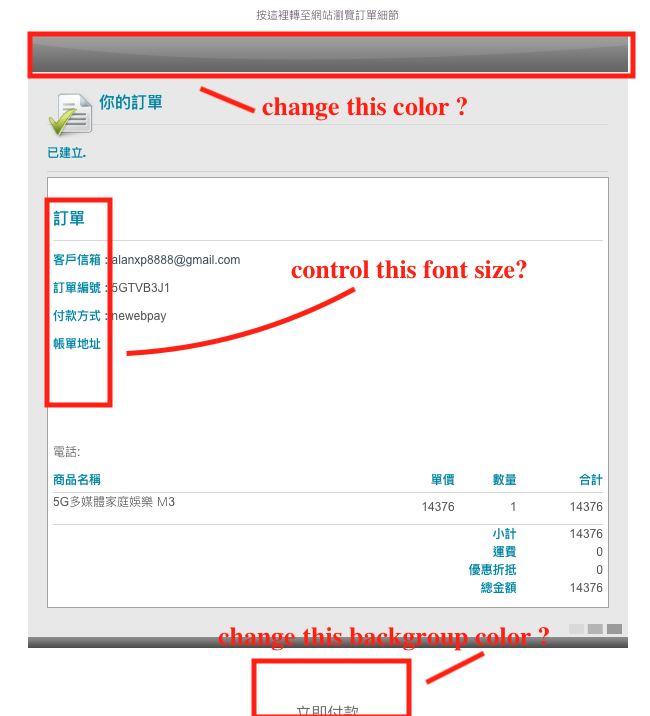 when checkout color display?
like my attachment file.
-- HikaShop version -- : 4.2.3
-- Joomla version -- : 3.9.16
-- PHP version -- : 7.3
-- Browser(s) name and version -- : safari
-- Error-message(debug-mod must be tuned on) -- : how to change this color display?
how to change this
like my attachment file.
Please Log in or Create an account to join the conversation.

6 years 7 months ago #317446
by nicolas
Replied by nicolas on topic how to change this color display?
Hi,
You want to edit the email via the menu System>Emails. There, you'll see the "template" setting with an edit icon. Click on that icon and it will open a popup where you can modify all of these.
You want to edit the email via the menu System>Emails. There, you'll see the "template" setting with an edit icon. Click on that icon and it will open a popup where you can modify all of these.
Please Log in or Create an account to join the conversation.
- albertluo0988
-
Topic Author
- Offline
Less
More
- Posts: 29
- Thank you received: 1
6 years 7 months ago #317988
by albertluo0988
Replied by albertluo0988 on topic how to change this color display?
Sorry , I change system > email >ORDER_STATUS_NOTIFICATION_SUBJECT
still nothing to change
Have more info to me?
still nothing to change
Have more info to me?
Please Log in or Create an account to join the conversation.
6 years 7 months ago #317993
by nicolas
Replied by nicolas on topic how to change this color display?
Hi,
What did you change there ?
As I said, you need to change the template. In the template, you'll find all the CSS used:
monosnap.com/file/JegV2JaRagjVxcq5grQHjKFzoudJLB
The background color comes from this CSS:
body.hikashop_mail { background-color:#ffffff; color:#575757; }
You'll also find many "font-size:12px;" in there which dictate the size of the text in the email.
And for the color of the header image, you'll have to do your own image, upload it on your website, and change media/com_hikashop/images/mail/header.png to use that new header image instead of the default one.
Please Log in or Create an account to join the conversation.
- albertluo0988
-
Topic Author
- Offline
Less
More
- Posts: 29
- Thank you received: 1
6 years 6 months ago #318687
by albertluo0988
Replied by albertluo0988 on topic how to change this color display?
you provide is email ORDER_STATUS_NOTIFICATION
but I need change is front webpage display .
but I need change is front webpage display .
Please Log in or Create an account to join the conversation.
6 years 6 months ago #318693
by nicolas
Replied by nicolas on topic how to change this color display?
Hi
I'm sorry but I don't understand how you get the result of your screenshot or what you want to do.
Did you do some code modification ? Or did you add the image of the email on the image of the thank you page screenshot ?
Are you saying you want to display the order details on the thank you page ?
Or something else ?
Please Log in or Create an account to join the conversation.
Time to create page: 0.060 seconds