
Mixed Products in Multiples of Six

6 years 5 months ago #319024
by ozneilau
Mixed Products in Multiples of Six was created by ozneilau
-- HikaShop version -- : 4.2.3
-- Joomla version -- : 3.9.18
-- PHP version -- : 7.3.17
-- Browser(s) name and version -- : Firefox 76.0.1
Similar to www.hikashop.com/forum/4-how-to/17516-ordering-mixed-cases.html , my client wishes to sell wine in multiples of 6 bottles to fit their packaging.
Clients should be able to choose from a number of different wines such as five of one type and one of another or three of each to make a total of 6 or 12 etc.
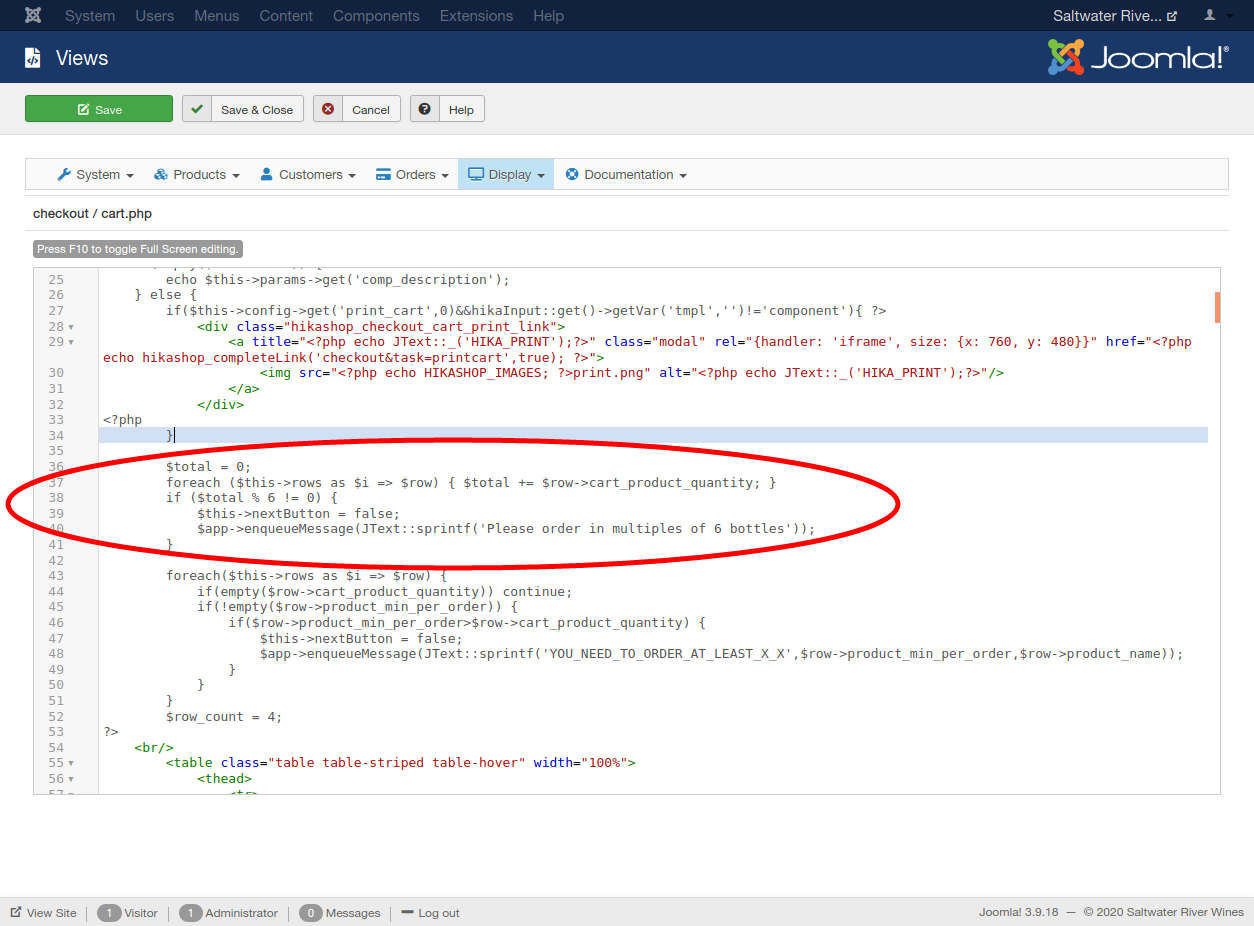
I have edited the cart file of the checkout view to create an override for the active template (see attached image).
This is not working as intended so I'm not sure if I have inserted the code in the wrong place or the wrong file.
I would really appreciate some help.
Thanks.
-- Joomla version -- : 3.9.18
-- PHP version -- : 7.3.17
-- Browser(s) name and version -- : Firefox 76.0.1
Similar to www.hikashop.com/forum/4-how-to/17516-ordering-mixed-cases.html , my client wishes to sell wine in multiples of 6 bottles to fit their packaging.
Clients should be able to choose from a number of different wines such as five of one type and one of another or three of each to make a total of 6 or 12 etc.
I have edited the cart file of the checkout view to create an override for the active template (see attached image).
This is not working as intended so I'm not sure if I have inserted the code in the wrong place or the wrong file.
I would really appreciate some help.
Thanks.
Please Log in or Create an account to join the conversation.

6 years 5 months ago #319028
by nicolas
Replied by nicolas on topic Mixed Products in Multiples of Six
Hi,
That's the correct code in the correct place.
However, this code change will only work if you have the "checkout legacy" setting activated and use the old checkout system of HikaShop.
The new checkout system uses other view files as it works completely differently from the old checkout.
With the new checkout, you'll want to edit the file checkout / show.php via the menu Display>Views and add such code at the top:
Note that this will hide the checkout interface when the quantity is not correct.
That's the correct code in the correct place.
However, this code change will only work if you have the "checkout legacy" setting activated and use the old checkout system of HikaShop.
The new checkout system uses other view files as it works completely differently from the old checkout.
With the new checkout, you'll want to edit the file checkout / show.php via the menu Display>Views and add such code at the top:
Code:
$cart = $this->checkoutHelper->getCart();
$total = 0;
foreach($cart->products as $i => $row){ $total +=$row->cart_product_quantity; }
if($total%6){
$app = JFactory::getApplication();
$app->enqueueMessage('Please order in multiples of 6 bottles');
return;
}
The following user(s) said Thank You: ozneilau
Please Log in or Create an account to join the conversation.
6 years 5 months ago #319055
by ozneilau
Replied by ozneilau on topic Mixed Products in Multiples of Six
This is working perfectly.
Thanks so much for the quick response and keep up the good work!
Thanks so much for the quick response and keep up the good work!
Please Log in or Create an account to join the conversation.
Time to create page: 0.058 seconds