

- Posts: 42
- Thank you received: 2
Which Template Controls Guest Address at Checkout?
6 years 4 months ago - 6 years 3 months ago #321706
by aisweb
Which Template Controls Guest Address at Checkout? was created by aisweb
-- url of the page with the problem -- :
vixenfire.com.au/index.php/your-quote-cart/checkout
-- HikaShop version -- : 4.3.0
-- Joomla version -- : 3.9.19
-- PHP version -- : 7.3
-- Browser(s) name and version -- : FF 77.0.1
-- Error-message(debug-mod must be tuned on) -- : none
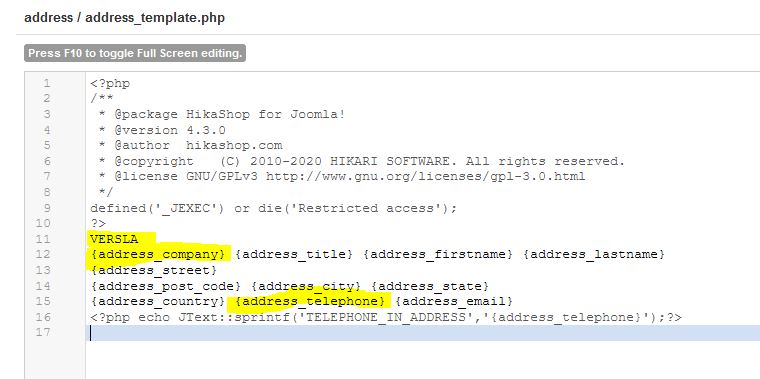
I followed guides found on the Forum - changed all address_template views.
There are 5 different templates, so I changed all 5 templates.
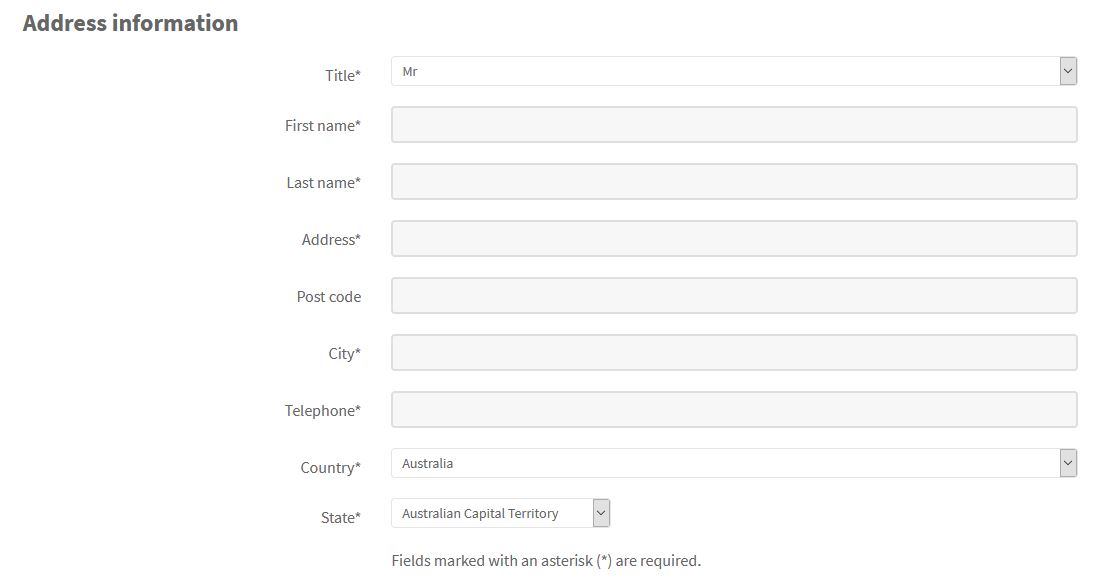
But new fields {address_company} and {address_telephone} do not appear on checkout.
Thanks for your advice.
Paul
-- HikaShop version -- : 4.3.0
-- Joomla version -- : 3.9.19
-- PHP version -- : 7.3
-- Browser(s) name and version -- : FF 77.0.1
-- Error-message(debug-mod must be tuned on) -- : none
I followed guides found on the Forum - changed all address_template views.
There are 5 different templates, so I changed all 5 templates.
But new fields {address_company} and {address_telephone} do not appear on checkout.
Thanks for your advice.
Paul
Last edit: 6 years 3 months ago by aisweb.
Please Log in or Create an account to join the conversation.

6 years 3 months ago #321708
by nicolas
Replied by nicolas on topic Which Template Controls Guest Address at Checkout?
Hi,
The "address_template" view file is used to display an address after it has been entered in the system.
Your screenshot is of the address entry form.
This form displays the fields based on how you configured them in the Display>Custom fields menu. So that's where you need to look. It's likely that you just need to publish these fields.
Note that there is no need to edit the "address_template" view files anymore. There is now a central "address format" setting under the "checkout" tab of the Hikashop configuration which will override these view files for you when you change it and save the configuration.
The "address_template" view file is used to display an address after it has been entered in the system.
Your screenshot is of the address entry form.
This form displays the fields based on how you configured them in the Display>Custom fields menu. So that's where you need to look. It's likely that you just need to publish these fields.
Note that there is no need to edit the "address_template" view files anymore. There is now a central "address format" setting under the "checkout" tab of the Hikashop configuration which will override these view files for you when you change it and save the configuration.
The following user(s) said Thank You: aisweb
Please Log in or Create an account to join the conversation.

Less
More
- Posts: 35
- Thank you received: 1
6 years 2 months ago - 6 years 2 months ago #323621
by bmorrelltx
Replied by bmorrelltx on topic Which Template Controls Guest Address at Checkout?
I am having the same problem checkout configuration has no affect
Last edit: 6 years 2 months ago by bmorrelltx.
Please Log in or Create an account to join the conversation.
6 years 2 months ago #323624
by nicolas
Replied by nicolas on topic Which Template Controls Guest Address at Checkout?
Hi,
As I explained in my previous message here, you need to go in the menu Display>Custom fields to reorder / add / change the address fields the way you want them.
The checkout configuration tab has no effect with the display of the address edition form itself.
As I explained in my previous message here, you need to go in the menu Display>Custom fields to reorder / add / change the address fields the way you want them.
The checkout configuration tab has no effect with the display of the address edition form itself.
Please Log in or Create an account to join the conversation.
Less
More
- Posts: 35
- Thank you received: 1
6 years 2 months ago - 6 years 2 months ago #323658
by bmorrelltx
Replied by bmorrelltx on topic Which Template Controls Guest Address at Checkout?
There is no display Display>Custom fields
I have searched the every [possible page and documentation to discover where this option is no luck... What am I doing wrong??
I have searched the every [possible page and documentation to discover where this option is no luck... What am I doing wrong??
Code:
Main
Checkout
Display
Features
Advanced
Languages
Cron
General display options
CSS
Product options
Modules main default options
Default parameters for products
Default parameters for categories
Default parameters for DIVs
GENERAL DISPLAY OPTIONS
Show footer
Yes No
Button style
Popup mode
Image popup mode
Use Chosen library
Yes No
Pagination
CSS OPTIONS
Front-end CSS File
Styles for the front-end
Back-end CSS File
CSS for buttons
hikabtn
Extra CSS for add to cart buttons
hikacart
Extra CSS for add to wishlist buttons
hikawishlist
PRODUCT OPTIONS
Modules under the product page
Layout on product page
Quantity input method
Characteristics selection method
Characteristics dynamic display
Yes No
Product selection method
Add to cart on listings
One per product Global
Display a contact button on the product page
Display the contact button on listings
Yes No
Display product code
Yes No
Dimensions display
Yes No
Weight Display
Yes No
Display the characteristics name
Yes No
Display the brand
Yes No
Display the cost per unit weight
Yes No
Show shortcuts to other category products
Yes No
MODULES MAIN DEFAULT OPTIONS
Type of content
Type of layout
Number of columns
1
Number of items
20
Random items
Yes No
Ordering direction
Sub elements filter
Main category
35 - Astrofactor Products
Synchronize with currently
displayed item when possible
Yes No
Use content heading instead of
category name for the title
Yes No
DEFAULT PARAMETERS FOR PRODUCTS
Ordering field
Display 'Add to cart' button
Yes No
Quantity field on 'Add to cart' button
Yes No
Display 'Add to wishlist' button
Yes No
Link to the product page
Yes No
Product details button
Yes No
Content on product page
Display price
Yes No
Show price in original currency
Yes No
Show discounted price
Price display method
Display Badge
Yes No
DEFAULT PARAMETERS FOR CATEGORIES
Ordering field
Show sub categories
Number of sub categories
Show the number of products
Yes No
Link on main categories
Yes No
Only display categories with products
Yes No
DEFAULT PARAMETERS FOR DIVS
Type of item layout
Item box background color
#ffffff
Item box margin
10
px
Item box border
No Yes Thumbnail
Item box rounded corners
Yes No
Text centered
Yes No
Table switcher
Yes No
Last edit: 6 years 2 months ago by Jerome.
Please Log in or Create an account to join the conversation.

6 years 2 months ago #323659
by Jerome
Jerome - Obsidev.com
HikaMarket & HikaSerial developer / HikaShop core dev team.
Replied by Jerome on topic Which Template Controls Guest Address at Checkout?
Hello,
See : pasteboard.co/JpAaaUe.png
And you can also check our demo website : demo.hikashop.com/administrator/index.ph..._hikashop&ctrl=field
Regards,
See : pasteboard.co/JpAaaUe.png
And you can also check our demo website : demo.hikashop.com/administrator/index.ph..._hikashop&ctrl=field
Regards,
Jerome - Obsidev.com
HikaMarket & HikaSerial developer / HikaShop core dev team.
Please Log in or Create an account to join the conversation.
Less
More
- Posts: 35
- Thank you received: 1
6 years 1 month ago #323791
by bmorrelltx
Replied by bmorrelltx on topic Which Template Controls Guest Address at Checkout?
Thank you, I was blind! Bruce
Please Log in or Create an account to join the conversation.
Time to create page: 0.108 seconds