
- Posts: 161
- Thank you received: 8
Do not show shipping cost until it's calculated
- Crashbandi
-
 Topic Author
- Offline
Less
More
6 years 3 months ago #322383
by Crashbandi
Do not show shipping cost until it's calculated was created by Crashbandi
-- url of the page with the problem -- :
www.luxminime.com
-- HikaShop version -- : 4.3.0
-- Joomla version -- : 3.9.20
-- PHP version -- : 7.2.31
Hi,
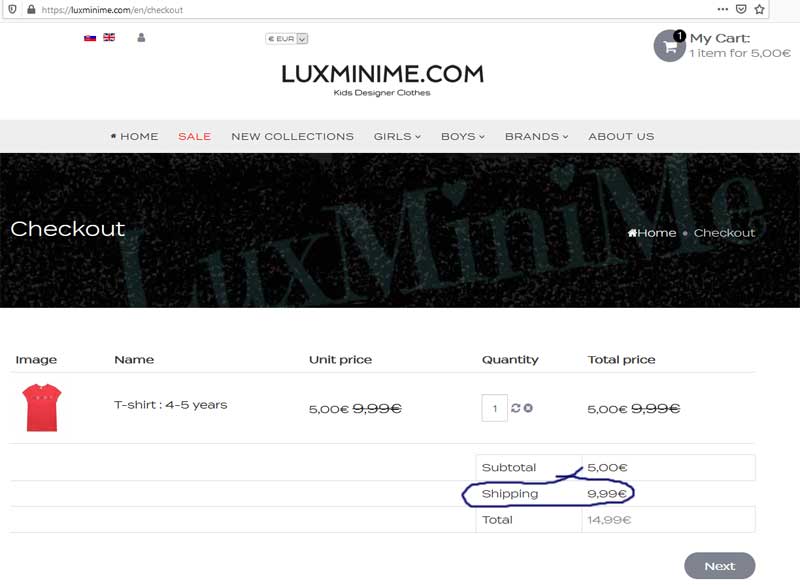
I have some free shipping options, but a shipping cost is displayed as soon as the client views the cart. They then leave the site because they think they have to pay for shipping.
Can you let me know how to remove visibility of shipping until it has been calculated.
Thanks.
-- HikaShop version -- : 4.3.0
-- Joomla version -- : 3.9.20
-- PHP version -- : 7.2.31
Hi,
I have some free shipping options, but a shipping cost is displayed as soon as the client views the cart. They then leave the site because they think they have to pay for shipping.
Can you let me know how to remove visibility of shipping until it has been calculated.
Thanks.
Please Log in or Create an account to join the conversation.

Less
More
- Posts: 12953
- Thank you received: 1778
6 years 3 months ago #322399
by Mohamed Thelji
Replied by Mohamed Thelji on topic Do not show shipping cost until it's calculated
Hello,
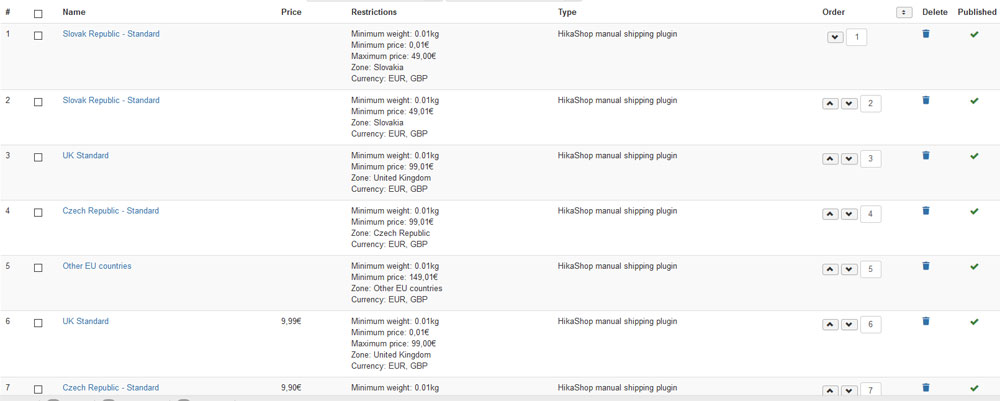
The solution will be to directly change the ordering of you shipping methods via "Hikashop->System->Shipping methods" and put the free shipping method first.
Kind regards,
Mohamed.
The solution will be to directly change the ordering of you shipping methods via "Hikashop->System->Shipping methods" and put the free shipping method first.
Kind regards,
Mohamed.
Please Log in or Create an account to join the conversation.
- Crashbandi
-
Topic Author
- Offline
Less
More
- Posts: 161
- Thank you received: 8
6 years 3 months ago #322426
by Crashbandi
Replied by Crashbandi on topic Do not show shipping cost until it's calculated
Hi,
Thanks for your help.
The free shipping method is already first?
Ideally, I would like no reference to shipping until the customer address has ben entered. Is this possible?
Regards,
Colin.
Thanks for your help.
The free shipping method is already first?
Ideally, I would like no reference to shipping until the customer address has ben entered. Is this possible?
Regards,
Colin.
Please Log in or Create an account to join the conversation.
Less
More
- Posts: 12953
- Thank you received: 1778
6 years 3 months ago #322446
by Mohamed Thelji
Replied by Mohamed Thelji on topic Do not show shipping cost until it's calculated
Hello Colin,
In that case you should make sure that the free shipping available to your customers as soon they put an item in their cart, and that their default shipping address match with the restriction your have set for that shipping address.
You can for example clear your browser cache and session and test it again.
Kind regards,
Mohamed.
In that case you should make sure that the free shipping available to your customers as soon they put an item in their cart, and that their default shipping address match with the restriction your have set for that shipping address.
You can for example clear your browser cache and session and test it again.
Kind regards,
Mohamed.
Please Log in or Create an account to join the conversation.
- Crashbandi
-
Topic Author
- Offline
Less
More
- Posts: 161
- Thank you received: 8
6 years 3 months ago #322481
by Crashbandi
Replied by Crashbandi on topic Do not show shipping cost until it's calculated
Hi,
The shipping cost shows before any address information is entered?
Regards,
Colin.
The shipping cost shows before any address information is entered?
Regards,
Colin.
Please Log in or Create an account to join the conversation.
Less
More
- Posts: 12953
- Thank you received: 1778
6 years 3 months ago #322491
by Mohamed Thelji
Replied by Mohamed Thelji on topic Do not show shipping cost until it's calculated
Hello Colin,
Yes, the checkout will always pre-select the first information the first shipping method available based on :
- Products in your cart
- Your default shipping address that you can configure through the user control panel on the "Adresses" tab
Kind regards,
Mohamed.
Yes, the checkout will always pre-select the first information the first shipping method available based on :
- Products in your cart
- Your default shipping address that you can configure through the user control panel on the "Adresses" tab
Kind regards,
Mohamed.
Please Log in or Create an account to join the conversation.
- Crashbandi
-
Topic Author
- Offline
Less
More
- Posts: 161
- Thank you received: 8
6 years 3 months ago #322532
by Crashbandi
Replied by Crashbandi on topic Do not show shipping cost until it's calculated
The first shipping method is free?
There is no user address to configure because they have not even registered as a user yet?
There is no user address to configure because they have not even registered as a user yet?
Please Log in or Create an account to join the conversation.
- Crashbandi
-
Topic Author
- Offline
Less
More
- Posts: 161
- Thank you received: 8
6 years 3 months ago #322535
by Crashbandi
Replied by Crashbandi on topic Do not show shipping cost until it's calculated
Is there a way not to show any shipping information until it has been calculated?
Regards,
Colin.
Regards,
Colin.
Please Log in or Create an account to join the conversation.
Less
More
- Posts: 12953
- Thank you received: 1778
6 years 3 months ago #322552
by Mohamed Thelji
Replied by Mohamed Thelji on topic Do not show shipping cost until it's calculated
Hello,
Kind regards,
Mohamed.
Then the first shipping method which have no zone restriction will be displayed.There is no user address to configure because they have not even registered as a user yet?
Sure, but it will require customization of the "show_block_cart" file of the "checkout" view of your front-end template via "Hikashop->Display->Views".Is there a way not to show any shipping information until it has been calculated?
Kind regards,
Mohamed.
Please Log in or Create an account to join the conversation.
- Crashbandi
-
Topic Author
- Offline
Less
More
- Posts: 161
- Thank you received: 8
6 years 3 months ago #322575
by Crashbandi
Replied by Crashbandi on topic Do not show shipping cost until it's calculated
Thanks Mohamed,
I will need to customise the "show_block_cart" file.
Can you let me know which line I need to comment out.
Regards,
Colin.
I will need to customise the "show_block_cart" file.
Can you let me know which line I need to comment out.
Regards,
Colin.
Please Log in or Create an account to join the conversation.
Less
More
- Posts: 12953
- Thank you received: 1778
6 years 3 months ago #322608
by Mohamed Thelji
Replied by Mohamed Thelji on topic Do not show shipping cost until it's calculated
Hello Colin,
Well, if you just want to always hide the shipping price through the cart detail line, then you still have the "Show shipping price" through the "Cart" step of your checkout workflow.
Else you'll have to adapt the code through these lines :
Kind regards,
Mohamed.
Well, if you just want to always hide the shipping price through the cart detail line, then you still have the "Show shipping price" through the "Cart" step of your checkout workflow.
Else you'll have to adapt the code through these lines :
Code:
if(!empty($this->options['show_price']) && !empty($cart->shipping) && !empty($this->options['show_shipping'])) {
?>
<tr>
<td colspan="<?php echo $row_count - 2; ?>" class="hikashop_cart_empty_footer"></td>
<td id="hikashop_checkout_cart_shipping_title" class="hikashop_cart_shipping_title hikashop_cart_title"><?php
echo JText::_('HIKASHOP_SHIPPING');
?></td>
<td class="hikashop_cart_shipping_value" data-title="<?php echo JText::_('HIKASHOP_SHIPPING'); ?>">
<span class="hikashop_checkout_cart_shipping">
<?php
if(isset($this->value)) {
echo $this->value;
} else {
$shipping_price = null;
foreach($cart->shipping as $shipping) {
if(!isset($shipping->shipping_price) && isset($shipping->shipping_price_with_tax) ) {
$shipping->shipping_price = $shipping->shipping_price_with_tax;
//$shipping->shipping_price_with_tax = 0.0;
}
if(isset($shipping->shipping_price)) {
if($shipping_price === null)
$shipping_price = 0.0;
if(empty($this->options['price_with_tax']) || !isset($shipping->shipping_price_with_tax))
$shipping_price += $shipping->shipping_price;
else
$shipping_price += $shipping->shipping_price_with_tax;
}
}
if($shipping_price !== null)
echo $this->currencyClass->format($shipping_price, $cart->full_total->prices[0]->price_currency_id);
}
?>
</span>
</td>
</tr>
<?php
}
Kind regards,
Mohamed.
Please Log in or Create an account to join the conversation.
- Crashbandi
-
Topic Author
- Offline
Less
More
- Posts: 161
- Thank you received: 8
6 years 3 months ago #322663
by Crashbandi
Replied by Crashbandi on topic Do not show shipping cost until it's calculated
Hi Mohamed,
Thanks for this.
I have checked the Workflow and I can't see the "Show shipping price" option?
Regards,
Colin
Thanks for this.
I have checked the Workflow and I can't see the "Show shipping price" option?
Regards,
Colin
Please Log in or Create an account to join the conversation.
- Crashbandi
-
Topic Author
- Offline
Less
More
- Posts: 161
- Thank you received: 8
6 years 3 months ago #322665
by Crashbandi
Replied by Crashbandi on topic Do not show shipping cost until it's calculated
... also, I tried the code but it still adds a shipping cost in the total?
Regards,
Colin
Regards,
Colin
Please Log in or Create an account to join the conversation.
Less
More
- Posts: 12953
- Thank you received: 1778
6 years 3 months ago - 6 years 3 months ago #322674
by Mohamed Thelji
Replied by Mohamed Thelji on topic Do not show shipping cost until it's calculated
Hello,
This code will only change the way the shipping price line is displayed.
Regarding the "Show shipping price" , you'll find it through the cart step of your checkout workflow via "Hikashop->System->Configuration->Checkout"
Kind regards,
Mohamed.
This code will only change the way the shipping price line is displayed.
Regarding the "Show shipping price" , you'll find it through the cart step of your checkout workflow via "Hikashop->System->Configuration->Checkout"
Kind regards,
Mohamed.
Last edit: 6 years 3 months ago by Mohamed Thelji.
Please Log in or Create an account to join the conversation.
- Crashbandi
-
Topic Author
- Offline
Less
More
- Posts: 161
- Thank you received: 8
6 years 3 months ago #322705
by Crashbandi
Replied by Crashbandi on topic Do not show shipping cost until it's calculated
Hi,
Please see the screenshot I have already sent. The option "Show shipping price" isn't there.
I'm losing money because of this. Can you take a look at the secreenshot asap and advise.
Please see the screenshot I have already sent. The option "Show shipping price" isn't there.
I'm losing money because of this. Can you take a look at the secreenshot asap and advise.
Please Log in or Create an account to join the conversation.
Less
More
- Posts: 12953
- Thank you received: 1778
6 years 3 months ago - 6 years 3 months ago #322709
by Mohamed Thelji
Replied by Mohamed Thelji on topic Do not show shipping cost until it's calculated
Hello,
You're right, seems like that option wasn't added, we'll test it again on our end, add it through the last Hikashop version and notify you so that you'll just have to download it through our website, and install it.
Kind regards,
Mohamed.
You're right, seems like that option wasn't added, we'll test it again on our end, add it through the last Hikashop version and notify you so that you'll just have to download it through our website, and install it.
Kind regards,
Mohamed.
Last edit: 6 years 3 months ago by Mohamed Thelji.
Please Log in or Create an account to join the conversation.
- Crashbandi
-
Topic Author
- Offline
Less
More
- Posts: 161
- Thank you received: 8
6 years 3 months ago #322776
by Crashbandi
Replied by Crashbandi on topic Do not show shipping cost until it's calculated
Hi,
Thanks for this.
Can you let me know how long it will take. Also, just to confirm it will not add any shipping cost to the total until it is calculated.
Regard,
Colin.
Thanks for this.
Can you let me know how long it will take. Also, just to confirm it will not add any shipping cost to the total until it is calculated.
Regard,
Colin.
Please Log in or Create an account to join the conversation.
Less
More
- Posts: 12953
- Thank you received: 1778
6 years 3 months ago #322794
by Mohamed Thelji
Replied by Mohamed Thelji on topic Do not show shipping cost until it's calculated
Hello Colin,
We just made a new package with that new option, you'll just have to download it through our website, install it and test it again.
Kind regards,
Mohamed.
We just made a new package with that new option, you'll just have to download it through our website, install it and test it again.
Kind regards,
Mohamed.
Please Log in or Create an account to join the conversation.
- Crashbandi
-
Topic Author
- Offline
Less
More
- Posts: 161
- Thank you received: 8
6 years 2 months ago #322817
by Crashbandi
Replied by Crashbandi on topic Do not show shipping cost until it's calculated
Hi,
Installed and tested, but it's just the same.
"Show shipping price" is set to "No".
I place an item in the cart and it displays a shipping cost. I enter addres details and the shipping cost goes to zero.
I am losing sales because customers are leaving the site thinking thet have to pay postage.
I need this fixing ASAP please.
Regards,
Colin.
Installed and tested, but it's just the same.
"Show shipping price" is set to "No".
I place an item in the cart and it displays a shipping cost. I enter addres details and the shipping cost goes to zero.
I am losing sales because customers are leaving the site thinking thet have to pay postage.
I need this fixing ASAP please.
Regards,
Colin.
Please Log in or Create an account to join the conversation.
Less
More
- Posts: 12953
- Thank you received: 1778
6 years 2 months ago #322832
by Mohamed Thelji
Replied by Mohamed Thelji on topic Do not show shipping cost until it's calculated
Hello Colin,
Do you have a customization on the "Show_block_cart" file of the "Checkout" view of your front-end template ? If that's the case, you should remove it and test it again.
Else, can you send use a temporary back-end access to your website, so that we can directly test it? Thank you.
You can send it using our contact form and specifying a link to that thread in your message:
www.hikashop.com/support/contact-us.html
Kind regards,
Mohamed.
Do you have a customization on the "Show_block_cart" file of the "Checkout" view of your front-end template ? If that's the case, you should remove it and test it again.
Else, can you send use a temporary back-end access to your website, so that we can directly test it? Thank you.
You can send it using our contact form and specifying a link to that thread in your message:
www.hikashop.com/support/contact-us.html
Kind regards,
Mohamed.
Please Log in or Create an account to join the conversation.
Time to create page: 0.129 seconds