

- Posts: 208
- Thank you received: 10
Can I remove these icon from the cart view?
4 years 4 months ago #342435
by simmiepam
Can I remove these icon from the cart view? was created by simmiepam
-- HikaShop version -- : 4.6.0
-- Joomla version -- : 3.9.10
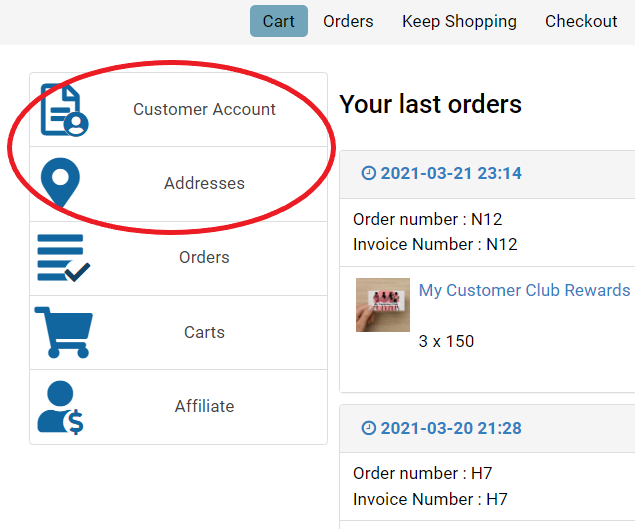
When on the cart page, the customer has these items down the left side.
When they click on CUSTOMER ACCOUNT, it takes them to the profile. That's fine, but there's not button to return them to the cart.
When they click on ADDRESSES, it takes them to choose their default address but it DOES have a return buttom.
My question is can I just remove these two icons altogether? How?
-- Joomla version -- : 3.9.10
When on the cart page, the customer has these items down the left side.
When they click on CUSTOMER ACCOUNT, it takes them to the profile. That's fine, but there's not button to return them to the cart.
When they click on ADDRESSES, it takes them to choose their default address but it DOES have a return buttom.
My question is can I just remove these two icons altogether? How?
Please Log in or Create an account to join the conversation.

4 years 4 months ago #342440
by nicolas
Replied by nicolas on topic Can I remove these icon from the cart view?
Hi,
The profile edition page is a Joomla page. And Joomla has no mechanism to allow us to add a return button on that page. That's why there is no return button there. To add one, you would have to create a view override of the Joomla user profile page and add custom HTML for the button.
To remove the "customer account" button from the HikaShop user control panel, you can just disable the "HikaShop joomla user account link plugin" via the Joomla plugins manager.
For the addresses button, there is no option to remove it, but you can hide it easily with a bit of custom CSS you can add either in HikaShop or in your template:
The profile edition page is a Joomla page. And Joomla has no mechanism to allow us to add a return button on that page. That's why there is no return button there. To add one, you would have to create a view override of the Joomla user profile page and add custom HTML for the button.
To remove the "customer account" button from the HikaShop user control panel, you can just disable the "HikaShop joomla user account link plugin" via the Joomla plugins manager.
For the addresses button, there is no option to remove it, but you can hide it easily with a bit of custom CSS you can add either in HikaShop or in your template:
Code:
.hikashop_cpanel_address_div{ display: none; }
Please Log in or Create an account to join the conversation.
4 years 4 months ago #342442
by simmiepam
Replied by simmiepam on topic Can I remove these icon from the cart view?
Thank you. I'll look at those options.
The following user(s) said Thank You: Philip
Please Log in or Create an account to join the conversation.
Time to create page: 0.124 seconds