

- Posts: 208
- Thank you received: 10
Remove the TOTAL line??
4 years 4 months ago #342436
by simmiepam
Remove the TOTAL line?? was created by simmiepam
-- HikaShop version -- : 4.6.0
-- Joomla version -- : 3.9.10
I'm only using points for my store.
I'd like to remove the TOTAL row (which is 0 because only points are used). Is there a place in the configuration where I tell it to eliminate that row?
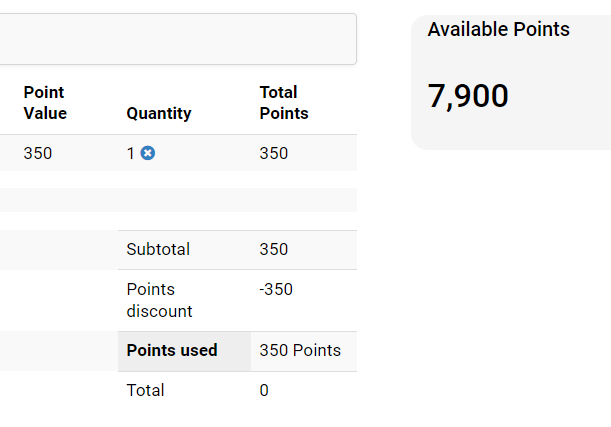
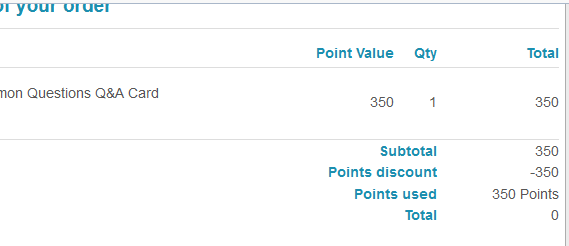
In addition, in the order confirmation email, the TOTAL row showing 0 shows there as well. How can that be removed?
-- Joomla version -- : 3.9.10
I'm only using points for my store.
I'd like to remove the TOTAL row (which is 0 because only points are used). Is there a place in the configuration where I tell it to eliminate that row?
In addition, in the order confirmation email, the TOTAL row showing 0 shows there as well. How can that be removed?
Please Log in or Create an account to join the conversation.

4 years 4 months ago #342441
by nicolas
Replied by nicolas on topic Remove the TOTAL line??
Hi,
There is no option to remove the total. However, you can do so with CSS for the views of the frontend. I'm not sure in which view your first screenshot was taken, so I can't say exactly what CSS code you would need. But if you look for the classes of the area with the inspector tool of your browser, you should be able to find easily what class to use and then you can just apply a display:none; on them:
www.hostinger.com/tutorials/website/how-...-using-google-chrome
Regarding the emails, you can edit them in the menu System>Emails of HikaShop. There, you can remove the code:
from the "preload" area at the bottom to remove the total.
There is no option to remove the total. However, you can do so with CSS for the views of the frontend. I'm not sure in which view your first screenshot was taken, so I can't say exactly what CSS code you would need. But if you look for the classes of the area with the inspector tool of your browser, you should be able to find easily what class to use and then you can just apply a display:none; on them:
www.hostinger.com/tutorials/website/how-...-using-google-chrome
Regarding the emails, you can edit them in the menu System>Emails of HikaShop. There, you can remove the code:
Code:
$cartFooters[] = array(
'CLASS' => 'total_with_tax',
'NAME' => JText::_('HIKASHOP_TOTAL'),
'VALUE' => $currencyHelper->format($data->cart->full_total->prices[0]->price_value_with_tax,$data->cart->order_currency_id)
);
Please Log in or Create an account to join the conversation.
4 years 4 months ago #342443
by simmiepam
Replied by simmiepam on topic Remove the TOTAL line??
Thanks so much. That's helpful.
The following user(s) said Thank You: Philip
Please Log in or Create an account to join the conversation.
Time to create page: 0.082 seconds