

- Posts: 4
- Thank you received: 0
Guest to accept terms and conditions
4 years 1 month ago #344720
by KasiaMela
Guest to accept terms and conditions was created by KasiaMela
-- HikaShop version -- : 4.6.1
-- Joomla version -- : 4.2.2.
-- PHP version -- : 8.0.23
When there is checkout, when I switch to register, a checkbox and a link to the privacy policy will appear.
When I want to shop as a guest, a checkbox to check appears, but the text with the privacy policy is not linked.
The guest user cannot read the policy before checking the checkbox

-- Joomla version -- : 4.2.2.
-- PHP version -- : 8.0.23
When there is checkout, when I switch to register, a checkbox and a link to the privacy policy will appear.
When I want to shop as a guest, a checkbox to check appears, but the text with the privacy policy is not linked.
The guest user cannot read the policy before checking the checkbox
Please Log in or Create an account to join the conversation.

4 years 1 month ago #344724
by nicolas
Replied by nicolas on topic Guest to accept terms and conditions
Hi,
In the settings of the "Content - Confirm Consent" plugin of Joomla, you need to select your privacy article in the corresponding setting.
In the settings of the "Content - Confirm Consent" plugin of Joomla, you need to select your privacy article in the corresponding setting.
Please Log in or Create an account to join the conversation.
4 years 1 month ago #344725
by KasiaMela
Replied by KasiaMela on topic Guest to accept terms and conditions
Thanks for the reply.
This article is already selected in the plugin . It is displayed in the contact form.
In the store, the policy is also displayed if the customer chooses the option of shopping with registration.
When we select the Guest option, the text remains inactive
And that's what I mean. I would like both - Guest and Registered policy to be linked
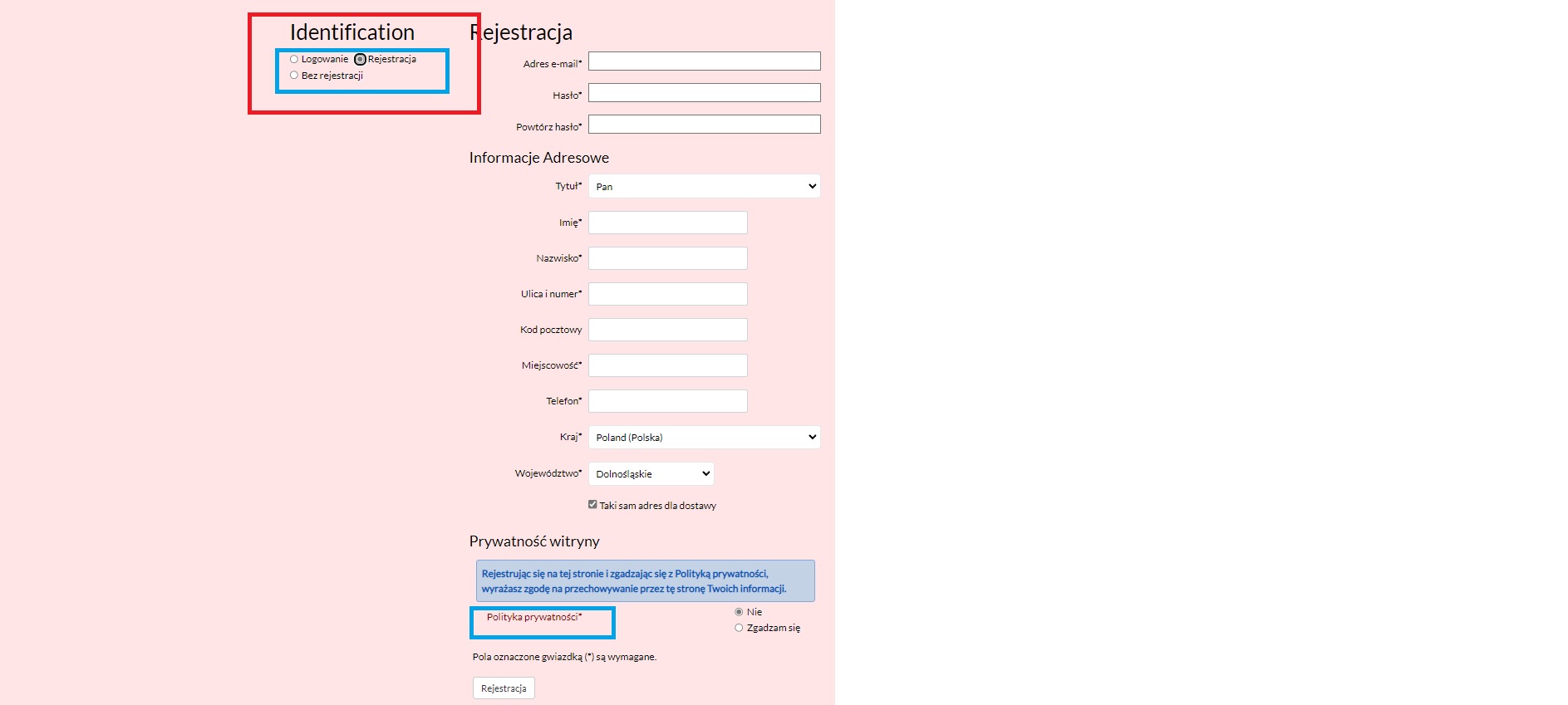
This article is already selected in the plugin . It is displayed in the contact form.
In the store, the policy is also displayed if the customer chooses the option of shopping with registration.
When we select the Guest option, the text remains inactive
And that's what I mean. I would like both - Guest and Registered policy to be linked
Please Log in or Create an account to join the conversation.
4 years 1 month ago #344730
by nicolas
Replied by nicolas on topic Guest to accept terms and conditions
Hi,
I just did a test on my end and it works fine:
i.imgur.com/Xmy3Moi.png
Could you provide a screenshot of the settings of your "Content - Confirm Consent" plugin ?
Because besides that I don't see a reason why it wouldn't work.
I just did a test on my end and it works fine:
i.imgur.com/Xmy3Moi.png
Could you provide a screenshot of the settings of your "Content - Confirm Consent" plugin ?
Because besides that I don't see a reason why it wouldn't work.
Please Log in or Create an account to join the conversation.
4 years 1 month ago #344737
by KasiaMela
Replied by KasiaMela on topic Guest to accept terms and conditions
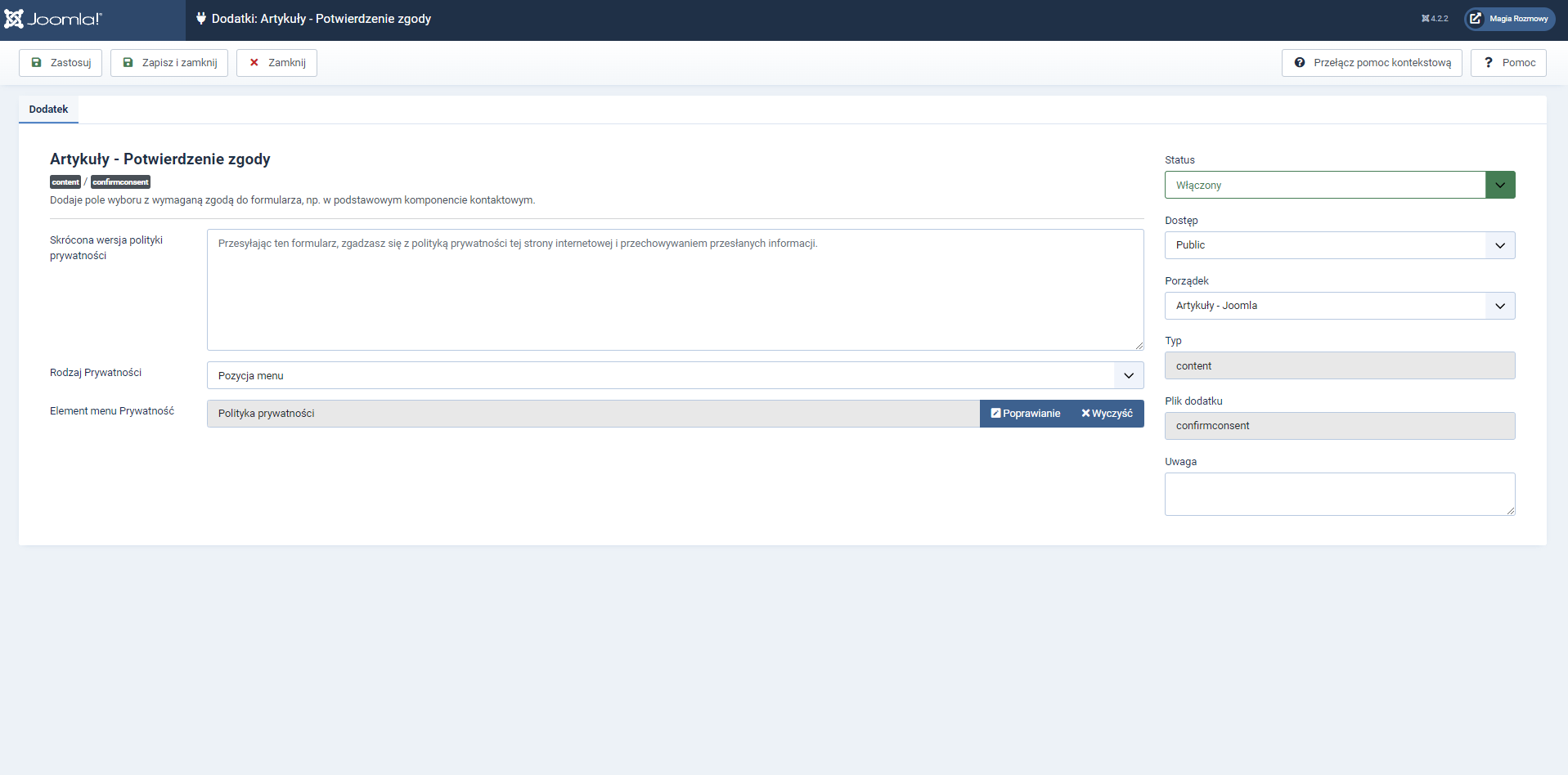
as I wrote earlier. in the contact form the link works properly
Please Log in or Create an account to join the conversation.
4 years 1 month ago #344740
by nicolas
Replied by nicolas on topic Guest to accept terms and conditions
Hi,
You need to use the "article" mode, not the "menu" mode, which is not supported.
For the registration form, you're using the "article" mode and that's why you get the link and not on the guest form.
You need to use the "article" mode, not the "menu" mode, which is not supported.
For the registration form, you're using the "article" mode and that's why you get the link and not on the guest form.
Please Log in or Create an account to join the conversation.
4 years 1 month ago #344746
by KasiaMela
Replied by KasiaMela on topic Guest to accept terms and conditions
Thank you very much for your help. Of course, that was the problem.
Please Log in or Create an account to join the conversation.
Time to create page: 0.104 seconds