
- Posts: 70
- Thank you received: 4
Cart Styling
- srtdesigns
-
 Topic Author
- Offline
Less
More
3 years 9 months ago #348219
by srtdesigns
Cart Styling was created by srtdesigns
-- HikaShop version -- : 4.7.0
-- Joomla version -- : 4.2.6
-- PHP version -- : 8.0.26
-- Browser(s) name and version -- : Edge Version 108.0.1462.54 (Official build) (64-bit)
I am almost there but unable to finalising styling. I have attached a screenshot of 4 areas I would like some assistance with please.
1: How can you change the colour of the circles in the cart wizard?
2: How can you delete the word each?
3: How can you center align the quantity column; e.g. qty, refresh icon and delete icon? The Title is center aligned but not the rest.
4: How can you text align right the Subtotal, shipping, VAT and total?
I have tried the obvious but have had no luck.
Many thanks.
-- Joomla version -- : 4.2.6
-- PHP version -- : 8.0.26
-- Browser(s) name and version -- : Edge Version 108.0.1462.54 (Official build) (64-bit)
I am almost there but unable to finalising styling. I have attached a screenshot of 4 areas I would like some assistance with please.
1: How can you change the colour of the circles in the cart wizard?
2: How can you delete the word each?
3: How can you center align the quantity column; e.g. qty, refresh icon and delete icon? The Title is center aligned but not the rest.
4: How can you text align right the Subtotal, shipping, VAT and total?
I have tried the obvious but have had no luck.
Many thanks.
Please Log in or Create an account to join the conversation.

3 years 9 months ago - 3 years 9 months ago #348223
by Philip
Replied by Philip on topic Cart Styling
Hello,
First, to get off to a good start, let's talk in detail about the theory of selector precedence.
This often explains CSS customization failures.
How to build high priority css command ?
1. First the minimum necessary to function properly :[/b]
Check that your selector is well written, good class (or Id) html and no mistake or typo
If your command is visible in your browser inspector tool, but is overridden (css command crossed out), then his priority isn't strong enough.
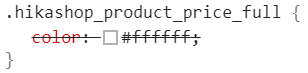
2. Now, some css priority system explanation :[/b]
From less to the highest priority :
.html_class_element {command: value}
.html_class_module .html_class_element {command: value}
.html_class_page .html_class_module .html_class_element {command: value}
.html_class_page .html_class_module .html_class_element {command: value !important;}
Note, that if 2 css commands have strictly the same selector, then the last written in the css file will be the one used.
Now, in order to be more specific and better understand step by step to your questions :
"1: How can you change the colour of the circles in the cart wizard?"

Your Css command is "background-color", and you can add in order to increase priority with "hikashop_wizardbar" class.
html_container.hikashop_wizardbar html.element_class {
command: value;
}
"2: How can you delete the word each?"
You can use your browser inspector tool, point your element you want to edit, then right-click => Inspect (or inspector tool).
You will see a new window, that will display the html in order to get the correct element class.
Then write something like this :
html_container.class html_element.class {
display: none;
}
"3: How can you center align the quantity column; e.g. qty, refresh icon and delete icon? The Title is center aligned but not the rest."

It seems, that you have several custom command css, in your style_custom.
If you want everything center, then remove the "text-align: center;" or maybe the opposite for that matter.
"4: How can you text align right the Subtotal, shipping, VAT and total?"
With the same method than before, by using the inspector tool in order to get the required class elements.
You can list several elements like this for the same commandes :
html.class1,
html.class2,
html.class3 {
text-align: right;
}
Hope this will help you to achieve what you need.
Regards
First, to get off to a good start, let's talk in detail about the theory of selector precedence.
This often explains CSS customization failures.
How to build high priority css command ?
1. First the minimum necessary to function properly :[/b]
Check that your selector is well written, good class (or Id) html and no mistake or typo
If your command is visible in your browser inspector tool, but is overridden (css command crossed out), then his priority isn't strong enough.
2. Now, some css priority system explanation :[/b]
From less to the highest priority :
.html_class_element {command: value}
.html_class_module .html_class_element {command: value}
.html_class_page .html_class_module .html_class_element {command: value}
.html_class_page .html_class_module .html_class_element {command: value !important;}
Note, that if 2 css commands have strictly the same selector, then the last written in the css file will be the one used.
Now, in order to be more specific and better understand step by step to your questions :
"1: How can you change the colour of the circles in the cart wizard?"
Your Css command is "background-color", and you can add in order to increase priority with "hikashop_wizardbar" class.
html_container.hikashop_wizardbar html.element_class {
command: value;
}
"2: How can you delete the word each?"
You can use your browser inspector tool, point your element you want to edit, then right-click => Inspect (or inspector tool).
You will see a new window, that will display the html in order to get the correct element class.
Then write something like this :
html_container.class html_element.class {
display: none;
}
"3: How can you center align the quantity column; e.g. qty, refresh icon and delete icon? The Title is center aligned but not the rest."
It seems, that you have several custom command css, in your style_custom.
If you want everything center, then remove the "text-align: center;" or maybe the opposite for that matter.
"4: How can you text align right the Subtotal, shipping, VAT and total?"
With the same method than before, by using the inspector tool in order to get the required class elements.
You can list several elements like this for the same commandes :
html.class1,
html.class2,
html.class3 {
text-align: right;
}
Hope this will help you to achieve what you need.
Regards
Last edit: 3 years 9 months ago by Philip.
The following user(s) said Thank You: srtdesigns
Please Log in or Create an account to join the conversation.
- srtdesigns
-
Topic Author
- Offline
Less
More
- Posts: 70
- Thank you received: 4
3 years 9 months ago #348477
by srtdesigns
Replied by srtdesigns on topic Cart Styling
Perfect, all changes made. Many thanks.
The following user(s) said Thank You: Philip
Please Log in or Create an account to join the conversation.
Time to create page: 0.234 seconds