

- Posts: 48
- Thank you received: 4
Order page: wrong calculation of price if multiple items order
3 years 5 months ago - 3 years 5 months ago #351594
by pat01
-- HikaShop version -- : 4.7.2
-- Joomla version -- : 3.10.11
-- PHP version -- : 7.4
-- Browser(s) name and version -- : any
-- Error-message(debug-mod must be tuned on) -- : none
Hello
Before sending the order, there is an order summary shown.
If I order an item with price of 1,62 per item and I order 10 items, total price of 16,16 is shown instead of 16,20.
Here is screenshot:
It would be great if you could check this.
Thanks a lot.
Patrick
-- Joomla version -- : 3.10.11
-- PHP version -- : 7.4
-- Browser(s) name and version -- : any
-- Error-message(debug-mod must be tuned on) -- : none
Hello
Before sending the order, there is an order summary shown.
If I order an item with price of 1,62 per item and I order 10 items, total price of 16,16 is shown instead of 16,20.
Here is screenshot:
This message contains confidential information
It would be great if you could check this.
Thanks a lot.
Patrick
This message contains confidential information
Last edit: 3 years 5 months ago by pat01.
Please Log in or Create an account to join the conversation.

3 years 5 months ago #351596
by nicolas
Replied by nicolas on topic Order page: wrong calculation of price if multiple items order
Hi,
That's because you have the "round prices during calculations" setting turned off and thus the calculations are made without rounding and the rounding is only done during the display of the interface. This is how accounting software usually works.
Turn on the setting and it will calculate while rounding the amounts at each step. It will look more correct to you, but it will actually be less accurate.
That's because you have the "round prices during calculations" setting turned off and thus the calculations are made without rounding and the rounding is only done during the display of the interface. This is how accounting software usually works.
Turn on the setting and it will calculate while rounding the amounts at each step. It will look more correct to you, but it will actually be less accurate.
Please Log in or Create an account to join the conversation.
3 years 5 months ago - 3 years 5 months ago #351625
by pat01
Replied by pat01 on topic Order page: wrong calculation of price if multiple items order
Hi and thanks for your reply.
Now I see what causes the confusion. The price for single article is 1,6155 but even rounding is off, it still is shown rounded to 1,62:
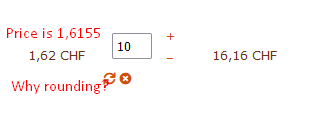
Why is it rounded even if rounding is off?
This is very confusing. Users will calculate 1,62 x 10 = 16,20 but 16.16 is shown (which is correct total not rounded).
Thanks.
nicolas wrote: That's because you have the "round prices during calculations" setting turned off and thus the calculations are made without rounding and the rounding is only done during the display of the interface.
Now I see what causes the confusion. The price for single article is 1,6155 but even rounding is off, it still is shown rounded to 1,62:
Why is it rounded even if rounding is off?
This is very confusing. Users will calculate 1,62 x 10 = 16,20 but 16.16 is shown (which is correct total not rounded).
Thanks.
Last edit: 3 years 5 months ago by pat01.
Please Log in or Create an account to join the conversation.
3 years 5 months ago - 3 years 5 months ago #351626
by nicolas
Replied by nicolas on topic Order page: wrong calculation of price if multiple items order
Hi,
The rounding is not off.
Rounding 1.6155 to 2 decimals will commonly result in 1.62 : www.mathsisfun.com/rounding-numbers.html
And 1.6155 * 10 = 16.155 which is then rounded to 16.16
As I said, if you want the calculations to appear more correct to you, you can activate the "round prices during calculations" setting in the HikaShop configuration. When you do, you'll see the total will be 16.20 like you expect. It's indeed less confusing for the user, but it's less accurate (since you entered a price of 1.6155 in your product and you purchase 10 of them, the exact amount is 16.155, so 16.16 is a more accurate result than 16.20 for an initial price of 1.6155).
Both rounding methods are valid. It's just a different approach. Here is a page presenting these two approaches:
pakk.io/post/vat-rounding
They call it the "unit method" and "line method" on that page.
The rounding is not off.
Rounding 1.6155 to 2 decimals will commonly result in 1.62 : www.mathsisfun.com/rounding-numbers.html
And 1.6155 * 10 = 16.155 which is then rounded to 16.16
As I said, if you want the calculations to appear more correct to you, you can activate the "round prices during calculations" setting in the HikaShop configuration. When you do, you'll see the total will be 16.20 like you expect. It's indeed less confusing for the user, but it's less accurate (since you entered a price of 1.6155 in your product and you purchase 10 of them, the exact amount is 16.155, so 16.16 is a more accurate result than 16.20 for an initial price of 1.6155).
Both rounding methods are valid. It's just a different approach. Here is a page presenting these two approaches:
pakk.io/post/vat-rounding
They call it the "unit method" and "line method" on that page.
Last edit: 3 years 5 months ago by nicolas.
The following user(s) said Thank You: pat01
Please Log in or Create an account to join the conversation.
Time to create page: 0.066 seconds