
- Posts: 48
- Thank you received: 5
checkout price aligment problem
- aromamassage
-
 Topic Author
- Offline
Less
More
3 years 6 months ago #351792
by aromamassage
checkout price aligment problem was created by aromamassage
-- url of the page with the problem -- :
www.aroma-massage.it/carrello/checkout.html
-- HikaShop version -- : 4.7.2
-- Joomla version -- : 4.3.1
hi everyone, going to the checkout page of my shop in mobile view there is a price display problem. In fact, the prices overlap the writing on the left.
now I don't know if it depends on my template or on hikashop but I can't solve it.
thank you all, I trust in your help
Please Log in or Create an account to join the conversation.
3 years 6 months ago - 3 years 6 months ago #351799
by Philip
Replied by Philip on topic checkout price aligment problem
Hello,
In this kind of case, you can process a test with a default template like ProtoStar (for J3) or Cassiopeia (for J4), and if that solve your display issue then, there are good chance that it's your template.
Now, we did not see your problem described, but maybe we didn't understand you well ?

Regards
In this kind of case, you can process a test with a default template like ProtoStar (for J3) or Cassiopeia (for J4), and if that solve your display issue then, there are good chance that it's your template.
Now, we did not see your problem described, but maybe we didn't understand you well ?
Regards
Last edit: 3 years 6 months ago by Philip.
Please Log in or Create an account to join the conversation.
- aromamassage
-
Topic Author
- Offline
Less
More
- Posts: 48
- Thank you received: 5
3 years 6 months ago #351812
by aromamassage
Replied by aromamassage on topic checkout price aligment problem
you didn't get it right. Weird you can't see it :huh:
I am attaching a screenshot.
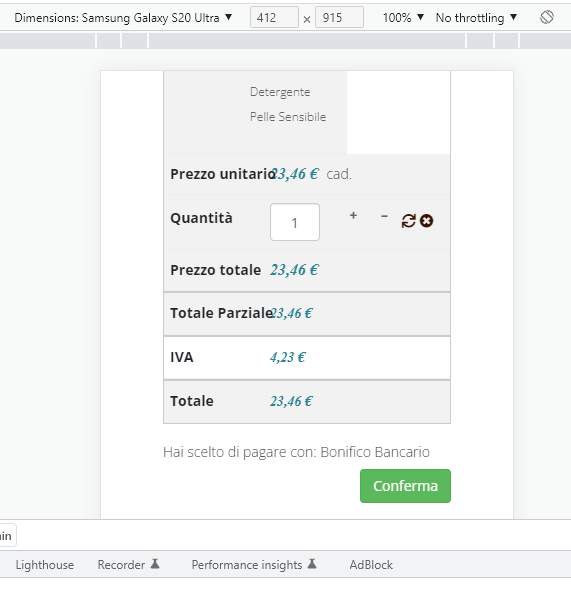
I am attaching a screenshot.
Please Log in or Create an account to join the conversation.
3 years 6 months ago - 3 years 6 months ago #351831
by Philip
Replied by Philip on topic checkout price aligment problem
Hello,
It seems that part of your display issue come from your template, see my screenshot in the red bordered part.
=> Too much padding that come from your template.

AND you can add this css command in order to have your text aligned on the right, see my screenshot green bordered part.
Regards
It seems that part of your display issue come from your template, see my screenshot in the red bordered part.
=> Too much padding that come from your template.
AND you can add this css command in order to have your text aligned on the right, see my screenshot green bordered part.
Regards
Last edit: 3 years 6 months ago by Philip.
Please Log in or Create an account to join the conversation.
- aromamassage
-
Topic Author
- Offline
Less
More
- Posts: 48
- Thank you received: 5
2 years 6 months ago - 2 years 6 months ago #360542
by aromamassage
Replied by aromamassage on topic checkout price aligment problem
hi, I'm continuing this topic because I've made various changes to the site, including the template which is currently Cassiopeia, but I still have the problem.
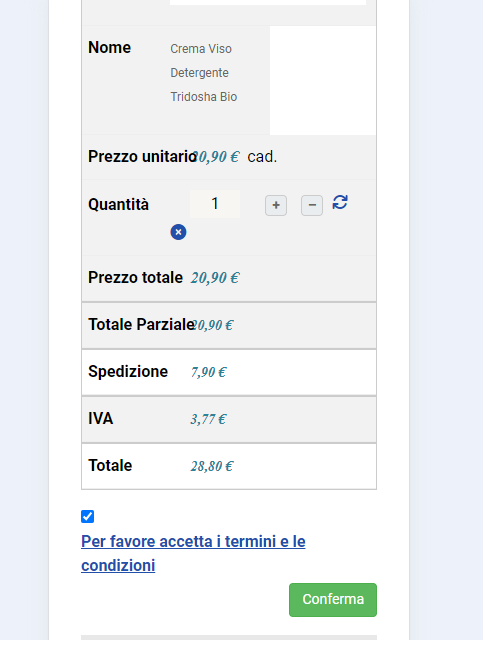
I also tried inserting the attribute
text-align: right but without success
I also tried inserting the attribute
text-align: right but without success
Last edit: 2 years 6 months ago by aromamassage.
Please Log in or Create an account to join the conversation.
2 years 6 months ago - 2 years 6 months ago #360543
by Philip
Replied by Philip on topic checkout price aligment problem
Hello,
A little like previous, we can guide you to correct this but the issue don't come from HikaShop, see my screenshot :

My correction that you can add in your custom frontend file Css :
Regards
A little like previous, we can guide you to correct this but the issue don't come from HikaShop, see my screenshot :
My correction that you can add in your custom frontend file Css :
Code:
@media only screen and (max-width: 760px), (min-device-width: 768px) and (max-device-width: 1024px) {
.hikashop_checkout_cart td.hikashop_cart_product_name_value {
width: 100%;
}
}
Regards
Last edit: 2 years 6 months ago by Philip.
Please Log in or Create an account to join the conversation.
- aromamassage
-
Topic Author
- Offline
Less
More
- Posts: 48
- Thank you received: 5
2 years 6 months ago - 2 years 6 months ago #360612
by aromamassage
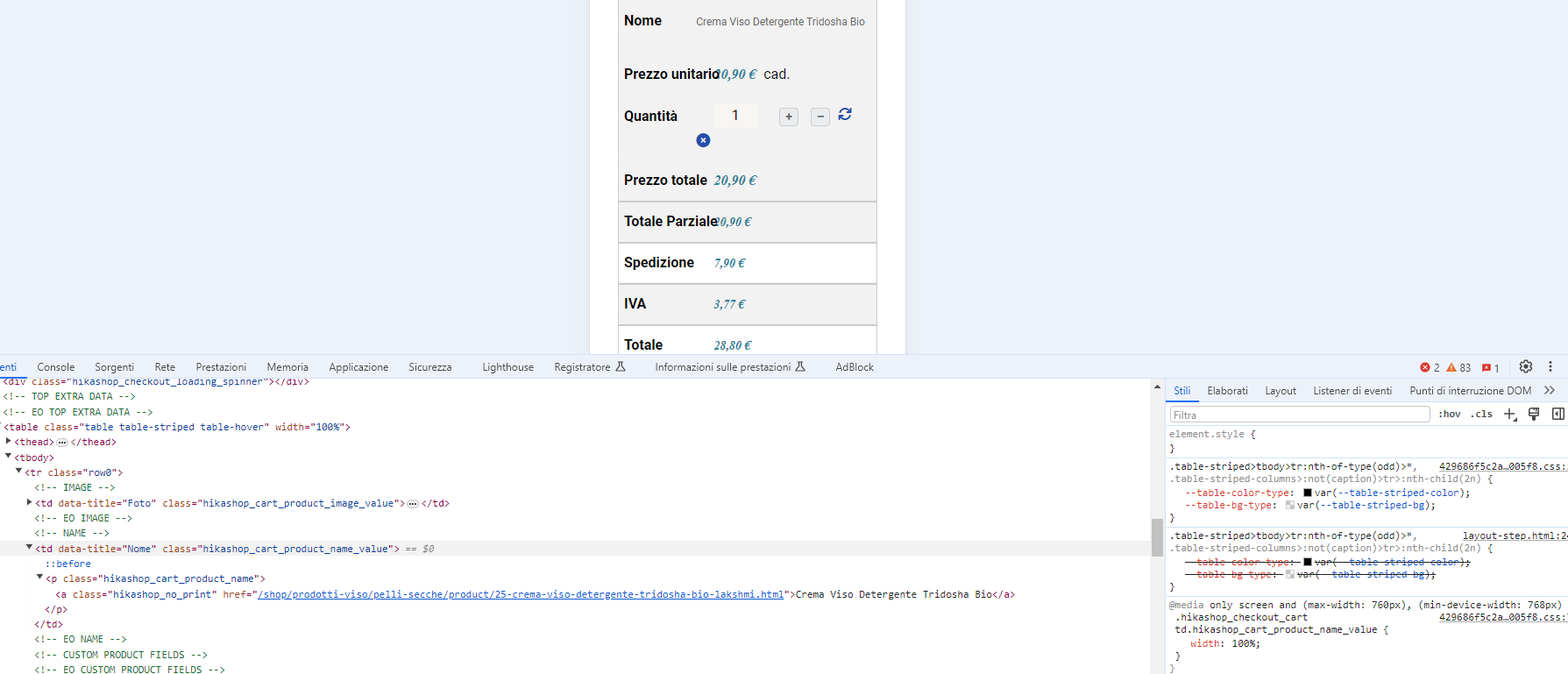
Even if you insert the correction you suggested, the prices remain the same.
for now I solved it by modifying the hika css with this
Replied by aromamassage on topic checkout price aligment problem
Even if you insert the correction you suggested, the prices remain the same.
for now I solved it by modifying the hika css with this
Code:
@media only screen and (max-width: 760px), (min-device-width: 768px) and (max-device-width: 1024px) {
.hikashop_checkout_cart table td {
padding-left: 40%
Last edit: 2 years 6 months ago by aromamassage.
Please Log in or Create an account to join the conversation.
2 years 6 months ago - 2 years 6 months ago #360616
by Philip
Replied by Philip on topic checkout price aligment problem
Hello,
Because it seems that you didn't add another css command like shown in my old message, here .
You have to define, a new position for your td in your cart view.

Regards
Because it seems that you didn't add another css command like shown in my old message, here .
You have to define, a new position for your td in your cart view.
Regards
Last edit: 2 years 6 months ago by Philip.
Please Log in or Create an account to join the conversation.
Time to create page: 0.076 seconds