

- Posts: 39
- Thank you received: 4
Prevent second step after entering the address as a guest
1 year 5 days ago #369023
by spike252
-- HikaShop version -- : 6.1.0
-- Joomla version -- : 5.4.0
-- PHP version -- : 8.3
-- Browser(s) name and version -- : Firefox
We only offer guest orders. After entering the address during checkout and clicking Continue, there must have to click Continue again to proceed to the next step. The entered data will be displayed again, with the option to edit it. I don't want this intermediate step.Is there any way to prevent this intermediate step and go directly to the next checkout step? I don't find it user-friendly to have to click Continue again after entering the address.
-- Joomla version -- : 5.4.0
-- PHP version -- : 8.3
-- Browser(s) name and version -- : Firefox
We only offer guest orders. After entering the address during checkout and clicking Continue, there must have to click Continue again to proceed to the next step. The entered data will be displayed again, with the option to edit it. I don't want this intermediate step.Is there any way to prevent this intermediate step and go directly to the next checkout step? I don't find it user-friendly to have to click Continue again after entering the address.
Please Log in or Create an account to join the conversation.

1 year 4 days ago #369030
by nicolas
Replied by nicolas on topic Prevent second step after entering the address as a guest
Hi,
I think you want to remove the address view from your checkout workflow under the checkout tab of the HikaShop configuration page to not have that extra step.
I think you want to remove the address view from your checkout workflow under the checkout tab of the HikaShop configuration page to not have that extra step.
Please Log in or Create an account to join the conversation.
1 year 3 days ago - 1 year 3 days ago #369058
by spike252
Replied by spike252 on topic Prevent second step after entering the address as a guest
Hello, I've now removed the additional "Next" button when entering the address in the shopping cart. Under Configuration --> Cart --> (Login) Show "Submit" button.
After entering the address, the address is still displayed again after clicking in the step, with the option to edit it, which is generally useful, but not in this step, but only when reviewing the order in the next step.
Is there a way to configure it so that after entering the correct address and clicking the main "Next" button, the system jumps directly to the next step, without displaying the address again and not having to click "Next" a second time?
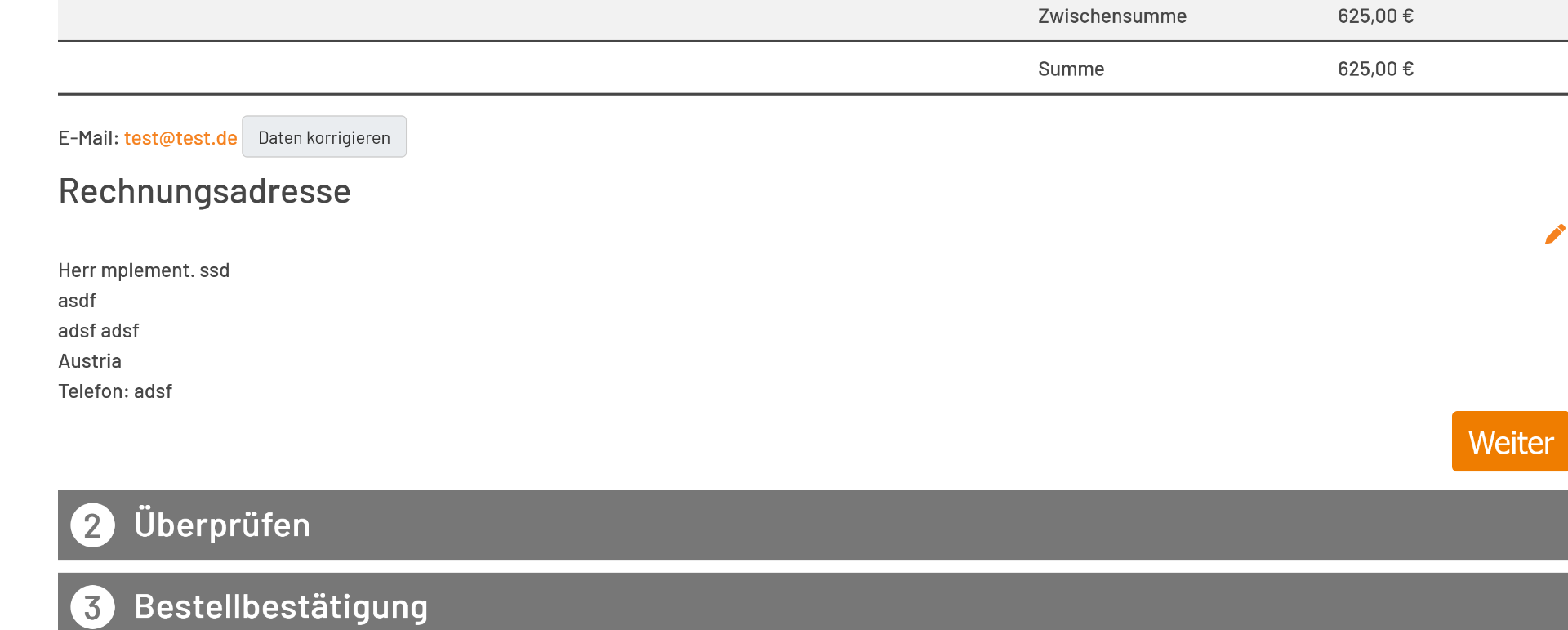
After entering the address, the address is still displayed again after clicking in the step, with the option to edit it, which is generally useful, but not in this step, but only when reviewing the order in the next step.
Is there a way to configure it so that after entering the correct address and clicking the main "Next" button, the system jumps directly to the next step, without displaying the address again and not having to click "Next" a second time?
Last edit: 1 year 3 days ago by spike252.
Please Log in or Create an account to join the conversation.
1 year 3 days ago #369059
by nicolas
Replied by nicolas on topic Prevent second step after entering the address as a guest
Hi,
Yes. As I said in my previous message, you want to remove the address view from your checkout workflow under the checkout tab of the HikaShop configuration page to not have that extra step.
This will remove the address display with the edit icon after entering the address.
This should also help avoid having to press the next button a second time as it should switch to the next step automatically.
Yes. As I said in my previous message, you want to remove the address view from your checkout workflow under the checkout tab of the HikaShop configuration page to not have that extra step.
This will remove the address display with the edit icon after entering the address.
This should also help avoid having to press the next button a second time as it should switch to the next step automatically.
Please Log in or Create an account to join the conversation.
1 year 2 days ago - 1 year 2 days ago #369072
by spike252
Replied by spike252 on topic Prevent second step after entering the address as a guest
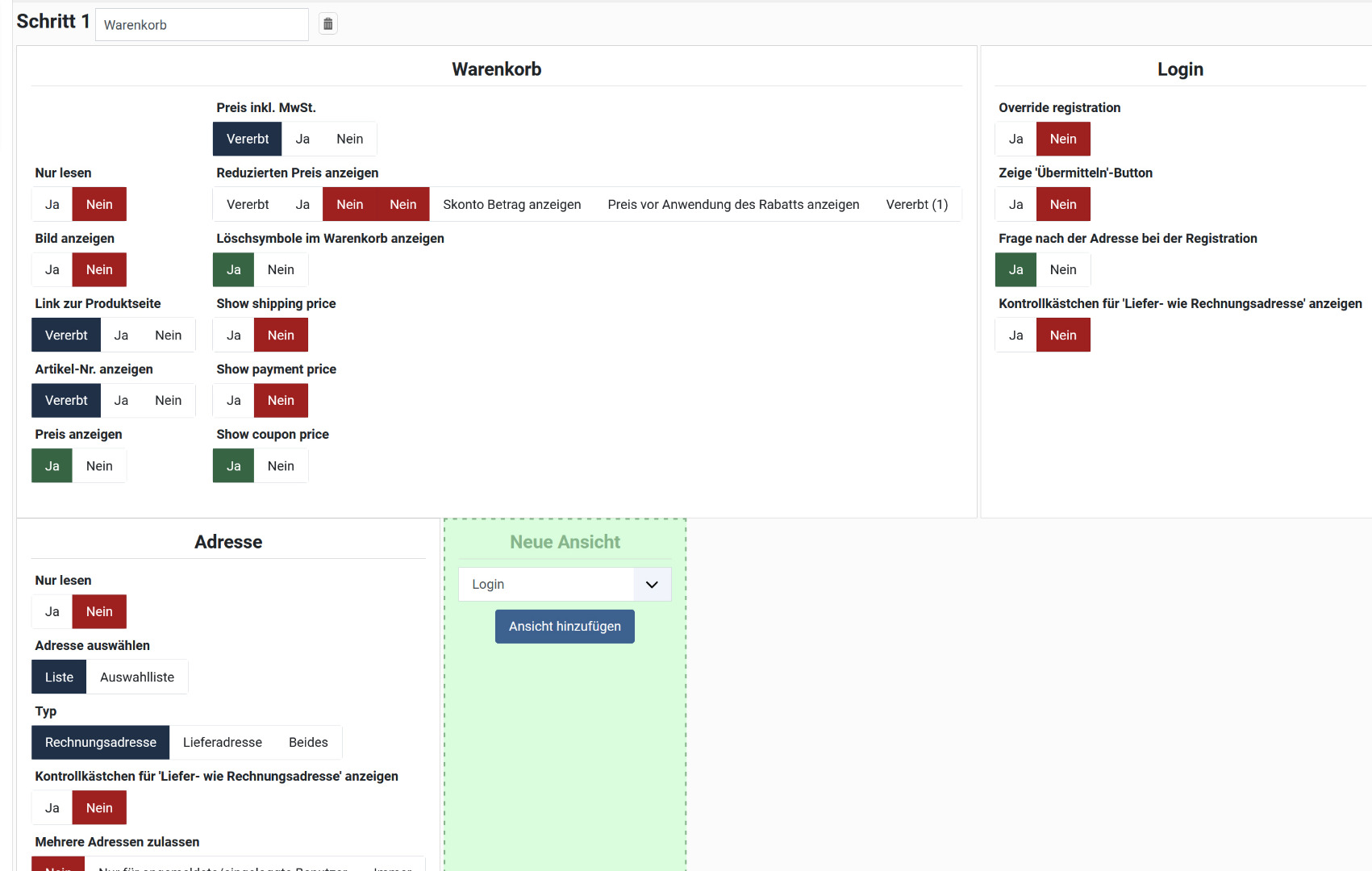
Hi, i know. But i can´t found that setting. Here is my configuration. I´ll hope you can help me what Setting you mean exactly.
Last edit: 1 year 2 days ago by spike252.
Please Log in or Create an account to join the conversation.
1 year 2 days ago #369078
by spike252
Replied by spike252 on topic Prevent second step after entering the address as a guest
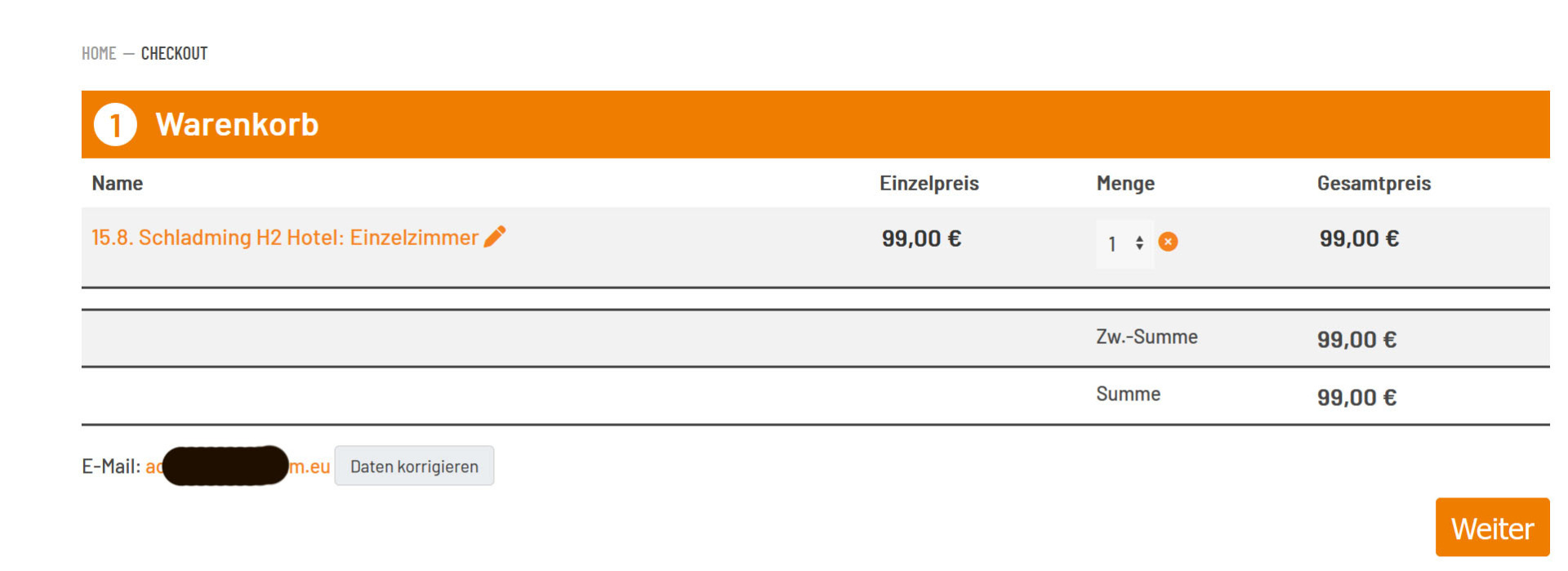
I just can't get it to work! I've deleted the address from the checkout workflow. Now after clicking "Next," I can't get to the next step. Instead of the address, I see the email address, with the option to correct it. I don't want that either! How do I get directly to the next step, "Verify Order," without clicking "Next" a second time?
Thanks in Advance.
Thanks in Advance.
Please Log in or Create an account to join the conversation.
1 year 1 day ago #369084
by nicolas
Replied by nicolas on topic Prevent second step after entering the address as a guest
Hi,
I think we're on the right track.
I've made a patch to hep with this. Download again the install package of the latest version of HikaShop from our website and install it on yours again to get the patch.
Also, I can see that you still have the "address" view in your first step:
i.imgur.com/CGQpnJM.png
If you want to remove it from there, you need to click on cross icon which appears when you hover on that view on the top right corner of the view.
With that address view in the first step, even with the patch, it won't go to the second step automatically after filling the guest form.
I think we're on the right track.
I've made a patch to hep with this. Download again the install package of the latest version of HikaShop from our website and install it on yours again to get the patch.
Also, I can see that you still have the "address" view in your first step:
i.imgur.com/CGQpnJM.png
If you want to remove it from there, you need to click on cross icon which appears when you hover on that view on the top right corner of the view.
With that address view in the first step, even with the patch, it won't go to the second step automatically after filling the guest form.
Please Log in or Create an account to join the conversation.
1 year 1 day ago #369087
by spike252
Replied by spike252 on topic Prevent second step after entering the address as a guest
Hi Nicolas, thx for fast Support and the Patch. I´ve installed the new Version, but still the same. I have removed the Adress View in Step1 in the Checkout Workflow.
Even with the new version, it does not jump directly to the next step.
I´ll hope you can fix that problem.
Thanks in Advance, Manfred
Even with the new version, it does not jump directly to the next step.
I´ll hope you can fix that problem.
Thanks in Advance, Manfred
Please Log in or Create an account to join the conversation.
1 year 1 day ago #369088
by spike252
Replied by spike252 on topic Prevent second step after entering the address as a guest
If the direct jump to the next step works in future...
In the second step, the email address, not just the address, must also be displayed, so that the user has the opportunity to check all the entered data and correct it if necessary.
It would be great if you could also incorporate that into the second patch.
Then everything would be perfect!
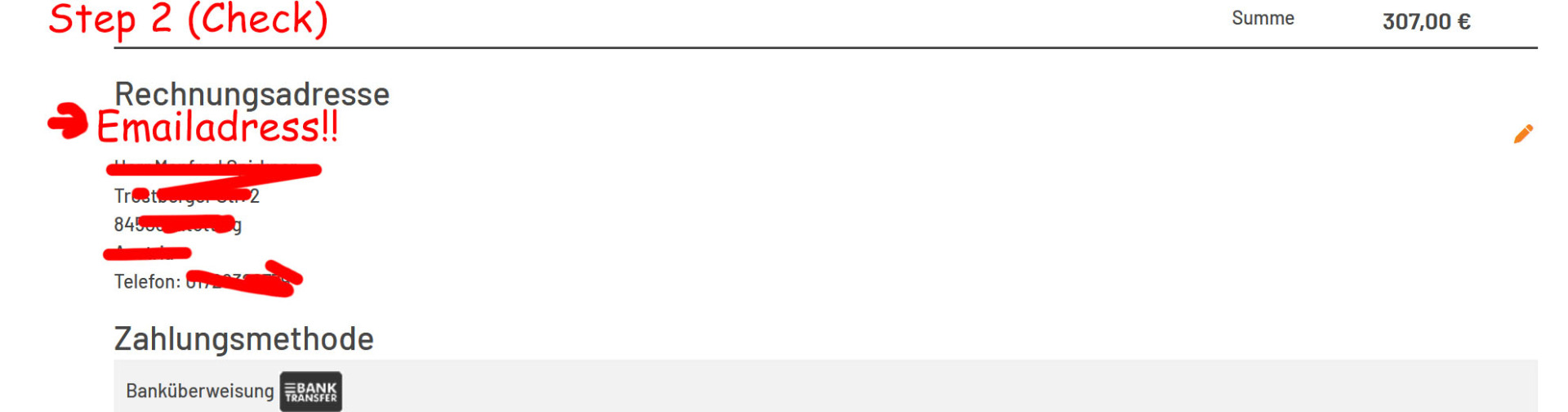
In the second step, the email address, not just the address, must also be displayed, so that the user has the opportunity to check all the entered data and correct it if necessary.
It would be great if you could also incorporate that into the second patch.
Then everything would be perfect!
Please Log in or Create an account to join the conversation.
1 year 1 day ago #369089
by nicolas
Replied by nicolas on topic Prevent second step after entering the address as a guest
Hi,
You can already do that for the second step. Just remove the "address" view in that second step and add instead a "login" step.
For the jump, its because of the cart view on the first step. It blocks the system from going to the next step.
I would recommend removing the cart view there. Maybe you could have it as a first step, on its own, and then the login step on its own.
You can already do that for the second step. Just remove the "address" view in that second step and add instead a "login" step.
For the jump, its because of the cart view on the first step. It blocks the system from going to the next step.
I would recommend removing the cart view there. Maybe you could have it as a first step, on its own, and then the login step on its own.
Please Log in or Create an account to join the conversation.
1 year 1 day ago - 1 year 1 day ago #369090
by spike252
Replied by spike252 on topic Prevent second step after entering the address as a guest
Thanks Nikolas, I think I did everything as you described... But I still can't get to the next step without further confirmation...
What am I doing wrong?
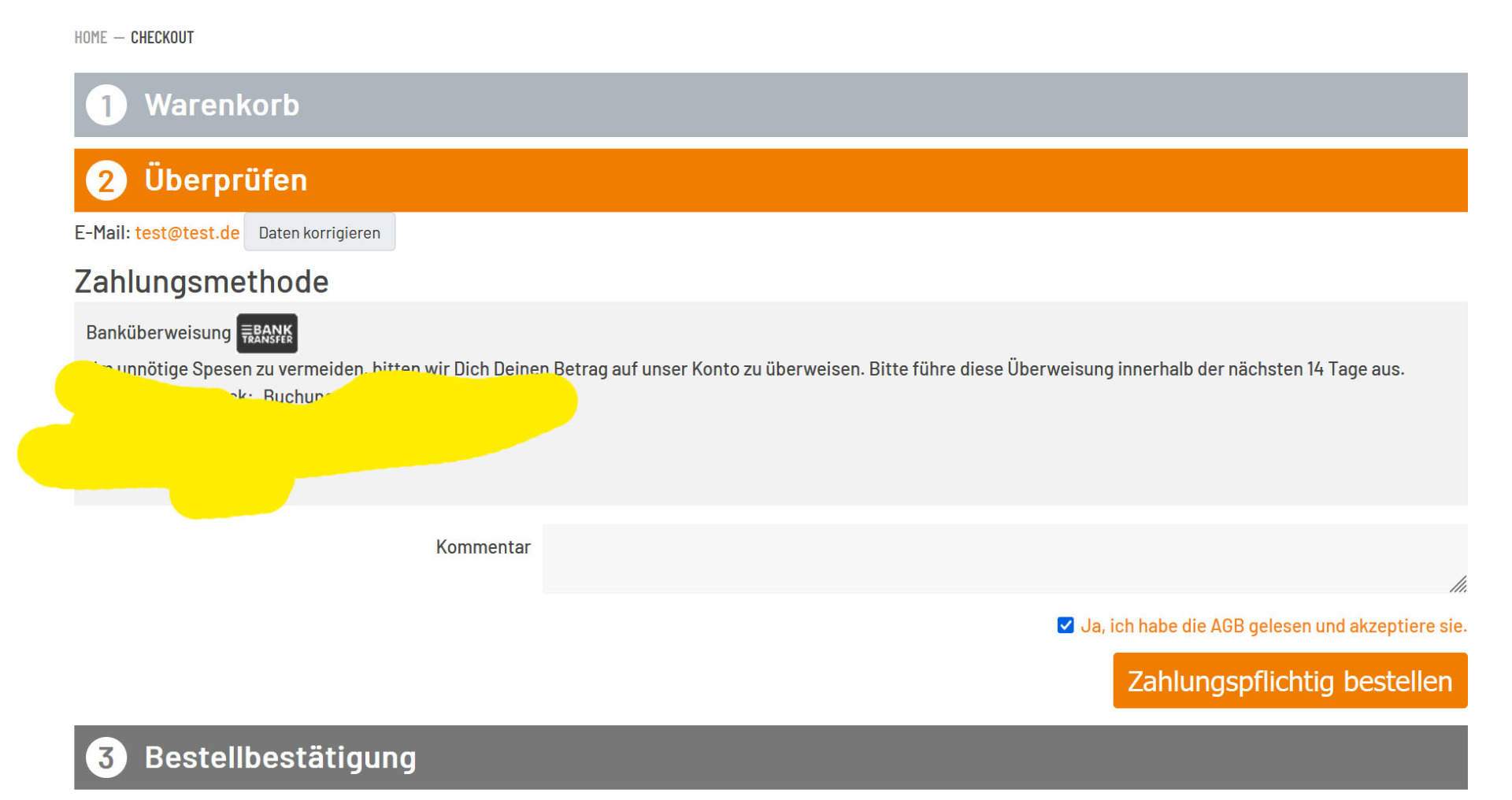
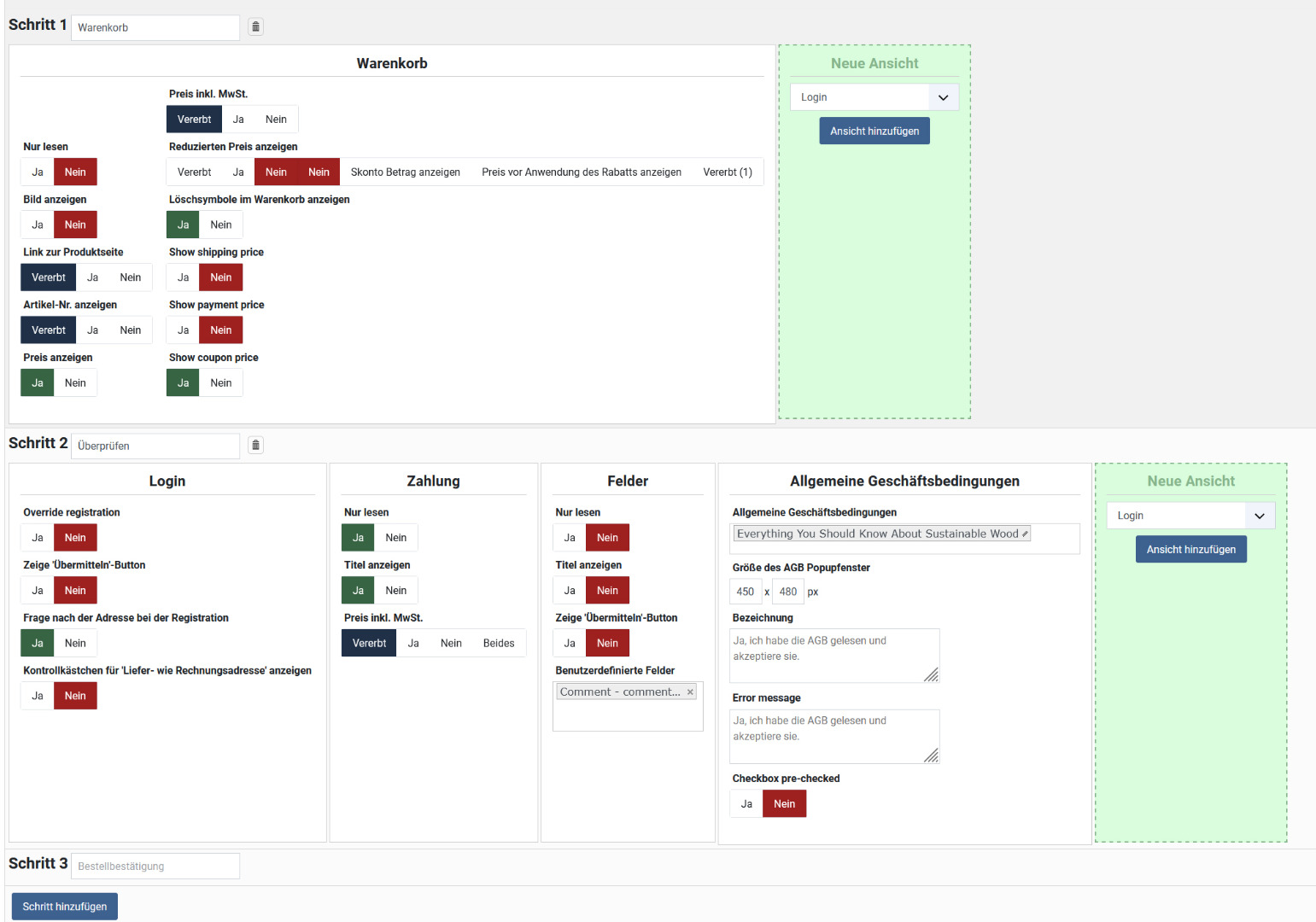
What am I doing wrong?
Last edit: 1 year 1 day ago by spike252.
Please Log in or Create an account to join the conversation.
1 year 18 hours ago #369091
by nicolas
Replied by nicolas on topic Prevent second step after entering the address as a guest
Hi,
No, I meant to remove the cart view from the first step and have only login on the first step
No, I meant to remove the cart view from the first step and have only login on the first step
Please Log in or Create an account to join the conversation.
1 year 16 hours ago #369092
by spike252
Replied by spike252 on topic Prevent second step after entering the address as a guest
Many thanks Nicolas, with these settings I finally got it working! Great support, great shopping system!
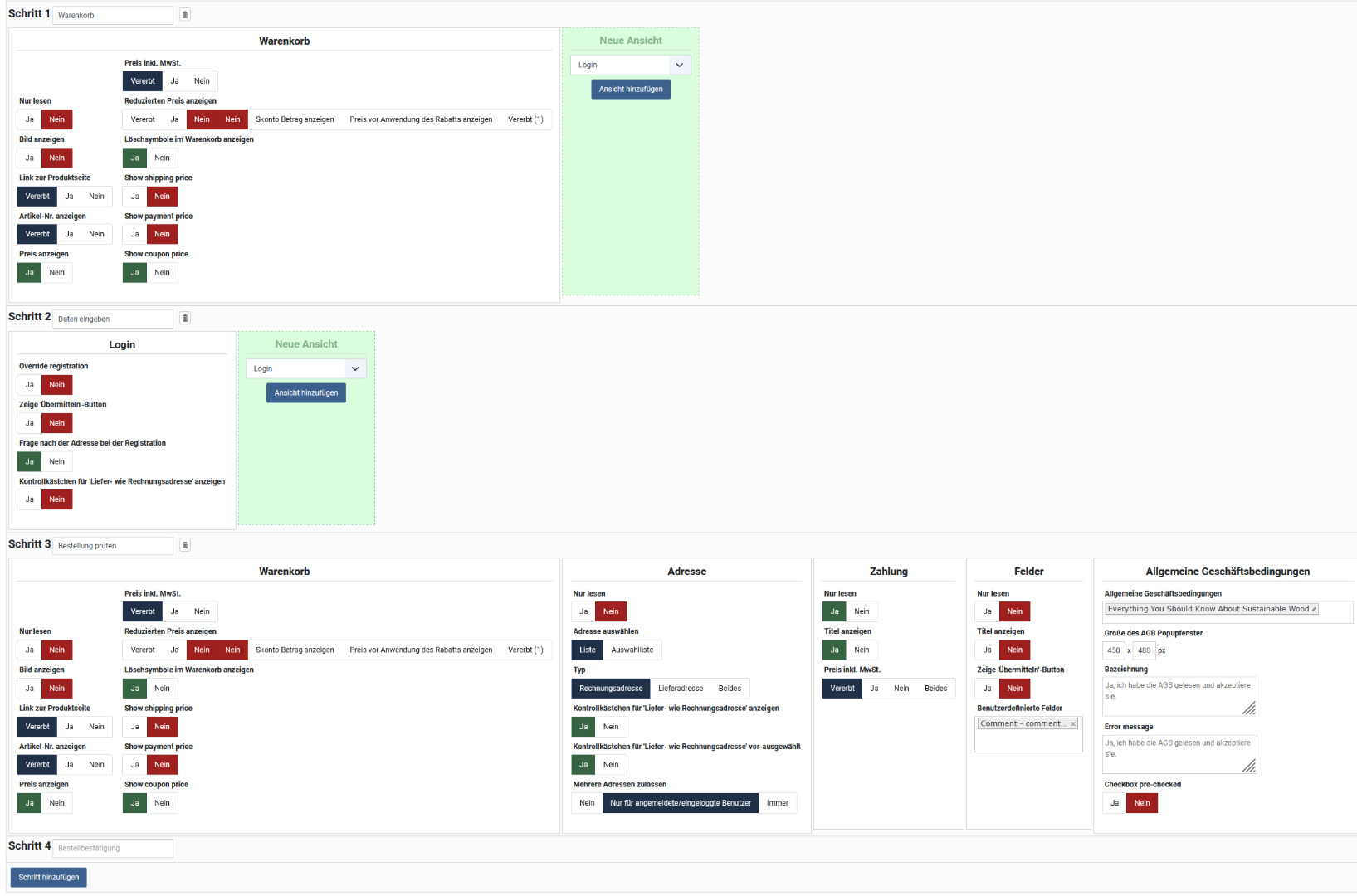
The following user(s) said Thank You: nicolas
Please Log in or Create an account to join the conversation.
Time to create page: 0.403 seconds