
Cart default value can not be 0

10 months 6 days ago #369856
by Rixters
Cart default value can not be 0 was created by Rixters
-- HikaShop version -- : 6.1.1
Normally the quantity is displayed in the cart button of the cart module. When the card is empty, I would like to show 0 as value. The problem is that the number 0 get ignored. Also when I change the language string CART_EMPTY="The cart is empty" to CART_EMPTY="0" the value is not shown.
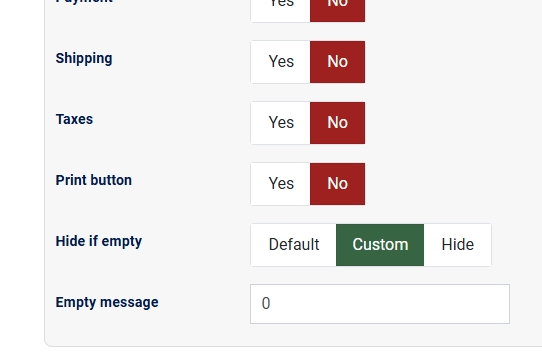
I hope this can be fixed.
Normally the quantity is displayed in the cart button of the cart module. When the card is empty, I would like to show 0 as value. The problem is that the number 0 get ignored. Also when I change the language string CART_EMPTY="The cart is empty" to CART_EMPTY="0" the value is not shown.
I hope this can be fixed.
Please Log in or Create an account to join the conversation.

10 months 6 days ago - 10 months 6 days ago #369861
by nicolas
Replied by nicolas on topic Cart default value can not be 0
Hi,
The system uses the PHP "empty" function to check the content of that field. And "0" is considered empty by PHP.
You could try to enter
in that field. It will be replaced by the browser to "0" automatically.
Otherwise, you can keep the "hide if empty" setting to "default", and use a translation override in order to customize the "The cart is empty" message in the cart module:
CART_EMPTY="0"
www.hikashop.com/download/languages.html#modify
The system uses the PHP "empty" function to check the content of that field. And "0" is considered empty by PHP.
You could try to enter
Code:
0
Otherwise, you can keep the "hide if empty" setting to "default", and use a translation override in order to customize the "The cart is empty" message in the cart module:
CART_EMPTY="0"
www.hikashop.com/download/languages.html#modify
Last edit: 10 months 6 days ago by nicolas.
Please Log in or Create an account to join the conversation.
10 months 5 days ago #369871
by Rixters
Replied by Rixters on topic Cart default value can not be 0
Hi,
Both options do not work. The text field in the module 0 and 0 have the same effect also the language override CART_EMPTY="0" outputs nothing. Do you haven on other solution? Or maybe check string length to check if the fields is empty?
Both options do not work. The text field in the module 0 and 0 have the same effect also the language override CART_EMPTY="0" outputs nothing. Do you haven on other solution? Or maybe check string length to check if the fields is empty?
Please Log in or Create an account to join the conversation.
10 months 5 days ago #369878
by nicolas
Replied by nicolas on topic Cart default value can not be 0
Hi,
Use the translation override like this:
Use the translation override like this:
Code:
CART_EMPTY="<span>0</span>"
The following user(s) said Thank You: Rixters
Please Log in or Create an account to join the conversation.
10 months 5 days ago #369882
by Rixters
Replied by Rixters on topic Cart default value can not be 0
Great solution!
Thanks for the feedback!
Thanks for the feedback!
Please Log in or Create an account to join the conversation.
Time to create page: 0.074 seconds