
- Posts: 18
- Thank you received: 0
UPS Shipping no showing at checkout
- robert_hatch
-
 Topic Author
- Offline
Less
More
13 years 1 month ago #118517
by robert_hatch
Replied by robert_hatch on topic UPS Shipping no showing at checkout
Please tell me only one thing.. is shipper number necessary for UPS shiping option?
Please Log in or Create an account to join the conversation.
- robert_hatch
-
Topic Author
- Offline
Less
More
- Posts: 18
- Thank you received: 0
13 years 1 month ago #118518
by robert_hatch
Replied by robert_hatch on topic UPS Shipping no showing at checkout
Please let me know one thing. Is shipper number is mandatory for UPS shipping option?
Please Log in or Create an account to join the conversation.

Less
More
- Posts: 12953
- Thank you received: 1778
13 years 1 month ago #118551
by Mohamed Thelji
Replied by Mohamed Thelji on topic UPS Shipping no showing at checkout
I tried it without any shipper number and also with your UPS configuration and it worked fine, so the shipper number don't seems to be necessary.
Can you test it with a product configured like this :
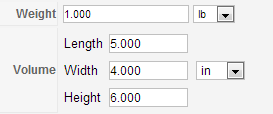
Also what address are you using when you are testing your shipping method ?
Can you test it with a product configured like this :
Also what address are you using when you are testing your shipping method ?
Please Log in or Create an account to join the conversation.

13 years 1 month ago #118598
by oranje
Replied by oranje on topic UPS Shipping no showing at checkout
that´s my problem in the checkout.
after update to 2.2
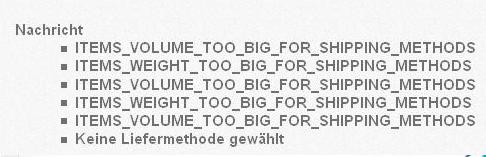
after update to 2.2
Please Log in or Create an account to join the conversation.
Less
More
- Posts: 12953
- Thank you received: 1778
13 years 1 month ago - 13 years 1 month ago #118679
by Mohamed Thelji
Replied by Mohamed Thelji on topic UPS Shipping no showing at checkout
Hi,
Can you edit the "YOUR_WEBSITE\administrator\components\com_hikashop\classes\shipping.php" file and change these lines :
By :
Thanks .
.
Can you edit the "YOUR_WEBSITE\administrator\components\com_hikashop\classes\shipping.php" file and change these lines :
Code:
$trans = JText::_(strtoupper(str_replace(' ','_',$value)));
if(strpos($trans,'%s')!==false){
$trans = JText::sprintf(strtoupper(str_replace(' ','_',$value)),$number);
}
if($trans!=$value){
$trans = $value;
}
$app = JFactory::getApplication();
$app->enqueueMessage($trans);
Code:
$transKey = strtoupper(str_replace(' ','_',$value));
$trans = JText::_($transKey);
if(strpos($trans,'%s')!==false){
$trans = JText::sprintf($transKey,$number);
}
if($trans != $transKey){
$value = $trans;
}
$app = JFactory::getApplication();
$app->enqueueMessage($value);
Thanks
.
Last edit: 13 years 1 month ago by Mohamed Thelji.
Please Log in or Create an account to join the conversation.
13 years 1 month ago #118974
by oranje
Replied by oranje on topic UPS Shipping no showing at checkout
Thanks for your help.
Now it change to german.
Now it change to german.
Please Log in or Create an account to join the conversation.
Less
More
- Posts: 12953
- Thank you received: 1778
13 years 1 month ago #119170
by Mohamed Thelji
Replied by Mohamed Thelji on topic UPS Shipping no showing at checkout
Ok, so we just fixed the translation issue, regarding the following errors that you are having, I'll need a temporary access to your back-end for testing purpose (that you can send me through a private message), Or screenshots of how did you configured your shipping methods.
Please Log in or Create an account to join the conversation.
Less
More
- Posts: 2
- Thank you received: 0
13 years 3 weeks ago #122459
by 4ronharris
Replied by 4ronharris on topic UPS Shipping no showing at checkout
UPS possible issue. I installed Hika Shop on a WAMP Server,
and used an install from directory in the tmp file. It installed fine.
However, I could not see the UPS Plugin in the list of Plugins
in the Admin. So, I went back into the intall files and found that
the UPS file itself was in the tmp install from directory, but
it was showing up as still being a zip file. So, I extracted it
and then tried a new install of Hika shop, which was successful,
but still no UPS Plugin in the admin.?????
So, I tired to just cut and paste the UPS yellow folder into the
plugins folder....that failed as well.
Do you have a procedure that I can follow to get the UPS plugin
to shop up as a Plugin?
Thanks
and used an install from directory in the tmp file. It installed fine.
However, I could not see the UPS Plugin in the list of Plugins
in the Admin. So, I went back into the intall files and found that
the UPS file itself was in the tmp install from directory, but
it was showing up as still being a zip file. So, I extracted it
and then tried a new install of Hika shop, which was successful,
but still no UPS Plugin in the admin.?????
So, I tired to just cut and paste the UPS yellow folder into the
plugins folder....that failed as well.
Do you have a procedure that I can follow to get the UPS plugin
to shop up as a Plugin?
Thanks
Please Log in or Create an account to join the conversation.
Less
More
- Posts: 12953
- Thank you received: 1778
13 years 3 weeks ago #122651
by Mohamed Thelji
Replied by Mohamed Thelji on topic UPS Shipping no showing at checkout
The solution will probably be to download the last hikashop version through our website, install it, and try it again .
. Please Log in or Create an account to join the conversation.
Time to create page: 0.237 seconds