

- Posts: 208
- Thank you received: 10
Don't want customer to choose method...I will
12 years 7 months ago #145807
by simmiepam
Don't want customer to choose method...I will was created by simmiepam
-- url of the page with the problem -- :
www.BestederNewsletters.com/cart
-- HikaShop version -- : 2.3.0 Essentials
-- Joomla version -- : 2.58
-- PHP version -- : No clue
-- Browser(s) name and version -- : Chrome
-- Error-message(debug-mod must be tuned on) -- :
My business isn't that sophisticated. Customer orders a pack of 25 post cards (which can fit into a regular business envelope) and be mailed for about $1.15 or so...I put in an envelope, stick postage on it (it's the same postage no matter where I mail in the U.S.) and that's it.
But...if the customer orders 5 packs of post cards, then obviously based upon weight, the price goes up because now I have to use a larger envelope and more postage.
If the customer ALSO orders...with those 5 post cards.... 3 posters... I have to now use a shipping box and not an envelope and the price goes up again.
My question...how can I place weight to every product and then based upon the combined weight...determine the amount of postage?
The only shipping methods I use is the U.S. Post Office...so I don't need FedEx or UPS, etc.
Thanks
Pam
-- HikaShop version -- : 2.3.0 Essentials
-- Joomla version -- : 2.58
-- PHP version -- : No clue
-- Browser(s) name and version -- : Chrome
-- Error-message(debug-mod must be tuned on) -- :
My business isn't that sophisticated. Customer orders a pack of 25 post cards (which can fit into a regular business envelope) and be mailed for about $1.15 or so...I put in an envelope, stick postage on it (it's the same postage no matter where I mail in the U.S.) and that's it.
But...if the customer orders 5 packs of post cards, then obviously based upon weight, the price goes up because now I have to use a larger envelope and more postage.
If the customer ALSO orders...with those 5 post cards.... 3 posters... I have to now use a shipping box and not an envelope and the price goes up again.
My question...how can I place weight to every product and then based upon the combined weight...determine the amount of postage?
The only shipping methods I use is the U.S. Post Office...so I don't need FedEx or UPS, etc.
Thanks
Pam
Please Log in or Create an account to join the conversation.

12 years 7 months ago #145866
by Xavier
Replied by Xavier on topic Don't want customer to choose method...I will
Hi,
I think that the best way is to use enable the option "Use price per product" in the shipping method configuration.
Then in each products edition page, set the desired price rules.
And in the checkout the final price will be calculated depending on the price of the shipping of each items in the cart.
I think that the best way is to use enable the option "Use price per product" in the shipping method configuration.
Then in each products edition page, set the desired price rules.
And in the checkout the final price will be calculated depending on the price of the shipping of each items in the cart.
Please Log in or Create an account to join the conversation.
12 years 7 months ago #145960
by simmiepam
Replied by simmiepam on topic Don't want customer to choose method...I will
Thank you....
Can I show you an image from my OLD shopping cart software to explain what I mean?
In this system's shipping rules for the U.S., we could give the total weight of each mailing (which included all the products on that order) and indicate the postal amount
For instance, a pack of 25 post cards weighted 3.6 ounces, so if a customer ordered just that, the postage would go up to the amount for mailing for 3.8 ounces and the shopping cart should charge them $1.50
If the also ordered an item that weighted 1 ounce, the postage would go up to $1.70 and so on
All I would do in each product's characteristics is say how much they weighed. Then based upon this schedule I have below, the cart would add them all together and give a total shipping price.
I see in my Hikashop products a place for weight...but I don't see in the shipping methods section for USPS (which is what I always use) a place for this type of listing.
How do I do this in Hikashop?
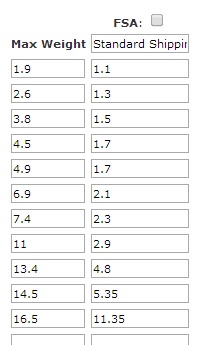
Can I show you an image from my OLD shopping cart software to explain what I mean?
In this system's shipping rules for the U.S., we could give the total weight of each mailing (which included all the products on that order) and indicate the postal amount
For instance, a pack of 25 post cards weighted 3.6 ounces, so if a customer ordered just that, the postage would go up to the amount for mailing for 3.8 ounces and the shopping cart should charge them $1.50
If the also ordered an item that weighted 1 ounce, the postage would go up to $1.70 and so on
All I would do in each product's characteristics is say how much they weighed. Then based upon this schedule I have below, the cart would add them all together and give a total shipping price.
I see in my Hikashop products a place for weight...but I don't see in the shipping methods section for USPS (which is what I always use) a place for this type of listing.
How do I do this in Hikashop?
Please Log in or Create an account to join the conversation.

12 years 7 months ago #145986
by nicolas
Replied by nicolas on topic Don't want customer to choose method...I will
Hi,
You can do the same in HikaShop if you want.
The USPS plugin is different from that thought. It actually automatically retrieve the shipping rates automatically from the USPS servers based on the weight/dimensions of your products and the origin and destination addresses.
If you want to enter manually the shipping rates based on the weight of the products in the cart, you don't want to use the USPS plugin and instead, you want to create manual shipping methods, one per weight range (with the min and max weight restrictions) with its corresponding price. The system will then display the corresponding shipping method(s) on the checkout based on their restrictions.
You can do the same in HikaShop if you want.
The USPS plugin is different from that thought. It actually automatically retrieve the shipping rates automatically from the USPS servers based on the weight/dimensions of your products and the origin and destination addresses.
If you want to enter manually the shipping rates based on the weight of the products in the cart, you don't want to use the USPS plugin and instead, you want to create manual shipping methods, one per weight range (with the min and max weight restrictions) with its corresponding price. The system will then display the corresponding shipping method(s) on the checkout based on their restrictions.
Please Log in or Create an account to join the conversation.
Time to create page: 0.203 seconds