

- Posts: 21
- Thank you received: 0
UPS plugin for Italy
11 years 11 months ago #175158
by bsign
UPS plugin for Italy was created by bsign
-- HikaShop version -- : 2.3.3
-- Joomla version -- : 3.2.7
-- PHP version -- : 5.3.3
-- Browser(s) name and version -- : ANY
Hello, we have encountered this problem:
Using UPS plugin in shipping metod in checkout we see normal UPS price and not negotiated one even if we have choosen in plugin the option.
We have contacted UPS and on UPS portal we can see normal price (like in hikashop) and negotiated price too. So UPS support redirect us to hikashop support.
can anyone help us? pls
-- Joomla version -- : 3.2.7
-- PHP version -- : 5.3.3
-- Browser(s) name and version -- : ANY
Hello, we have encountered this problem:
Using UPS plugin in shipping metod in checkout we see normal UPS price and not negotiated one even if we have choosen in plugin the option.
We have contacted UPS and on UPS portal we can see normal price (like in hikashop) and negotiated price too. So UPS support redirect us to hikashop support.
can anyone help us? pls
Please Log in or Create an account to join the conversation.

Less
More
- Posts: 12953
- Thank you received: 1778
11 years 11 months ago #175335
by Mohamed Thelji
Replied by Mohamed Thelji on topic UPS plugin for Italy
Hello,
Can you make sure that you have set the "Negotiated rate" option to YES, clear your cache and try it again ?
Can you make sure that you have set the "Negotiated rate" option to YES, clear your cache and try it again ?
Please Log in or Create an account to join the conversation.
11 years 11 months ago #175815
by bsign
Replied by bsign on topic UPS plugin for Italy
Hello,
yes i did! you can check by screenshot. I think the problem is for Italy localization.
waiting for your kindly feedback
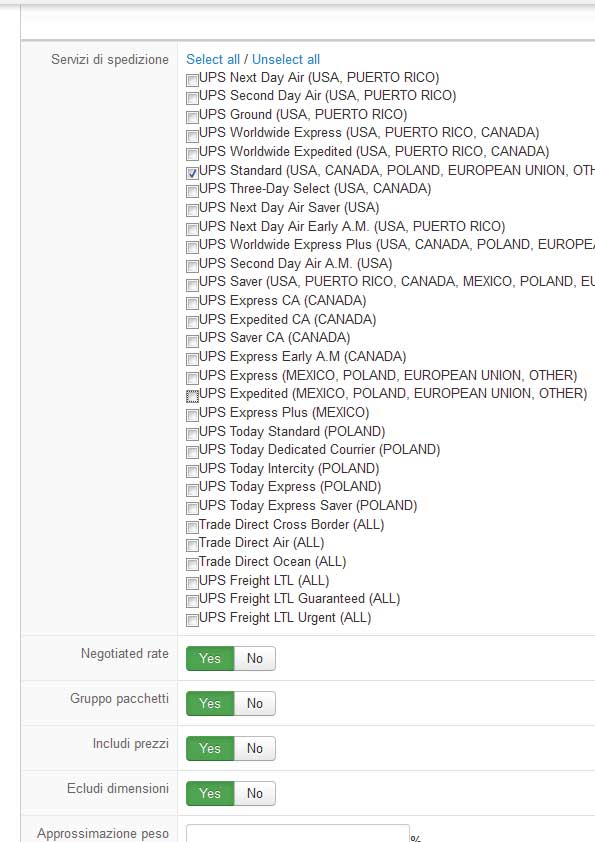
yes i did! you can check by screenshot. I think the problem is for Italy localization.
waiting for your kindly feedback
Please Log in or Create an account to join the conversation.
Less
More
- Posts: 12953
- Thank you received: 1778
11 years 11 months ago #175843
by Mohamed Thelji
Replied by Mohamed Thelji on topic UPS plugin for Italy
Ok,
And do you see a difference if you set the "Negotiated rate" option to NO ? Because the UPS plugin ask for the Negotiated rates and it's just displaying the rates that are sent through the UPS response.
And do you see a difference if you set the "Negotiated rate" option to NO ? Because the UPS plugin ask for the Negotiated rates and it's just displaying the rates that are sent through the UPS response.
Please Log in or Create an account to join the conversation.
11 years 11 months ago #175917
by bsign
Replied by bsign on topic UPS plugin for Italy
No differenze! Always same price.
Please Log in or Create an account to join the conversation.
Less
More
- Posts: 12953
- Thank you received: 1778
11 years 11 months ago #175995
by Mohamed Thelji
Replied by Mohamed Thelji on topic UPS plugin for Italy
Ok,
So I will :
- Do some tests regarding the "Negotiated rates" option of the UPS shipping plugin
- Check the UPS developer documentation or directly contact them
- Fix the code if I need to.
So I will :
- Do some tests regarding the "Negotiated rates" option of the UPS shipping plugin
- Check the UPS developer documentation or directly contact them
- Fix the code if I need to.
Please Log in or Create an account to join the conversation.
11 years 11 months ago #176045
by bsign
Replied by bsign on topic UPS plugin for Italy
Real nice thx front your assistence!
Waiting for your feedback.
Andrea
Waiting for your feedback.
Andrea
Please Log in or Create an account to join the conversation.
Less
More
- Posts: 12953
- Thank you received: 1778
11 years 11 months ago #176495
by Mohamed Thelji
Replied by Mohamed Thelji on topic UPS plugin for Italy
Hello Andrea,
Can you give me a temporary back-end access through a private message so that I can directly test it ?
Can you give me a temporary back-end access through a private message so that I can directly test it ?
Please Log in or Create an account to join the conversation.
11 years 11 months ago - 11 years 11 months ago #176642
by bsign
Replied by bsign on topic UPS plugin for Italy
Hrllo,
Sent by PM credential.
Let me know feedback
thx for your effort
Sent by PM credential.
Let me know feedback
thx for your effort
Last edit: 11 years 11 months ago by bsign.
Please Log in or Create an account to join the conversation.
11 years 10 months ago #177455
by bsign
Replied by bsign on topic UPS plugin for Italy
Hello, any feedback?
Andrea
Andrea
Please Log in or Create an account to join the conversation.
Less
More
- Posts: 12953
- Thank you received: 1778
11 years 10 months ago #177528
by Mohamed Thelji
Replied by Mohamed Thelji on topic UPS plugin for Italy
Yes, I found out from where the error was coming from, the negotiated was only working for "freight" services, I've done some changes through UPS files and I'm currently testing it.
Please Log in or Create an account to join the conversation.
11 years 10 months ago #177938
by bsign
Replied by bsign on topic UPS plugin for Italy
:woohoo: yes! great news.
Waiting for your kindly feedback
Andrea
Waiting for your kindly feedback
Andrea
Please Log in or Create an account to join the conversation.
11 years 10 months ago #179028
by bsign
Replied by bsign on topic UPS plugin for Italy
Any feedback for us?
BEst regards
Andrea
BEst regards
Andrea
Please Log in or Create an account to join the conversation.

11 years 10 months ago #179046
by Jerome
Jerome - Obsidev.com
HikaMarket & HikaSerial developer / HikaShop core dev team.
Also helping the HikaShop support team when having some time or couldn't sleep.
By the way, do not send me private message, use the "contact us" form instead.
Replied by Jerome on topic UPS plugin for Italy
Hi,
Mohamed is currently taking some rest ; he will come back Wednesday.
Regards,
Mohamed is currently taking some rest ; he will come back Wednesday.
Regards,
Jerome - Obsidev.com
HikaMarket & HikaSerial developer / HikaShop core dev team.
Also helping the HikaShop support team when having some time or couldn't sleep.
By the way, do not send me private message, use the "contact us" form instead.
Please Log in or Create an account to join the conversation.
Less
More
- Posts: 12953
- Thank you received: 1778
11 years 10 months ago - 11 years 10 months ago #179497
by Mohamed Thelji
Replied by Mohamed Thelji on topic UPS plugin for Italy
Hello,
Here is the last UPS shipping version, don't forget to fill the "State/province code" through your UPS shipping configuration page :
==> You should use that UPS version with the last Hikashop version.
Here is the last UPS shipping version, don't forget to fill the "State/province code" through your UPS shipping configuration page :
This attachment is hidden for guests.
Please log in or register to see it.
Please log in or register to see it.
==> You should use that UPS version with the last Hikashop version.
Last edit: 11 years 10 months ago by Mohamed Thelji.
Please Log in or Create an account to join the conversation.
11 years 10 months ago #179511
by bsign
Replied by bsign on topic UPS plugin for Italy
Thx Mohamed and wellcome back!
Where i can get STATE PROVINCE CODE information value? I have found where to fill it, but is not clear to me What is my STATE PROVINCE CODE.
Thx for your special effort
brgs
Andrea
Where i can get STATE PROVINCE CODE information value? I have found where to fill it, but is not clear to me What is my STATE PROVINCE CODE.
Thx for your special effort
brgs
Andrea
Please Log in or Create an account to join the conversation.
Less
More
- Posts: 12953
- Thank you received: 1778
11 years 10 months ago #179612
by Mohamed Thelji
Replied by Mohamed Thelji on topic UPS plugin for Italy
Hello !
You'll find it on that page : en.wikipedia.org/wiki/List_of_U.S._state_abbreviations
You'll just have to use the code of the "USPS" column.
You'll find it on that page : en.wikipedia.org/wiki/List_of_U.S._state_abbreviations
You'll just have to use the code of the "USPS" column.
Please Log in or Create an account to join the conversation.
11 years 10 months ago #179634
by bsign
Replied by bsign on topic UPS plugin for Italy
Sorry Mohamed, but is not clear to me.. why i should use a US code if we are talking about ITALY plugin?
We are in italy and in case i should have ti USE "IT" code.
Sorry but i don't understand and in case i don't understand which country of USA i should have to use,
Waiting for your feedback
Andrea
We are in italy and in case i should have ti USE "IT" code.
Sorry but i don't understand and in case i don't understand which country of USA i should have to use,
Waiting for your feedback
Andrea
Please Log in or Create an account to join the conversation.
Less
More
- Posts: 12953
- Thank you received: 1778
11 years 10 months ago #179641
by Mohamed Thelji
Replied by Mohamed Thelji on topic UPS plugin for Italy
Hello,
Then you'll find your italia province code through the "ISO code" column of that link : en.wikipedia.org/wiki/Provinces_of_Italy
I added a state or province code field because as it's said on the UPS documentation, that field is required for a negotiated rate request.
So in your case you'll just have to complete the address that you have added on the warehouse tab of your ups shipping configuration page.
Then you'll find your italia province code through the "ISO code" column of that link : en.wikipedia.org/wiki/Provinces_of_Italy
I added a state or province code field because as it's said on the UPS documentation, that field is required for a negotiated rate request.
So in your case you'll just have to complete the address that you have added on the warehouse tab of your ups shipping configuration page.
Please Log in or Create an account to join the conversation.
11 years 10 months ago #179936
by bsign
Replied by bsign on topic UPS plugin for Italy
Dear Mohamed,
I have filled stateprovince_code as your info.
to b sure i have attached the configuration printscreen.
If i able the UPS plugin checkout is blank page, if i disable checkout work properly.
Your account is stil lworkig in my ecommerce, can you be so kind to investigation plugin problem?
Waiting for you rfeedback
thx
Andrea
I have filled stateprovince_code as your info.
to b sure i have attached the configuration printscreen.
If i able the UPS plugin checkout is blank page, if i disable checkout work properly.
Your account is stil lworkig in my ecommerce, can you be so kind to investigation plugin problem?
Waiting for you rfeedback
thx
Andrea
Please Log in or Create an account to join the conversation.
Time to create page: 0.385 seconds