
- Posts: 4
- Thank you received: 0
Understanding Zone hierachy & possible logic error
- IanCalhaem
-
 Topic Author
- Offline
Less
More
11 years 9 months ago - 11 years 9 months ago #185163
by IanCalhaem
Understanding Zone hierachy & possible logic error was created by IanCalhaem
Hikashop comes with a comprehensive set of Country Zones. there are also a few others such as "Europe" set up as a tax zone. I cannot find the definition of what the different types of zone are used for. Is it just an aid so that the Tax type is obviously set up as a tax region, OR does the zone Type get used in the underlying logic?
For instance, setting up a manual shipping method will display all zone types allowing the user to select say the Country type and not just a ship type.
I initially thought I would need to set up a Shipping Zone for each country where goods were being dispatched (Multi warehouse environment) but this does not appear to be required.
I originally changed the Country type to Shipping, but then renamed it back to Country.
However:..
When I investigated the Hikashop table structure I find that both the country and Ship type are still recorded (in the XXX_hikashop_zone and xxx_hikashop_zone_link tables).
I had initially thought that the zone_link table was to provide the link between the country and the associated states.
In my example Cook Islands is linked to the 15 island states that make up the Cook Islands.
But after changing the type to Shipping and then back again, I am left with a complex table structure..
(see attached file)
In the Zone Table the entry for Cook Islands has been changed (Zone name, English name etc) and there is a new entry Ship_cookislands which now contains the missing information.
In the Zone link table "country_Cookislands" has the child "ship_Cookislands", "ship_Cookilands" has a child link to "country_Cookislands" and also links to itself.
I discovered the strange linking structure when from Hikashop I displayed the Country Zone "Cook Islands" and saw that it was not displaying the correct subzones. What is is displaying is the information stared in the php Tables.
The Zone table shows the Country Zone as unpublished but the Ship zone as published. Because the ship zone links to the Country zone as a child, then Hikashop, correctly follows the convoluted logic to display the Country Zone as being published and not the Shipping Zone.
Since I had saved a copy of my sql database I was able to easily recover the situation but many users will struggle to correct these issues.
On a separate bu related issue:
Setting up the zones is a complex and time consuming task. I was wanting to set up local zones (2 countries) a Pacific Zone, a North American Zone, and then the rest of the World. It would make it much easier if it was possible to EXCLUDE countries whilst setting up a new zone. eg first set up the local zones, and the smaller zones such as Pacific, but then set up the Rest of the World as All minus Pacific minus North America. etc.,
Currently the only easy way of checking the sub zones are set up correctly is to extract the tables from the php database into an excel spreadsheet.
For instance, setting up a manual shipping method will display all zone types allowing the user to select say the Country type and not just a ship type.
I initially thought I would need to set up a Shipping Zone for each country where goods were being dispatched (Multi warehouse environment) but this does not appear to be required.
I originally changed the Country type to Shipping, but then renamed it back to Country.
However:..
When I investigated the Hikashop table structure I find that both the country and Ship type are still recorded (in the XXX_hikashop_zone and xxx_hikashop_zone_link tables).
I had initially thought that the zone_link table was to provide the link between the country and the associated states.
In my example Cook Islands is linked to the 15 island states that make up the Cook Islands.
But after changing the type to Shipping and then back again, I am left with a complex table structure..
(see attached file)
In the Zone Table the entry for Cook Islands has been changed (Zone name, English name etc) and there is a new entry Ship_cookislands which now contains the missing information.
In the Zone link table "country_Cookislands" has the child "ship_Cookislands", "ship_Cookilands" has a child link to "country_Cookislands" and also links to itself.
I discovered the strange linking structure when from Hikashop I displayed the Country Zone "Cook Islands" and saw that it was not displaying the correct subzones. What is is displaying is the information stared in the php Tables.
The Zone table shows the Country Zone as unpublished but the Ship zone as published. Because the ship zone links to the Country zone as a child, then Hikashop, correctly follows the convoluted logic to display the Country Zone as being published and not the Shipping Zone.
Since I had saved a copy of my sql database I was able to easily recover the situation but many users will struggle to correct these issues.
On a separate bu related issue:
Setting up the zones is a complex and time consuming task. I was wanting to set up local zones (2 countries) a Pacific Zone, a North American Zone, and then the rest of the World. It would make it much easier if it was possible to EXCLUDE countries whilst setting up a new zone. eg first set up the local zones, and the smaller zones such as Pacific, but then set up the Rest of the World as All minus Pacific minus North America. etc.,
Currently the only easy way of checking the sub zones are set up correctly is to extract the tables from the php database into an excel spreadsheet.
Last edit: 11 years 9 months ago by IanCalhaem. Reason: spelling errors
Please Log in or Create an account to join the conversation.

11 years 9 months ago #185170
by nicolas
Replied by nicolas on topic Understanding Zone hierachy & possible logic error
Hi,
Adding all the countries at once to a zone requires only a few clicks. You click on the "add" button of the "sub zones" listing of your shipping/tax zone, select the "country" type in the top right dropdown of the popup, increase the pagination to see all of the countries and then click on the top checkbox to select them all before validating.
Then, you can just remove the ones you don't want.
So we didn't see the need for an exclude list since it's quite easy to add all of the countries at once. On top of that, adding such exclude list would be quite complex as the database structure isn't made to work like that.
In the zone table, you get all the zones with their type. If you change a country to another type, it won't display anymore in the country dropdown of the address, and it's the same for the states. So you shouldn't change their type.
State/Country type zones can be used as shipping/tax zones so you don't need to create a tax/shipping zone for just one country as you can directly use the country zone.
Adding all the countries at once to a zone requires only a few clicks. You click on the "add" button of the "sub zones" listing of your shipping/tax zone, select the "country" type in the top right dropdown of the popup, increase the pagination to see all of the countries and then click on the top checkbox to select them all before validating.
Then, you can just remove the ones you don't want.
So we didn't see the need for an exclude list since it's quite easy to add all of the countries at once. On top of that, adding such exclude list would be quite complex as the database structure isn't made to work like that.
In the zone table, you get all the zones with their type. If you change a country to another type, it won't display anymore in the country dropdown of the address, and it's the same for the states. So you shouldn't change their type.
State/Country type zones can be used as shipping/tax zones so you don't need to create a tax/shipping zone for just one country as you can directly use the country zone.
Please Log in or Create an account to join the conversation.
- IanCalhaem
-
Topic Author
- Offline
Less
More
- Posts: 4
- Thank you received: 0
11 years 9 months ago #185305
by IanCalhaem
Replied by IanCalhaem on topic Understanding Zone hierachy & possible logic error
Thanks for the clarification that a zone type can be used for anything and it is not necessary to create new shipping zones. I agree that it is possible to create a new Zone containing all country zones relatively easily (I found that 100 is the maximum number displayed per page and each page has to be saved (OKed) separately as changing pages deletes previous selections). However it is still a time consuming process to make sure that in zones containing a large number of entries, duplicates are not left active in more than one zone.
I will be able to create new tables using SQL and work in phpmyadmin, but I wondered if there would be an advantage to have a process where users could import preconfigured zones created by other users. Most Zones have a common origin - in my case it is the zones defined by the world wide postal system. eg Austalia and New Zealand both have zones local, Pacific, North America and the rest of the world. The Australia has a New Zealand zone, and New Zealand has an Autralia zone.The Cook Islands have local and 3 zones, A, B, C where A is Pacific (including Australia and New Zealand, B is North America and C is the rest of the world.
When I have configured and tested my zones I would be happy to share these for others to use.
thanks
I will be able to create new tables using SQL and work in phpmyadmin, but I wondered if there would be an advantage to have a process where users could import preconfigured zones created by other users. Most Zones have a common origin - in my case it is the zones defined by the world wide postal system. eg Austalia and New Zealand both have zones local, Pacific, North America and the rest of the world. The Australia has a New Zealand zone, and New Zealand has an Autralia zone.The Cook Islands have local and 3 zones, A, B, C where A is Pacific (including Australia and New Zealand, B is North America and C is the rest of the world.
When I have configured and tested my zones I would be happy to share these for others to use.
thanks
Please Log in or Create an account to join the conversation.
11 years 9 months ago #185341
by nicolas
Replied by nicolas on topic Understanding Zone hierachy & possible logic error
If fact you can already do that by creating a plugin to insert the zones automatically for the user during the install of the plugin.
It's the method we used for the EU tax rules plugin: www.hikashop.com/support/support/documen.../287#doc_tax_package
But that requires to have some development skills, so it could be interesting indeed to have a way of sharing the custom zones more easily. But it's a lot of work to have something in place to automate that sharing system between everyone for something that can be created manually in a few minutes via the interface. I think that this time could be better used improving other areas of HikaShop first.
It's the method we used for the EU tax rules plugin: www.hikashop.com/support/support/documen.../287#doc_tax_package
But that requires to have some development skills, so it could be interesting indeed to have a way of sharing the custom zones more easily. But it's a lot of work to have something in place to automate that sharing system between everyone for something that can be created manually in a few minutes via the interface. I think that this time could be better used improving other areas of HikaShop first.
Please Log in or Create an account to join the conversation.
11 years 3 months ago - 11 years 3 months ago #208132
by disc
Replied by disc on topic Understanding Zone hierachy & possible logic error
Hi,
something similar:
In Europe it is mostly strange to ask for states (sub-zones) when entering an address, so I would like to remove the states from the registration form.
1. I do not find the related file. Could you please point me to the right path?
2. I´m afraid that removing the code snippet for the state will cause an error as some other verification logic will require the state.
Is it possible to remove the state?
Thanks.
something similar:
In Europe it is mostly strange to ask for states (sub-zones) when entering an address, so I would like to remove the states from the registration form.
1. I do not find the related file. Could you please point me to the right path?
2. I´m afraid that removing the code snippet for the state will cause an error as some other verification logic will require the state.
Is it possible to remove the state?
Thanks.
Last edit: 11 years 3 months ago by disc.
Please Log in or Create an account to join the conversation.
11 years 3 months ago #208135
by nicolas
Replied by nicolas on topic Understanding Zone hierachy & possible logic error
Hi,
1. It's not a file. Go in the menu Display>Custom fields and unpublish the state field.
2. It won't because there is no code to change.
1. It's not a file. Go in the menu Display>Custom fields and unpublish the state field.
2. It won't because there is no code to change.
The following user(s) said Thank You: disc
Please Log in or Create an account to join the conversation.
11 years 2 months ago #209341
by disc
Replied by disc on topic Understanding Zone hierachy & possible logic error
Thanks Nicolas. Simple answer.
I completely overlooked that these fields are also one of the custom fields...
I completely overlooked that these fields are also one of the custom fields...
Please Log in or Create an account to join the conversation.
10 years 3 months ago #244397
by hlv008
Replied by hlv008 on topic Understanding Zone hierachy & possible logic error
Hi:
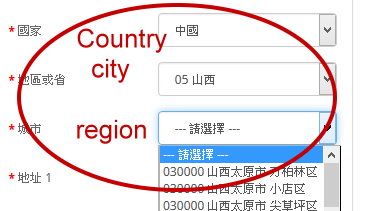
Please ask
The current approach
Would you please set up like this?
Thank you!
Please ask
The current approach
Would you please set up like this?
Thank you!
Please Log in or Create an account to join the conversation.
10 years 3 months ago #244409
by nicolas
Replied by nicolas on topic Understanding Zone hierachy & possible logic error
Hi,
Country is the address_country custom field that you didn't change
Region is the address_state custom field that you didn't change
And for the city, I suppose that you changed the address_city field from a text field to a dropdown.
Is that so ?
How about if someone select another region or country ? They won't be able to enter their city name with the way you did, no ?
In that case, I wouldn't do that.
Or maybe you only ship in China ?
We would need to know more about what you want to do with your website to be able to tell you if it's good or not.
Country is the address_country custom field that you didn't change
Region is the address_state custom field that you didn't change
And for the city, I suppose that you changed the address_city field from a text field to a dropdown.
Is that so ?
How about if someone select another region or country ? They won't be able to enter their city name with the way you did, no ?
In that case, I wouldn't do that.
Or maybe you only ship in China ?
We would need to know more about what you want to do with your website to be able to tell you if it's good or not.
Please Log in or Create an account to join the conversation.
10 years 3 months ago - 10 years 3 months ago #244528
by hlv008
Replied by hlv008 on topic Understanding Zone hierachy & possible logic error
Thank you for your reply.
The picture I attached was a screen capture from another website I found online. And I think maybe you can help me set up like that. In the "region" option, I would like to check the zone and the zip code, as what you said to turn it to be a dropdown instead of a text field. Also, when I try to choose some of the cities in Taiwan, it turns out that I cannot find the correct regions.
Hence I was wondering if you can deal with the aforementioned problems. Thank you.
The picture I attached was a screen capture from another website I found online. And I think maybe you can help me set up like that. In the "region" option, I would like to check the zone and the zip code, as what you said to turn it to be a dropdown instead of a text field. Also, when I try to choose some of the cities in Taiwan, it turns out that I cannot find the correct regions.
Hence I was wondering if you can deal with the aforementioned problems. Thank you.
Last edit: 10 years 3 months ago by hlv008.
Please Log in or Create an account to join the conversation.
10 years 3 months ago #244557
by nicolas
Replied by nicolas on topic Understanding Zone hierachy & possible logic error
Hi,
I'm sorry but I don't understand what you mean.
What do you mean by " I cannot find the correct regions" ?
Where do you " try to choose some of the cities in Taiwan" ?
When you say "I would like to check the zone and the zip code", where do you want to do that and what kind of check do you want to do ?
What do you mean by "In the "region" option" ? There is no such field by default. Are you talking about the "state" field ?
I'm sorry but I don't understand what you mean.
What do you mean by " I cannot find the correct regions" ?
Where do you " try to choose some of the cities in Taiwan" ?
When you say "I would like to check the zone and the zip code", where do you want to do that and what kind of check do you want to do ?
What do you mean by "In the "region" option" ? There is no such field by default. Are you talking about the "state" field ?
Please Log in or Create an account to join the conversation.
10 years 3 months ago - 10 years 3 months ago #244726
by hlv008
Replied by hlv008 on topic Understanding Zone hierachy & possible logic error
The picture I attached is the setting we could see now.
However, after I click the state I want, I can not see the change.
(All the states do not share the same cities.)
I was wondering if you could tell me how to deal with the issue, thanks.
However, after I click the state I want, I can not see the change.
(All the states do not share the same cities.)
I was wondering if you could tell me how to deal with the issue, thanks.
Last edit: 10 years 3 months ago by hlv008.
Please Log in or Create an account to join the conversation.
10 years 3 months ago #244727
by nicolas
Replied by nicolas on topic Understanding Zone hierachy & possible logic error
Hi,
So your question is "How to configure cities as sub zones for states and have them refresh when the state changes ?".
There is no such system in HikaShop.
HikaShop only handles dynamic refresh between state zones and country zones.
So if you want to have cities dynamically refresh, you would have to configure them as state zones, then configure states as country zones, rename the address_country field as state and the address_state field as city, and deactivate the address_city field.
That supposes that you would only ship to one country.
If you need to ship to several countries, I would recommend to leave the fields and zones as they are by default, and leave the address_city field as a text input field so that the customers can write themselves the name of their city.
So your question is "How to configure cities as sub zones for states and have them refresh when the state changes ?".
There is no such system in HikaShop.
HikaShop only handles dynamic refresh between state zones and country zones.
So if you want to have cities dynamically refresh, you would have to configure them as state zones, then configure states as country zones, rename the address_country field as state and the address_state field as city, and deactivate the address_city field.
That supposes that you would only ship to one country.
If you need to ship to several countries, I would recommend to leave the fields and zones as they are by default, and leave the address_city field as a text input field so that the customers can write themselves the name of their city.
Please Log in or Create an account to join the conversation.
Time to create page: 0.219 seconds