

- Posts: 41
- Thank you received: 0
How to set USPS to FREE shipping on orders >$50
11 years 9 months ago #188147
by okynnor
How to set USPS to FREE shipping on orders >$50 was created by okynnor
-- url of the page with the problem -- :
www.bityard.com
-- HikaShop version -- : 2.3.5
-- Joomla version -- : 3.3.6
Hi,
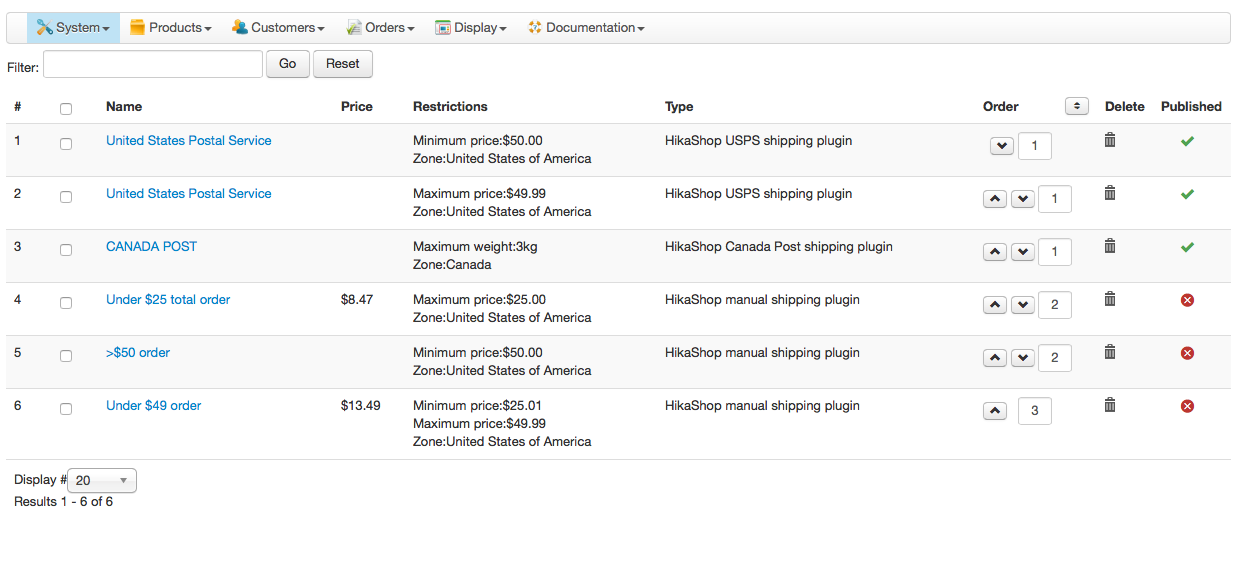
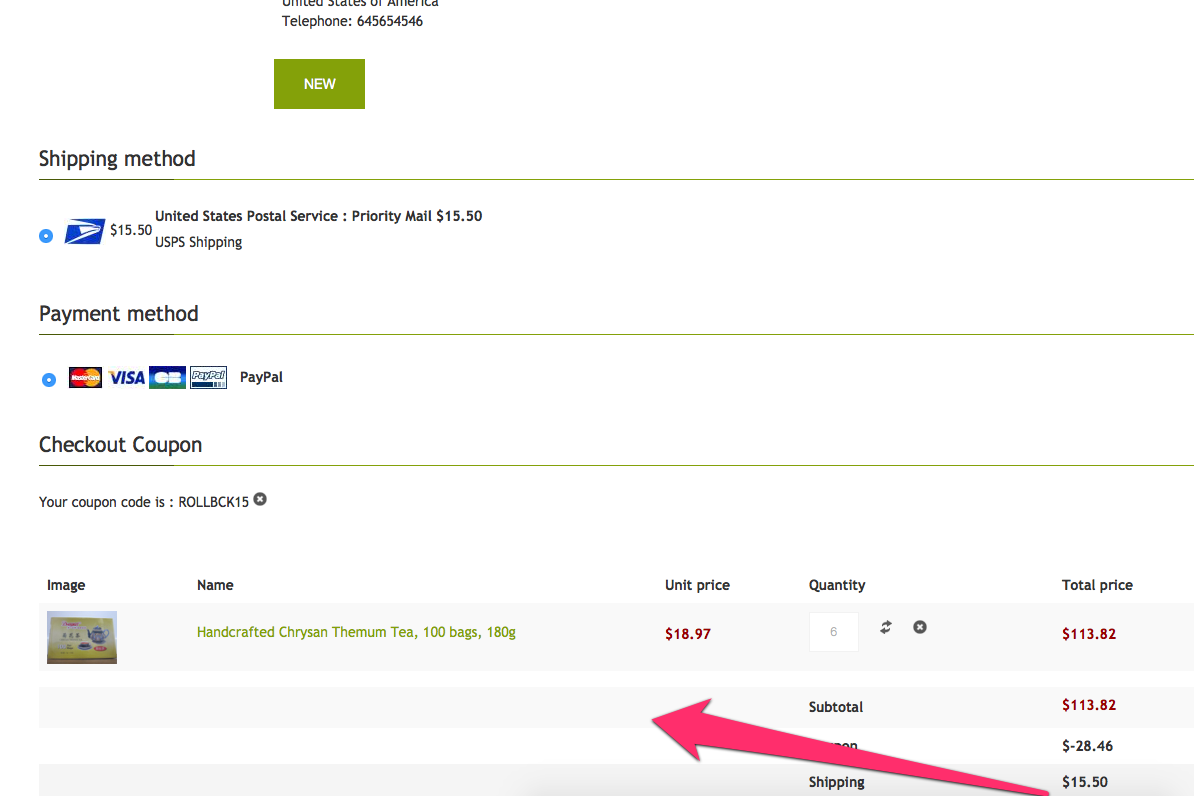
How can I setup the USPS shipping to allow FREE shipping on orders >=$50?
See the screenshots I've attached.
-- HikaShop version -- : 2.3.5
-- Joomla version -- : 3.3.6
Hi,
How can I setup the USPS shipping to allow FREE shipping on orders >=$50?
See the screenshots I've attached.
Please Log in or Create an account to join the conversation.

Less
More
- Posts: 12953
- Thank you received: 1778
11 years 9 months ago #188164
by Mohamed Thelji
Replied by Mohamed Thelji on topic How to set USPS to FREE shipping on orders >$50
Hello,
The solution will be to use the USPS shipping method for orders which have a price between 0 - 50 and then use a manual shipping method with a price equals to 0 for orders with a price higher than 50.
To do that you'll just have to use the "Minimum - Maximum Price" options through you shipping configuration page.
The solution will be to use the USPS shipping method for orders which have a price between 0 - 50 and then use a manual shipping method with a price equals to 0 for orders with a price higher than 50.
To do that you'll just have to use the "Minimum - Maximum Price" options through you shipping configuration page.
Please Log in or Create an account to join the conversation.
11 years 9 months ago #188257
by okynnor
Replied by okynnor on topic How to set USPS to FREE shipping on orders >$50
Hi,
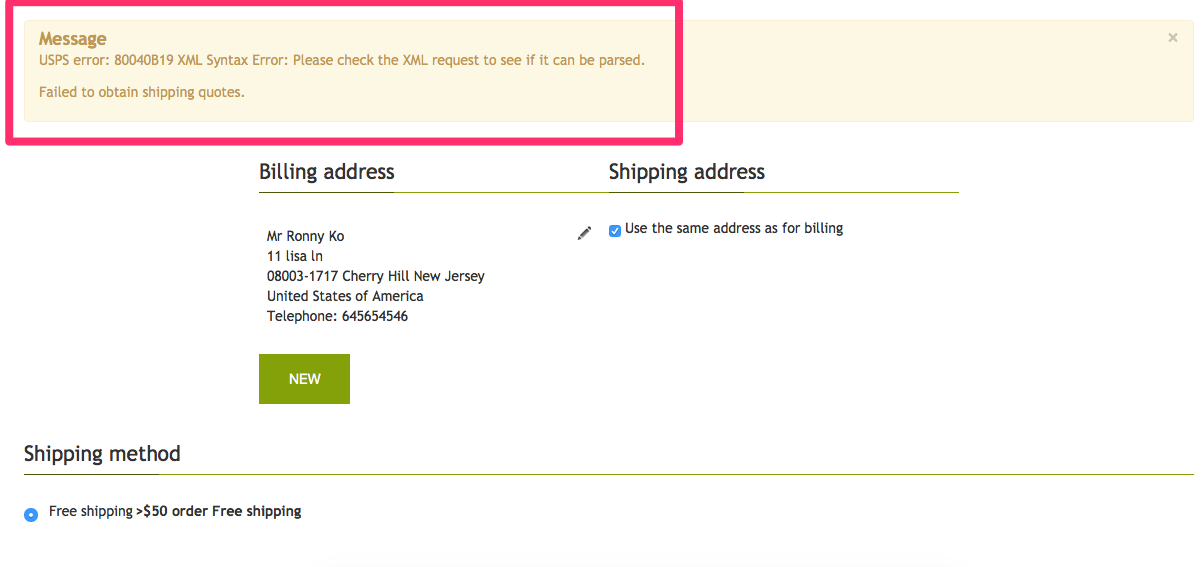
OK, so that addressed the issue of the >$50 FREE SHIPPING problem.
Now I have an error message which to me is OK but to a customer, they will think get confused.
Message
USPS error: 80040B19 XML Syntax Error: Please check the XML request to see if it can be parsed.
Failed to obtain shipping quotes.
Of course, there will be an error because the total of the order is now greater than $50, thus the FREE shipping manual plugin will work.
But is there a way to:
1. Suppress the message, or
2. hide?
OK, so that addressed the issue of the >$50 FREE SHIPPING problem.
Now I have an error message which to me is OK but to a customer, they will think get confused.
Message
USPS error: 80040B19 XML Syntax Error: Please check the XML request to see if it can be parsed.
Failed to obtain shipping quotes.
Of course, there will be an error because the total of the order is now greater than $50, thus the FREE shipping manual plugin will work.
But is there a way to:
1. Suppress the message, or
2. hide?
Please Log in or Create an account to join the conversation.

11 years 9 months ago #188261
by Jerome
Jerome - Obsidev.com
HikaMarket & HikaSerial developer / HikaShop core dev team.
Replied by Jerome on topic How to set USPS to FREE shipping on orders >$50
Hi,
Like Mohamed wrote in his previous message, the shipping method that you have to create for the order > $50, is a manual shipping method ; not a USPS one.
Regards,
Like Mohamed wrote in his previous message, the shipping method that you have to create for the order > $50, is a manual shipping method ; not a USPS one.
Regards,
Jerome - Obsidev.com
HikaMarket & HikaSerial developer / HikaShop core dev team.
Please Log in or Create an account to join the conversation.
11 years 8 months ago #188621
by okynnor
Replied by okynnor on topic How to set USPS to FREE shipping on orders >$50
I'm sorry, but the shipping method for order >$50 was already a _manual_ one. Please advise.
Please Log in or Create an account to join the conversation.
11 years 8 months ago #188625
by Jerome
Jerome - Obsidev.com
HikaMarket & HikaSerial developer / HikaShop core dev team.
Replied by Jerome on topic How to set USPS to FREE shipping on orders >$50
Hi,
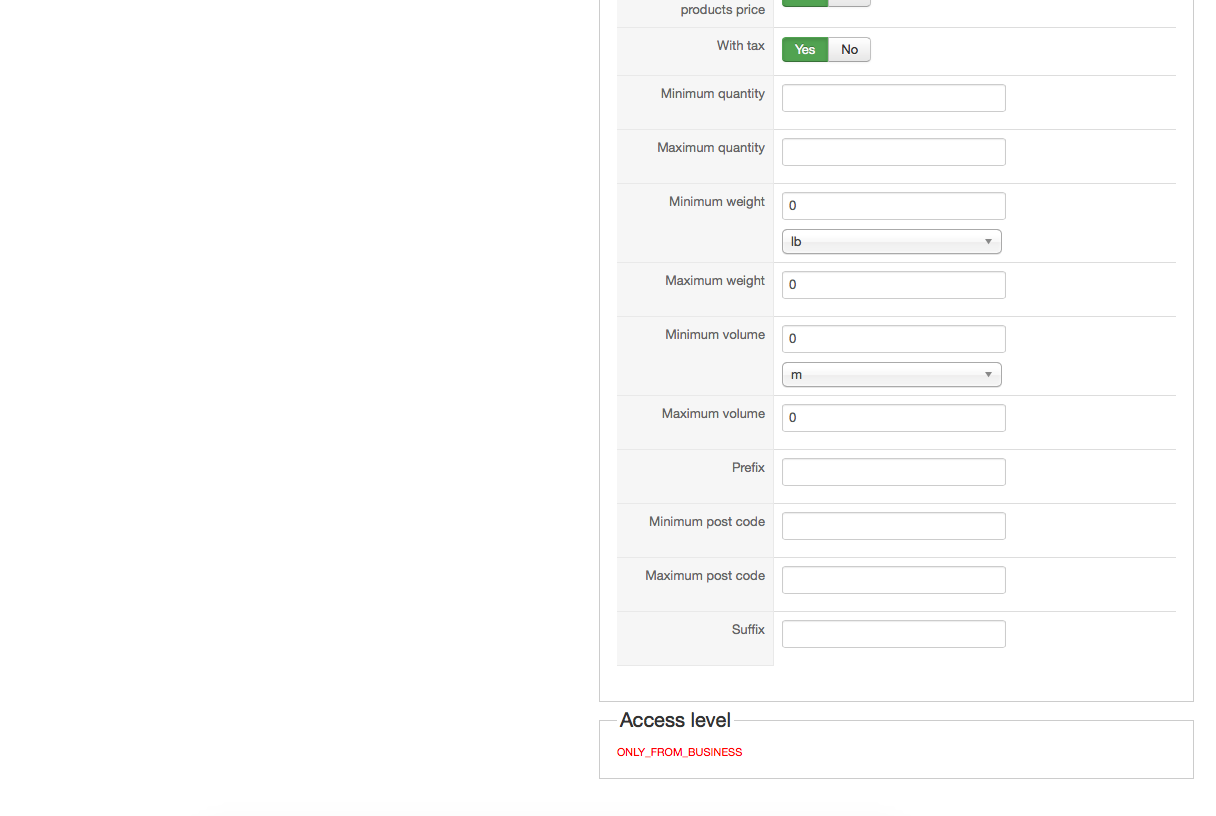
So please check your USPS configuration and post a screenshot here.
Thanks to that, we could see if something is wrong.
Regards,
So please check your USPS configuration and post a screenshot here.
Thanks to that, we could see if something is wrong.
Regards,
Jerome - Obsidev.com
HikaMarket & HikaSerial developer / HikaShop core dev team.
Please Log in or Create an account to join the conversation.
11 years 8 months ago #188652
by okynnor
Replied by okynnor on topic How to set USPS to FREE shipping on orders >$50
Hi,
As per your request..
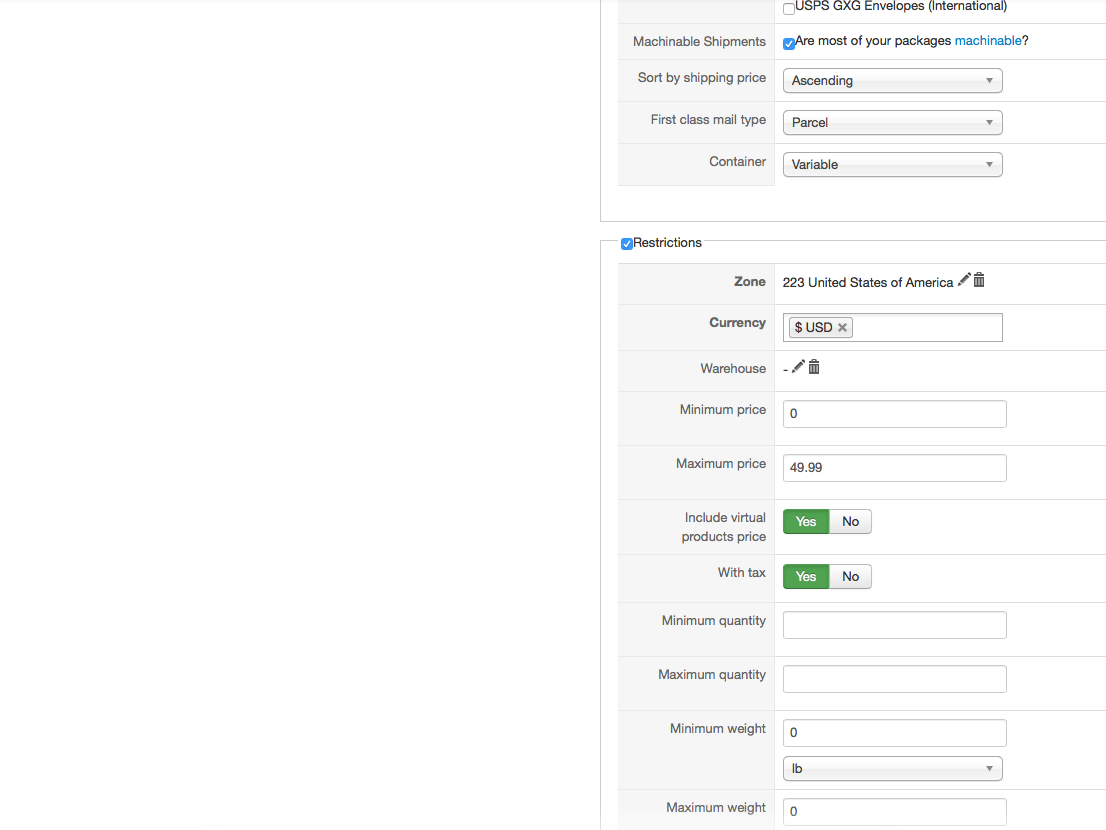
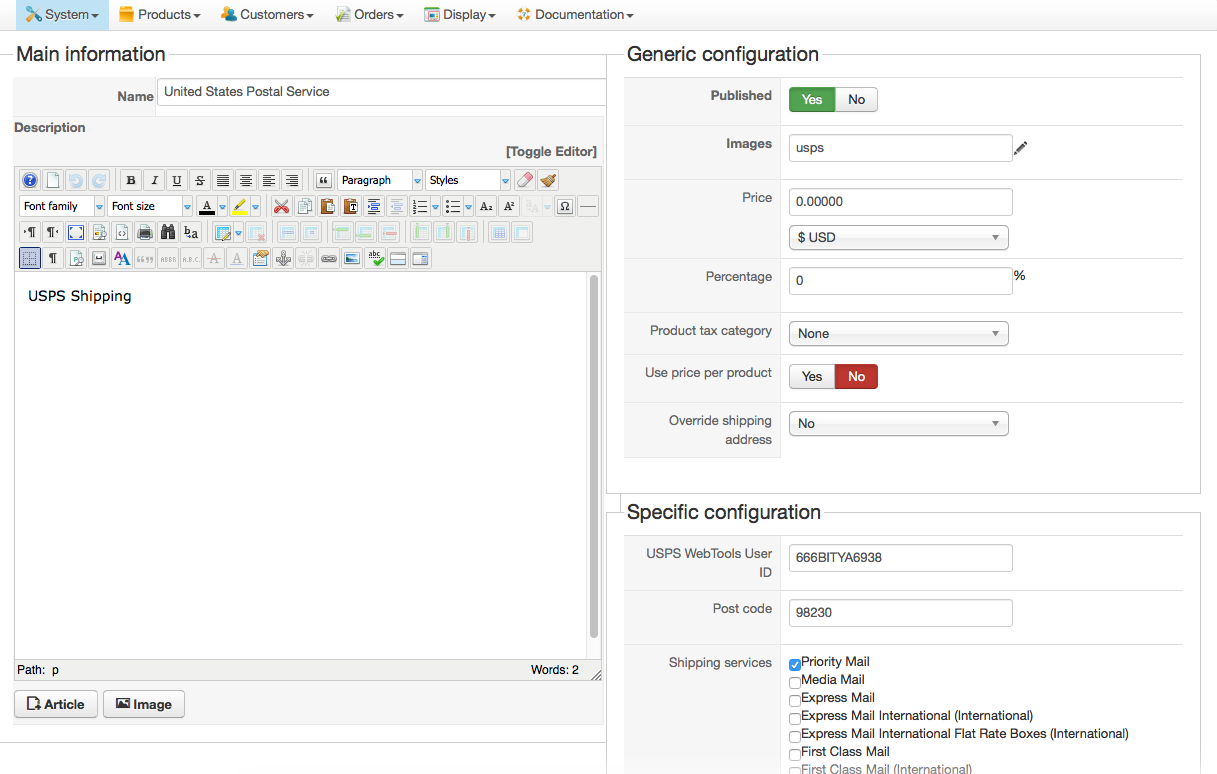
As per your request..
Please Log in or Create an account to join the conversation.
Less
More
- Posts: 12953
- Thank you received: 1778
11 years 8 months ago #188730
by Mohamed Thelji
Replied by Mohamed Thelji on topic How to set USPS to FREE shipping on orders >$50
Hello,
Can you give me a temporary back-end access through a private message so that I can directly test it ?
Thanks.
Can you give me a temporary back-end access through a private message so that I can directly test it ?
Thanks.
Please Log in or Create an account to join the conversation.
Less
More
- Posts: 12953
- Thank you received: 1778
11 years 8 months ago #188939
by Mohamed Thelji
Replied by Mohamed Thelji on topic How to set USPS to FREE shipping on orders >$50
Hello,
Your issue is coming from the fact that you didn't have added your credential through your USPS method with the "Minimum Price" option set to 50.
Your issue is coming from the fact that you didn't have added your credential through your USPS method with the "Minimum Price" option set to 50.
Please Log in or Create an account to join the conversation.
11 years 8 months ago #189164
by okynnor
Replied by okynnor on topic How to set USPS to FREE shipping on orders >$50
I'm not sure Im quite following your answer.
There is not $50 USPS shipping method ~ you advised me earlier to use a manual method for anything >=$50 so of course I wouldn't have any USPS credentials over there.
The next one down is the only USPS method which is $0-$49.99 and that should have the credentials already for USPS.
Would you please clarify?
Ronny
There is not $50 USPS shipping method ~ you advised me earlier to use a manual method for anything >=$50 so of course I wouldn't have any USPS credentials over there.
The next one down is the only USPS method which is $0-$49.99 and that should have the credentials already for USPS.
Would you please clarify?
Ronny
Please Log in or Create an account to join the conversation.
Less
More
- Posts: 12953
- Thank you received: 1778
11 years 8 months ago #189188
by Mohamed Thelji
Replied by Mohamed Thelji on topic How to set USPS to FREE shipping on orders >$50
Your issue was coming from the "United States Postal Service" shipping method, with the "Minimum price:$50.00", I just unpublished it, so you won't have your issue.
Please Log in or Create an account to join the conversation.
Less
More
- Posts: 1
- Thank you received: 0
11 years 8 months ago #190887
by loneswimmer
Replied by loneswimmer on topic How to set USPS to FREE shipping on orders >$50
We are a farm to home delivery business, we actually deliver the products our self to your home. Our rate is $100 or more for free, under that is a $15 delivery fee, with a minimum purchase of $40. I have the shipping set up. I have manual shipping plug-in set up right now, and I am able to get the $40 minimum order to work, where customers cannot order unless they reach that total, so all good there. I have checked and the $15 fee shows all the way to the PayPal page. My issue is how to set it up for orders over $100 to be free delivery with no $15 fee showing. I have tried and am confused on that one component of free shipping for $100 or more. We are calling it shiipping fee even though we deliver, no worries there. Can you help me please?
Please Log in or Create an account to join the conversation.
Less
More
- Posts: 12953
- Thank you received: 1778
11 years 8 months ago #190893
by Mohamed Thelji
Replied by Mohamed Thelji on topic How to set USPS to FREE shipping on orders >$50
Hello,
- One with a "Maximum price" option set to 99.99, and a "Price" option set to 15
- One with a "Minimum price" optione set to 100, and a "Price" option set to 0
The solution will be to directly create 2 shipping method :My issue is how to set it up for orders over $100 to be free delivery with no $15 fee showing. I have tried and am confused on that one component of free shipping for $100 or more. We are calling it shiipping fee even though we deliver, no worries there. Can you help me please?
- One with a "Maximum price" option set to 99.99, and a "Price" option set to 15
- One with a "Minimum price" optione set to 100, and a "Price" option set to 0
Please Log in or Create an account to join the conversation.
Time to create page: 0.443 seconds