

- Posts: 20
- Thank you received: 0
Canpar plugin error
11 years 7 months ago #192323
by spark-
Canpar plugin error was created by spark-
-- HikaShop version -- : 2.3.5
-- Error-message(debug-mod must be tuned on) -- : Notice: Undefined index: XMLpackage in /home/bulkbu5/public_html/sandbox/plugins/hikashopshipping/canpar/canpar.php on line 502
Notice: Array to string conversion in /home/bulkbu5/public_html/sandbox/plugins/hikashopshipping/canpar/canpar.php on line 502
Notice: Array to string conversion in /home/bulkbu5/public_html/sandbox/plugins/hikashopshipping/canpar/canpar.php on line 502
Fatal error: [] operator not supported for strings in /home/bulkbu5/public_html/sandbox/plugins/hikashopshipping/canpar/canpar.php on line 523
I would get these errors when the grouped packages would exceed one (1). Each additional package over one would generate a string conversion error. I changed line 502 from
to
it seems to have repaired the issue for me. I also made this change to line 478. Please confirm if there is a better or alternate solution.
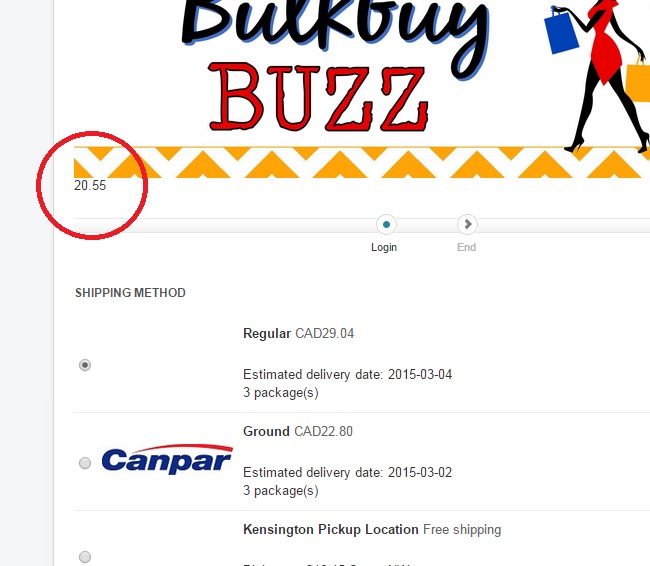
Also, the canpar base rate is appearing at the top of the checkout page. I'm not able to locate where in the code this is being generated. Please advise.
Thanks,
Steve
-- Error-message(debug-mod must be tuned on) -- : Notice: Undefined index: XMLpackage in /home/bulkbu5/public_html/sandbox/plugins/hikashopshipping/canpar/canpar.php on line 502
Notice: Array to string conversion in /home/bulkbu5/public_html/sandbox/plugins/hikashopshipping/canpar/canpar.php on line 502
Notice: Array to string conversion in /home/bulkbu5/public_html/sandbox/plugins/hikashopshipping/canpar/canpar.php on line 502
Fatal error: [] operator not supported for strings in /home/bulkbu5/public_html/sandbox/plugins/hikashopshipping/canpar/canpar.php on line 523
I would get these errors when the grouped packages would exceed one (1). Each additional package over one would generate a string conversion error. I changed line 502 from
Code:
$data['XMLpackage'] .= $this -> _createPackage($data, $product, $rate, $order);
to
Code:
$data['XMLpackage'][] = $this -> _createPackage($data, $product, $rate, $order);
it seems to have repaired the issue for me. I also made this change to line 478. Please confirm if there is a better or alternate solution.
Also, the canpar base rate is appearing at the top of the checkout page. I'm not able to locate where in the code this is being generated. Please advise.
Thanks,
Steve
Please Log in or Create an account to join the conversation.

Less
More
- Posts: 12953
- Thank you received: 1778
11 years 7 months ago #192358
by Mohamed Thelji
Replied by Mohamed Thelji on topic Canpar plugin error
Hello Steve,
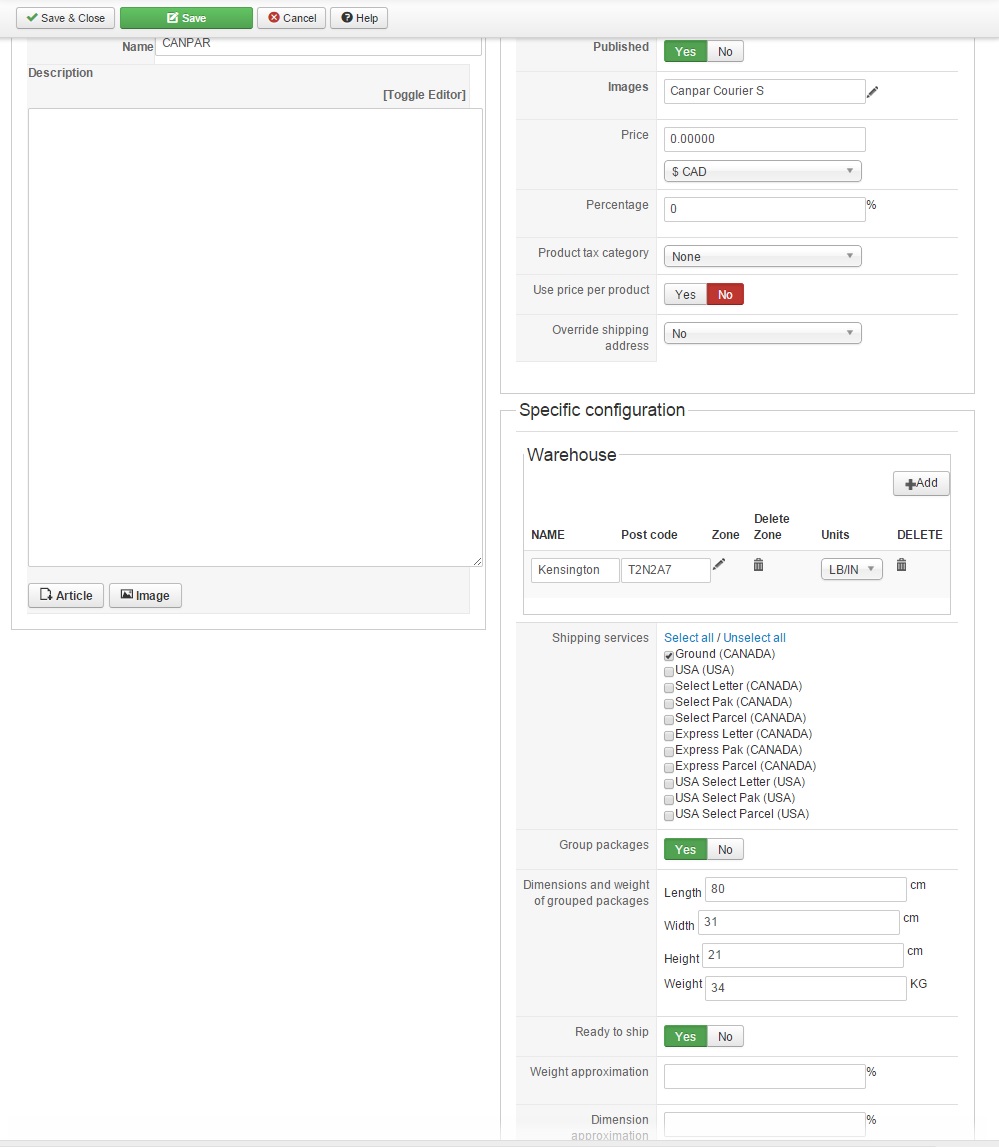
Can you show me some screenshots of how did you configured your Canpar shipping method so that I can test it on my end ?
Thanks.
Can you show me some screenshots of how did you configured your Canpar shipping method so that I can test it on my end ?
Thanks.
Please Log in or Create an account to join the conversation.
11 years 7 months ago #192444
by spark-
Replied by spark- on topic Canpar plugin error
Here's my current config.
Please Log in or Create an account to join the conversation.
11 years 7 months ago #192445
by spark-
Replied by spark- on topic Canpar plugin error
I've also modified line 444 to accommodate a larger and heavier maximum box size.
This was based on your similar recommendation for the Canada Post plugin in thread www.hikashop.com/forum/shipping-methods/...t-plugin-issues.html
Regards,
Steve
Code:
$limitation = array('length' => 80, 'weight' => 34, 'width' => 50, 'height' => 50);
This was based on your similar recommendation for the Canada Post plugin in thread www.hikashop.com/forum/shipping-methods/...t-plugin-issues.html
Regards,
Steve
Please Log in or Create an account to join the conversation.
Less
More
- Posts: 12953
- Thank you received: 1778
11 years 7 months ago #192739
by Mohamed Thelji
Replied by Mohamed Thelji on topic Canpar plugin error
Hello Steve,
I just tested it on my end, and I'm not having any notice/fatal error.
Regarding the number that is currently displayed during your checkout workflow when you publish your Canpar shipping method, you should edit the canpar.php file and change this line :
By :
I just tested it on my end, and I'm not having any notice/fatal error.
Regarding the number that is currently displayed during your checkout workflow when you publish your Canpar shipping method, you should edit the canpar.php file and change this line :
Code:
echo($method['value']);
Code:
//echo($method['value']);
Please Log in or Create an account to join the conversation.
Time to create page: 0.145 seconds