

- Posts: 637
- Thank you received: 26
shipping method restrictions for products
8 years 11 months ago - 8 years 11 months ago #280966
by Lumiga
Kind regards,
Lumiga
shipping method restrictions for products was created by Lumiga
-- url of the page with the problem --
-- HikaShop version -- : 3.2.0
-- Joomla version -- : 3.8
-- PHP version -- : 7
Hi Hikashop Team,
My client have different products in their webshop and they sent only to their own country (Netherlands) and Germany. But some of the product categories may not shipped to Germany. How can we prevent these products from being shipped to Germany. But unfortunately
I see no restrictions in the manual shipping methods for products or product categories.
Is there another way we can handle this?
Hope to hear from you.
Kind regards,
Lumiga
P.S. It would be nice if we could have such a sort of options like Woocommerce where product categories and product classes would be very helpful or the Product-level Rules. See:
docs.woocommerce.com/document/woocommerc...-payments/#section-9
-- HikaShop version -- : 3.2.0
-- Joomla version -- : 3.8
-- PHP version -- : 7
Hi Hikashop Team,
My client have different products in their webshop and they sent only to their own country (Netherlands) and Germany. But some of the product categories may not shipped to Germany. How can we prevent these products from being shipped to Germany. But unfortunately
I see no restrictions in the manual shipping methods for products or product categories.
Is there another way we can handle this?
Hope to hear from you.
Kind regards,
Lumiga
P.S. It would be nice if we could have such a sort of options like Woocommerce where product categories and product classes would be very helpful or the Product-level Rules. See:
docs.woocommerce.com/document/woocommerc...-payments/#section-9
Kind regards,
Lumiga
Last edit: 8 years 11 months ago by Lumiga.
Please Log in or Create an account to join the conversation.

8 years 11 months ago #280972
by nicolas
Replied by nicolas on topic shipping method restrictions for products
Hi,
There is.
You need to activate the "use shipping price per product" in your shipping methods.
Then, when you edit a product, you have a "shipping prices" area and there, for each shipping method, you can click on the + button and check the "block" checkbox and save the product settings and these blocked shipping methods won't be available on the checkout when that product is in the cart.
That way, you can restrict shipping methods to different zones and thus block products for some countries.
There is.
You need to activate the "use shipping price per product" in your shipping methods.
Then, when you edit a product, you have a "shipping prices" area and there, for each shipping method, you can click on the + button and check the "block" checkbox and save the product settings and these blocked shipping methods won't be available on the checkout when that product is in the cart.
That way, you can restrict shipping methods to different zones and thus block products for some countries.
The following user(s) said Thank You: Lumiga
Please Log in or Create an account to join the conversation.
8 years 11 months ago #281090
by Lumiga
Kind regards,
Lumiga
Replied by Lumiga on topic shipping method restrictions for products
Thanks Nicolas,
But that's a lot of work to block 7 shipping methods for every product characteristic.
That's more than 2.000 clicks for me.
So I was looking for the Mass Actions and hoped that it will help to do this job for me.
But I can't find a table where this is stored in the database. Also when I do an export from a product with several shipping prices blocked I can't find the table either.
Hope you can give me a hint to find out how to automate this for all products in certain categories.
Kind regards,
Lumiga
But that's a lot of work to block 7 shipping methods for every product characteristic.
That's more than 2.000 clicks for me.
So I was looking for the Mass Actions and hoped that it will help to do this job for me.
But I can't find a table where this is stored in the database. Also when I do an export from a product with several shipping prices blocked I can't find the table either.
Hope you can give me a hint to find out how to automate this for all products in certain categories.
Kind regards,
Lumiga
Kind regards,
Lumiga
Please Log in or Create an account to join the conversation.
8 years 11 months ago #281094
by nicolas
Replied by nicolas on topic shipping method restrictions for products
Hi,
You don't need to do it for each variant of a product. You can do it for the main product and it will apply to all the variants of the product.
The shipping prices per product are not stored in the hikashop_product table and there is no mass action on it.
You can check the hikashop_shipping_price table via your phpmyadmin.
You can export it as a CSV, edit it with excel and import it back.
That way, you can add entries to it rapidely.
You don't need to do it for each variant of a product. You can do it for the main product and it will apply to all the variants of the product.
The shipping prices per product are not stored in the hikashop_product table and there is no mass action on it.
You can check the hikashop_shipping_price table via your phpmyadmin.
You can export it as a CSV, edit it with excel and import it back.
That way, you can add entries to it rapidely.
The following user(s) said Thank You: Lumiga
Please Log in or Create an account to join the conversation.
8 years 11 months ago #281168
by Lumiga
Kind regards,
Lumiga
Replied by Lumiga on topic shipping method restrictions for products
Thanks Nicolas,
I will try to do the CSV trick
For your information. I have tested this several times, but in the most cases you have to set te variants by your self. Sometimes only the default variant is set right. But most of the times it's not set to the variants and you have to do it by yourself.
Kind regards,
Lumiga
I will try to do the CSV trick
You don't need to do it for each variant of a product. You can do it for the main product and it will apply to all the variants of the product.
For your information. I have tested this several times, but in the most cases you have to set te variants by your self. Sometimes only the default variant is set right. But most of the times it's not set to the variants and you have to do it by yourself.
This message contains confidential information
Kind regards,
Lumiga
Kind regards,
Lumiga
Please Log in or Create an account to join the conversation.
8 years 11 months ago #281172
by nicolas
Replied by nicolas on topic shipping method restrictions for products
Hi,
Thanks for the feedback.
Change the code:
to:
in the file administrator/components/com_hikashop/helpers/helper.php and that should fix the issue with the main product shipping prices not taken into account on the frontend because of some changes we've made in the cart system with HikaShop 3.
Let us know how it goes.
Thanks for the feedback.
Change the code:
Code:
$product_ids = array_keys($shipping_price->products);
JArrayHelper::toInteger($product_ids);
Code:
$product_ids = array();
foreach($shipping_price->products as $product){
$product_ids[] = (int)$product->product_id;
}
Let us know how it goes.
Please Log in or Create an account to join the conversation.

Less
More
- Posts: 515
- Thank you received: 22
8 years 10 months ago #281476
by jouwnaambord.nl
Replied by jouwnaambord.nl on topic shipping method restrictions for products
Hi,
Same issue here, tried to change this code in helper.php. Didn't work, there seems to be a codeproblem, the site freezes in step 3.
kind regards,
Michel
Same issue here, tried to change this code in helper.php. Didn't work, there seems to be a codeproblem, the site freezes in step 3.
kind regards,
Michel
Please Log in or Create an account to join the conversation.

8 years 10 months ago #281479
by Jerome
Jerome - Obsidev.com
HikaMarket & HikaSerial developer / HikaShop core dev team.
Also helping the HikaShop support team when having some time or couldn't sleep.
By the way, do not send me private message, use the "contact us" form instead.
Replied by Jerome on topic shipping method restrictions for products
Hello,
Please details your issue and your context.
Unfortunately, we do not know what is "step 3", not your website, version number, configuration, etc.
Nicolas proposed a patch but we did not get any return from "Sailfin73" so we can't tell you right now if it solve the problem.
Regards,
Please details your issue and your context.
Unfortunately, we do not know what is "step 3", not your website, version number, configuration, etc.
Nicolas proposed a patch but we did not get any return from "Sailfin73" so we can't tell you right now if it solve the problem.
Regards,
Jerome - Obsidev.com
HikaMarket & HikaSerial developer / HikaShop core dev team.
Also helping the HikaShop support team when having some time or couldn't sleep.
By the way, do not send me private message, use the "contact us" form instead.
Please Log in or Create an account to join the conversation.
Less
More
- Posts: 515
- Thank you received: 22
8 years 10 months ago #281513
by jouwnaambord.nl
Replied by jouwnaambord.nl on topic shipping method restrictions for products
Hi Jerome,
Well, I changed the code:
$product_ids = array_keys($shipping_price->products);
JArrayHelper::toInteger($product_ids);
to:
$product_ids = array();
foreach($shipping_price->products as $product){
$product_ids[] = (int)$product->product_id;
}
as Nicolas suggested in the file helper.php. There must be an error in the code as the screen turns blank on the checkoutstep where the shippingmethod is presented. Obviously I restored the code to have the site work properly. URL therefore is not usefull, as the helper.php file is again the original one.
Joomla 3.8.1
Hikashop 3.2.0
PHP 7.0
Well, I changed the code:
$product_ids = array_keys($shipping_price->products);
JArrayHelper::toInteger($product_ids);
to:
$product_ids = array();
foreach($shipping_price->products as $product){
$product_ids[] = (int)$product->product_id;
}
as Nicolas suggested in the file helper.php. There must be an error in the code as the screen turns blank on the checkoutstep where the shippingmethod is presented. Obviously I restored the code to have the site work properly. URL therefore is not usefull, as the helper.php file is again the original one.
Joomla 3.8.1
Hikashop 3.2.0
PHP 7.0
Please Log in or Create an account to join the conversation.
8 years 10 months ago - 8 years 10 months ago #281515
by Lumiga
Kind regards,
Lumiga
Replied by Lumiga on topic shipping method restrictions for products
Hi,
Sorry, but the code from Nicolas doesn't fixed the issue. I still have to do all the variants one by one after I set the main product.
I get no freezes or errors like michelpouli when I walk through the checkout process.
Kind regards,
Lumiga
Sorry, but the code from Nicolas doesn't fixed the issue. I still have to do all the variants one by one after I set the main product.
I get no freezes or errors like michelpouli when I walk through the checkout process.
Kind regards,
Lumiga
Kind regards,
Lumiga
Last edit: 8 years 10 months ago by Lumiga.
Please Log in or Create an account to join the conversation.
8 years 10 months ago #281875
by Jerome
Jerome - Obsidev.com
HikaMarket & HikaSerial developer / HikaShop core dev team.
Also helping the HikaShop support team when having some time or couldn't sleep.
By the way, do not send me private message, use the "contact us" form instead.
Replied by Jerome on topic shipping method restrictions for products
Hello,
I set-up a test environnement for that case and my conclusion for the patch is really different than the one proposed by Nicolas.
It is important to keep the "array_key" to get the product_ids since the structure hasn't changed with HikaShop 3 and it's not related to the new cart system.
Here the modified code :
Regards,
I set-up a test environnement for that case and my conclusion for the patch is really different than the one proposed by Nicolas.
It is important to keep the "array_key" to get the product_ids since the structure hasn't changed with HikaShop 3 and it's not related to the new cart system.
Here the modified code :
Code:
foreach($order->shipping_prices as $key => $shipping_price) {
if(empty($shipping_price->price_per_product) || empty($shipping_price->products))
continue;
$shipping_ids = array_keys($shipping_price->price_per_product);
JArrayHelper::toInteger($shipping_ids);
$product_ids = array_keys($shipping_price->products);
$query = 'SELECT a.shipping_id, a.shipping_price_ref_id as `ref_id`, a.shipping_price_min_quantity as `min_quantity`, a.shipping_price_value as `price`, a.shipping_fee_value as `fee` '.
' FROM ' . hikashop_table('shipping_price') . ' AS a '.
' WHERE a.shipping_id IN (' . implode(',', $shipping_ids) . ') '.
' AND a.shipping_price_ref_id IN (' . implode(',', $product_ids) . ') AND a.shipping_price_ref_type = \'product\' '.
' ORDER BY a.shipping_id, a.shipping_price_ref_id, a.shipping_price_min_quantity';
$db = JFactory::getDBO();
$db->setQuery($query);
$ret = $db->loadObjectList();
if(empty($ret))
continue;
$products_qty = $shipping_price->products;
foreach($order->products as $ordered_product) {
if($ordered_product->product_parent_id == 0)
continue;
foreach($ret as $ship) {
if($ordered_product->product_id == $ship->ref_id) {
$products_qty[ (int)$ordered_product->product_parent_id ] -= $products_qty[ (int)$ordered_product->product_id ];
}
}
}
foreach($ret as $ship) {
if($products_qty[$ship->ref_id] > 0 && $ship->min_quantity <= $products_qty[$ship->ref_id]) {
$order->shipping_prices[$key]->price_per_product[$ship->shipping_id]['products'][$ship->ref_id] = ($ship->price * $products_qty[$ship->ref_id]) + $ship->fee;
}
}
unset($products_qty);
}
Regards,
Jerome - Obsidev.com
HikaMarket & HikaSerial developer / HikaShop core dev team.
Also helping the HikaShop support team when having some time or couldn't sleep.
By the way, do not send me private message, use the "contact us" form instead.
Please Log in or Create an account to join the conversation.
Less
More
- Posts: 515
- Thank you received: 22
8 years 10 months ago #282081
by jouwnaambord.nl
Replied by jouwnaambord.nl on topic shipping method restrictions for products
Hi Jerome,
Yes this seems to work. But now there's a warningmessage: "There are items in your shoppingcart that can't be shipped to you."
And there's one more thing: I have a paymentmethods connected to the shippingmethods and they still show when the shippingmethod doesn't.
Yes this seems to work. But now there's a warningmessage: "There are items in your shoppingcart that can't be shipped to you."
And there's one more thing: I have a paymentmethods connected to the shippingmethods and they still show when the shippingmethod doesn't.
Please Log in or Create an account to join the conversation.

Less
More
- Posts: 12953
- Thank you received: 1778
8 years 10 months ago #282091
by Mohamed Thelji
Replied by Mohamed Thelji on topic shipping method restrictions for products
Hello,
In that case, we'll need more information through some screenshots for example about how you configured your :
- Products
- Shipping method(s)
- Payment method(s)
In that case, we'll need more information through some screenshots for example about how you configured your :
- Products
- Shipping method(s)
- Payment method(s)
Please Log in or Create an account to join the conversation.
8 years 10 months ago #282181
by Lumiga
Kind regards,
Lumiga
Replied by Lumiga on topic shipping method restrictions for products
Hi Jerome,
I changed this code in the file administrator/components/com_hikashop/helpers/helper.php
to your code:
See screenshot:
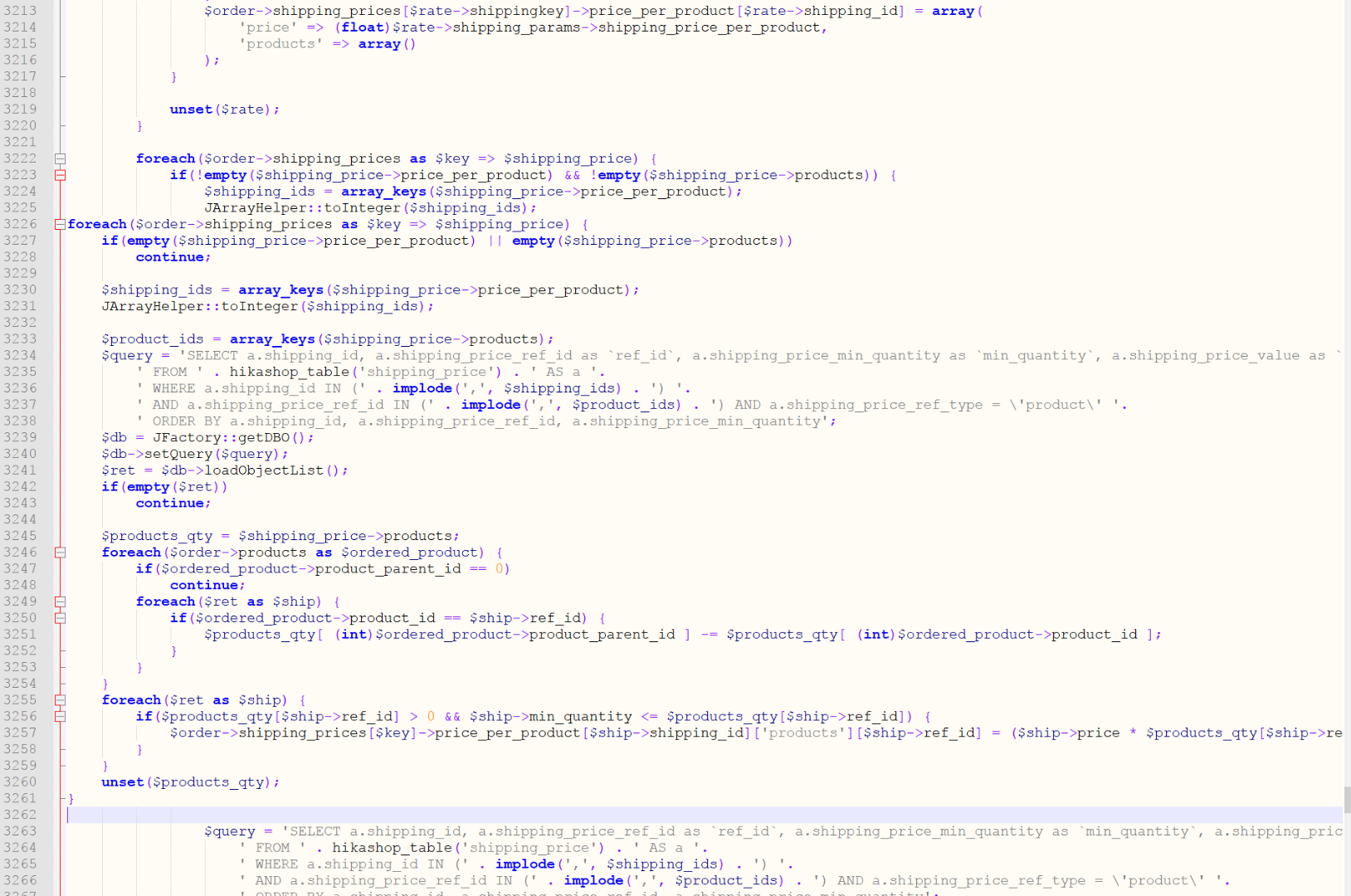
But that didn't fixed the issue that you can do it for the main product and it will apply to all the variants of the product.
It looks like one variant (the first one) is updated but not all the other variants.
But one the second test it looks like only the last variant is updated. So that really strange!!!
P.S. I don't get an warningmessage like michelpouli. I have no issue with shipping and paymentmethodes and shippingmethods showing at the checkout. In my case it's working fine.
There is another issue but that's only related to this issue. Because when I have a product in my cart which may not be sent to Germany (in my case) then I get as shipping address the address from the shop and not from the Germany address. But that's fine!. So when I delete the specific product which may not be sent to Germany, then still the address from the shop is displayed as the shipping address. To fix this I have to go first to step 3 and then select a shipping method and then I have to go back to step 2 to see my address with the option to change it. But that's not really user friendly I think.
I hope you find a solution for both issues.
Kind regards,
Lumiga
I changed this code in the file administrator/components/com_hikashop/helpers/helper.php
Code:
$product_ids = array_keys($shipping_price->products);
JArrayHelper::toInteger($product_ids);
Code:
foreach($order->shipping_prices as $key => $shipping_price) {
if(empty($shipping_price->price_per_product) || empty($shipping_price->products))
continue;
$shipping_ids = array_keys($shipping_price->price_per_product);
JArrayHelper::toInteger($shipping_ids);
$product_ids = array_keys($shipping_price->products);
$query = 'SELECT a.shipping_id, a.shipping_price_ref_id as `ref_id`, a.shipping_price_min_quantity as `min_quantity`, a.shipping_price_value as `price`, a.shipping_fee_value as `fee` '.
' FROM ' . hikashop_table('shipping_price') . ' AS a '.
' WHERE a.shipping_id IN (' . implode(',', $shipping_ids) . ') '.
' AND a.shipping_price_ref_id IN (' . implode(',', $product_ids) . ') AND a.shipping_price_ref_type = \'product\' '.
' ORDER BY a.shipping_id, a.shipping_price_ref_id, a.shipping_price_min_quantity';
$db = JFactory::getDBO();
$db->setQuery($query);
$ret = $db->loadObjectList();
if(empty($ret))
continue;
$products_qty = $shipping_price->products;
foreach($order->products as $ordered_product) {
if($ordered_product->product_parent_id == 0)
continue;
foreach($ret as $ship) {
if($ordered_product->product_id == $ship->ref_id) {
$products_qty[ (int)$ordered_product->product_parent_id ] -= $products_qty[ (int)$ordered_product->product_id ];
}
}
}
foreach($ret as $ship) {
if($products_qty[$ship->ref_id] > 0 && $ship->min_quantity <= $products_qty[$ship->ref_id]) {
$order->shipping_prices[$key]->price_per_product[$ship->shipping_id]['products'][$ship->ref_id] = ($ship->price * $products_qty[$ship->ref_id]) + $ship->fee;
}
}
unset($products_qty);
}
See screenshot:
But that didn't fixed the issue that you can do it for the main product and it will apply to all the variants of the product.
It looks like one variant (the first one) is updated but not all the other variants.
This message contains confidential information
But one the second test it looks like only the last variant is updated. So that really strange!!!
This message contains confidential information
P.S. I don't get an warningmessage like michelpouli. I have no issue with shipping and paymentmethodes and shippingmethods showing at the checkout. In my case it's working fine.
There is another issue but that's only related to this issue. Because when I have a product in my cart which may not be sent to Germany (in my case) then I get as shipping address the address from the shop and not from the Germany address. But that's fine!. So when I delete the specific product which may not be sent to Germany, then still the address from the shop is displayed as the shipping address. To fix this I have to go first to step 3 and then select a shipping method and then I have to go back to step 2 to see my address with the option to change it. But that's not really user friendly I think.
This message contains confidential information
I hope you find a solution for both issues.
Kind regards,
Lumiga
Kind regards,
Lumiga
Please Log in or Create an account to join the conversation.
8 years 10 months ago #282219
by Jerome
Jerome - Obsidev.com
HikaMarket & HikaSerial developer / HikaShop core dev team.
Also helping the HikaShop support team when having some time or couldn't sleep.
By the way, do not send me private message, use the "contact us" form instead.
Replied by Jerome on topic shipping method restrictions for products
Hello,
I'm sorry but you did not replace the code at it should.
In the screenshot we can see twice the line
So it means that you add some content and not replace it.
Best for you would be to re-download the HikaShop 3.2.1 package.
Regards,
I'm sorry but you did not replace the code at it should.
In the screenshot we can see twice the line
Code:
foreach($order->shipping_prices as $key => $shipping_price) {
Best for you would be to re-download the HikaShop 3.2.1 package.
Regards,
Jerome - Obsidev.com
HikaMarket & HikaSerial developer / HikaShop core dev team.
Also helping the HikaShop support team when having some time or couldn't sleep.
By the way, do not send me private message, use the "contact us" form instead.
Please Log in or Create an account to join the conversation.
Time to create page: 0.236 seconds