

- Posts: 104
- Thank you received: 5
Shipping Prices are WRONG !
8 years 7 months ago #287553
by p3.chuck
Replied by p3.chuck on topic Shipping Prices are WRONG !
These packages should be grouped because that is what is set in the Options. This just keeps dragging on. I'm not sure if I'm not explaining myself well or you don't understand how your software works and just have not taking the time to look at the product in our back end to see how it is setup. I've used the ProX Plus in my examples because it is a product that is setup with options - which makes the software know that there are 2 boxes in the product.
The "ProX Plus Package: Virtual Golfing Package" product is in the 'Root->Golf Simulator Packages' folder of products. If you look at the product you will see it has no weight and no volume settings. Instead, it has 2 Options. [44] Sensor Unit with 132 Courses (15x11x8 12#) and [29] pkg_Stance_Mat (48x24x8 29#). These options are listed in 'Root->Package Items' in the products tree. There you will see that each has its dimensions and weight filled in.
This is the way it needs to be setup to get the 2 individual boxes into the single product (this idea came from Nicholas in a different post). This works well and allows the items to show up properly on the shipping page with just a single shipping option list.
The "ProX Plus Package: Virtual Golfing Package" product is in the 'Root->Golf Simulator Packages' folder of products. If you look at the product you will see it has no weight and no volume settings. Instead, it has 2 Options. [44] Sensor Unit with 132 Courses (15x11x8 12#) and [29] pkg_Stance_Mat (48x24x8 29#). These options are listed in 'Root->Package Items' in the products tree. There you will see that each has its dimensions and weight filled in.
This is the way it needs to be setup to get the 2 individual boxes into the single product (this idea came from Nicholas in a different post). This works well and allows the items to show up properly on the shipping page with just a single shipping option list.
Please Log in or Create an account to join the conversation.

Less
More
- Posts: 12953
- Thank you received: 1778
8 years 7 months ago #287575
by Mohamed Thelji
Replied by Mohamed Thelji on topic Shipping Prices are WRONG !
Hello,
In that case we'll retrieve your products configuration and directly test it on our end to make sure that displayed rates are correct, but also to compare rates returned from the UPS platform through the plugin and their online tool.
Best regards,
Mohamed Thelji.
In that case we'll retrieve your products configuration and directly test it on our end to make sure that displayed rates are correct, but also to compare rates returned from the UPS platform through the plugin and their online tool.
Best regards,
Mohamed Thelji.
Please Log in or Create an account to join the conversation.
Less
More
- Posts: 12953
- Thank you received: 1778
8 years 7 months ago - 8 years 7 months ago #287647
by Mohamed Thelji
Replied by Mohamed Thelji on topic Shipping Prices are WRONG !
Hello,
After some more testing, here is the code that is sent to the UPS platform when you have the "ProX plus" product with both options in your cart :
If you product dimensions are 42x24x8 and 15x11x8, then dimensions of the "grouped product package" will be will be 48x24x16 with a total weight of 41 lbs(29 + 12).
When I tested it on my end, returned rates were the same as on your end, but we also tested it via UPS online calculation tool (cf. screenshots).
So we can't do nothing more, the UPS shipping method seems to be correctly sending information to the UPS platform and is only displaying returned rates.
After some more testing, here is the code that is sent to the UPS platform when you have the "ProX plus" product with both options in your cart :
Code:
<?xml version="1.0" ?>
<AccessRequest xml:lang='en-US'>
<AccessLicenseNumber>XXX</AccessLicenseNumber>
<UserId>XXXXX</UserId>
<Password>XXXXX</Password>
</AccessRequest>
<?xml version="1.0" ?>
<RatingServiceSelectionRequest>
<Request>
<TransactionReference>
<CustomerContext>Rating and Service</CustomerContext>
<XpciVersion>1.0</XpciVersion>
</TransactionReference>
<RequestAction>Rate</RequestAction>
<RequestOption>shop</RequestOption>
</Request>
<PickupType>
<Code>01</Code>
<Description>Daily Pickup</Description>
</PickupType>
<Shipment>
<Description>Rate Shopping - Domestic</Description>
<Shipper>
<ShipperNumber>XXXXXX</ShipperNumber>
<Address>
<City>Bethel</City>
<PostalCode>04217</PostalCode>
<CountryCode>US</CountryCode>
</Address>
</Shipper>
<ShipTo>
<Address>
<City>Bethel</City>
<StateProvinceCode>ME</StateProvinceCode>
<PostalCode>04217</PostalCode>
<CountryCode>US</CountryCode>
<ResidentialAddressIndicator/>
</Address>
</ShipTo>
<ShipFrom>
<Address>
<City>Bethel</City>
<StateProvinceCode>ME</StateProvinceCode>
<PostalCode>04217</PostalCode>
<CountryCode>US</CountryCode>
</Address>
</ShipFrom>
<Package>
<PackagingType>
<Code>02</Code>
</PackagingType>
<Description>Shop</Description>
<Dimensions>
<UnitOfMeasurement>
<Code>IN</Code>
</UnitOfMeasurement>
<Length>24</Length>
<Width>16</Width>
<Height>48</Height>
</Dimensions>
<PackageWeight>
<UnitOfMeasurement>
<Code>LBS</Code>
</UnitOfMeasurement>
<Weight>40.999994758377</Weight>
</PackageWeight>
<PackageServiceOptions>
<InsuredValue>
<CurrencyCode>EUR</CurrencyCode>
<MonetaryValue>90</MonetaryValue>
</InsuredValue>
</PackageServiceOptions>
</Package>
<ShipmentServiceOptions />
</Shipment>
</RatingServiceSelectionRequest>
If you product dimensions are 42x24x8 and 15x11x8, then dimensions of the "grouped product package" will be will be 48x24x16 with a total weight of 41 lbs(29 + 12).
When I tested it on my end, returned rates were the same as on your end, but we also tested it via UPS online calculation tool (cf. screenshots).
So we can't do nothing more, the UPS shipping method seems to be correctly sending information to the UPS platform and is only displaying returned rates.
Last edit: 8 years 7 months ago by Mohamed Thelji.
Please Log in or Create an account to join the conversation.
8 years 7 months ago #287671
by p3.chuck
Replied by p3.chuck on topic Shipping Prices are WRONG !
I realize you're trying to close this out, but if you could please pass this along to someone who is willing to read the post and actually try to resolve the customer issue it would be appreciated. Maybe a member of your senior management team would actually want to help.
You're passing the information to UPS WRONG and that is likely why the pricing is wrong. This is 2 packages, not one oversized package. That's the first problem. Problem # 2 is why is there 'Insured Value' being passed? We're not insuring the package. And we surely would not be passing any values as Euros.
If you could please have someone look into this so we can get it corrected it would be appreciated. This has been dragging on far too long and I'm sure we're losing sales because of it.
You're passing the information to UPS WRONG and that is likely why the pricing is wrong. This is 2 packages, not one oversized package. That's the first problem. Problem # 2 is why is there 'Insured Value' being passed? We're not insuring the package. And we surely would not be passing any values as Euros.
If you could please have someone look into this so we can get it corrected it would be appreciated. This has been dragging on far too long and I'm sure we're losing sales because of it.
Please Log in or Create an account to join the conversation.
8 years 7 months ago #287673
by p3.chuck
Replied by p3.chuck on topic Shipping Prices are WRONG !
And why would a $1600 product only be insured for approximately $110? Not that we want it insured, but if your system was going to insure it - wouldn't it be for the full price?
Please Log in or Create an account to join the conversation.

8 years 7 months ago #287677
by Jerome
Jerome - Obsidev.com
HikaMarket & HikaSerial developer / HikaShop core dev team.
Also helping the HikaShop support team when having some time or couldn't sleep.
By the way, do not send me private message, use the "contact us" form instead.
Replied by Jerome on topic Shipping Prices are WRONG !
Hello,
The processing of the package size is using the official algorithm and it does not include "packaging compression" method.
If you have another algorithm, instead of telling that the values are wrong in uppercase ; it would best for everyone to simply provide the details of your calculation ; your algorithm.
Only then we will be able to give you more details.
But without any concrete details ; I'm sorry but I can't do anything useful for you.
CF : www.hikashop.com/support/documentation/9...ipping-ups-form.html
Regards,
I'm afraid that without any "proof" or explanation on what should be the "right" processing ; we can't give you any useful answer.You're passing the information to UPS WRONG and that is likely why the pricing is wrong.
The processing of the package size is using the official algorithm and it does not include "packaging compression" method.
If you have another algorithm, instead of telling that the values are wrong in uppercase ; it would best for everyone to simply provide the details of your calculation ; your algorithm.
Only then we will be able to give you more details.
But without any concrete details ; I'm sorry but I can't do anything useful for you.
Because you have configured the plugin to do so by activating the corresponding setting "include prices".is why is there 'Insured Value' being passed?
CF : www.hikashop.com/support/documentation/9...ipping-ups-form.html
I really suggest you to read the plugin documentation step-by-step ; it explains the various setting and their implications.Include prices : If this option is activated the price of goods is given to UPS so that it can add the shipping insurance in the prices (more expensive).
Regards,
Jerome - Obsidev.com
HikaMarket & HikaSerial developer / HikaShop core dev team.
Also helping the HikaShop support team when having some time or couldn't sleep.
By the way, do not send me private message, use the "contact us" form instead.
Please Log in or Create an account to join the conversation.
8 years 7 months ago #287776
by p3.chuck
Replied by p3.chuck on topic Shipping Prices are WRONG !
Hi Jerome,
I can state that it is being processed wrong, but the XML that was posted shows 1 package being sent to UPS. This product is setup with options that include 2 individual packages. I have no idea what your algorithms are, but I do have UPS WorldShip and the ability to check the pricing online as well. And when I input these 2 packages into those UPS systems, they come out entirely different than HikaShop is providing. I would imagine that UPS uses the same algorithms in all of their software to calculate prices so they are consistent.
Also, I have 'Use price per product' set to 'No'. Originally, I did have it incorrect but it was fixed before that XML was posted. And as I stated, if it was using the insurance why would the price not match the product price?
We have enjoyed using HikaShop and the system seems to work quite well with the exception of processing multiple packages in a single product. It was explained to me, previously by HikaShop, that the way to accomplish this was by using Options. Then the dimensions of the Options packages would be used and sent to UPS. Thus the reason that products that have multiple boxes are setup that way in our HikaShop setup.
In this specific example (the ProX Plus), the information being passed to UPS should be:
If you could provide instructions or an update on how to successfully have this work it would be greatly appreciated.
I can state that it is being processed wrong, but the XML that was posted shows 1 package being sent to UPS. This product is setup with options that include 2 individual packages. I have no idea what your algorithms are, but I do have UPS WorldShip and the ability to check the pricing online as well. And when I input these 2 packages into those UPS systems, they come out entirely different than HikaShop is providing. I would imagine that UPS uses the same algorithms in all of their software to calculate prices so they are consistent.
Also, I have 'Use price per product' set to 'No'. Originally, I did have it incorrect but it was fixed before that XML was posted. And as I stated, if it was using the insurance why would the price not match the product price?
We have enjoyed using HikaShop and the system seems to work quite well with the exception of processing multiple packages in a single product. It was explained to me, previously by HikaShop, that the way to accomplish this was by using Options. Then the dimensions of the Options packages would be used and sent to UPS. Thus the reason that products that have multiple boxes are setup that way in our HikaShop setup.
In this specific example (the ProX Plus), the information being passed to UPS should be:
- Package 1: 15" x 11" x 8" 12#
- Package 2: 48" x 24" x 8" 29#
If you could provide instructions or an update on how to successfully have this work it would be greatly appreciated.
Please Log in or Create an account to join the conversation.
8 years 7 months ago #287777
by p3.chuck
Replied by p3.chuck on topic Shipping Prices are WRONG !
I think part of the challenge here is that you have the 'Group Packages' as a general setting. We need to allow products to be grouped, but we also have packages that are do not have other items combined into them. For example, all of our mats are pre-packaged and do not have other items combined in their boxes. While things like accessories are grouped all the time.
2 suggestions:
#1 - Have Group Package as a product option, not a general option. Thus, if a product does not get combined with other products you can set this to 'No' and it should be passed to UPS as its own package.
#2 - As mentioned earlier, all multiple package dimensions for a single product. So when companies are selling "packages" with multiple package it processes the multiple packages to UPS properly.
2 suggestions:
#1 - Have Group Package as a product option, not a general option. Thus, if a product does not get combined with other products you can set this to 'No' and it should be passed to UPS as its own package.
#2 - As mentioned earlier, all multiple package dimensions for a single product. So when companies are selling "packages" with multiple package it processes the multiple packages to UPS properly.
Please Log in or Create an account to join the conversation.
Less
More
- Posts: 12953
- Thank you received: 1778
8 years 7 months ago #287784
by Mohamed Thelji
Replied by Mohamed Thelji on topic Shipping Prices are WRONG !
Hello,
Regarding these questions :
The "include prices" option worked correctly.
CF : www.hikashop.com/support/documentation/9...ipping-ups-form.html
You should just disable that option.
Thank you for your feedback.
Regarding these questions :
And why would a $1600 product only be insured for approximately $110? Not that we want it insured, but if your system was going to insure it - wouldn't it be for the full price?
The XML sent to the UPS platform was generated on my website with my products which have different prices than your products.Also, I have 'Use price per product' set to 'No'. Originally, I did have it incorrect but it was fixed before that XML was posted. And as I stated, if it was using the insurance why would the price not match the product price?
The "include prices" option worked correctly.
You have configured the plugin to do so by activating the corresponding setting "Group packages".I can state that it is being processed wrong, but the XML that was posted shows 1 package being sent to UPS. This product is setup with options that include 2 individual packages.
CF : www.hikashop.com/support/documentation/9...ipping-ups-form.html
Group packages : If this option is activated, products will be grouped together. Otherwise, every product will have its own package (more expensive).
You should just disable that option.
Well, we can eventually add it on our TODO list, but if you need the help of a professional developer to quickly develop it, you can check our partners section : www.hikashop.com/home/our-partners.html#1 - Have Group Package as a product option, not a general option. Thus, if a product does not get combined with other products you can set this to 'No' and it should be passed to UPS as its own package.
#2 - As mentioned earlier, all multiple package dimensions for a single product. So when companies are selling "packages" with multiple package it processes the multiple packages to UPS properly.
Thank you for your feedback.
Please Log in or Create an account to join the conversation.
8 years 7 months ago #287866
by p3.chuck
Replied by p3.chuck on topic Shipping Prices are WRONG !
I disabled the 'Group Packages' and it does not have any effect on the shipping cost of the ProX Plus. My concern with turning this off is that if someone orders multiple accessories it will calculate each item as a separate package and cause those prices to sky rocket.
But at the moment, I turned it off. Cleared the Joomla Cache and I'm still getting the same $84.50 for shipping as I was getting prior to turning off this setting.
But at the moment, I turned it off. Cleared the Joomla Cache and I'm still getting the same $84.50 for shipping as I was getting prior to turning off this setting.
Please Log in or Create an account to join the conversation.
Less
More
- Posts: 12953
- Thank you received: 1778
8 years 7 months ago #287874
by Mohamed Thelji
Replied by Mohamed Thelji on topic Shipping Prices are WRONG !
Hello,
It's probably from the fact that we have added some improvement through the Group packages algorithm of the last Hikashop version.
Can you download it through our website, install it and test it again after clearing your browser cache ?
Thank you.
It's probably from the fact that we have added some improvement through the Group packages algorithm of the last Hikashop version.
Can you download it through our website, install it and test it again after clearing your browser cache ?
Thank you.
Please Log in or Create an account to join the conversation.
8 years 7 months ago #287932
by SVT
Replied by SVT on topic Shipping Prices are WRONG !
OK. The new version seems to handle the multiple packages well if I turn off 'Group Packages'. But, turning off 'Group Packages' causes a different issue (as I expected). If I put a single small item in the shopping cart (such as
Driver/Hybrid Tape
it will present a shipping prices of $16.64. That's fine and normal. However, if I change that quantity to 2 - it doubles the shipping because it wants to ship that item separately. These easily fit in a single box and would be grouped (this is why I had 'Group Packages On'.
As I stated earlier, this is why Group Packages should be at a product level and not an overall setting. Some items should not be grouped, while other products can be.
As I stated earlier, this is why Group Packages should be at a product level and not an overall setting. Some items should not be grouped, while other products can be.
Please Log in or Create an account to join the conversation.
8 years 7 months ago #287933
by SVT
Replied by SVT on topic Shipping Prices are WRONG !
FYI... SVT and p3.chuck are the same person. SVT is the username that the product is purchased under and thus I logged in that way to download 3.3.0.
In the interim, I have set 'Group Packages' back to off so folks trying to buy small accessories from us can do so at a reasonable shipping fee. However, this will cause our 'packaged products' to again be way off.
Hopefully this is something you can fix quickly or provide another alternative to having reasonable shipping prices. I find it hard to imagine we're the only company using Hikashop that has multiple box items.
In the interim, I have set 'Group Packages' back to off so folks trying to buy small accessories from us can do so at a reasonable shipping fee. However, this will cause our 'packaged products' to again be way off.
Hopefully this is something you can fix quickly or provide another alternative to having reasonable shipping prices. I find it hard to imagine we're the only company using Hikashop that has multiple box items.
Please Log in or Create an account to join the conversation.
Less
More
- Posts: 12953
- Thank you received: 1778
8 years 7 months ago #287936
by Mohamed Thelji
Replied by Mohamed Thelji on topic Shipping Prices are WRONG !
Hello,
In that case the solution will be to directly use different warehouses for product which should be grouped into packages and product which should be sent separately.
To do that, you'll just have to :
- Duplicate your UPS shipping method via "Hikashop->System->Shipping methods"
- Set different values for the "Group package" option of these 2 shipping methods
- Create 2 warehouses via "Hikashop->System->Warehouses"
- Add the good warehouse through the "warehouse" option of your products configuration page
- Add the good warehouse through the "warehouse" option of your shipping methods
Best regards,
Mohamed Thelji.
Hopefully this is something you can fix quickly or provide another alternative to having reasonable shipping prices. I find it hard to imagine we're the only company using Hikashop that has multiple box items.
In that case the solution will be to directly use different warehouses for product which should be grouped into packages and product which should be sent separately.
To do that, you'll just have to :
- Duplicate your UPS shipping method via "Hikashop->System->Shipping methods"
- Set different values for the "Group package" option of these 2 shipping methods
- Create 2 warehouses via "Hikashop->System->Warehouses"
- Add the good warehouse through the "warehouse" option of your products configuration page
- Add the good warehouse through the "warehouse" option of your shipping methods
Best regards,
Mohamed Thelji.
Please Log in or Create an account to join the conversation.
8 years 7 months ago #287983
by p3.chuck
Does this match the text of the name field? I only ask because I've had 'Main' in there previously but I have not had a 'Main' warehouse.
Sorry for all the questions, but I want to be sure that I have this correct so everything works as expected.
Replied by p3.chuck on topic Shipping Prices are WRONG !
I've duplicated the UPS Shipping Method. So I have 2 Shipping Methods now:- Duplicate your UPS shipping method via "Hikashop->System->Shipping methods"
- Set different values for the "Group package" option of these 2 shipping methods
- 'UPS' - with Group Packages set to 'YES' (this would be the original one)
- 'UPS - No Grouping' - with Group Packages set to 'NO' (this is the new one I just added
I previously only had 1 warehouse, named 'Single Package'. This is what I had set to each 'Package Item' that was used in the Options of the products which had multiple packages. I created an additional Warehouse called 'Package Grouping'. These only have Name and Published as fields (Description is empty).- Create 2 warehouses via "Hikashop->System->Warehouses"
So, if I understand you correctly for the rest I need to go to each Product and set a warehouse. I had previously setup all the 'Package Items' to the 'Single Package' warehouse. All other products had the warehouse set to 'None'. I would assume I need to change these all to 'Package Grouping'? I would also imaging that the Products which contain the options would need to be 'Single Package' as a warehouse?- Add the good warehouse through the "warehouse" option of your products configuration page
So I need to go to the shipping method and change the warehouse name to match the warehouse name created? So, where this was 'Main' before, it needs to be 'Single Package' for the 'UPS - No Grouping' Shipping Method and 'Package Grouping' for the 'UPS' Shipping Method?- Add the good warehouse through the "warehouse" option of your shipping methods
Does this match the text of the name field? I only ask because I've had 'Main' in there previously but I have not had a 'Main' warehouse.
Sorry for all the questions, but I want to be sure that I have this correct so everything works as expected.
Please Log in or Create an account to join the conversation.
8 years 7 months ago #287986
by p3.chuck
Replied by p3.chuck on topic Shipping Prices are WRONG !
I've just done some testing and this seems to work. I actually do not need to change the products that are ok to Group. Leaving them with a Warehouse of 'Main' works as expected. I did have to go the products that had multiple boxes and change those warehouses to 'Single Package'. That seemed to be the missing piece that was not done previously.
So to summarize, in case someone else finds this thread useful, here are the keys:
I know this has been a difficult post to resolve, but I do appreciate all the effort to get to the final resolution on this. Hopefully making this an easier process will remain on the 'To Do' list.
So to summarize, in case someone else finds this thread useful, here are the keys:
- Setup a Warehouse for packages that you do not want combined (in my case 'Single Packages')
- Copying the UPS Shipping Method so you have 1 with 'Group Packages' set to 'Yes' & 1 with 'Group Packages' set to 'No'. Be sure the Warehouse Name matches the name you used above.
- Be sure the product pages (for both the 'options' and also the Product containing those options) are set to Warehouse = 'Single Package' (or whatever you name yours)
I know this has been a difficult post to resolve, but I do appreciate all the effort to get to the final resolution on this. Hopefully making this an easier process will remain on the 'To Do' list.
Please Log in or Create an account to join the conversation.
8 years 6 months ago #289503
by p3.chuck
Replied by p3.chuck on topic Shipping Prices are WRONG !
Well, I thought I had this fixed, but now it is doubling shipping on small packages. I even went in and changed 2 products to be 'Main' as warehouse to assure it was not an issue there. I've also renamed the second warehouse to be 'Main' so the warehouse name matched.
To summarize:
Item # 1: Level VIII Virtual Golf Course Pack . Dimensions are 1" x 1" x 1". Weight is 0.041 pounds. Only warehouse is 'Main'
Item # 2: One Step Hybrid / Driver Tape . Dimensions are 6" x 5" x 0.125". Weight is 0.200 pounds. Once warehouse is 'Main'
The address that I'm testing with is:
10026 LONGS MILL RD
ROCKY RIDGE, MD 21778
When I put the first item (the Course Pack) into the shopping cart, it shows UPS Ground Shipping at $17.68. When I add the second item the shipping changes to $35.36.
Ironically, if I change either quantity to 2 (and hit refresh), the shipping does not change., Almost like 'Group Products' is only looking at the individual items to group them.
To summarize:
- I have 2 warehouses
I have 2 Shipping Methods:- UPS : Group Packages set to Yes
- UPS - No Grouping: Group Packages set to No)
- I have 2 Warehouses:
- Single Package (
- Main
Item # 1: Level VIII Virtual Golf Course Pack . Dimensions are 1" x 1" x 1". Weight is 0.041 pounds. Only warehouse is 'Main'
Item # 2: One Step Hybrid / Driver Tape . Dimensions are 6" x 5" x 0.125". Weight is 0.200 pounds. Once warehouse is 'Main'
The address that I'm testing with is:
10026 LONGS MILL RD
ROCKY RIDGE, MD 21778
When I put the first item (the Course Pack) into the shopping cart, it shows UPS Ground Shipping at $17.68. When I add the second item the shipping changes to $35.36.
Ironically, if I change either quantity to 2 (and hit refresh), the shipping does not change., Almost like 'Group Products' is only looking at the individual items to group them.
Please Log in or Create an account to join the conversation.
Less
More
- Posts: 12953
- Thank you received: 1778
8 years 6 months ago #289549
by Mohamed Thelji
Replied by Mohamed Thelji on topic Shipping Prices are WRONG !
Hello,
Can you download the last Hikashop version through our website, install it and test it again ? Thank you.
If you're still having that issue, we'll investigate it on our end to reproduce and fix it.
Can you download the last Hikashop version through our website, install it and test it again ? Thank you.
If you're still having that issue, we'll investigate it on our end to reproduce and fix it.
Please Log in or Create an account to join the conversation.
8 years 6 months ago #289573
by SVT
Replied by SVT on topic Shipping Prices are WRONG !
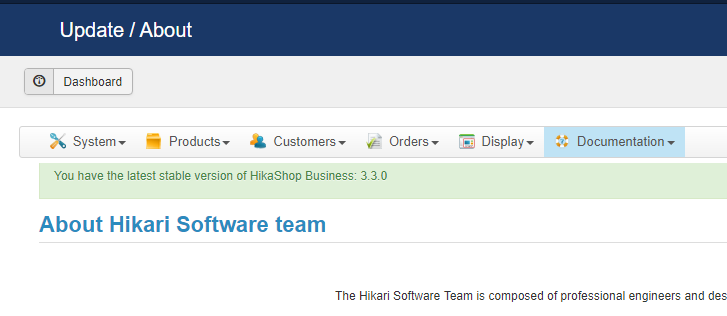
We are on the latest version (HikaShop Business: 3.3.0)
Please Log in or Create an account to join the conversation.
8 years 6 months ago #289650
by Jerome
Jerome - Obsidev.com
HikaMarket & HikaSerial developer / HikaShop core dev team.
Also helping the HikaShop support team when having some time or couldn't sleep.
By the way, do not send me private message, use the "contact us" form instead.
Replied by Jerome on topic Shipping Prices are WRONG !
Hello,
See : pasteboard.co/HbSnWBp.png
Mohamed asked you to get the very latest version of HikaShop since you're using a package from one month ago.
So you do not have the patches that Mohamed made and want you to test.
Regards,
See : pasteboard.co/HbSnWBp.png
Mohamed asked you to get the very latest version of HikaShop since you're using a package from one month ago.
So you do not have the patches that Mohamed made and want you to test.
Regards,
Jerome - Obsidev.com
HikaMarket & HikaSerial developer / HikaShop core dev team.
Also helping the HikaShop support team when having some time or couldn't sleep.
By the way, do not send me private message, use the "contact us" form instead.
Please Log in or Create an account to join the conversation.
Time to create page: 0.349 seconds