
- Posts: 1
- Thank you received: 0
Shipping cost per country
- valentinoflowers
-
 Topic Author
- Offline
Less
More
7 years 9 months ago #302603
by valentinoflowers
Shipping cost per country was created by valentinoflowers
-- url of the page with the problem -- : valentino-flowers.com
-- HikaShop version -- : 4.0.1
-- Joomla version -- : 7.1
Hello.
I want to create different shipping costs for different countries.
For example.
Netherlands €6,95
Belgium €9,95
Germany €14,95
I cant figure it out. Do i need to create different shipping options per country or is it possible that the price will adjust when a customer selects shipment to another country
please help
-- HikaShop version -- : 4.0.1
-- Joomla version -- : 7.1
Hello.
I want to create different shipping costs for different countries.
For example.
Netherlands €6,95
Belgium €9,95
Germany €14,95
I cant figure it out. Do i need to create different shipping options per country or is it possible that the price will adjust when a customer selects shipment to another country
please help
Please Log in or Create an account to join the conversation.

Less
More
- Posts: 12953
- Thank you received: 1778
7 years 9 months ago #302626
by Mohamed Thelji
Replied by Mohamed Thelji on topic Shipping cost per country
Hello,
The solution will be to :
- Create 3 manual shipping methods via "Hikashop->System->Shipping methods"
- Use prices and zones options to properly restrict your shipping methods to "Netherlands/Belgium/Germany".
Kind regards,
Mohamed Thelji.
The solution will be to :
- Create 3 manual shipping methods via "Hikashop->System->Shipping methods"
- Use prices and zones options to properly restrict your shipping methods to "Netherlands/Belgium/Germany".
Kind regards,
Mohamed Thelji.
Please Log in or Create an account to join the conversation.
7 years 9 months ago #302786
by ginmacher
Replied by ginmacher on topic Shipping cost per country
Hello Team
I have the same issue and the setting doesn't work in my shop. I had two different, manuel shipping options for Germany based on weight. That worked fine. Now I copied them and set in the first two the Zone to Germany, in the two new ones the Zone to Austria (same settings for weight, but differnet prices for shipping to Austria). Both countries are activated with the respective sub zones underneath.
If I go into the checkout with one product it shows me as a standard Germany as a country and also the 16 states in the dropdown. If I change Germany now to Austria and any state below, the shipping cost will stay those for Germany. They only change if a put another item in the basket (so based on wieght the hight shipping cost will be selected). But only for Germany. It looks like Austria will not be taken in consideration at all.
What do I miss??
Thanks!
I have the same issue and the setting doesn't work in my shop. I had two different, manuel shipping options for Germany based on weight. That worked fine. Now I copied them and set in the first two the Zone to Germany, in the two new ones the Zone to Austria (same settings for weight, but differnet prices for shipping to Austria). Both countries are activated with the respective sub zones underneath.
If I go into the checkout with one product it shows me as a standard Germany as a country and also the 16 states in the dropdown. If I change Germany now to Austria and any state below, the shipping cost will stay those for Germany. They only change if a put another item in the basket (so based on wieght the hight shipping cost will be selected). But only for Germany. It looks like Austria will not be taken in consideration at all.
What do I miss??
Thanks!
Please Log in or Create an account to join the conversation.
Less
More
- Posts: 12953
- Thank you received: 1778
7 years 8 months ago #302807
by Mohamed Thelji
Replied by Mohamed Thelji on topic Shipping cost per country
Hello,
Following each points of the "Shipping methods" section of the FAQ will probably help you :
www.hikashop.com/support/faq.html#ship
If you're still having your issue, can you show us screenshots of how you configured :
- Shipping methods that should be displayed on your checkout
- Products dimensions/weight that are in your cart
- your checkout workflow via "Hikashop->System->Configuration->Checkout"
Thank you.
Kind regards,
Mohamed Thelji.
Following each points of the "Shipping methods" section of the FAQ will probably help you :
www.hikashop.com/support/faq.html#ship
If you're still having your issue, can you show us screenshots of how you configured :
- Shipping methods that should be displayed on your checkout
- Products dimensions/weight that are in your cart
- your checkout workflow via "Hikashop->System->Configuration->Checkout"
Thank you.
Kind regards,
Mohamed Thelji.
Please Log in or Create an account to join the conversation.
7 years 8 months ago #302962
by ginmacher
Replied by ginmacher on topic Shipping cost per country
Hi Mohamed,
FAQ didn't help. What I did.
I have for Country Germany two Shipping Methods which are working perfectly based on the restrictions I did within the products and shipping methods. Based on the weight either the cheaper or the more expensive shipping method will be taken from the system. In the shipping methods I also restricted by Zone Germany.
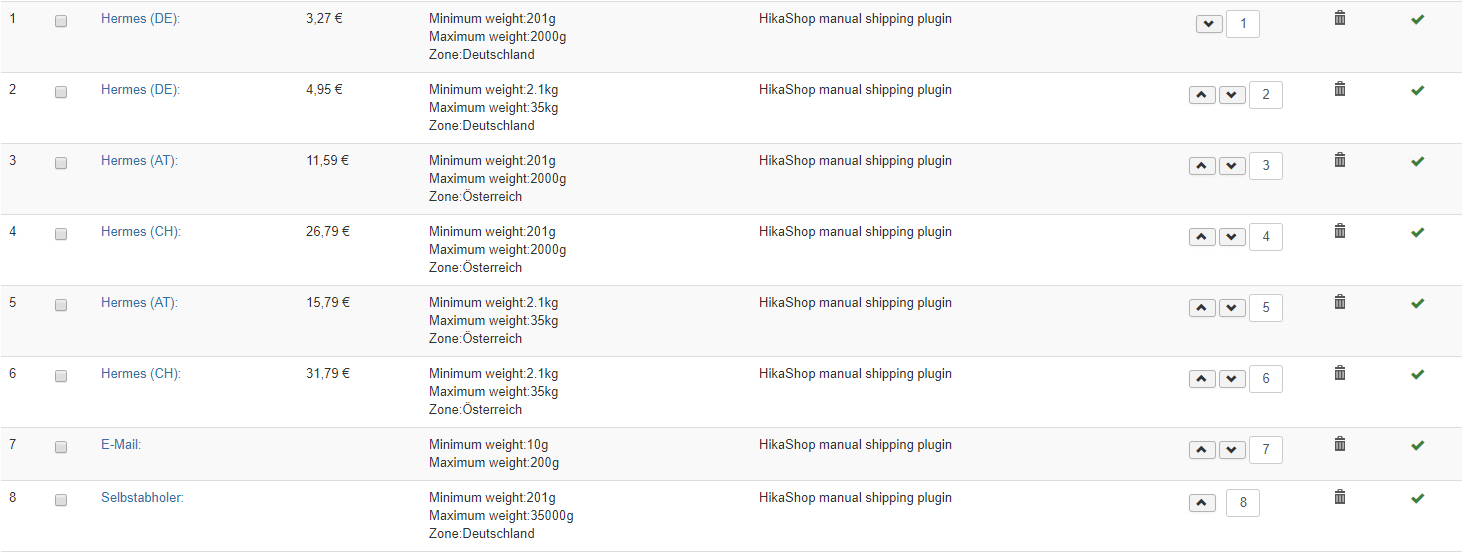
So I copied the shipping methods from Germany now to Austria and Switzerland with the difference, that I adjusted the price for it and also the zone restriction (two more (see screenshot):
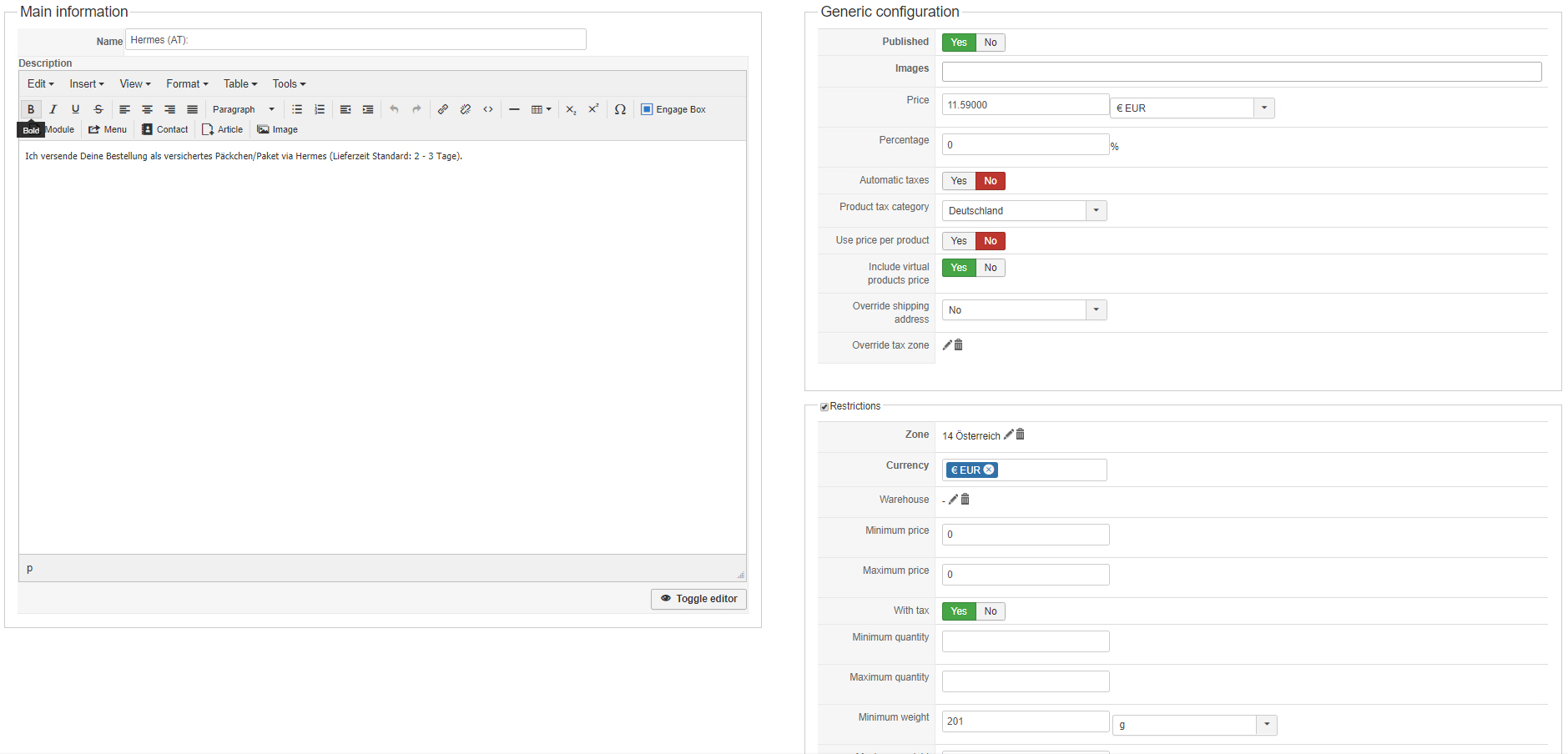
The shiping methods are setup like this (for all 4):
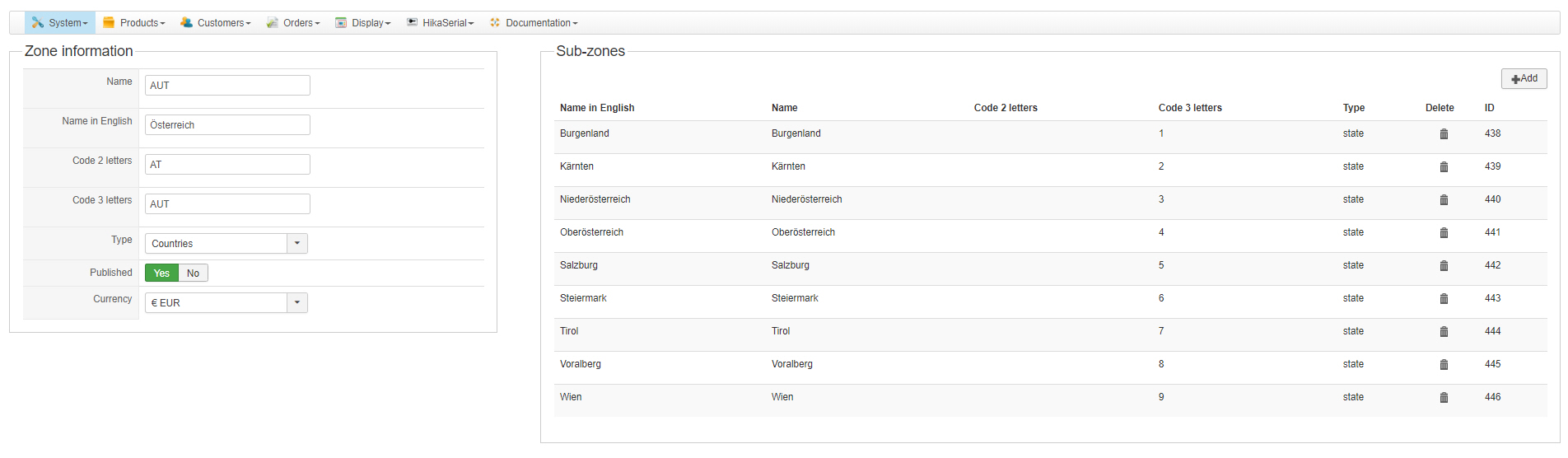
I additionally setup the zones and activated them (so I have only Germany, Austria and Switzerland as countries and the respective regions within this counties active) - they are also shown, when active, in the shopping cart at checkout (see next screenshots)
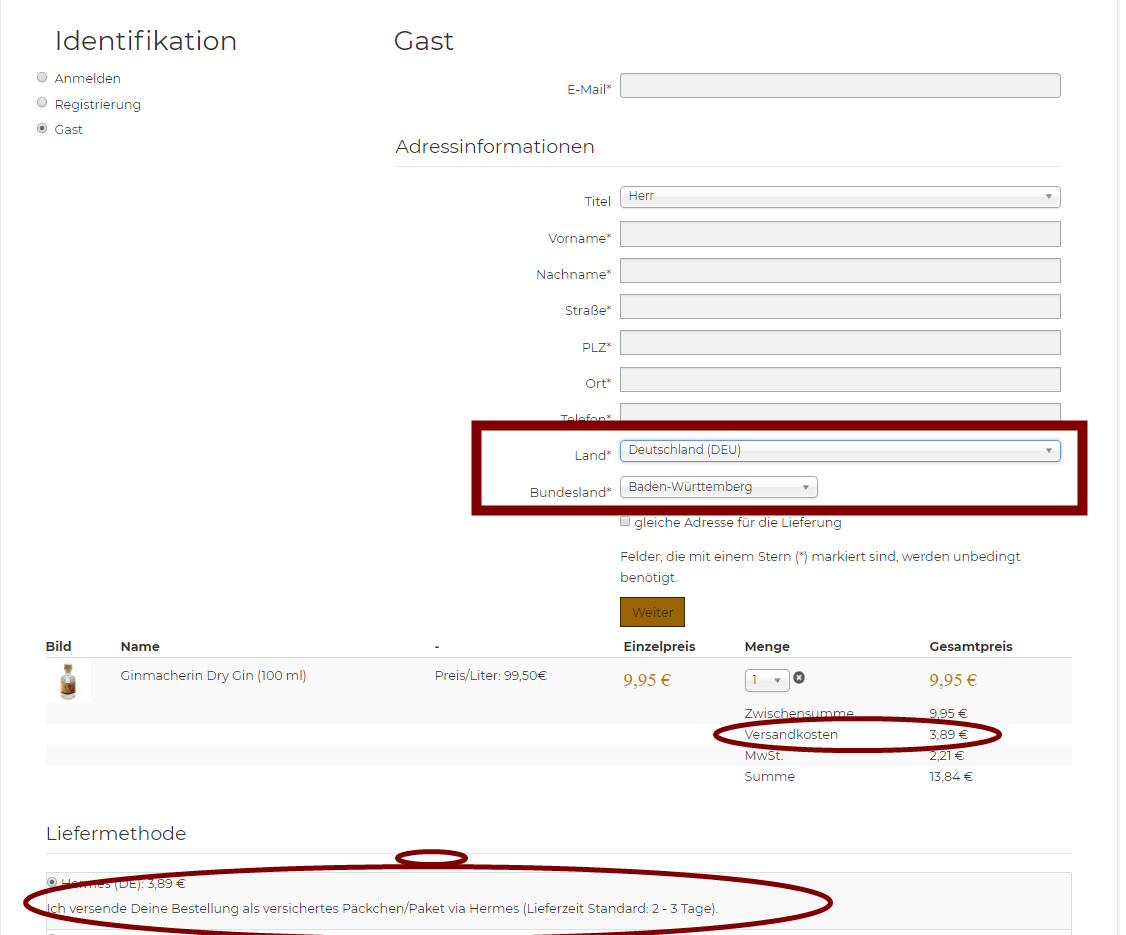
When I enter now the shopping cart and select GUEST as checkout, I can select all Countries (Germany, Austria, Switerland) and in the Dropdown below based on the country the regions. But when I select for example Austria as Country, the shipping cost stay extacly the same (Germany), nothing changes based on that selection.
What Do I miss here? Thanks for help.
FAQ didn't help. What I did.
I have for Country Germany two Shipping Methods which are working perfectly based on the restrictions I did within the products and shipping methods. Based on the weight either the cheaper or the more expensive shipping method will be taken from the system. In the shipping methods I also restricted by Zone Germany.
So I copied the shipping methods from Germany now to Austria and Switzerland with the difference, that I adjusted the price for it and also the zone restriction (two more (see screenshot):
The shiping methods are setup like this (for all 4):
I additionally setup the zones and activated them (so I have only Germany, Austria and Switzerland as countries and the respective regions within this counties active) - they are also shown, when active, in the shopping cart at checkout (see next screenshots)
When I enter now the shopping cart and select GUEST as checkout, I can select all Countries (Germany, Austria, Switerland) and in the Dropdown below based on the country the regions. But when I select for example Austria as Country, the shipping cost stay extacly the same (Germany), nothing changes based on that selection.
What Do I miss here? Thanks for help.
Please Log in or Create an account to join the conversation.

7 years 8 months ago #302966
by nicolas
Replied by nicolas on topic Shipping cost per country
Hi,
The filtering of the shipping methods happens based on the address of the customer.
As long as you don't click on the "Weiter" button of the guest form, the address is not taken into account. Only then will the filtering of the shipping methods apply based on what country you selected in the address.
So in your case, you might want to change the checkout workflow ( in the checkout tab of the HikaShop configuration) to have two steps so that the shipping fee is not displayed before your pass the login/registration/guest view.
The filtering of the shipping methods happens based on the address of the customer.
As long as you don't click on the "Weiter" button of the guest form, the address is not taken into account. Only then will the filtering of the shipping methods apply based on what country you selected in the address.
So in your case, you might want to change the checkout workflow ( in the checkout tab of the HikaShop configuration) to have two steps so that the shipping fee is not displayed before your pass the login/registration/guest view.
The following user(s) said Thank You: ginmacher
Please Log in or Create an account to join the conversation.
7 years 8 months ago #302988
by ginmacher
Replied by ginmacher on topic Shipping cost per country
Thank you Nicolas,
that works and makes sense. I'll check out the checkout-flow also regarding two-step approach!
Alex
that works and makes sense. I'll check out the checkout-flow also regarding two-step approach!
Alex
Please Log in or Create an account to join the conversation.
7 years 8 months ago #303315
by sarawhite
Replied by sarawhite on topic Shipping cost per country
Hello
I experience a smiliar problem. I used to only sell to Australia, now I am opening up to New Zealand and UK.
I have now ordered the steps to show the cart first, then the address then the shipping costs. However, the shipping costs are displayed in the first view of the cart - see screenshot:
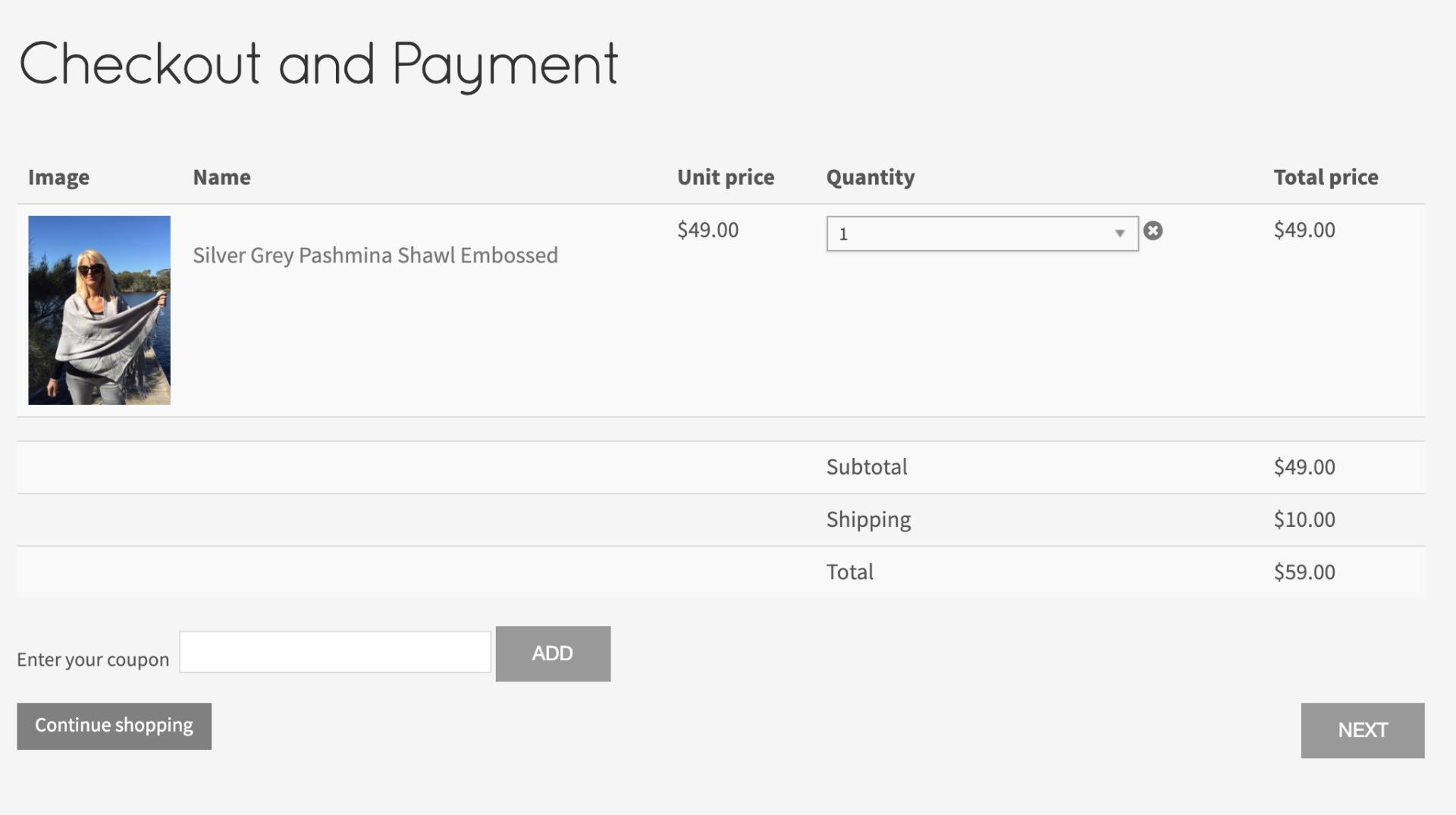
I experience a smiliar problem. I used to only sell to Australia, now I am opening up to New Zealand and UK.
I have now ordered the steps to show the cart first, then the address then the shipping costs. However, the shipping costs are displayed in the first view of the cart - see screenshot:
Please Log in or Create an account to join the conversation.
7 years 8 months ago #303326
by nicolas
Replied by nicolas on topic Shipping cost per country
Hi,
If you access the checkout while logged in, it will automatically use the address you already have to pre select the shipping method. So the shipping fee you see will already be the ones that should apply to you.
If you access the checkout while not yet logged, then it will use the "main tax zone" setting of your HikaShop configuration as the current zone to pre-select the shipping method. So if you don't want any shipping method to appear at that point for non logged in users, you could select a main tax zone without any shipping methods available and that should not it.
Note that because of the caching done, you'll have to try after clearing your browser's cache and logging in and out.
If you access the checkout while logged in, it will automatically use the address you already have to pre select the shipping method. So the shipping fee you see will already be the ones that should apply to you.
If you access the checkout while not yet logged, then it will use the "main tax zone" setting of your HikaShop configuration as the current zone to pre-select the shipping method. So if you don't want any shipping method to appear at that point for non logged in users, you could select a main tax zone without any shipping methods available and that should not it.
Note that because of the caching done, you'll have to try after clearing your browser's cache and logging in and out.
Please Log in or Create an account to join the conversation.
Time to create page: 0.153 seconds