
- Posts: 51
- Thank you received: 4
Shipping depending on price does not show
- anders.drejer
-
 Topic Author
- Offline
Less
More
6 years 8 months ago #315113
by anders.drejer
Shipping depending on price does not show was created by anders.drejer
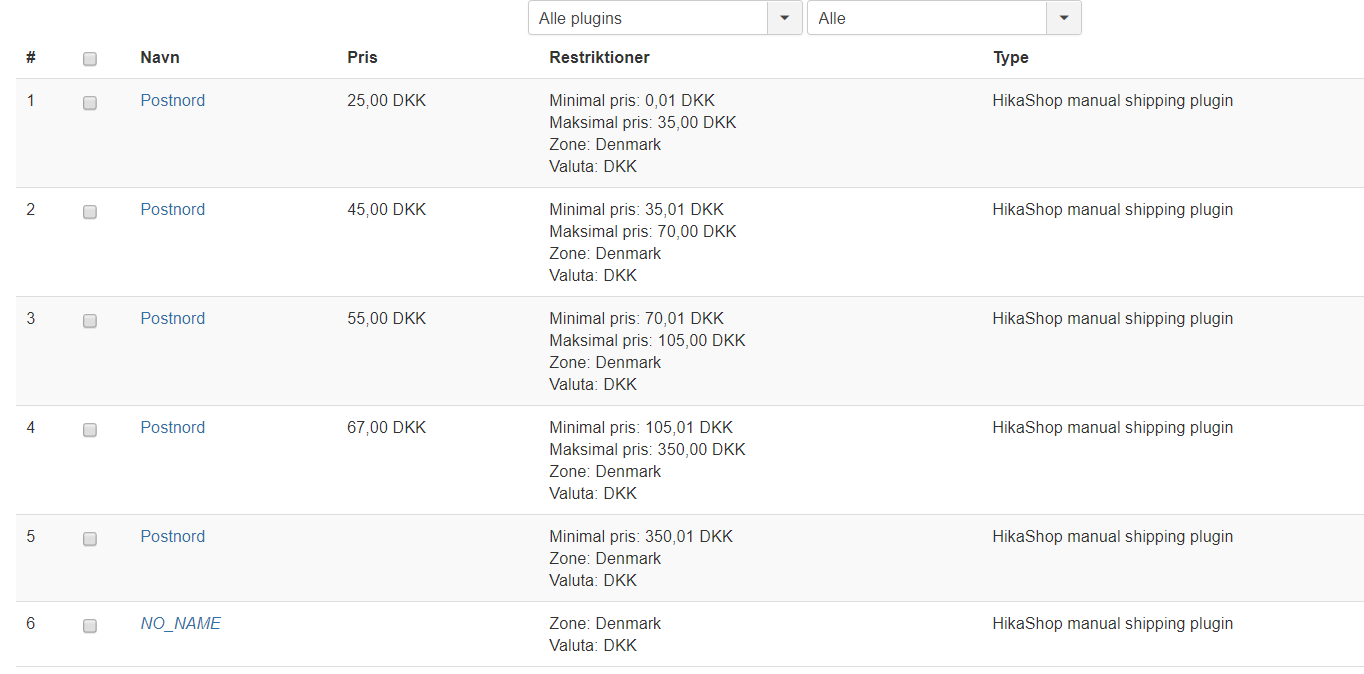
I am working on a shop, where the shipping is depend on the price of the bought product(s) and also it should be possible to pick up the products at the shop at no fee. But when I test the shipping only the free pick up at the shop does show. Can you see what is wrong from the attached screen dump?
Best Regards,
Anders
Best Regards,
Anders
Please Log in or Create an account to join the conversation.

6 years 8 months ago #315122
by nicolas
Replied by nicolas on topic Shipping depending on price does not show
Hi,
First, check if your products have a weight. If not they are considered "virtual products" and if the "force shipping regardless of weight" setting is turned off in the Hikashop configuration, the shipping method won't appear for them on the checkout.
Then, make sure that you still have the "shipping" view in the "checkout workflow" editor of the HikaShop configuration.
If you removed it, then no shipping method selection will appear on the checkout.
Finally, also check the "include virtual product prices" setting of your shipping methods. If your products don't have a weight and that setting is turned off, then the products price won't be taken into account for the min/max price restriction settings of your shipping methods.
First, check if your products have a weight. If not they are considered "virtual products" and if the "force shipping regardless of weight" setting is turned off in the Hikashop configuration, the shipping method won't appear for them on the checkout.
Then, make sure that you still have the "shipping" view in the "checkout workflow" editor of the HikaShop configuration.
If you removed it, then no shipping method selection will appear on the checkout.
Finally, also check the "include virtual product prices" setting of your shipping methods. If your products don't have a weight and that setting is turned off, then the products price won't be taken into account for the min/max price restriction settings of your shipping methods.
Please Log in or Create an account to join the conversation.
- anders.drejer
-
Topic Author
- Offline
Less
More
- Posts: 51
- Thank you received: 4
6 years 8 months ago - 6 years 8 months ago #315123
by anders.drejer
Replied by anders.drejer on topic Shipping depending on price does not show
Thank you - it was the "include virtual product prices" check that was missing.
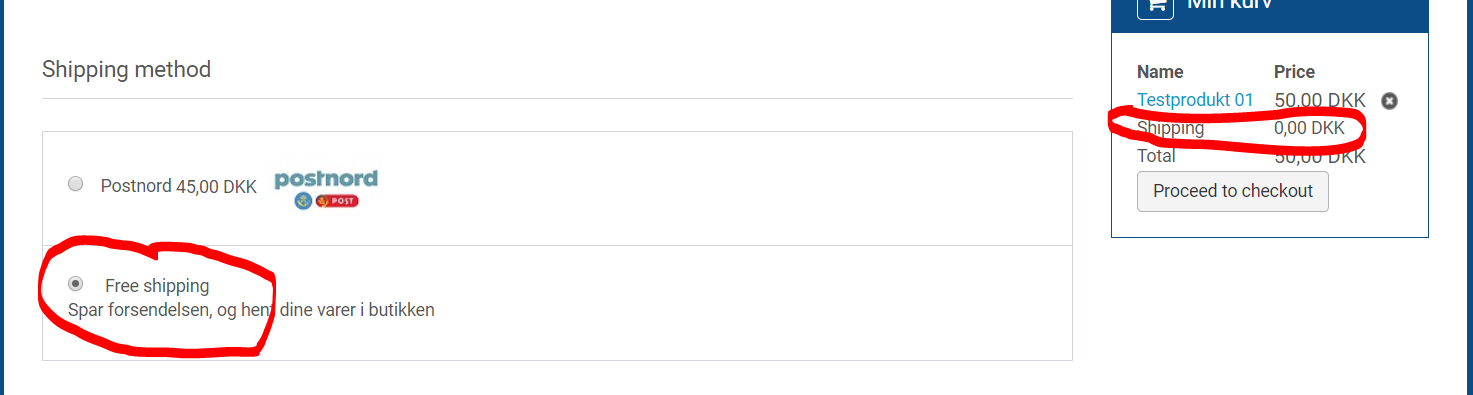
I have an additional question regarding the shipping fee. I have shipping fees based on price (how much you buy) but also it is possible to pick up the products at the production plant for free. It seems that default shipping it is the free/pick up at production plant at the shopping cart and check out. Can this be changed to always use the paid shipping as default?
Best Regards,
Anders
I have an additional question regarding the shipping fee. I have shipping fees based on price (how much you buy) but also it is possible to pick up the products at the production plant for free. It seems that default shipping it is the free/pick up at production plant at the shopping cart and check out. Can this be changed to always use the paid shipping as default?
Best Regards,
Anders
Last edit: 6 years 8 months ago by anders.drejer.
Please Log in or Create an account to join the conversation.
6 years 8 months ago #315125
by nicolas
Replied by nicolas on topic Shipping depending on price does not show
Hi,
The default shipping method selected will be the first one listed.
It seems that it's already the case on your screenshot.
So you should be all good.
Note that if a shipping method is already selected for a cart, it won't change the selection.
So after you've ordered your shipping mehtods in the order you want in the System>Shipping methods menu, you'll want to delete your cart via the Customers>Carts menu of your backend. Then, add the products to a new cart on your frontend and go to the checkout and you should see the first one selected.
The default shipping method selected will be the first one listed.
It seems that it's already the case on your screenshot.
So you should be all good.
Note that if a shipping method is already selected for a cart, it won't change the selection.
So after you've ordered your shipping mehtods in the order you want in the System>Shipping methods menu, you'll want to delete your cart via the Customers>Carts menu of your backend. Then, add the products to a new cart on your frontend and go to the checkout and you should see the first one selected.
The following user(s) said Thank You: anders.drejer
Please Log in or Create an account to join the conversation.
- anders.drejer
-
Topic Author
- Offline
Less
More
- Posts: 51
- Thank you received: 4
6 years 7 months ago #315160
by anders.drejer
Replied by anders.drejer on topic Shipping depending on price does not show
Thank you for your fantastic support 
Best Regards,
Anders
Best Regards,
Anders
Please Log in or Create an account to join the conversation.
Time to create page: 0.172 seconds