

- Posts: 317
- Thank you received: 20
Looking for update
3 years 3 months ago #354264
by jgribble
Replied by jgribble on topic Looking for update
Many thanks, I did create a hidden Hika checkout page, forced that menu item on checkout, and it worked!
-Jim G.
-Jim G.
Please Log in or Create an account to join the conversation.
3 years 3 months ago - 3 years 3 months ago #354282
by jgribble
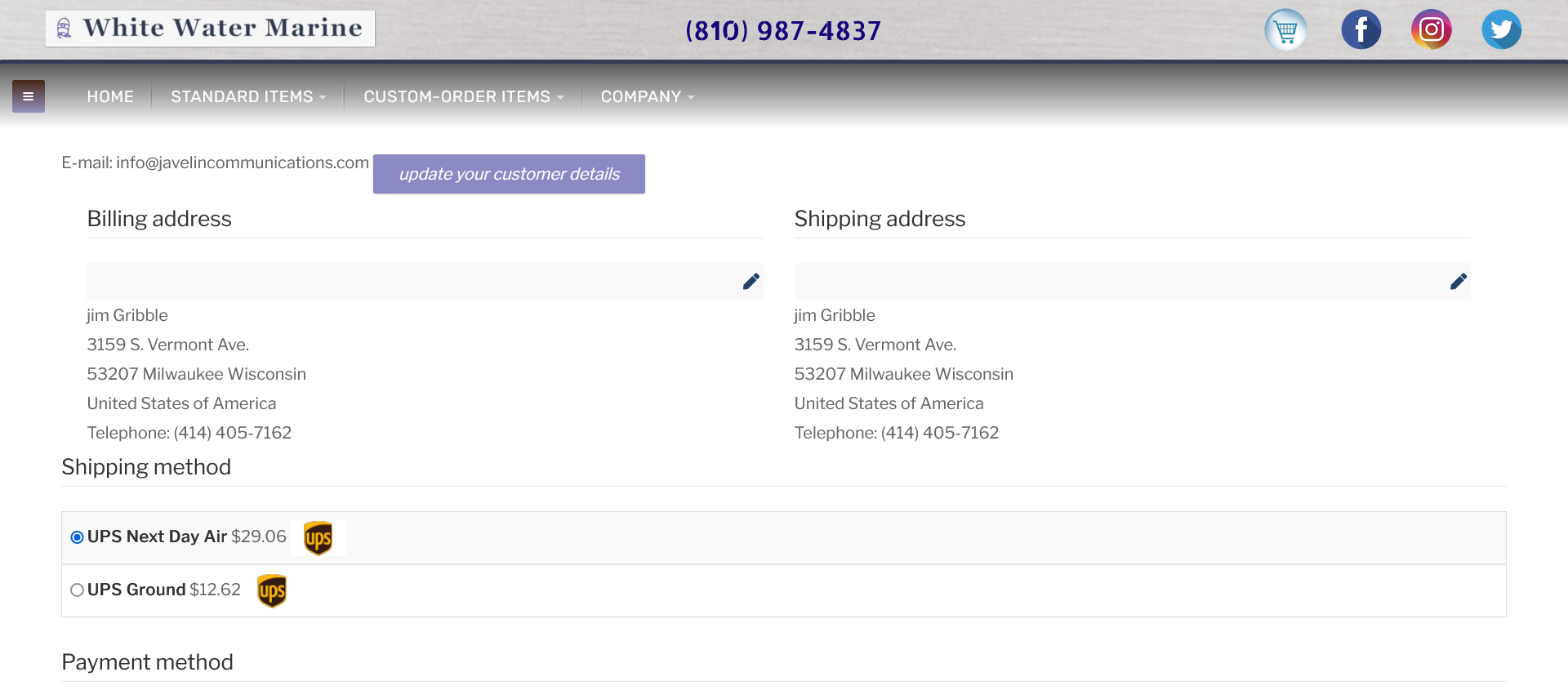
Here we see that the top button encroaches on the e-mail value.
This fix to the script will work:
<span id="hikashop_checkout_guest_email_value" style="margin-right: 40px">info@javelincommunications.com</span>
But for the life of me in all the views I can't find where to put it. Have already spent a lot of time poking around. No luck. Since you know where everything is, I thought I would just ask.
Is there a more simple CSS fix?
I could and did apply left margin to the button. But that cascades to all Hika frontend buttons. I would prefer to fix this one instance on the checkout page.
Thank you,
-Jim G.
Replied by jgribble on topic Looking for update
Here we see that the top button encroaches on the e-mail value.
This fix to the script will work:
<span id="hikashop_checkout_guest_email_value" style="margin-right: 40px">info@javelincommunications.com</span>
But for the life of me in all the views I can't find where to put it. Have already spent a lot of time poking around. No luck. Since you know where everything is, I thought I would just ask.
Is there a more simple CSS fix?
I could and did apply left margin to the button. But that cascades to all Hika frontend buttons. I would prefer to fix this one instance on the checkout page.
Thank you,
-Jim G.
Last edit: 3 years 3 months ago by jgribble.
Please Log in or Create an account to join the conversation.
3 years 3 months ago #354291
by jgribble
Replied by jgribble on topic Looking for update
To keep things really simple, how do I unpublish "agree to the privacy policy." First, we don't have one. Second, we don't store logins or any customer data. Third, we don't do business in Europe. There is no such requirement here in the U.S. Please advise?
Thank you,
-Jim Gribble
Thank you,
-Jim Gribble
Please Log in or Create an account to join the conversation.
3 years 3 months ago - 3 years 3 months ago #354295
by jgribble
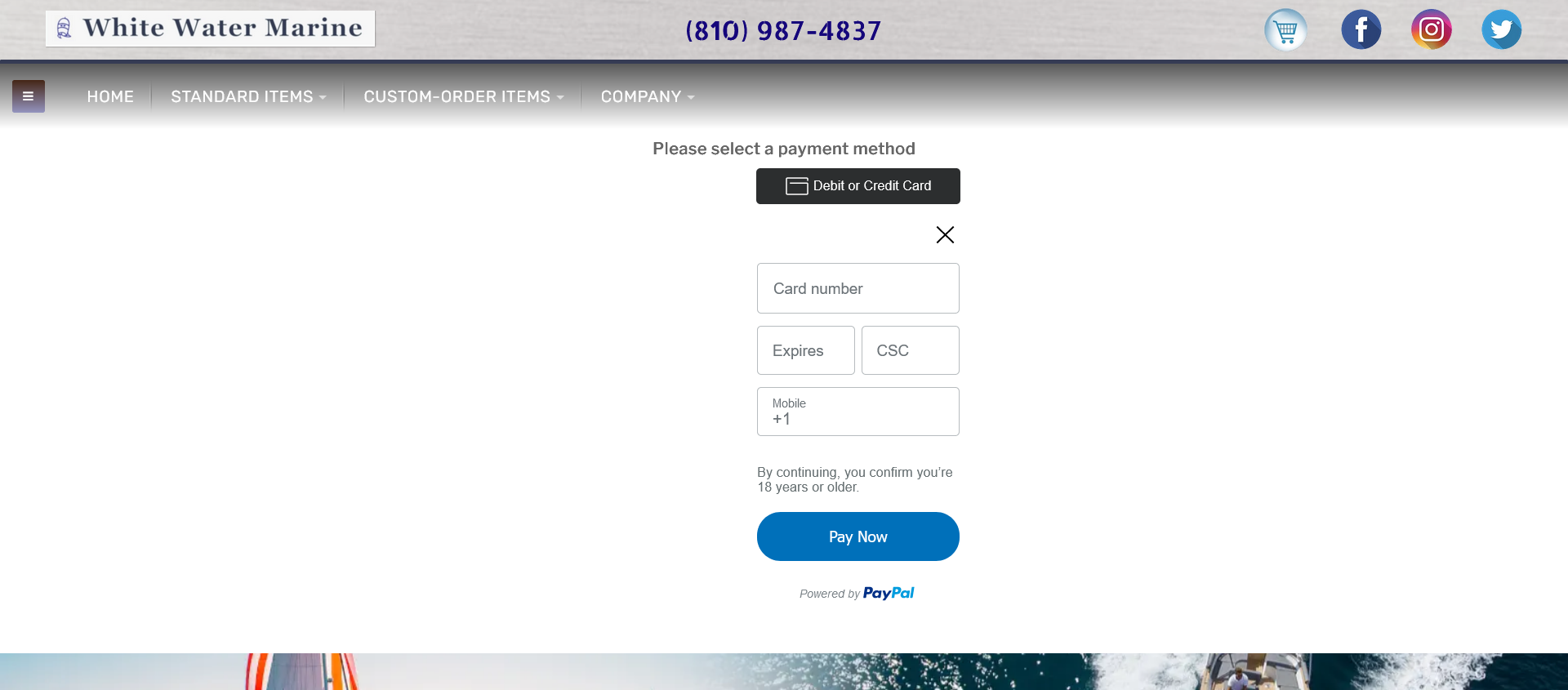
So now we have all the credentials squared away and have made the connection. Shouldn't the product price be showing though?
Thank you,
-Jim G.
Replied by jgribble on topic Looking for update
So now we have all the credentials squared away and have made the connection. Shouldn't the product price be showing though?
Thank you,
-Jim G.
Last edit: 3 years 3 months ago by jgribble.
Please Log in or Create an account to join the conversation.
3 years 3 months ago #354296
by jgribble
Replied by jgribble on topic Looking for update
It looks like this is going to work. Right now I have the payment plugin in Sandbox mode. So I'd like to make some test purchases to debug the last step in the user experience, including receipt of the custom invoice I designed. Do you have a guide for how to do that? I am reading up on PayPal sandbox but it's pretty heavy going and seems dedicated to simply testing whether card purchases go through. I know you already shared some stuff and I am looking back over this discussion thread.
Thank you,
-Jim Gribble
Thank you,
-Jim Gribble
Please Log in or Create an account to join the conversation.
3 years 3 months ago #354299
by jgribble
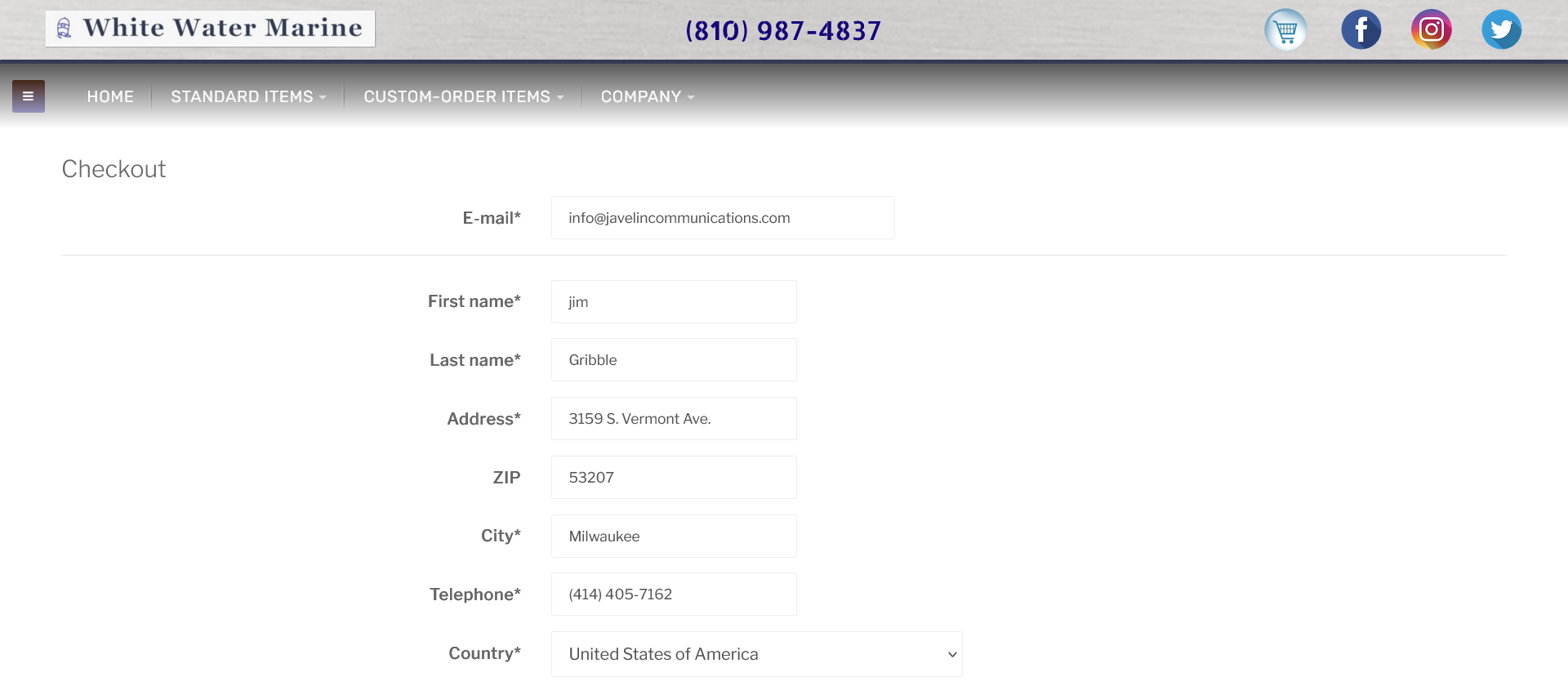
When user exercises option to edit customer information, we see this. The order of the fields is all messed up. It does not appear that this is governed by the checkflow workflow settings. Where do I go to arrange the fields in the order the user normally expects to see?
Thank you,
-Jim G.
Replied by jgribble on topic Looking for update
When user exercises option to edit customer information, we see this. The order of the fields is all messed up. It does not appear that this is governed by the checkflow workflow settings. Where do I go to arrange the fields in the order the user normally expects to see?
Thank you,
-Jim G.
Please Log in or Create an account to join the conversation.

3 years 3 months ago - 3 years 3 months ago #354286
by nicolas
Replied by nicolas on topic Looking for update
Hi,
1. You don't need to do a view override for that.
Since the email text has a span with the id "hikashop_checkout_guest_email_value" around it, you can just add CSS code like this in a CSS file of your website to do the same:
Here is a tutorial on how to add CSS code in HikaShop:
www.hikashop.com/support/documentation/1...ize-the-display.html
2. The privacy policy checkbox displays there because you've activated and configured the corresponding privacy policy consent plugin in the Joomla plugins manager. Deactivate it and it will remove it from the guest form.
3. The interface of the credit card form is displayed by PayPal, so it can't be changed.
However, it's possible to change the "Please selectg a payment method" message at the top. For that, copy the file plugins/hikashoppayment/paypalcheckout/paypalcheckout_end.php to templates/YOUR_TEMPLATE/hikashoppayment/paypalcheckout_end.php via FTP. Then, you can modify that file templates/YOUR_TEMPLATE/hikashoppayment/paypalcheckout_end.php to customize the look.
For example, you have the line:
You could add before it this code:
4. To test the credit card payment with a sandbox account you need to use test credit card numbers provided by PayPal:
developer.paypal.com/tools/sandbox/card-testing/
5. You can change the order of the address fields in the Display>Custom fields menu.
1. You don't need to do a view override for that.
Since the email text has a span with the id "hikashop_checkout_guest_email_value" around it, you can just add CSS code like this in a CSS file of your website to do the same:
Code:
#hikashop_checkout_guest_email_value { margin-right: 40px }
www.hikashop.com/support/documentation/1...ize-the-display.html
2. The privacy policy checkbox displays there because you've activated and configured the corresponding privacy policy consent plugin in the Joomla plugins manager. Deactivate it and it will remove it from the guest form.
3. The interface of the credit card form is displayed by PayPal, so it can't be changed.
However, it's possible to change the "Please selectg a payment method" message at the top. For that, copy the file plugins/hikashoppayment/paypalcheckout/paypalcheckout_end.php to templates/YOUR_TEMPLATE/hikashoppayment/paypalcheckout_end.php via FTP. Then, you can modify that file templates/YOUR_TEMPLATE/hikashoppayment/paypalcheckout_end.php to customize the look.
For example, you have the line:
Code:
<div id="paypal-select-message"><?php echo JText::_('PLEASE_SELECT_A_PAYMENT_METHOD'); ?></div>
Code:
<div id="custom_message">Your order <?php echo $this->order->order_number; ?> of $<?php echo round($this->order->order_full_price,2) ?> must now be paid.</div>
4. To test the credit card payment with a sandbox account you need to use test credit card numbers provided by PayPal:
developer.paypal.com/tools/sandbox/card-testing/
5. You can change the order of the address fields in the Display>Custom fields menu.
Last edit: 3 years 3 months ago by nicolas.
Please Log in or Create an account to join the conversation.
3 years 3 months ago #354304
by jgribble
Replied by jgribble on topic Looking for update
This all looks to be really easy. The privacy plugin must be enabled by default. I wasn't even aware it existed.
I tried that very CSS but didn't use hashtag selector. I'm sure it will work.
I did create two sandbox accounts but did not see where I could obtain the test credit card numbers. I will dig further.
Must I leave the plugin in Sandbox mode while testing?
Thank you.
-Jim G.
I tried that very CSS but didn't use hashtag selector. I'm sure it will work.
I did create two sandbox accounts but did not see where I could obtain the test credit card numbers. I will dig further.
Must I leave the plugin in Sandbox mode while testing?
Thank you.
-Jim G.
Please Log in or Create an account to join the conversation.
3 years 3 months ago - 3 years 3 months ago #354306
by jgribble
Replied by jgribble on topic Looking for update
"The privacy policy checkbox displays there because you've activated and configured the corresponding privacy policy consent plugin in the Joomla plugins manager. Deactivate it and it will remove it from the guest form."
Hi. Unfortunately this didn't work. The checkbox and message are still there. What can I do?
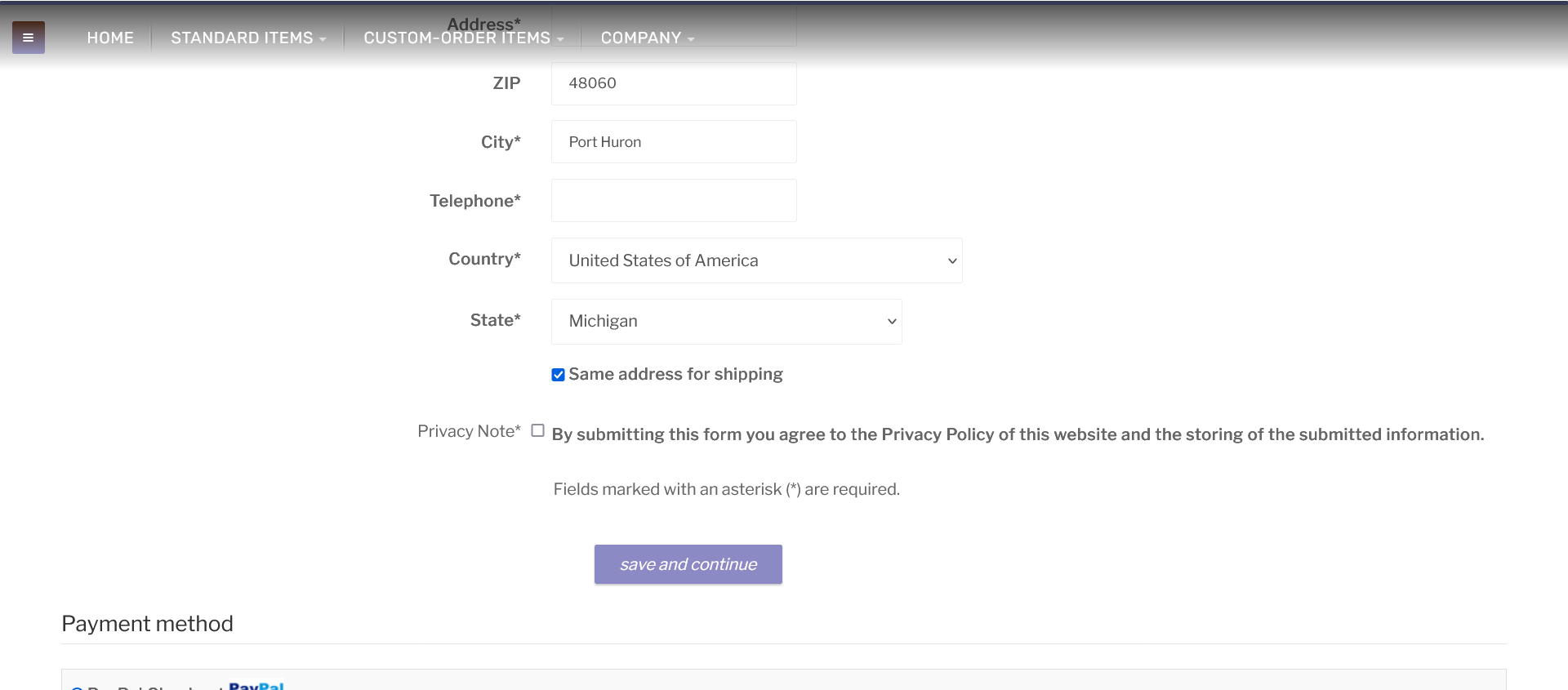
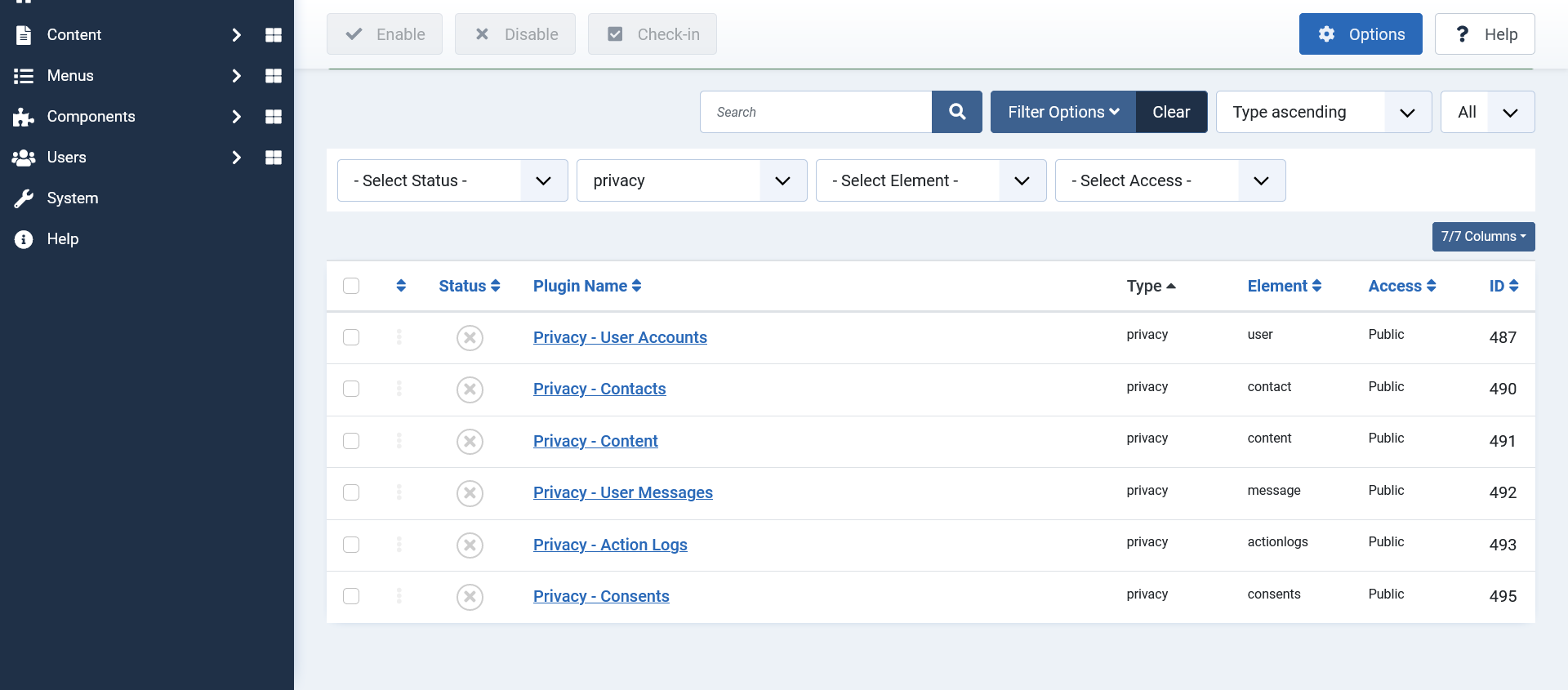
Hi. Unfortunately this didn't work. The checkbox and message are still there. What can I do?
Last edit: 3 years 3 months ago by jgribble.
Please Log in or Create an account to join the conversation.
3 years 3 months ago #354308
by nicolas
Replied by nicolas on topic Looking for update
Hi,
1. Yes, you need to leave the sandbox mode turned on if you want to make fake payments with test credit card numbers.
Note that when you turn off the sandbox mode, you'll have to change the client id and client secret to the ones of your live PayPal account. If you keep the sandbox account credentials there, it won't work.
2. There is also a plugin of the group "system" you need to look for:
www.joomlashack.com/blog/tutorials/gdpr/
1. Yes, you need to leave the sandbox mode turned on if you want to make fake payments with test credit card numbers.
Note that when you turn off the sandbox mode, you'll have to change the client id and client secret to the ones of your live PayPal account. If you keep the sandbox account credentials there, it won't work.
2. There is also a plugin of the group "system" you need to look for:
www.joomlashack.com/blog/tutorials/gdpr/
Please Log in or Create an account to join the conversation.
3 years 3 months ago - 3 years 3 months ago #354314
by jgribble
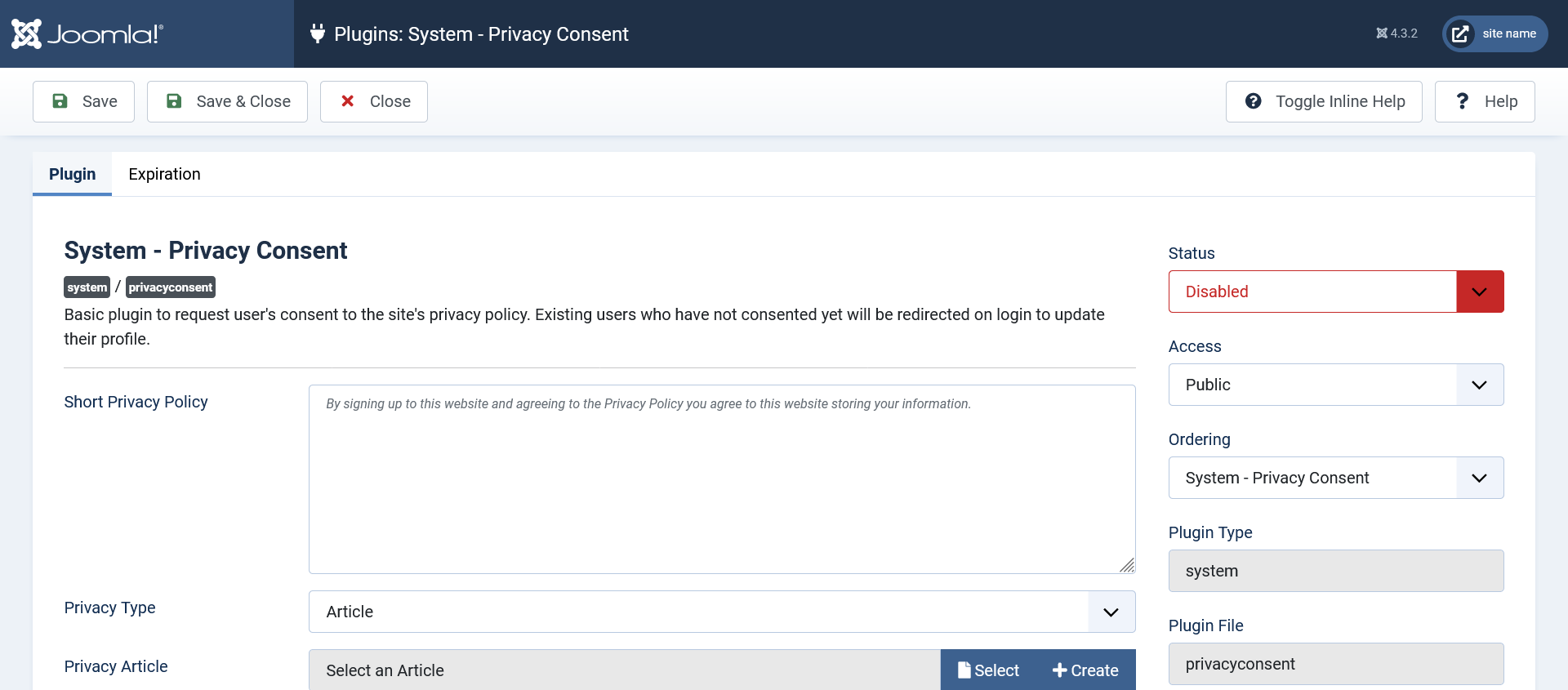
This appears to be the plugin you are referencing. The checkbox still shows. Since turning off the plugin doesn't work, is there a workaround? It can't be deleted as it is a system file. This will just annoy and confuse our users, so we have to deal with it before launch. I think it is necessary to delete it from Hikashop. Since there isn't a settings toggle, where do I find the view which contains the script? I want to delete that.
Thank you,
-Jim G.
Replied by jgribble on topic Looking for update
This appears to be the plugin you are referencing. The checkbox still shows. Since turning off the plugin doesn't work, is there a workaround? It can't be deleted as it is a system file. This will just annoy and confuse our users, so we have to deal with it before launch. I think it is necessary to delete it from Hikashop. Since there isn't a settings toggle, where do I find the view which contains the script? I want to delete that.
Thank you,
-Jim G.
Last edit: 3 years 3 months ago by jgribble.
Please Log in or Create an account to join the conversation.
3 years 3 months ago #354318
by jgribble
Replied by jgribble on topic Looking for update
I did a successful test purchase. Worked flawlessly. But I will have a couple questions.
In the screenshot we see a way to contact us with questions. I tested it and it sent. But I'm not sure where it went. Where do I configure that e-mail destination?
Also I note that on this screen as with so many others the privacy checkbox publishes even though that plugin has been disabled. We don't want to show it anywhere to our users because we don't store user data and don't ever want to give the impression that we do. It is just not something we want people to worry about since we have proactively removed the risk of data theft.
Thank you,
-Jim Gribble
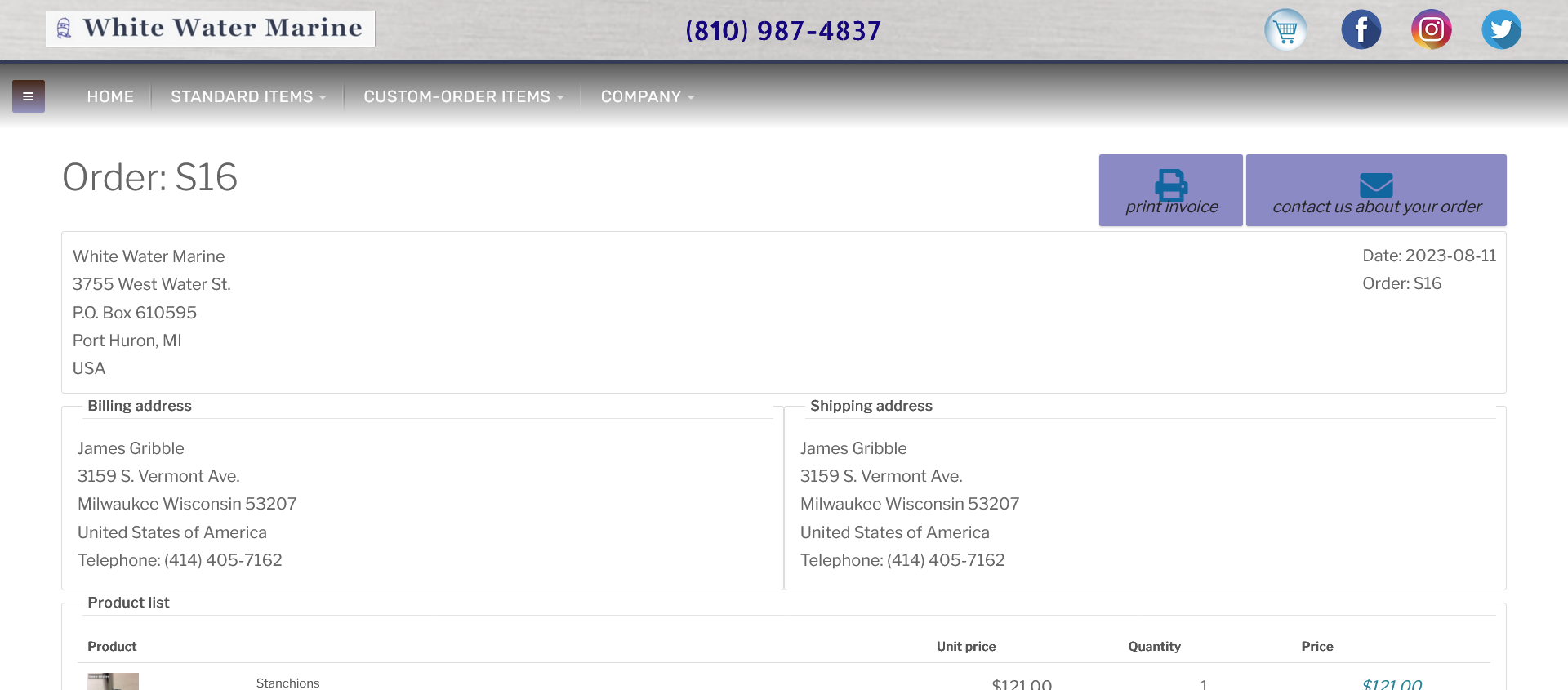
In the screenshot we see a way to contact us with questions. I tested it and it sent. But I'm not sure where it went. Where do I configure that e-mail destination?
Also I note that on this screen as with so many others the privacy checkbox publishes even though that plugin has been disabled. We don't want to show it anywhere to our users because we don't store user data and don't ever want to give the impression that we do. It is just not something we want people to worry about since we have proactively removed the risk of data theft.
Thank you,
-Jim Gribble
Please Log in or Create an account to join the conversation.
3 years 3 months ago - 3 years 2 months ago #354319
by jgribble
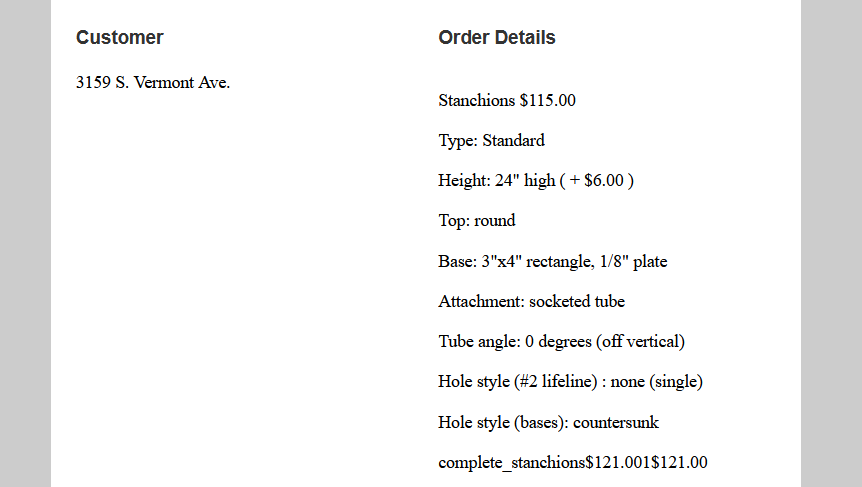
While everything seems to work, there are a few pesky issues. Here all the info is there but the last line is garbled. That field shows total price with options. That's what it should say. And it shouldn't show the price twice. I am also attaching my custom template.The operative field name appears to be {LINEVAR:PRODUCT_TOTAL}
Also, why does customer e-mail not show shipping and tax in total? Works perfectly in the admin email.
I would rather not use default template because we want to show our own branding.
But if I have ti revert, do I just toggle to one of the others default versions? And I can do some customizing? Will any work, or just the one titled "user notification"?
Thank you,
-Jim Gribble
Replied by jgribble on topic Looking for update
While everything seems to work, there are a few pesky issues. Here all the info is there but the last line is garbled. That field shows total price with options. That's what it should say. And it shouldn't show the price twice. I am also attaching my custom template.The operative field name appears to be {LINEVAR:PRODUCT_TOTAL}
Also, why does customer e-mail not show shipping and tax in total? Works perfectly in the admin email.
I would rather not use default template because we want to show our own branding.
But if I have ti revert, do I just toggle to one of the others default versions? And I can do some customizing? Will any work, or just the one titled "user notification"?
Thank you,
-Jim Gribble
This attachment is hidden for guests.
Please log in or register to see it.
Please log in or register to see it.
Last edit: 3 years 2 months ago by jgribble.
Please Log in or Create an account to join the conversation.
3 years 2 months ago - 3 years 2 months ago #354322
by jgribble
Replied by jgribble on topic Looking for update
After some tests I had to conclude that my template won't work. So I'm going to use one of yours and just add our own footer and header and some other customization. Functionally the test was a success. But {TXT:NOTIFICATION_MESSAGE} needs some major editing and I can't see where to do that. It isn't in the language file or anywhere else I could find, so I thought I would just ask.
We just want to say something like Hi there, your order went through. Please see the details below. Do not hesitate to follow up with us. We value your business!"
We don't store card numbers or allow people to have an account because that quickly gets super expensive for a small business, when you include servier hardening and PCI scanning. It will NOT be possible to go to the website and log in and view your order. That link has to be deleted.
I'm sure I can do all this if pointed gently in the right direction.
This and the privacy issue are the last two things, I hope. And then I will not have to bother you again for a long time.
Here is a screenshot of the customer e-mail issue.
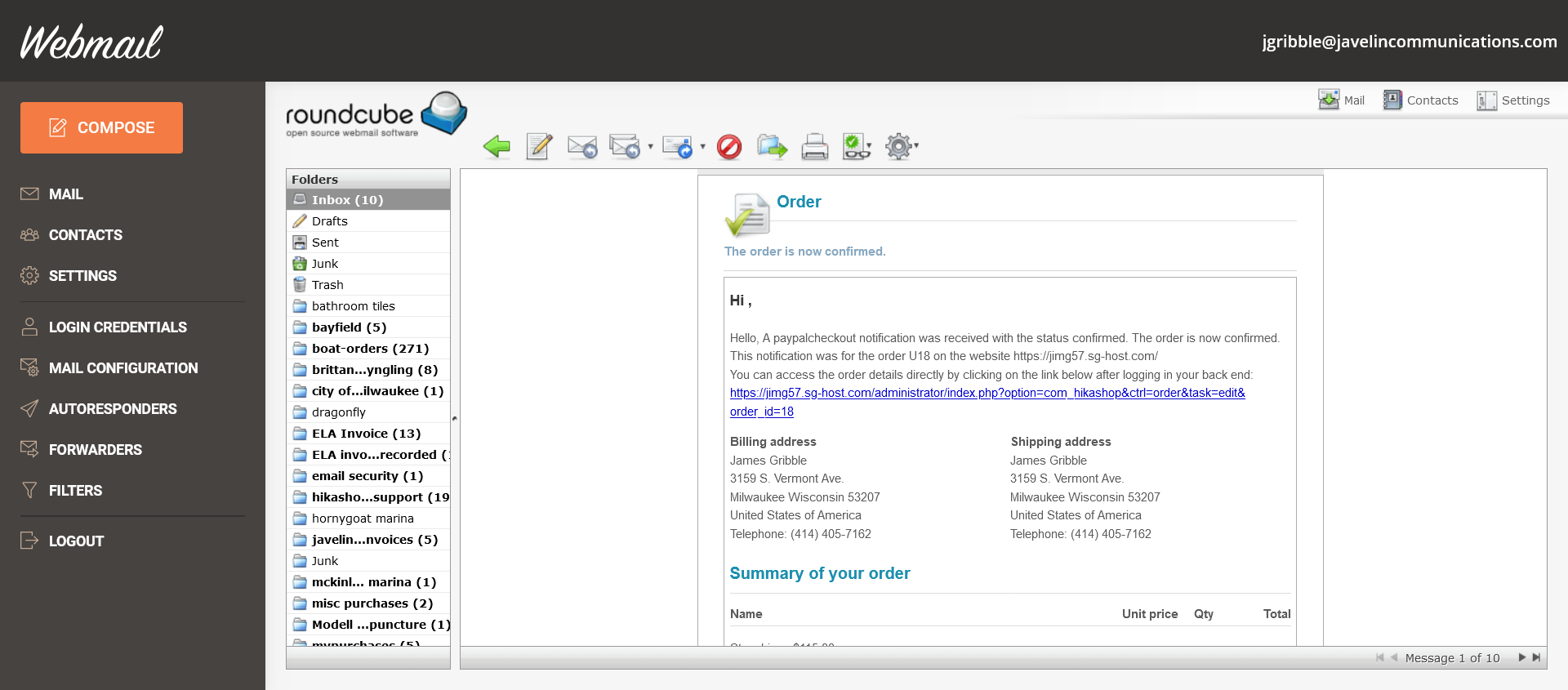
We just want to say something like Hi there, your order went through. Please see the details below. Do not hesitate to follow up with us. We value your business!"
We don't store card numbers or allow people to have an account because that quickly gets super expensive for a small business, when you include servier hardening and PCI scanning. It will NOT be possible to go to the website and log in and view your order. That link has to be deleted.
I'm sure I can do all this if pointed gently in the right direction.
This and the privacy issue are the last two things, I hope. And then I will not have to bother you again for a long time.
Here is a screenshot of the customer e-mail issue.
Last edit: 3 years 2 months ago by jgribble.
Please Log in or Create an account to join the conversation.
3 years 2 months ago - 3 years 2 months ago #354324
by jgribble
Replied by jgribble on topic Looking for update
I wonder if there isn't something wrong with my version of Hikshop. I have read some related posts and it appears I should be able to easily change the e-mail texts. But that field is blank. Here's a sceenshot. No idea why data hasn't been populated to this screen. If I understand the other posts and the documentation, I should see all the text messages here and be able to edit them and save. I hope you will come on the site and take a look, now having all the access. Thank you.
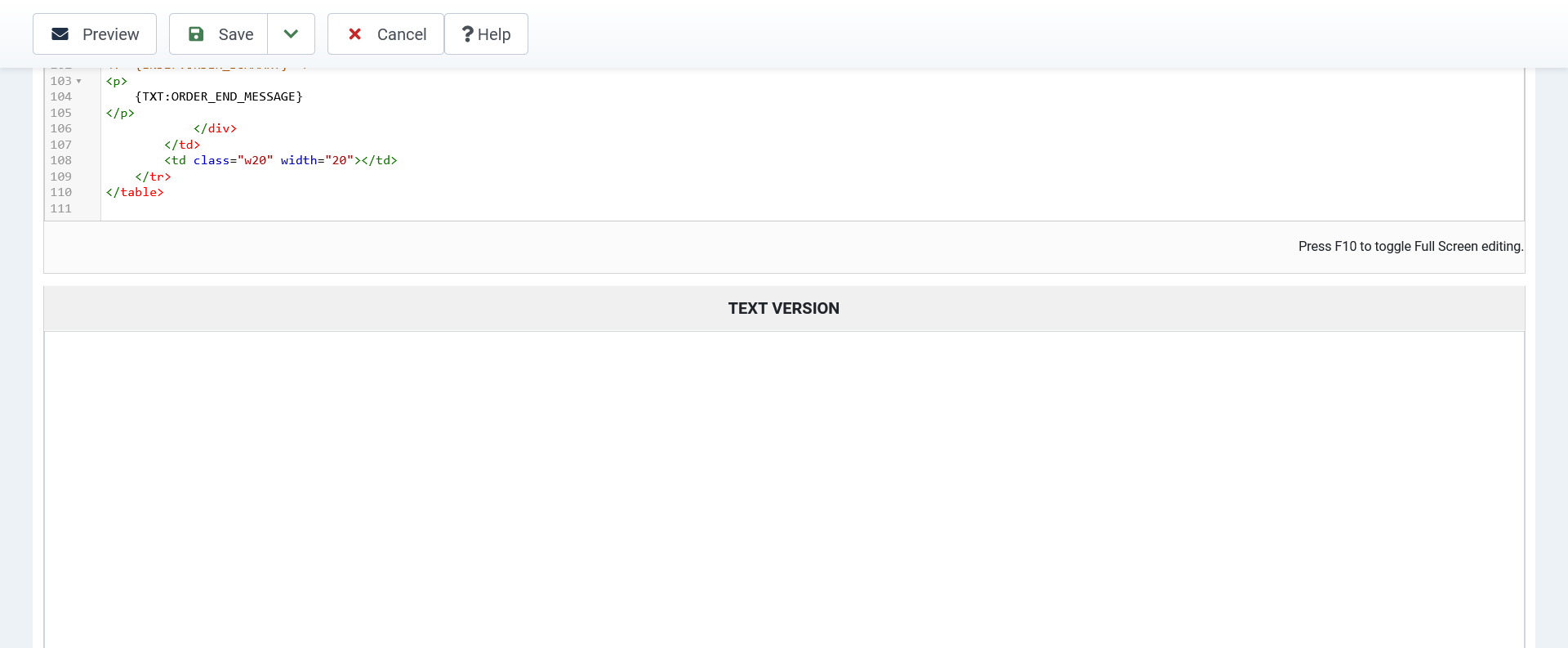
Last edit: 3 years 2 months ago by jgribble.
Please Log in or Create an account to join the conversation.
3 years 2 months ago - 3 years 2 months ago #354315
by nicolas
Replied by nicolas on topic Looking for update
Hi,
1. It's either this plugin or the plugin of the group "content" and with the folder name "confirmconsent" which is enabled.
Please understand that it's not about a workaround, if you have that checkbox, it means you have a privacy consent plugin of joomla activated.
2. In the Emails section of the Hikashop configuration page, you have the setting "Contact request email address" for that.
3.
You have the tags:
one after the other. So the display is: $121.00 (for the unit price of the product) 1 (for the quantity ordered) $121.00 (for the total price, which is the unit price times the quantity purchased). And since there is no spacing, you see everything together as $121.001$121.00
4. The shipping and grand total are not displayed because you didn't include the tags for that. These are the tags for the shipping fee, taxes, total, etc:
5. Texts in the emails, as well as in the interface of HikaShop can be changed with translation overrides:
www.hikashop.com/download/languages.html#modify
6. Note that if you purchase as a guest, the link to the order will include a token so that you can access the order details page without having a user account and others won't be able to access your order details page as they won't know the token in the URL. So I don't think you need to remove the link from there.
7. The blank "text version" is normal. Emails can be sent in either HTML or text. When the text version is empty, HikaShop will generate the text version from the HTML version. The text version is not used much nowadays as email clients usually all support HTML. So you can ignore it. As I said in point 5, you can change the texts in the email with translation overrides.
1. It's either this plugin or the plugin of the group "content" and with the folder name "confirmconsent" which is enabled.
Please understand that it's not about a workaround, if you have that checkbox, it means you have a privacy consent plugin of joomla activated.
2. In the Emails section of the Hikashop configuration page, you have the setting "Contact request email address" for that.
3.
You're wrong. The display does that display based on the tags you have there.Here all the info is there but the last line is garbled. That field shows total price with options. That's what it should say. And it shouldn't show the price twice. I am also attaching my custom template.The operative field name appears to be {LINEVAR:PRODUCT_TOTAL}
You have the tags:
Code:
{LINEVAR:PRODUCT_PRICE}{LINEVAR:PRODUCT_QUANTITY}{LINEVAR:PRODUCT_TOTAL}
4. The shipping and grand total are not displayed because you didn't include the tags for that. These are the tags for the shipping fee, taxes, total, etc:
Code:
<!--{START:ORDER_FOOTER}-->
<tr>
<td class="hika_template_color {LINEVAR:CLASS}_label" colspan="{TXT:FOOTER_COLSPAN}" style="text-align:right;font-size:12px;font-weight:bold;">{LINEVAR:NAME}</td>
<td class="{LINEVAR:CLASS}_value" style="text-align:right">{LINEVAR:VALUE}</td>
</tr>
<!--{END:ORDER_FOOTER}-->
5. Texts in the emails, as well as in the interface of HikaShop can be changed with translation overrides:
www.hikashop.com/download/languages.html#modify
6. Note that if you purchase as a guest, the link to the order will include a token so that you can access the order details page without having a user account and others won't be able to access your order details page as they won't know the token in the URL. So I don't think you need to remove the link from there.
7. The blank "text version" is normal. Emails can be sent in either HTML or text. When the text version is empty, HikaShop will generate the text version from the HTML version. The text version is not used much nowadays as email clients usually all support HTML. So you can ignore it. As I said in point 5, you can change the texts in the email with translation overrides.
Last edit: 3 years 2 months ago by nicolas.
Please Log in or Create an account to join the conversation.
3 years 2 months ago - 3 years 2 months ago #354328
by jgribble
Replied by jgribble on topic Looking for update
I didn't think you'd be working at this hour!
Most of my issues stemmed from trying to make my own custom style template.
I gave up on that. Copied one of yours and customized it - the old-fashioned way, by hand coding.
I deduced which fields were generating the unwanted auto-verbiage and deleted them.
I don't think I need do anything in the translations section but now I know how.
I wound up with a greatly streamlined but good-looking and functional all-purpose e-mail design.
After filtering and scouring and scouring the plugins some more, I found the troublesome plugin. It's a content plugin titled Content - Confirm Consent. It may be that the corresponding system plugin also needs to be disabled. Anyway, issue resolved.
Thanks for all the help with this complicated little project! We are now at the finish line and I'm going to turn it over to the customer so he can experience exactly what users experience.
It had been some years since I first worked with Hikashop on a big conventional e-commerce site. There have been a lot of changes. But two things haven't changed. Support is still the best in the business. And the extension is the most versatile e-commerce solution for Joomla or WordPrfess. My client will love it.
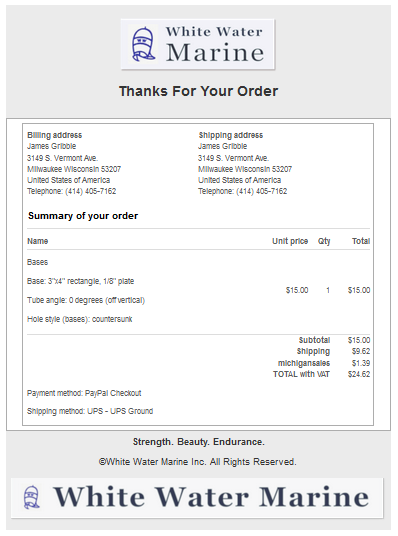
Most of my issues stemmed from trying to make my own custom style template.
I gave up on that. Copied one of yours and customized it - the old-fashioned way, by hand coding.
I deduced which fields were generating the unwanted auto-verbiage and deleted them.
I don't think I need do anything in the translations section but now I know how.
I wound up with a greatly streamlined but good-looking and functional all-purpose e-mail design.
After filtering and scouring and scouring the plugins some more, I found the troublesome plugin. It's a content plugin titled Content - Confirm Consent. It may be that the corresponding system plugin also needs to be disabled. Anyway, issue resolved.
Thanks for all the help with this complicated little project! We are now at the finish line and I'm going to turn it over to the customer so he can experience exactly what users experience.
It had been some years since I first worked with Hikashop on a big conventional e-commerce site. There have been a lot of changes. But two things haven't changed. Support is still the best in the business. And the extension is the most versatile e-commerce solution for Joomla or WordPrfess. My client will love it.
Last edit: 3 years 2 months ago by jgribble.
The following user(s) said Thank You: nicolas
Please Log in or Create an account to join the conversation.
3 years 2 months ago #354329
by jgribble
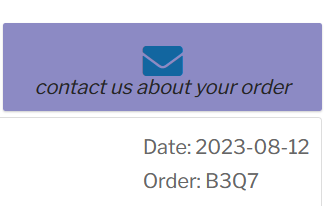
This is a great little feature. How do I route it to sales@whitewatermarineinc.com? I think it may already be fetching that value. I looked a the contact_request e-mail and this is what I found.
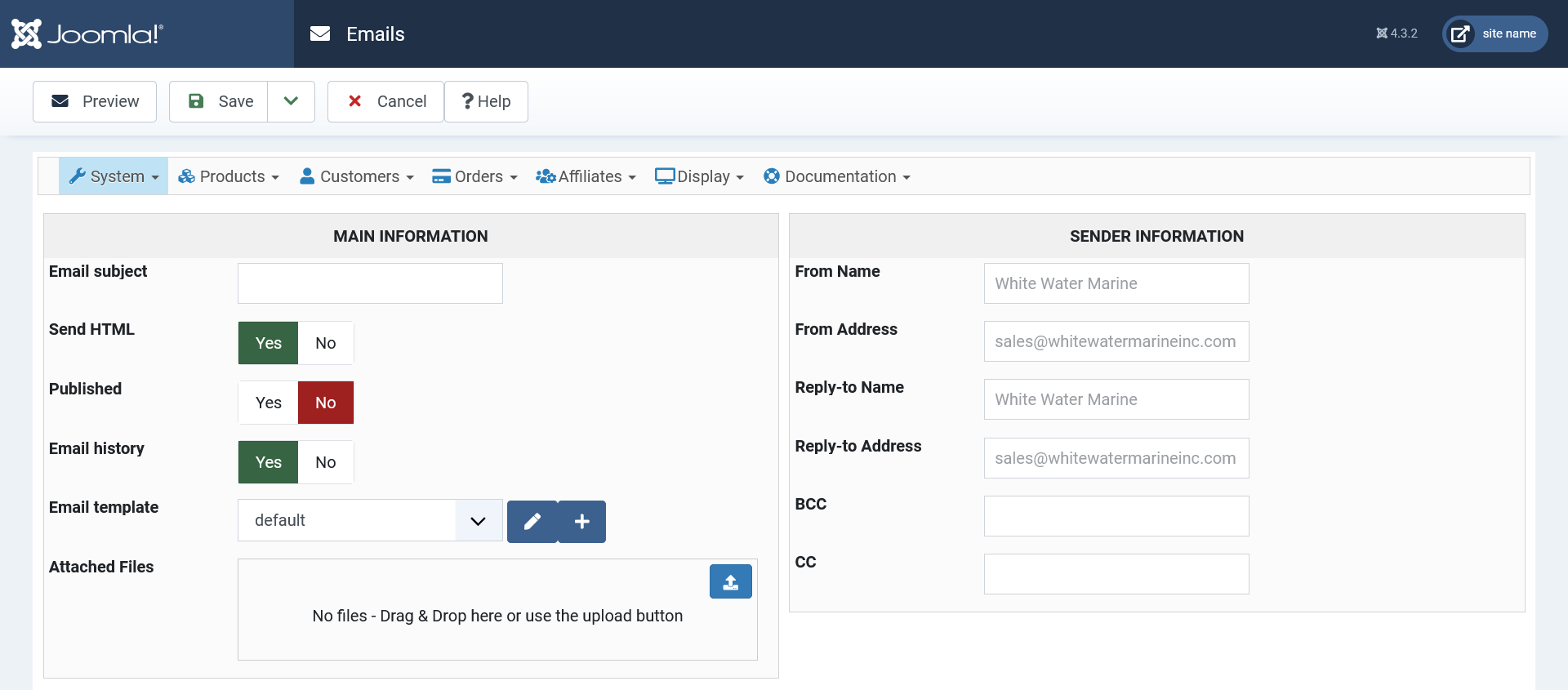
Replied by jgribble on topic Looking for update
This is a great little feature. How do I route it to sales@whitewatermarineinc.com? I think it may already be fetching that value. I looked a the contact_request e-mail and this is what I found.
Please Log in or Create an account to join the conversation.
3 years 2 months ago #354332
by nicolas
Replied by nicolas on topic Looking for update
Hi,
As I said in my previous message:
In the Emails section of the Hikashop configuration page, you have the setting "Contact request email address" for that.
As I said in my previous message:
In the Emails section of the Hikashop configuration page, you have the setting "Contact request email address" for that.
The following user(s) said Thank You: jgribble
Please Log in or Create an account to join the conversation.
3 years 2 months ago #354485
by jgribble
Replied by jgribble on topic Looking for update
Testing has gone very well, clear to launch. I am curious about one thing,. May want to disable this or not.
On adding product to cart, an off-canvas message slides down from top of page and stays there for several seconds. This covers up cart button briefly, which could be annoying to user. It kind of does annoy me.
The behavior of this feature seems contingent both on Hikashop and the Joomlart template. My inspector hasn't been too much help in fully understanding it.
So, 1: How do I speed it up so that it is on screen only very briefly? So it doesn't linger?
2: How do I turn it off altogether?
Is it something simple in the control panel settings? I am looking now but I'm not sure what the name of the feature is.
Thank you,
-Jim Gribble
On adding product to cart, an off-canvas message slides down from top of page and stays there for several seconds. This covers up cart button briefly, which could be annoying to user. It kind of does annoy me.
The behavior of this feature seems contingent both on Hikashop and the Joomlart template. My inspector hasn't been too much help in fully understanding it.
So, 1: How do I speed it up so that it is on screen only very briefly? So it doesn't linger?
2: How do I turn it off altogether?
Is it something simple in the control panel settings? I am looking now but I'm not sure what the name of the feature is.
Thank you,
-Jim Gribble
Please Log in or Create an account to join the conversation.
Time to create page: 0.116 seconds