

- Posts: 92
- Thank you received: 6
Error with Shipstation Plugin
2 years 5 months ago #360380
by spytech
Error with Shipstation Plugin was created by spytech
-- HikaShop version -- : 5.0.4
-- Joomla version -- : 4.4.3
-- PHP version -- : 8.1.28
-- Error-message(debug-mod must be tuned on) -- : -- 04.17.24 09:22:01 --
no orders database matched with this dates ( www.lemotv.co.uk/index.php?option=com_hi...f2024+07%3a22&page=1 )
Start Date: 04%2f17%2f2024+07%3a17 // End date: 04%2f17%2f2024+07%3a22-- 04.17.24 09:22:02 --
no orders database matched with this dates ( www.lemotv.co.uk/index.php?option=com_hi...f2024+00%3a22&page=1 )
Start Date: 04%2f16%2f2024+22%3a51 // End date: 04%2f18%2f2024+00%3a22-- 04.17.24 09:22:27 --
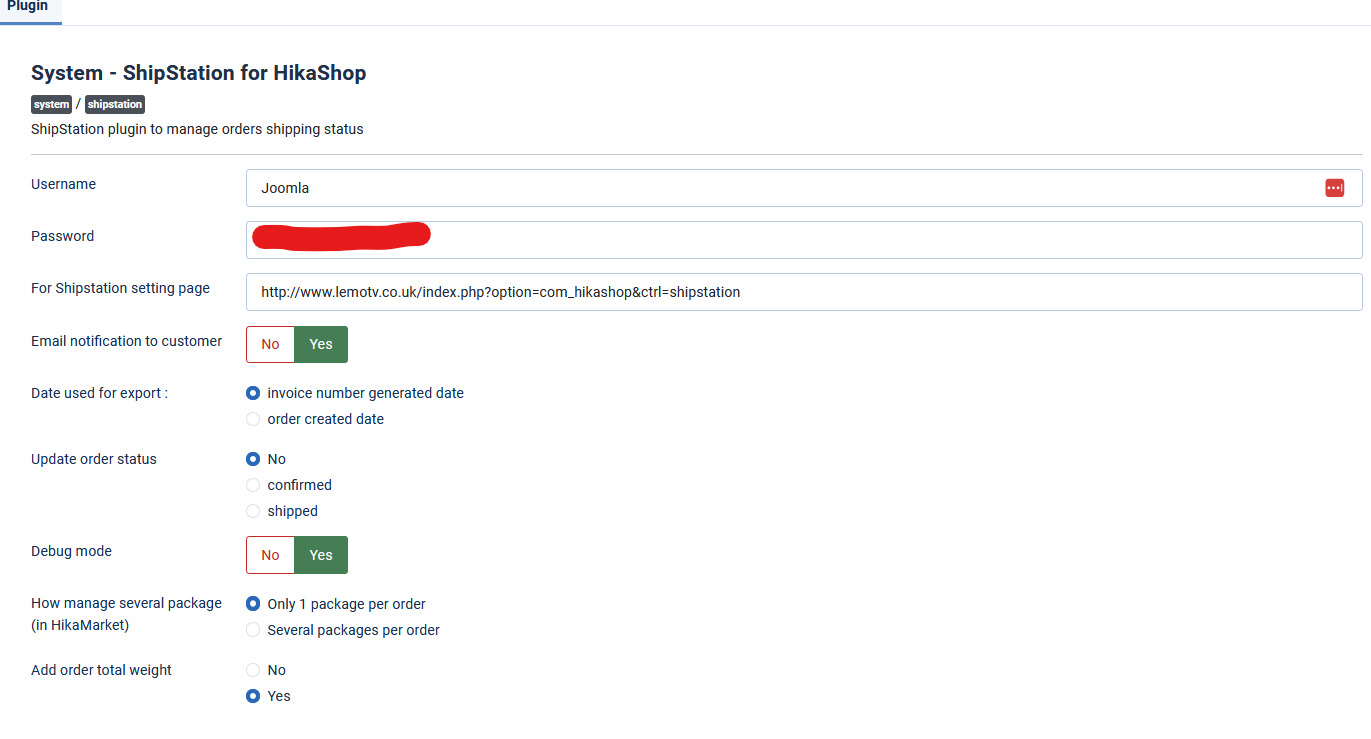
Hi, I am testing the Ship Station plugin and I can not seem to get it to connect to Hikashop. I have tested the connection and then is all good with no errors. I have followed the instructions to setup, although they are not very clear so I may have done something incorrectly.
I get the error in the logs 'no orders database matched with this dates'. I have check forums but I can see any resolution.

-- Joomla version -- : 4.4.3
-- PHP version -- : 8.1.28
-- Error-message(debug-mod must be tuned on) -- : -- 04.17.24 09:22:01 --
no orders database matched with this dates ( www.lemotv.co.uk/index.php?option=com_hi...f2024+07%3a22&page=1 )
Start Date: 04%2f17%2f2024+07%3a17 // End date: 04%2f17%2f2024+07%3a22-- 04.17.24 09:22:02 --
no orders database matched with this dates ( www.lemotv.co.uk/index.php?option=com_hi...f2024+00%3a22&page=1 )
Start Date: 04%2f16%2f2024+22%3a51 // End date: 04%2f18%2f2024+00%3a22-- 04.17.24 09:22:27 --
Hi, I am testing the Ship Station plugin and I can not seem to get it to connect to Hikashop. I have tested the connection and then is all good with no errors. I have followed the instructions to setup, although they are not very clear so I may have done something incorrectly.
I get the error in the logs 'no orders database matched with this dates'. I have check forums but I can see any resolution.
Please Log in or Create an account to join the conversation.

2 years 5 months ago - 2 years 5 months ago #360382
by Philip
Replied by Philip on topic Error with Shipstation Plugin
Hello,
This can be linked to several points :
1. You have an old version that have bug with date management (it depended on the version of php, the time configuration of your zone etc...)
=> Can you precise to be sure your Shipstation version (free or updated)
=> Update your Shipstation plugin to be sure to have the last version
2. I see that you have define your order to export to only order that have generated an Invoice number, but maybe no order have reach this level?
=> Try to switch for "order created date", and force the Shipstation update via your Shipstation account :

Awaiting your returns to progress on your subject.
Regards
This can be linked to several points :
1. You have an old version that have bug with date management (it depended on the version of php, the time configuration of your zone etc...)
=> Can you precise to be sure your Shipstation version (free or updated)
=> Update your Shipstation plugin to be sure to have the last version
2. I see that you have define your order to export to only order that have generated an Invoice number, but maybe no order have reach this level?
=> Try to switch for "order created date", and force the Shipstation update via your Shipstation account :
Awaiting your returns to progress on your subject.
Regards
Last edit: 2 years 5 months ago by Philip.
Please Log in or Create an account to join the conversation.
2 years 5 months ago #360396
by spytech
Replied by spytech on topic Error with Shipstation Plugin
Hi, thanks for the response. I did install the latest plugin: 2.5.4
I did have it set to 'Order Created Date' but neither options work, just tried.
Let me know what I can try next or if you need access.
Thx
I did have it set to 'Order Created Date' but neither options work, just tried.
Let me know what I can try next or if you need access.
Thx
Please Log in or Create an account to join the conversation.
2 years 5 months ago - 2 years 5 months ago #360397
by Philip
Replied by Philip on topic Error with Shipstation Plugin
Hello,
Please, provide these elements in order to allow us to process some tests :
- Url link to your backend (administrator)
- Backend user references (maximum ACL)
Note: Use our Contact us form to provide these elements, and don't forget to add an Url link to this topic in your message.
Regards
Please, provide these elements in order to allow us to process some tests :
- Url link to your backend (administrator)
- Backend user references (maximum ACL)
Note: Use our Contact us form to provide these elements, and don't forget to add an Url link to this topic in your message.
Regards
Last edit: 2 years 5 months ago by Philip.
Please Log in or Create an account to join the conversation.
2 years 5 months ago #360426
by spytech
Replied by spytech on topic Error with Shipstation Plugin
Thanks, that has been sent.
Please Log in or Create an account to join the conversation.
2 years 5 months ago - 2 years 5 months ago #360438
by Philip
Replied by Philip on topic Error with Shipstation Plugin
Hello,
After several tests, without understanding what's going on, I noticed, somewhat by chance... that your order has no price and no shipping address. So, I guess you haven't created your test orders as they were meant to be...
Could you please process new tests with "real" orders? Including prices, shipping addresses, etc.!
Looking forward to your response.
Regards.
After several tests, without understanding what's going on, I noticed, somewhat by chance... that your order has no price and no shipping address. So, I guess you haven't created your test orders as they were meant to be...
Could you please process new tests with "real" orders? Including prices, shipping addresses, etc.!
Looking forward to your response.
Regards.
Last edit: 2 years 5 months ago by Philip.
Please Log in or Create an account to join the conversation.
2 years 5 months ago #360582
by spytech
Replied by spytech on topic Error with Shipstation Plugin
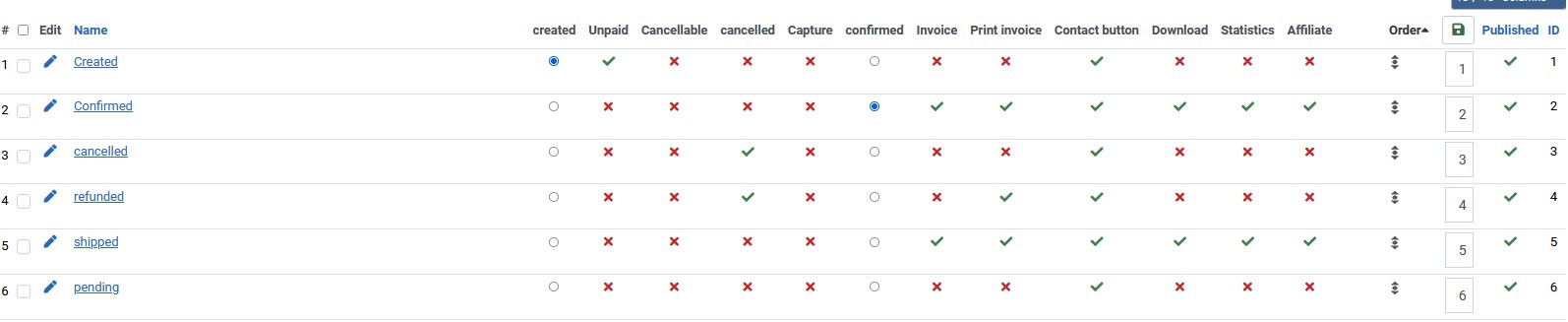
Hi, I have managed to make a payment with an order that is marked as Confirmed, it has a Shipping Address and is paid successfully but still no luck to go to Ship Station. Please can you look, it is order J8
Please Log in or Create an account to join the conversation.
2 years 4 months ago - 2 years 4 months ago #360604
by Philip
Replied by Philip on topic Error with Shipstation Plugin
Hello,
We will be able to generate an XML, so now do you mean that your didn't find your order in your Shipstation Account ?
Did you try to process a manual update as shown in my message, here .
You can see in your log file that the Shipstation have create your XML, which Shipstation servers should now be able to receive.

Awaiting your returns in order to progress on your issue.
Regards
We will be able to generate an XML, so now do you mean that your didn't find your order in your Shipstation Account ?
Did you try to process a manual update as shown in my message, here .
You can see in your log file that the Shipstation have create your XML, which Shipstation servers should now be able to receive.
Awaiting your returns in order to progress on your issue.
Regards
Last edit: 2 years 4 months ago by Philip.
Please Log in or Create an account to join the conversation.
2 years 4 months ago #360620
by spytech
Replied by spytech on topic Error with Shipstation Plugin
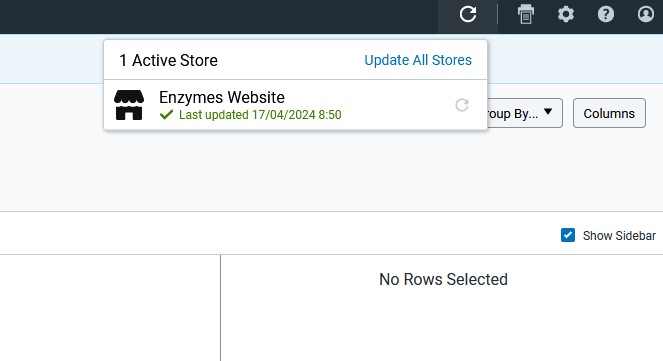
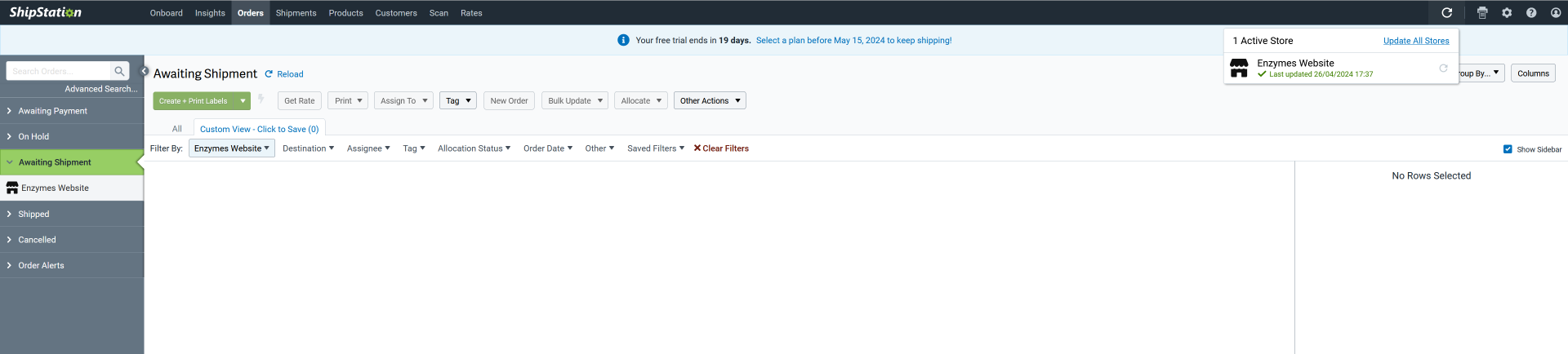
Hi, yes I am saying that the order is created, it is paid, it has an invoice number BUT is not moving to ShipStation. I check ShipStation and click the refresh and it is not showing in the system. It also shows no error when I refresh the store, see attachement.
Please Log in or Create an account to join the conversation.
2 years 4 months ago - 2 years 4 months ago #360622
by Philip
Replied by Philip on topic Error with Shipstation Plugin
Bonjour,
We will need more elements then to go more far in our investiguations, so like previously (via our Contact Us form) can you provide your Shipstation references to be able to login in Shipstation account manager ( here ).
Regards
We will need more elements then to go more far in our investiguations, so like previously (via our Contact Us form) can you provide your Shipstation references to be able to login in Shipstation account manager ( here ).
Regards
Last edit: 2 years 4 months ago by Philip.
Please Log in or Create an account to join the conversation.
2 years 4 months ago #360636
by spytech
Replied by spytech on topic Error with Shipstation Plugin
Thanks, I have sent the details for you to access shipstation.
Please Log in or Create an account to join the conversation.
2 years 4 months ago - 2 years 4 months ago #360675
by Philip
Replied by Philip on topic Error with Shipstation Plugin
Hello,
I check your Shipstation settings in your Shipstation account ( here ), and something seems wrong.

I reprocess settings and was able to process a connection & an update.
Surely an error in the configuration?
I would like to remind you that you have documentation to configure your Shipstation plugin step by step.
Regards
I check your Shipstation settings in your Shipstation account ( here ), and something seems wrong.
I reprocess settings and was able to process a connection & an update.
Surely an error in the configuration?
I would like to remind you that you have documentation to configure your Shipstation plugin step by step.
Regards
Last edit: 2 years 4 months ago by Philip.
Please Log in or Create an account to join the conversation.
2 years 4 months ago #360691
by spytech
Replied by spytech on topic Error with Shipstation Plugin
Hi, not sure how you got that error but when I test all is good, I also re-added the details to the connection and tested, all worked see attached. Oddly I can see a Product in the ShipStation that has come from Hikashop, so there must be some sort off connection.
I am not sure where else to look, I check the documentation and it is all setup correctly based on the Hikashop Ship Station docs.
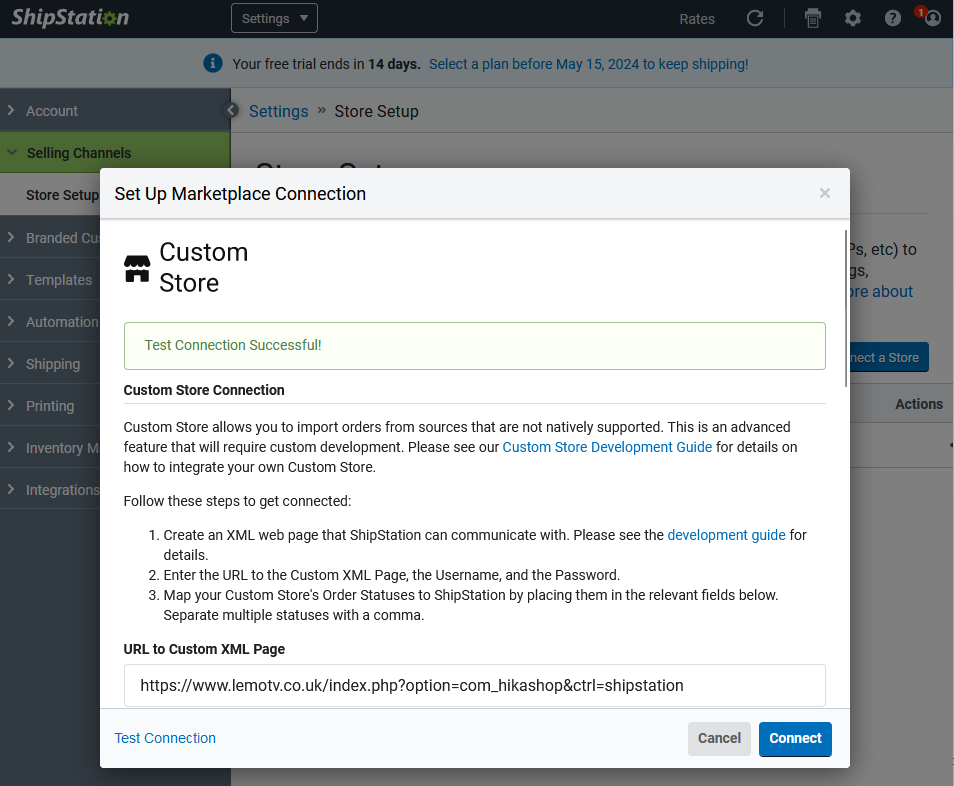
I am not sure where else to look, I check the documentation and it is all setup correctly based on the Hikashop Ship Station docs.
Please Log in or Create an account to join the conversation.
2 years 4 months ago #360694
by Philip
Replied by Philip on topic Error with Shipstation Plugin
Hello,
Unfortunately, I can't tell you where the configuration problem was because when you configure (or reconfigure) the old entries are not visible...
I basically redid everything from the start and found that it works now.
Regards
Unfortunately, I can't tell you where the configuration problem was because when you configure (or reconfigure) the old entries are not visible...
I basically redid everything from the start and found that it works now.
Regards
Please Log in or Create an account to join the conversation.
2 years 4 months ago #361030
by spytech
Replied by spytech on topic Error with Shipstation Plugin
Hi There, so I have got to the point that the orders are coming in to Shipstation but they come in as cancelled straight away. I spoke to Shipstation and they have said that this is an issue on the Hikashop side.
Do you know why it would be coming in as cancelled? Hopefully this helps to resolve the issue?
Thanks!
Do you know why it would be coming in as cancelled? Hopefully this helps to resolve the issue?
Thanks!
Please Log in or Create an account to join the conversation.
2 years 4 months ago #361044
by Philip
Replied by Philip on topic Error with Shipstation Plugin
Hello,
We have done some research using your information provided and without in any way denying that the problem could be on our side, it would be nice if Shipstation sees something wrong in the data sent by HikaShop and they see it that They clarify their idea because we see nothing abnormal so far.
And this is the first time that such a problem has manifested itself.
Sorry for this back and forth between us & Shipstation...
Regards
We have done some research using your information provided and without in any way denying that the problem could be on our side, it would be nice if Shipstation sees something wrong in the data sent by HikaShop and they see it that They clarify their idea because we see nothing abnormal so far.
And this is the first time that such a problem has manifested itself.
Sorry for this back and forth between us & Shipstation...
Regards
Please Log in or Create an account to join the conversation.
Time to create page: 0.299 seconds