
- Posts: 47
- Thank you received: 8
Stripe Checkout: thank you page loses the language
- Alouette00
-
 Topic Author
- Offline
Less
More
3 weeks 8 hours ago #100000575
by Alouette00
Stripe Checkout: thank you page loses the language was created by Alouette00
-- HikaShop version -- : 6.8.1
-- Joomla version -- : 6.2.0
-- PHP version -- : 8.5.12
-- Browser(s) name and version -- : Safari 605.1
Hello,
On a multilingual Joomla site (Japanese by default, English as second language), a customer who pays with Stripe Checkout from the English pages comes back to the thank you page in Japanese. With the bank transfer method, the thank you page stays in English.
Screenshot 1: bank transfer, ordered from the English pages, the thank you page stays in English (/en/ in the URL).
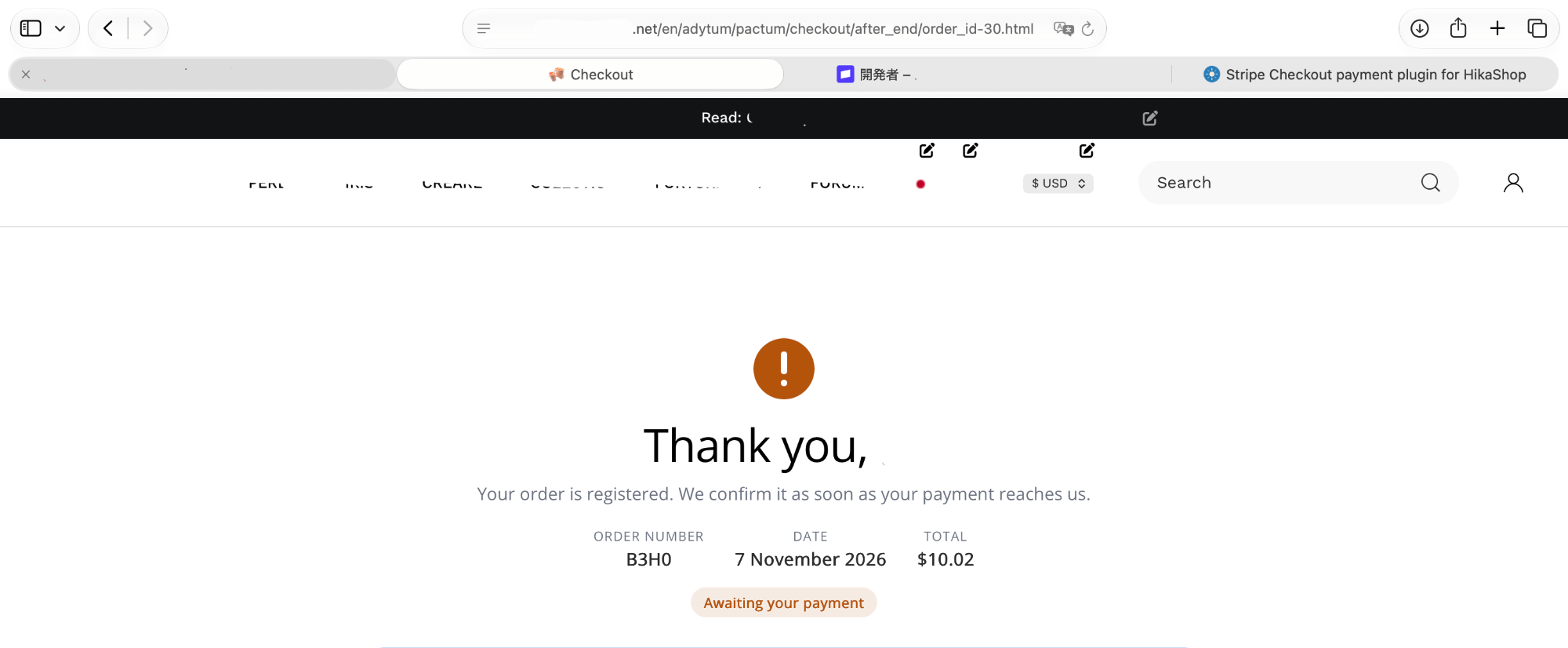
Screenshot 2: Stripe Checkout, ordered from the English pages, the thank you page comes back in Japanese (no language in the URL).
The URLs given to Stripe (success_url and cancel_url in _createCheckoutSession()) and the $endUrl / $cancelUrl of _handleSessionReturn() and _handle3dsReturn() are built as HIKASHOP_LIVE . 'index.php?...' without the language. So the Language Filter plugin of Joomla picks the language from the browser or the default language of the site.
Routing these URLs with the language of the order fixed it on my site. I added this helper:
and used it for $endUrl and $cancelUrl in _handleSessionReturn() and _handle3dsReturn() with $dbOrder->order_lang, and for $cancelUrl in _createCheckoutSession(). After that, the customer comes back in the language of the order, both after paying and after canceling on the Stripe page.
Versions: Joomla 6.2.0, HikaShop Business 6.8.1, Stripe Checkout 1.5.9, PHP 8.5.12.
Thank you.
-- Joomla version -- : 6.2.0
-- PHP version -- : 8.5.12
-- Browser(s) name and version -- : Safari 605.1
Hello,
On a multilingual Joomla site (Japanese by default, English as second language), a customer who pays with Stripe Checkout from the English pages comes back to the thank you page in Japanese. With the bank transfer method, the thank you page stays in English.
Screenshot 1: bank transfer, ordered from the English pages, the thank you page stays in English (/en/ in the URL).
Screenshot 2: Stripe Checkout, ordered from the English pages, the thank you page comes back in Japanese (no language in the URL).
The URLs given to Stripe (success_url and cancel_url in _createCheckoutSession()) and the $endUrl / $cancelUrl of _handleSessionReturn() and _handle3dsReturn() are built as HIKASHOP_LIVE . 'index.php?...' without the language. So the Language Filter plugin of Joomla picks the language from the browser or the default language of the site.
Routing these URLs with the language of the order fixed it on my site. I added this helper:
Code:
private function _langUrl($query, $langTag = '') {
if(empty($langTag))
$langTag = \Joomla\CMS\Factory::getLanguage()->getTag();
if(!empty($langTag) && \Joomla\CMS\Language\Multilanguage::isEnabled())
$query .= '&lang=' . $langTag;
return \Joomla\CMS\Router\Route::_($query, false, 0, true);
}
Versions: Joomla 6.2.0, HikaShop Business 6.8.1, Stripe Checkout 1.5.9, PHP 8.5.12.
Thank you.
Please Log in or Create an account to join the conversation.

3 weeks 1 hour ago #100000597
by nicolas
Replied by nicolas on topic Stripe Checkout: thank you page loses the language
Hi,
The return addresses given to Stripe (after paying and after cancelling on the Stripe page) and the thank you page address the plugin sends the customer to were built without the language, so on a multilingual site Joomla's Language Filter fell back to the browser's or the site's default language. Your analysis was right, thank you for the detailed report.
This is fixed in version 1.5.10 of the Stripe Checkout plugin, available now: Joomla's updater shows it, or you can download it from your account on our website, and install it over your current version (your settings are kept). The customer now comes back in the language they ordered in, on the thank you page after paying and on the cancel page after giving up on the Stripe page.
The update replaces the plugin file, so your own modification goes away with it and is no longer needed.
Plugin page: www.hikashop.com/marketplace/product/296-stripe-checkout.html
The following user(s) said Thank You: Alouette00
Please Log in or Create an account to join the conversation.
- Alouette00
-
Topic Author
- Offline
Less
More
- Posts: 47
- Thank you received: 8
2 weeks 6 days ago #100000606
by Alouette00
Replied by Alouette00 on topic Stripe Checkout: thank you page loses the language
Hi,
Thank you very much for the quick fix and the clear explanation.
I installed version 1.5.10 on my test site, and it works well. After paying and after cancelling on the Stripe page, the customer now comes back in the language of the order. I will update my live shop and remove my own modification.
Thank you again for your support.
Please Log in or Create an account to join the conversation.
Time to create page: 0.050 seconds