

- Posts: 21
- Thank you received: 2
Is it possible to disable coupons
15 years 3 weeks ago - 15 years 3 weeks ago #24743
by Tusk
Is it possible to disable coupons was created by Tusk
Hi I would like to disable the coupons at this stage as we do not plan on offering any for the time being. Having the "Enter your coupon" filled on the checkout page may just cause confusion? I have tried to find a way to switch it off and searched the help forum but cant find how to do this, is it possible?
Last edit: 15 years 3 weeks ago by Tusk.
The following user(s) said Thank You: NigelPeck, andrewwinkler
Please Log in or Create an account to join the conversation.

15 years 3 weeks ago #24746
by nicolas
Replied by nicolas on topic Re: Is it possible to disable coupons
Hi,
Sure. You just need to remove the view "coupon" from the "Checkout workflow" option of the Checkout tab of the config. More information about that option on:
www.hikashop.com/support/documentation/5...config.html#checkout
Sure. You just need to remove the view "coupon" from the "Checkout workflow" option of the Checkout tab of the config. More information about that option on:
www.hikashop.com/support/documentation/5...config.html#checkout
The following user(s) said Thank You: NigelPeck
Please Log in or Create an account to join the conversation.

Less
More
- Posts: 121
- Thank you received: 2
5 years 6 months ago - 5 years 6 months ago #330425
by andrewwinkler
Replied by andrewwinkler on topic Is it possible to disable coupons
I tried to work out how to disable the coupons feature following the cryptic instructions on this thread, as well as linked page. However, I was unable to work this out from the information provided. Incredibly frustrating!!! Either you guys don't know how to explain or get some sadistic kick out of giving nebulous instructions. Anyhow, I need clearer and and easier step by step instructions how to disable coupons for a HikaShop site, and wouldn't be surprised if I was NOT the only customer getting frustrated with your lack of clarity with regards to your instructions.
Last edit: 5 years 6 months ago by andrewwinkler.
Please Log in or Create an account to join the conversation.
5 years 6 months ago #330439
by nicolas
Replied by nicolas on topic Is it possible to disable coupons
Hi,
I would recommend you to first read this tutorial which explains how to modify your checkout workflow:
www.hikashop.com/support/documentation/4...eckout-workflow.html
Once you read it and understand how this all works, our messages here should be easier to understand.
More specifically, you just need to hover on the "coupon" view in your checkout workflow, and you'll see the delete icon to delete the view. Here is a screenshot:
i.imgur.com/jII0YtQ.png
I would recommend you to first read this tutorial which explains how to modify your checkout workflow:
www.hikashop.com/support/documentation/4...eckout-workflow.html
Once you read it and understand how this all works, our messages here should be easier to understand.
More specifically, you just need to hover on the "coupon" view in your checkout workflow, and you'll see the delete icon to delete the view. Here is a screenshot:
i.imgur.com/jII0YtQ.png
Please Log in or Create an account to join the conversation.
Less
More
- Posts: 121
- Thank you received: 2
5 years 6 months ago - 5 years 6 months ago #330459
by andrewwinkler
Replied by andrewwinkler on topic Is it possible to disable coupons
I've deleted the "coupon" column as you suggested.
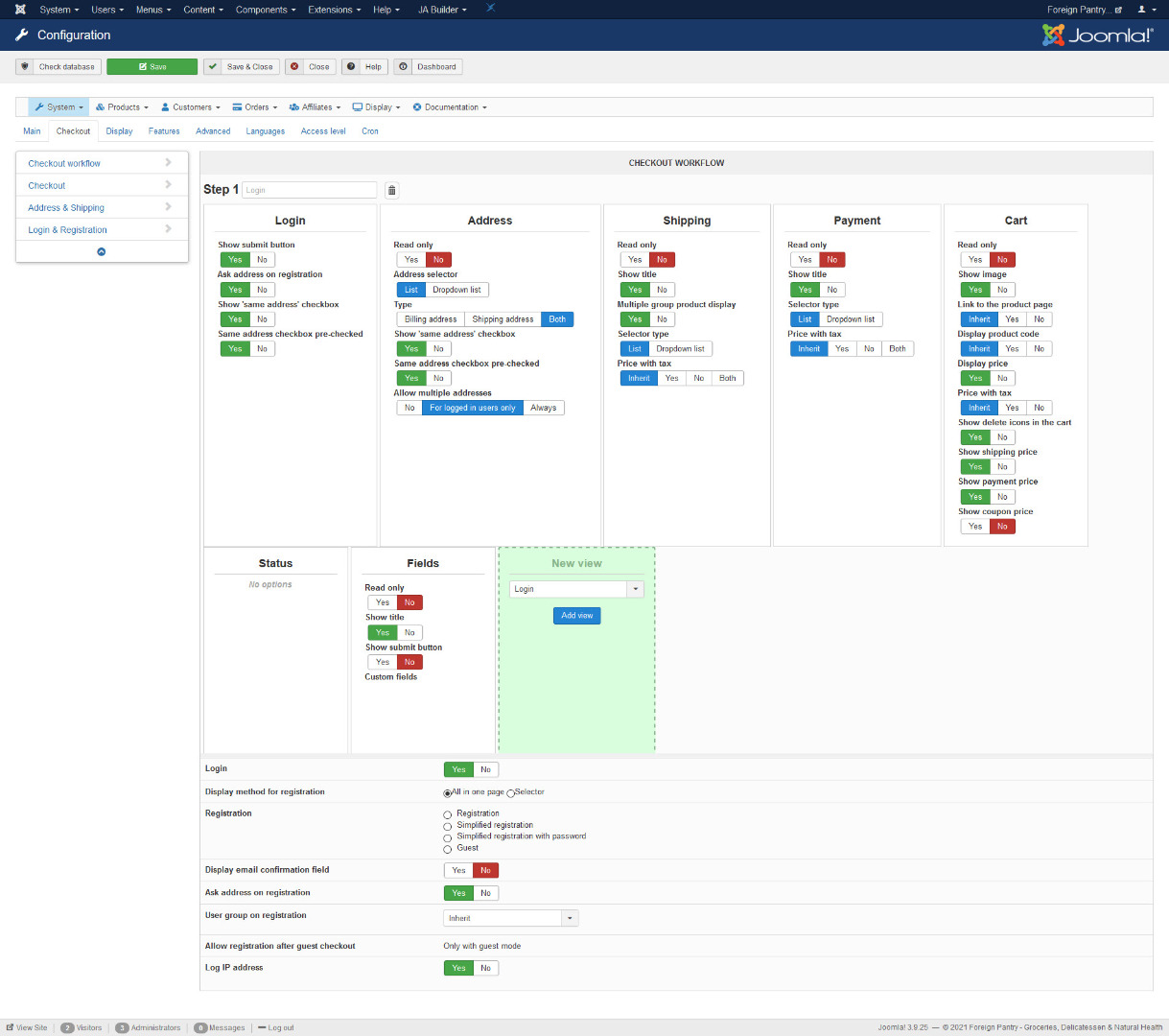
However, the coupon entry form is still being displayed on the checkout page.
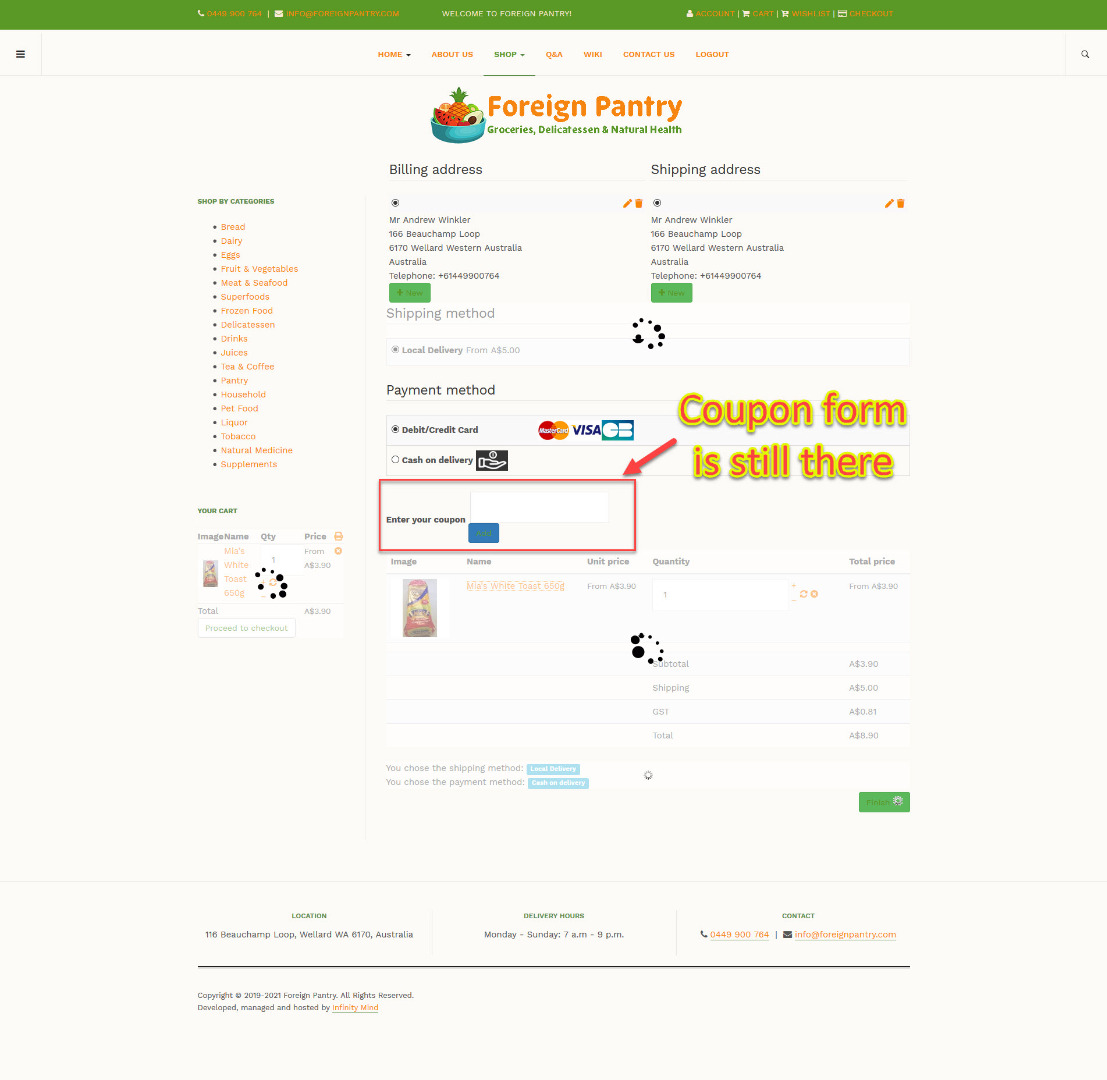
However, the coupon entry form is still being displayed on the checkout page.
Last edit: 5 years 6 months ago by andrewwinkler.
Please Log in or Create an account to join the conversation.

5 years 6 months ago - 5 years 6 months ago #330467
by Philip
Replied by Philip on topic Is it possible to disable coupons
Hello,
Then you have to remove the block coupon in your Checkout Workflow settings.
You can reach these settings from Main HikaShop option => Checkout Tab, then Checkout Workflow part
Hope this will fit your needs.
Regards
Then you have to remove the block coupon in your Checkout Workflow settings.
You can reach these settings from Main HikaShop option => Checkout Tab, then Checkout Workflow part
Hope this will fit your needs.
Regards
Last edit: 5 years 6 months ago by Philip.
The following user(s) said Thank You: andrewwinkler
Please Log in or Create an account to join the conversation.
Less
More
- Posts: 121
- Thank you received: 2
5 years 6 months ago #330621
by andrewwinkler
Replied by andrewwinkler on topic Is it possible to disable coupons
It's fine now. Thanks.
Please Log in or Create an account to join the conversation.
Time to create page: 0.199 seconds