

- Posts: 70
- Thank you received: 4
What should the Return URL be for Auth.net plugin?
13 years 2 weeks ago - 13 years 2 weeks ago #123267
by intown
What should the Return URL be for Auth.net plugin? was created by intown
-- url of the page with the problem -- :
mywebsite.com/mypage
-- HikaShop version -- : 2.2.1
-- Joomla version -- : 3.1.5
Not sure why this is not working or what I can not find the answer.
What should the return URL be for the Authorize.net plugin?
Thanks!
-- HikaShop version -- : 2.2.1
-- Joomla version -- : 3.1.5
Not sure why this is not working or what I can not find the answer.
What should the return URL be for the Authorize.net plugin?
Thanks!
Last edit: 13 years 2 weeks ago by intown.
Please Log in or Create an account to join the conversation.

13 years 2 weeks ago #123270
by Jerome
Jerome - Obsidev.com
HikaMarket & HikaSerial developer / HikaShop core dev team.
Replied by Jerome on topic What should the Return URL be for Auth.net plugin?
Hi,
Nothing.
Regards,
Nothing.
Regards,
Jerome - Obsidev.com
HikaMarket & HikaSerial developer / HikaShop core dev team.
Please Log in or Create an account to join the conversation.
13 years 2 weeks ago #123271
by intown
Replied by intown on topic What should the Return URL be for Auth.net plugin?
Thanks for the reply! That explains why I could not find anything.
you can see the shop here
www.charitymobi.org/index.php?option=com...yout=show&Itemid=183
When I go through the process this is all I see after entering my CC info at
secure.authorize.net/gateway/transact.dll
Thank you for your purchase.
and I am not brought back to hikashop
What am I missing? -- Steven
you can see the shop here
www.charitymobi.org/index.php?option=com...yout=show&Itemid=183
When I go through the process this is all I see after entering my CC info at
secure.authorize.net/gateway/transact.dll
Thank you for your purchase.
and I am not brought back to hikashop
What am I missing? -- Steven
Please Log in or Create an account to join the conversation.
13 years 2 weeks ago #123286
by Jerome
Jerome - Obsidev.com
HikaMarket & HikaSerial developer / HikaShop core dev team.
Replied by Jerome on topic What should the Return URL be for Auth.net plugin?
Hi,
www.hikashop.com/support/2013-08-08-00-1...-authorize-form.html
Which Authorize.net mode are you using ? A.I.M. ?
Regards,
www.hikashop.com/support/2013-08-08-00-1...-authorize-form.html
Logically, Authorize shouldd redirect the user to the HikaShop store. After that, HikaShop check this parameter and redirect the user to another page if required. So if you let the "return url" empty, it will use the default end page.Return url : The url you want your users to be redirected to when they finish their payment on the Authorize.net interface. By default, they will be redirected to the after_end page of the checkout process which will thank them for their order.
Which Authorize.net mode are you using ? A.I.M. ?
Regards,
Jerome - Obsidev.com
HikaMarket & HikaSerial developer / HikaShop core dev team.
The following user(s) said Thank You: intown
Please Log in or Create an account to join the conversation.
13 years 2 weeks ago - 13 years 2 weeks ago #123291
by intown
Replied by intown on topic What should the Return URL be for Auth.net plugin?
I am using the SIM interface.
If I add a URL to the auth.net plugin like charitymobi.org/raffle-thank-you then on the auth.net thankyou page a link appears that a user can click and they are taken to our thankyou page (this is just a joomla article) and does not show them what they have purchased or their order.
I really appreciated the help. -- Steven
If I add a URL to the auth.net plugin like charitymobi.org/raffle-thank-you then on the auth.net thankyou page a link appears that a user can click and they are taken to our thankyou page (this is just a joomla article) and does not show them what they have purchased or their order.
I really appreciated the help. -- Steven
Last edit: 13 years 2 weeks ago by intown.
Please Log in or Create an account to join the conversation.
13 years 2 weeks ago #123439
by intown
Replied by intown on topic What should the Return URL be for Auth.net plugin?
Any thoughts on why the default URL Redirection is not working for the Authorize.net SIM payment plugin?
After some testing here is what I learned.
1. I can set "Allow payment notifications from %s" to No and the customer is shown the authorize.net receipt page but the order is not updated in Hikashop and I need the order to be updated.
2. "Allow payment notifications from %s" is set back to yes and I leave "Return url" empty. The order is updated and the customer is shown an empty white page that says "Thank you for your order" with no other information
3. "Allow payment notifications from %s" is set back to yes and in "Return url" I enter a URL to a Joomla article. The order is updated and the customer is shown an empty white page that says "Thank you for your order" with with a link that directs them to my Joomla Thankyou article. This is better but not really ideal since the customer never sees a proper receipt page with the order details and shipping address and confirmation number.
Does any of this make sense? Am I missing something simple?
Thanks! -- Steven
After some testing here is what I learned.
1. I can set "Allow payment notifications from %s" to No and the customer is shown the authorize.net receipt page but the order is not updated in Hikashop and I need the order to be updated.
2. "Allow payment notifications from %s" is set back to yes and I leave "Return url" empty. The order is updated and the customer is shown an empty white page that says "Thank you for your order" with no other information
3. "Allow payment notifications from %s" is set back to yes and in "Return url" I enter a URL to a Joomla article. The order is updated and the customer is shown an empty white page that says "Thank you for your order" with with a link that directs them to my Joomla Thankyou article. This is better but not really ideal since the customer never sees a proper receipt page with the order details and shipping address and confirmation number.
Does any of this make sense? Am I missing something simple?
Thanks! -- Steven
Please Log in or Create an account to join the conversation.

13 years 2 weeks ago #123501
by nicolas
Replied by nicolas on topic What should the Return URL be for Auth.net plugin?
1. You should leave that option turned on.
2. The Thank you for your order page should redirect you to the default "normal" thank you page of HikaShop.
There is actually a glitch in the plugin.
The line:
$return_url = HIKASHOP_LIVE.'index.php?option=com_hikashop&ctrl=checkout&task=after_end&order_id='.$order_id.$this->url_itemid;
should actually be:
$this->payment_params->return_url = HIKASHOP_LIVE.'index.php?option=com_hikashop&ctrl=checkout&task=after_end&order_id='.$order_id.$this->url_itemid;
in plugins/hikashoppayment/authorize/authorize.php and it will work properly.
3. In that case, if the redirection doesn't work, it means that the mootools library is not loaded on your website
Add the code:
before
in plugins/hikashoppayment/authorize/authorize_thankyou.php and that should make it work.
Regarding the order page, you could enter the URL of the user's order listing (you can create a menu item of the type HikaShop order listing via the menu manager to get the URL).
2. The Thank you for your order page should redirect you to the default "normal" thank you page of HikaShop.
There is actually a glitch in the plugin.
The line:
$return_url = HIKASHOP_LIVE.'index.php?option=com_hikashop&ctrl=checkout&task=after_end&order_id='.$order_id.$this->url_itemid;
should actually be:
$this->payment_params->return_url = HIKASHOP_LIVE.'index.php?option=com_hikashop&ctrl=checkout&task=after_end&order_id='.$order_id.$this->url_itemid;
in plugins/hikashoppayment/authorize/authorize.php and it will work properly.
3. In that case, if the redirection doesn't work, it means that the mootools library is not loaded on your website
Add the code:
Code:
if(!HIKASHOP_J30)
JHTML::_('behavior.mootools');
else
JHTML::_('behavior.framework');
Code:
$doc->addScriptDeclaration("window.addEvent('domready', function() {window.location='".$this->payment_params->return_url."'});");
Regarding the order page, you could enter the URL of the user's order listing (you can create a menu item of the type HikaShop order listing via the menu manager to get the URL).
The following user(s) said Thank You: intown
Please Log in or Create an account to join the conversation.
13 years 2 weeks ago #123888
by intown
Replied by intown on topic What should the Return URL be for Auth.net plugin?
Thanks for the reply and info.
I updated the authorize.php file and now the Authorize.net gateway redirects them back to.
On this page the customer sees a message dialog box that says:
Is it possible to show the customer their receipt page? so that they can print it?
Thanks! -- Steven
I updated the authorize.php file and now the Authorize.net gateway redirects them back to.
Code:
https://www.charitymobi.org/index.php?option=com_hikashop&ctrl=checkout&task=after_end&order_id=XXX&Itemid=YYY
(where XXX & YYY are numbers)
On this page the customer sees a message dialog box that says:
Message
Thank you for your purchase.
Is it possible to show the customer their receipt page? so that they can print it?
Thanks! -- Steven
Please Log in or Create an account to join the conversation.

13 years 2 weeks ago #123928
by Xavier
Replied by Xavier on topic What should the Return URL be for Auth.net plugin?
Hi,
You can edit the view "checkout / after_end" via the menu Display > Views to redirect the customers directly to the user control panel menu in the frontend.
You can edit the view "checkout / after_end" via the menu Display > Views to redirect the customers directly to the user control panel menu in the frontend.
Please Log in or Create an account to join the conversation.

Less
More
- Posts: 279
- Thank you received: 1
13 years 1 week ago - 13 years 1 week ago #124220
by trogladyte
Replied by trogladyte on topic What should the Return URL be for Auth.net plugin?
I made the changes suggest and I am still not being returned to the site. It's just hung up on the Authorize.net receipt page (I'm using SIM). I have a return URL set in the AN plugin, but it's a valid one so will resolve. However the page has no continue or return button on it - no idea what to do.
URL: www.ckdev.info/o2m
AN is in test mode btw.
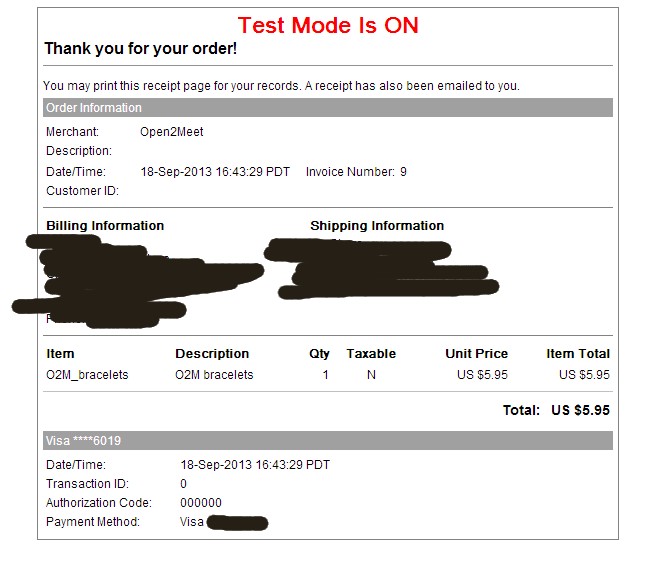
UPDATE:
I changed the "Allow payment notifications from %s" to YES and it worked (I previously had it as Yes, but it didn't - doh!). I actually want it to auto return to the site - is that a function I need to sort out in the AN backend?
URL: www.ckdev.info/o2m
AN is in test mode btw.
UPDATE:
I changed the "Allow payment notifications from %s" to YES and it worked (I previously had it as Yes, but it didn't - doh!). I actually want it to auto return to the site - is that a function I need to sort out in the AN backend?
Last edit: 13 years 1 week ago by trogladyte.
Please Log in or Create an account to join the conversation.
13 years 1 week ago #124398
by Jerome
Jerome - Obsidev.com
HikaMarket & HikaSerial developer / HikaShop core dev team.
Replied by Jerome on topic What should the Return URL be for Auth.net plugin?
Hi,
Regards,
In SIM mode, I do not see an option in the API in order to specify a "return back" url. So I suppose that it has to be configured in the Authorize.net backend directly, that it is not something dynamic.I changed the "Allow payment notifications from %s" to YES and it worked (I previously had it as Yes, but it didn't - doh!). I actually want it to auto return to the site - is that a function I need to sort out in the AN backend?
Regards,
Jerome - Obsidev.com
HikaMarket & HikaSerial developer / HikaShop core dev team.
Please Log in or Create an account to join the conversation.
Time to create page: 0.250 seconds