

- Posts: 6
- Thank you received: 0
Payment method: where is the radio button?
12 years 9 months ago #141353
by Jojo
Payment method: where is the radio button? was created by Jojo
-- HikaShop version -- : 2.2.3 Starter
-- Joomla version -- : 3.1.2
Good evening,
first of all, thank you very much for this great shop system. After installing and messing around with other systems, Hikashop runs stable, is intuitive, has an excellent documentation and a support forum. I am using the Starter Version just to get familiar with it. I have read the documentation and watched the webinar on YouTube. But one problem ist left, which wasn't there at the beginning. Maybe I destroyed something (but I never changed the source code anyway, only frontend)?
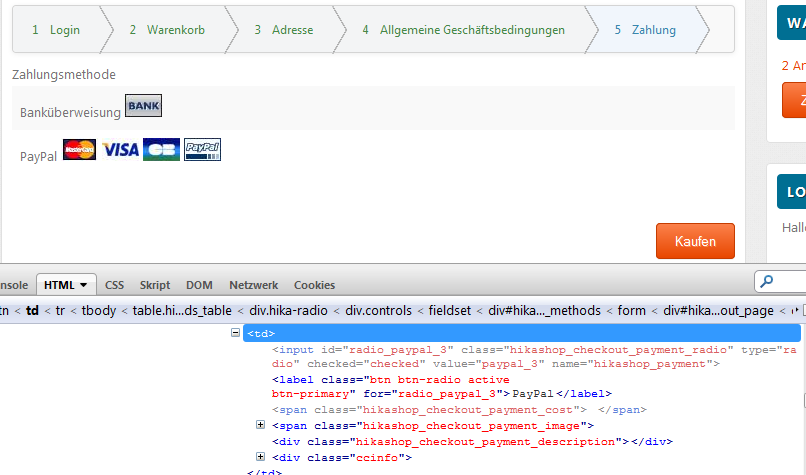
I have set up two payment methods (bank transfer and PayPal) and normally there should be a radion button to select a method. But they are suddenly gone. Firebug shows the <input type ...> etc. but they are not visible. When I use no CSS (not default and not custom) they are visible. Please note the attached file, showing Firebug-HTML and the result.
Okay, I could change the PHP but I think, this is not a good way to solve the problem mainly because future updates will overwrite this again. Can anyone help me?
And one more question, which may be related to this. The progress bar above the cart changed. At first there was a line with points, suddenly there are arrows. Where are the points? I switched CSS to No and default but they are gone, also...
-- Joomla version -- : 3.1.2
Good evening,
first of all, thank you very much for this great shop system. After installing and messing around with other systems, Hikashop runs stable, is intuitive, has an excellent documentation and a support forum. I am using the Starter Version just to get familiar with it. I have read the documentation and watched the webinar on YouTube. But one problem ist left, which wasn't there at the beginning. Maybe I destroyed something (but I never changed the source code anyway, only frontend)?
I have set up two payment methods (bank transfer and PayPal) and normally there should be a radion button to select a method. But they are suddenly gone. Firebug shows the <input type ...> etc. but they are not visible. When I use no CSS (not default and not custom) they are visible. Please note the attached file, showing Firebug-HTML and the result.
Okay, I could change the PHP but I think, this is not a good way to solve the problem mainly because future updates will overwrite this again. Can anyone help me?
And one more question, which may be related to this. The progress bar above the cart changed. At first there was a line with points, suddenly there are arrows. Where are the points? I switched CSS to No and default but they are gone, also...
Please Log in or Create an account to join the conversation.

12 years 9 months ago #141356
by Jerome
Jerome - Obsidev.com
HikaMarket & HikaSerial developer / HikaShop core dev team.
Replied by Jerome on topic Payment method: where is the radio button?
Hi,
Please deactivate the "bootstrap design" in your HikaShop configuration.
Your template is not bootstrap compatible.
Regards,
Please deactivate the "bootstrap design" in your HikaShop configuration.
Your template is not bootstrap compatible.
Regards,
Jerome - Obsidev.com
HikaMarket & HikaSerial developer / HikaShop core dev team.
The following user(s) said Thank You: Jojo
Please Log in or Create an account to join the conversation.
12 years 9 months ago #141367
by Jojo
Replied by Jojo on topic Payment method: where is the radio button?
Great! That's it!!! Thanks a lot  I never would have figured this out on my own...
I never would have figured this out on my own... Please Log in or Create an account to join the conversation.
12 years 7 months ago #146710
by cembos
Replied by cembos on topic Payment method: where is the radio button?
Hi,
That's exactly the trouble. It solved also my display trouble but if i disable the bootstrap option, on a mobile phone, the product displying is very ugly?
Any solution for that please?
Thanks a lot.
That's exactly the trouble. It solved also my display trouble but if i disable the bootstrap option, on a mobile phone, the product displying is very ugly?
Any solution for that please?
Thanks a lot.
Please Log in or Create an account to join the conversation.

12 years 7 months ago #146717
by nicolas
Replied by nicolas on topic Payment method: where is the radio button?
Than you would have to edit the file "payment" of the view "checkout" and replace the text HIKASHOP_RESPONSIVE by false via the menu Display>Views.
Please Log in or Create an account to join the conversation.
12 years 7 months ago #146721
by cembos
Replied by cembos on topic Payment method: where is the radio button?
Hi Nicolas,
Thanks a lot i works like a charm.
Really, i would like to thank you.
I'm gonna buy the essential of Hikashop, i'm trying to test it before and with a forum like this one i think that i'm gonna do it pretty quick
Greatings
Thanks a lot i works like a charm.
Really, i would like to thank you.
I'm gonna buy the essential of Hikashop, i'm trying to test it before and with a forum like this one i think that i'm gonna do it pretty quick
Greatings
Please Log in or Create an account to join the conversation.
Time to create page: 0.093 seconds