

- Posts: 208
- Thank you received: 10
I must be missing something....Alphauserpoints
12 years 8 months ago #145629
by simmiepam
I must be missing something....Alphauserpoints was created by simmiepam
-- url of the page with the problem -- :
mywebsite.com/mypage
-- HikaShop version -- : x.x.x
-- Joomla version -- : x.x
-- PHP version -- : x.x.x
-- Browser(s) name and version -- : XXXXX x.x.x
-- Error-message(debug-mod must be tuned on) -- : Error_message
I'm pretty bright and understand most things....but I cannot get my head around the percentages (%) for the alphauserpoints payment system
Here's the scenarios
Customer has 10,000 points
Purchases a $5.20 product
I don't have any amounts in the maximum % field or the minimum % field (because I'm confused on how to use them)
So I check out the documentation and use the sample info (75% maximum) and (50% minimum) to see what it looks like in my dummy order...and
1. I don't see an option where the user gets to CHOOSE to use points to partially pay for the order
2. I don't really understand what the 75% and 50% actually do in the order.
Pam
-- HikaShop version -- : x.x.x
-- Joomla version -- : x.x
-- PHP version -- : x.x.x
-- Browser(s) name and version -- : XXXXX x.x.x
-- Error-message(debug-mod must be tuned on) -- : Error_message
I'm pretty bright and understand most things....but I cannot get my head around the percentages (%) for the alphauserpoints payment system
Here's the scenarios
Customer has 10,000 points
Purchases a $5.20 product
I don't have any amounts in the maximum % field or the minimum % field (because I'm confused on how to use them)
So I check out the documentation and use the sample info (75% maximum) and (50% minimum) to see what it looks like in my dummy order...and
1. I don't see an option where the user gets to CHOOSE to use points to partially pay for the order
2. I don't really understand what the 75% and 50% actually do in the order.
Pam
Please Log in or Create an account to join the conversation.

12 years 8 months ago #145743
by Eliot
Replied by Eliot on topic I must be missing something....Alphauserpoints
Hi there,
I don't know which version of Hikashop you are using but we did a lot of improvements on this plugin.
First, make sure you have the last Hikashop version. Then, tell me what you are trying to do and I'll give you some guidelines to achieve it.
I don't know which version of Hikashop you are using but we did a lot of improvements on this plugin.
First, make sure you have the last Hikashop version. Then, tell me what you are trying to do and I'll give you some guidelines to achieve it.
Please Log in or Create an account to join the conversation.
12 years 8 months ago #145744
by simmiepam
Replied by simmiepam on topic I must be missing something....Alphauserpoints
Sorry!
I just purchased ESSENTIALS yesterday! Woohoo very happpy with it, so I assume the plugin that came with the purchase is updated???
I'm just trying to have users, when they checkout EITHER choose to use their points (or some of them) to pay OR use a credit card to pay. AND if the system will let them...use some points and some credit card to finish the cart.
I've been reading all over and trying to figure out what I'm going.
There's a Hikashop User Points plugin and a HikaShop Alphauserpoints plugin. Should I be using both?
I'm testing this in a dummy site right now to make sure I know what I'm doing before I go live.
If you want I can give you the backend login info so you can help me understand what I'm doing wrong.
The site is: BestederNewsletters.com/cart
I'll try to send you the login for the backend.
I just purchased ESSENTIALS yesterday! Woohoo very happpy with it, so I assume the plugin that came with the purchase is updated???
I'm just trying to have users, when they checkout EITHER choose to use their points (or some of them) to pay OR use a credit card to pay. AND if the system will let them...use some points and some credit card to finish the cart.
I've been reading all over and trying to figure out what I'm going.
There's a Hikashop User Points plugin and a HikaShop Alphauserpoints plugin. Should I be using both?
I'm testing this in a dummy site right now to make sure I know what I'm doing before I go live.
If you want I can give you the backend login info so you can help me understand what I'm doing wrong.
The site is: BestederNewsletters.com/cart
I'll try to send you the login for the backend.
Please Log in or Create an account to join the conversation.
12 years 8 months ago #145753
by Eliot
Replied by Eliot on topic I must be missing something....Alphauserpoints
No need of a backend access for that kind of thing, it's pretty easy 
What you need to do is enable the option "partial payment" of the plugin.
This will allow your customer to pay with point but not the entire order.
Then, to determine the range they can pay, you must use the minimum and maximum values.
Example, Min:50% and max:75%
Order is 100€.
You customer will be able to use their point to pay between 50 and 75€ (if they have enough points)
If you want them to pay 20% max, just set min: 0 and max: 20%
I hope it's clear enough!
What you need to do is enable the option "partial payment" of the plugin.
This will allow your customer to pay with point but not the entire order.
Then, to determine the range they can pay, you must use the minimum and maximum values.
Example, Min:50% and max:75%
Order is 100€.
You customer will be able to use their point to pay between 50 and 75€ (if they have enough points)
If you want them to pay 20% max, just set min: 0 and max: 20%
I hope it's clear enough!
Please Log in or Create an account to join the conversation.
12 years 8 months ago - 12 years 8 months ago #145789
by simmiepam
Replied by simmiepam on topic I must be missing something....Alphauserpoints
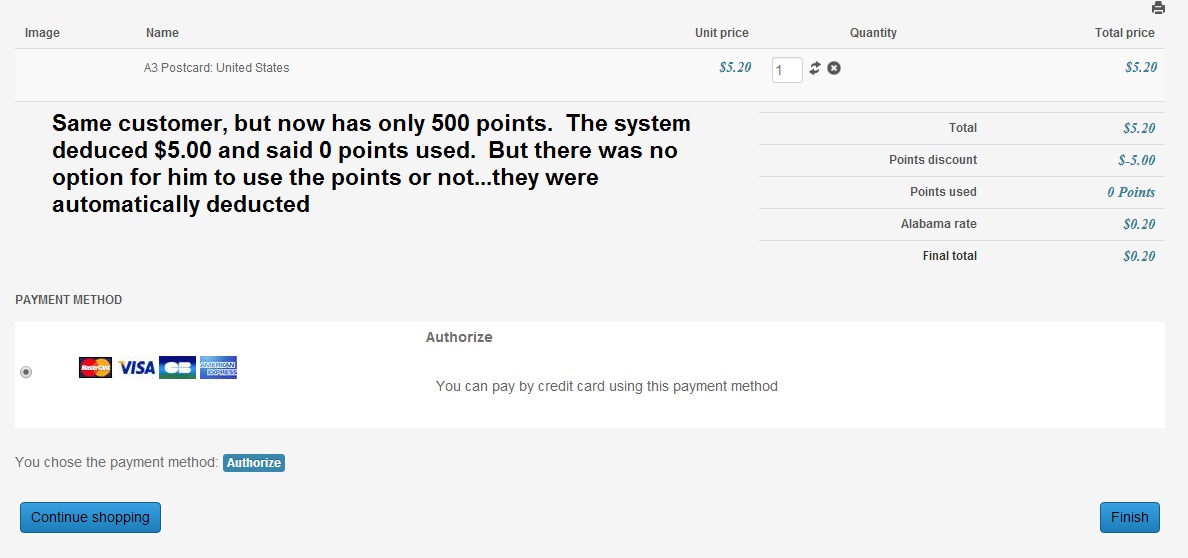
Yes, it makes sense...but something is still not working because I still don't see an option in the payment methods for the customer to use the points for the payment. The system is just automatically applying them without him choosing to or not.
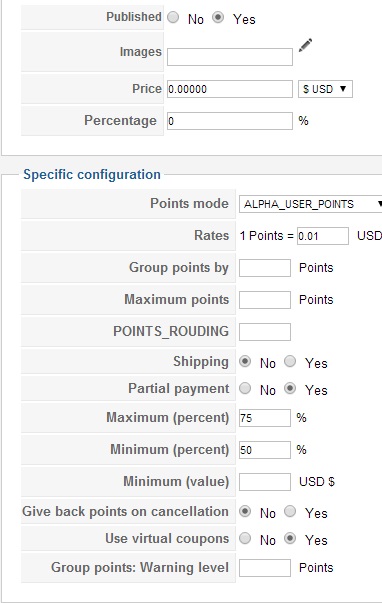
Here's the plugin and what I have done:
Here's a shot of the cart for customer test 1. Customer has 500 points....
Here's the plugin and what I have done:
Here's a shot of the cart for customer test 1. Customer has 500 points....
Last edit: 12 years 8 months ago by simmiepam. Reason: Wrong screen shot for the plugin
Please Log in or Create an account to join the conversation.

12 years 8 months ago #145811
by Jerome
Jerome - Obsidev.com
HikaMarket & HikaSerial developer / HikaShop core dev team.
Replied by Jerome on topic I must be missing something....Alphauserpoints
Hi,
Which version of HikaShop are you using ?
It is strange that it says you are using "0 points", it looks like an old bug on the plugin which did a wrong conversion of the point number during the display. It should be fixed in the latest version : 2.3.0
Otherwise, to let the customer choose if he want to use his points or not, you have to activate the option "Ask for no coupon" in the plugin (your last screenshot) and after that, you will see a new available step while configuring your checkout workflow.
This new step will allow your customer to see the number of his points and choose if he want to use them or not for this order.
Regards,
Which version of HikaShop are you using ?
It is strange that it says you are using "0 points", it looks like an old bug on the plugin which did a wrong conversion of the point number during the display. It should be fixed in the latest version : 2.3.0
Otherwise, to let the customer choose if he want to use his points or not, you have to activate the option "Ask for no coupon" in the plugin (your last screenshot) and after that, you will see a new available step while configuring your checkout workflow.
This new step will allow your customer to see the number of his points and choose if he want to use them or not for this order.
Regards,
Jerome - Obsidev.com
HikaMarket & HikaSerial developer / HikaShop core dev team.
Please Log in or Create an account to join the conversation.
12 years 8 months ago #145813
by simmiepam
Replied by simmiepam on topic I must be missing something....Alphauserpoints
Thank you...I just purchased Essentials 2 days ago.
Is there something else I should have downloaded other than buy Essentials?
Pam
Is there something else I should have downloaded other than buy Essentials?
Pam
Please Log in or Create an account to join the conversation.
12 years 8 months ago #145814
by simmiepam
Replied by simmiepam on topic I must be missing something....Alphauserpoints
EUREKA. It's working
Here's what I WAS NOT doing.
On the plugin...I didn't have the Ask For No Coupon checked
And I didn't have the SHOW POINTS as Alphauserpoints. I had HikaShop chosen instead.
Hooray!
Here's what I WAS NOT doing.
On the plugin...I didn't have the Ask For No Coupon checked
And I didn't have the SHOW POINTS as Alphauserpoints. I had HikaShop chosen instead.
Hooray!
Please Log in or Create an account to join the conversation.
12 years 8 months ago #145815
by simmiepam
Replied by simmiepam on topic I must be missing something....Alphauserpoints
OK. I now have the points section showing...
BUT.... the statement that I've used 0 points is still showing
And....the points section...can I alter how that looks? Box around it....the text larger, etc.? If so...where can I do that?
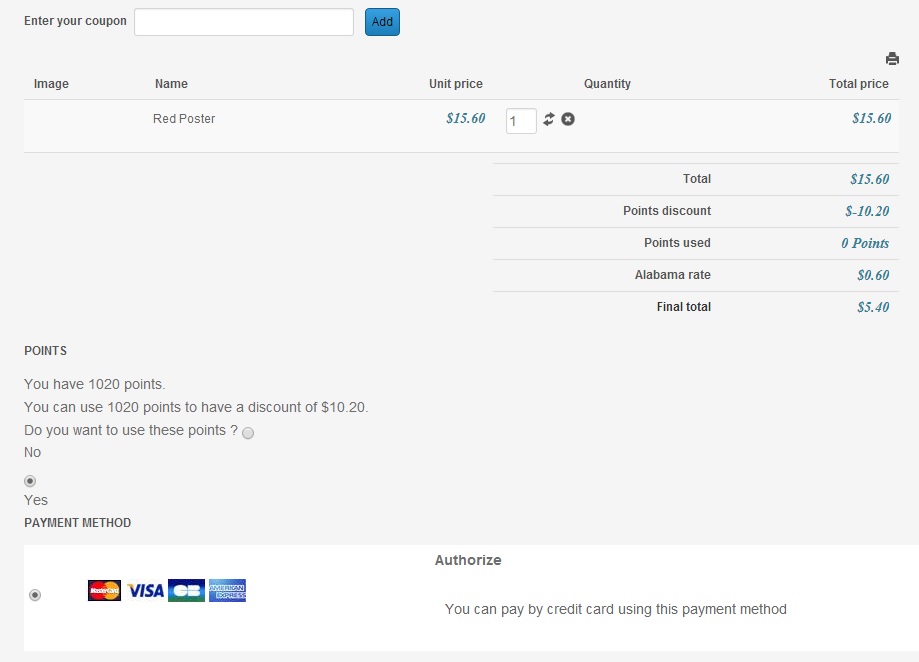
BUT.... the statement that I've used 0 points is still showing
And....the points section...can I alter how that looks? Box around it....the text larger, etc.? If so...where can I do that?
Please Log in or Create an account to join the conversation.
12 years 8 months ago #145893
by Jerome
Jerome - Obsidev.com
HikaMarket & HikaSerial developer / HikaShop core dev team.
Replied by Jerome on topic I must be missing something....Alphauserpoints
Hi,
I see two different threads for the same kind of trouble.
But I do not see this "0 Points" problem in the other thread.
Does this one is fixed ?
Regards,
I see two different threads for the same kind of trouble.
But I do not see this "0 Points" problem in the other thread.
Does this one is fixed ?
Regards,
Jerome - Obsidev.com
HikaMarket & HikaSerial developer / HikaShop core dev team.
Please Log in or Create an account to join the conversation.
12 years 7 months ago #145951
by simmiepam
Replied by simmiepam on topic I must be missing something....Alphauserpoints
Yes, it seems to be fixed now. .... so far so good!
Please Log in or Create an account to join the conversation.
12 years 4 months ago #159483
by simmiepam
Replied by simmiepam on topic I must be missing something....Alphauserpoints
For some reason.....the problem is happening AGAIN!
It is AUTOMATICALLY applying the alpha user points to the cart WITHOUT giving the customer the option to choose or not!!!
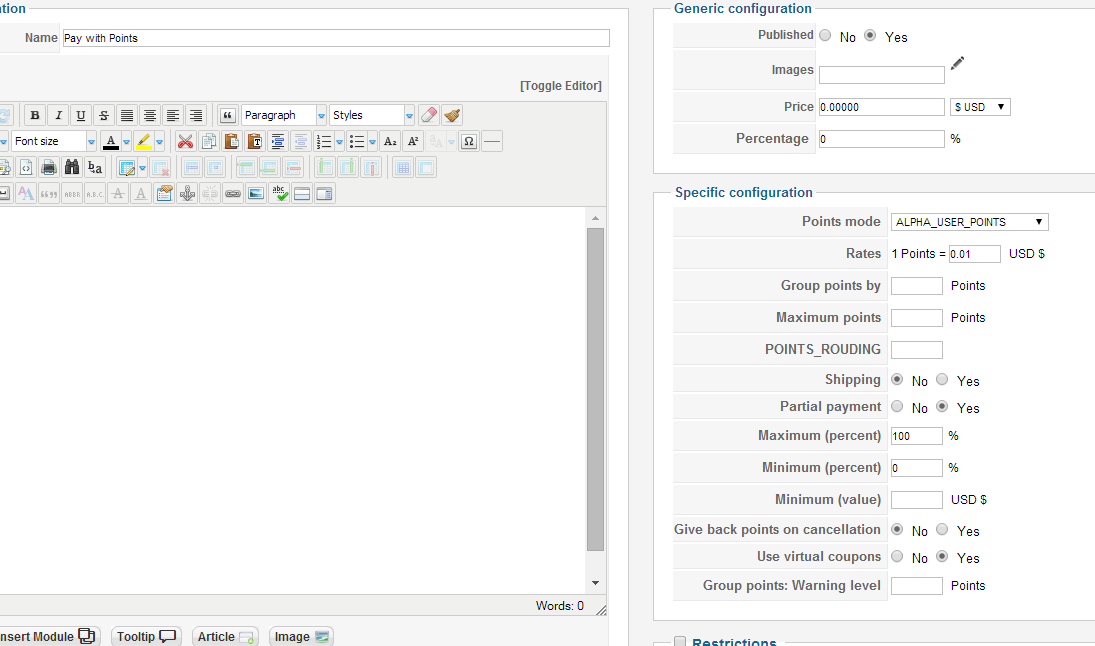
Here's my screenshot for the plugins and cart
Hikashop AlphaUserPoints Plugin screenshot
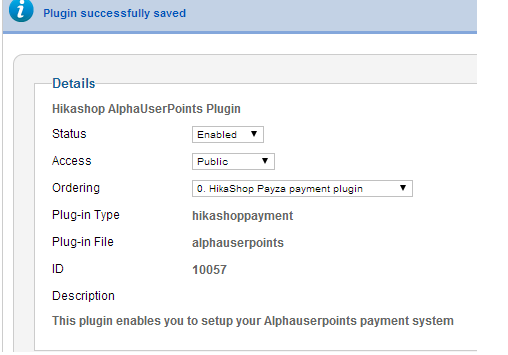
HikaShop User Points payment plugin screenshot
Cart Screenshot
Notice it did not give the customer the OPTION to use the points or not...it automatically applied them!!!!
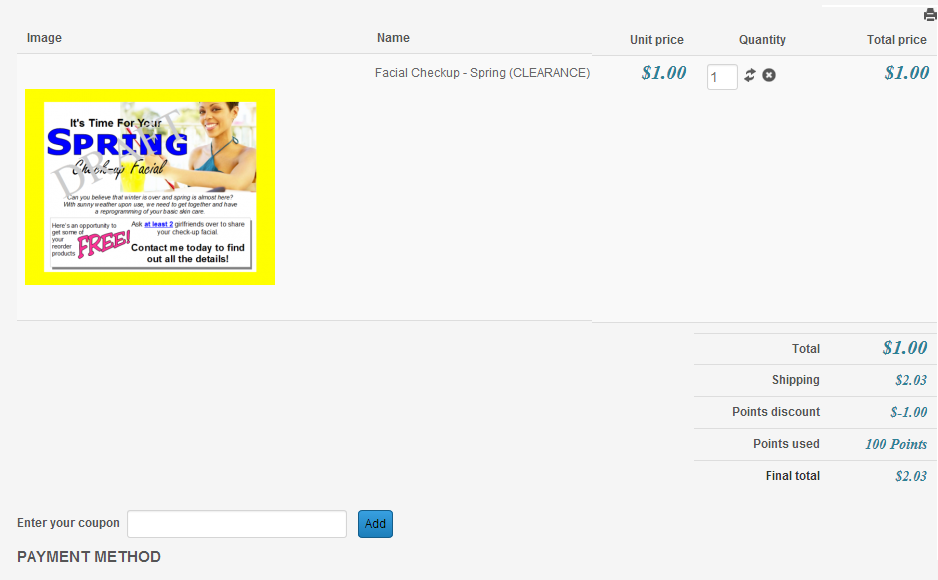
It is AUTOMATICALLY applying the alpha user points to the cart WITHOUT giving the customer the option to choose or not!!!
Here's my screenshot for the plugins and cart
Hikashop AlphaUserPoints Plugin screenshot
HikaShop User Points payment plugin screenshot
Cart Screenshot
Notice it did not give the customer the OPTION to use the points or not...it automatically applied them!!!!
Please Log in or Create an account to join the conversation.
12 years 4 months ago #159498
by Jerome
Jerome - Obsidev.com
HikaMarket & HikaSerial developer / HikaShop core dev team.
Replied by Jerome on topic I must be missing something....Alphauserpoints
Hi,
The plugins "user points" are not the same than the plugin "alpha user points".
Please do not use the "alpha user points" one which is deprecated.
Regards,
The plugins "user points" are not the same than the plugin "alpha user points".
Please do not use the "alpha user points" one which is deprecated.
Regards,
Jerome - Obsidev.com
HikaMarket & HikaSerial developer / HikaShop core dev team.
Please Log in or Create an account to join the conversation.
12 years 4 months ago #159534
by simmiepam
Replied by simmiepam on topic I must be missing something....Alphauserpoints
Thank you
If you notice the title of my images.....I'm not using the outdated plugin...
I'm using:
Hikashop AlphaUserPoints Plugin
HikaShop User Points payment plugin
If you notice the title of my images.....I'm not using the outdated plugin...
I'm using:
Hikashop AlphaUserPoints Plugin
HikaShop User Points payment plugin
Please Log in or Create an account to join the conversation.
12 years 4 months ago #159543
by Jerome
Jerome - Obsidev.com
HikaMarket & HikaSerial developer / HikaShop core dev team.
Replied by Jerome on topic I must be missing something....Alphauserpoints
Hi,
"Hikashop AlphaUserPoints Plugin" is outdated/deprecated.
"HikaShop User Points payment plugin" is the plugin which replace the payment part of the deprecated plugin.
"HikaShop User Points plugin" is the plugin which replace the "gain of point" part of the deprecated plugin.
Regards,
"Hikashop AlphaUserPoints Plugin" is outdated/deprecated.
"HikaShop User Points payment plugin" is the plugin which replace the payment part of the deprecated plugin.
"HikaShop User Points plugin" is the plugin which replace the "gain of point" part of the deprecated plugin.
Regards,
Jerome - Obsidev.com
HikaMarket & HikaSerial developer / HikaShop core dev team.
Please Log in or Create an account to join the conversation.
12 years 4 months ago #159620
by simmiepam
Replied by simmiepam on topic I must be missing something....Alphauserpoints
Thank you that explained it.

Pam
Pam
Please Log in or Create an account to join the conversation.
Time to create page: 0.585 seconds