

- Posts: 16
- Thank you received: 0
Paypal problem - No payment confirmation not sent
12 years 1 month ago #171190
by Phil
Paypal problem - No payment confirmation not sent was created by Phil
-- url of the page with the problem -- :
www.frenchessentials.com
-- HikaShop version -- : 2.3.2 Essentials
-- Joomla version -- : 3.3.3
-- PHP version -- : 5.4.32
-- Browser(s) name and version -- : safari 7.0.6
Hi,
When customers purchase on our site, we do get paid but the orders are never confirmed and we have to do it manually.
I went through all the posts about paypal notification problem, and your paypal issue page but I still have questions. :huh:
See my screenshot attached.
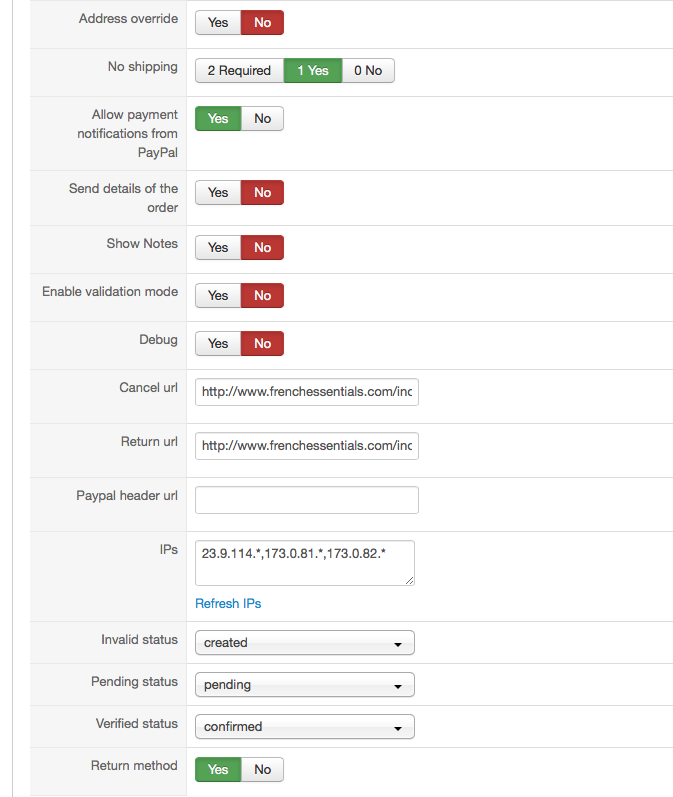
1/ Should "Enable validation mode" be activated?
2/ I have disable "send details of the order" to prevent 1 cent problems. Is it correct?
3/ Is there any settings I am missing?
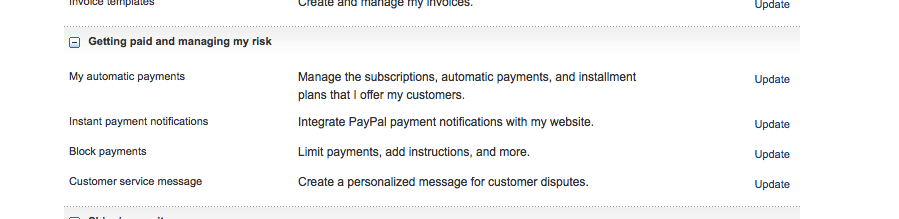
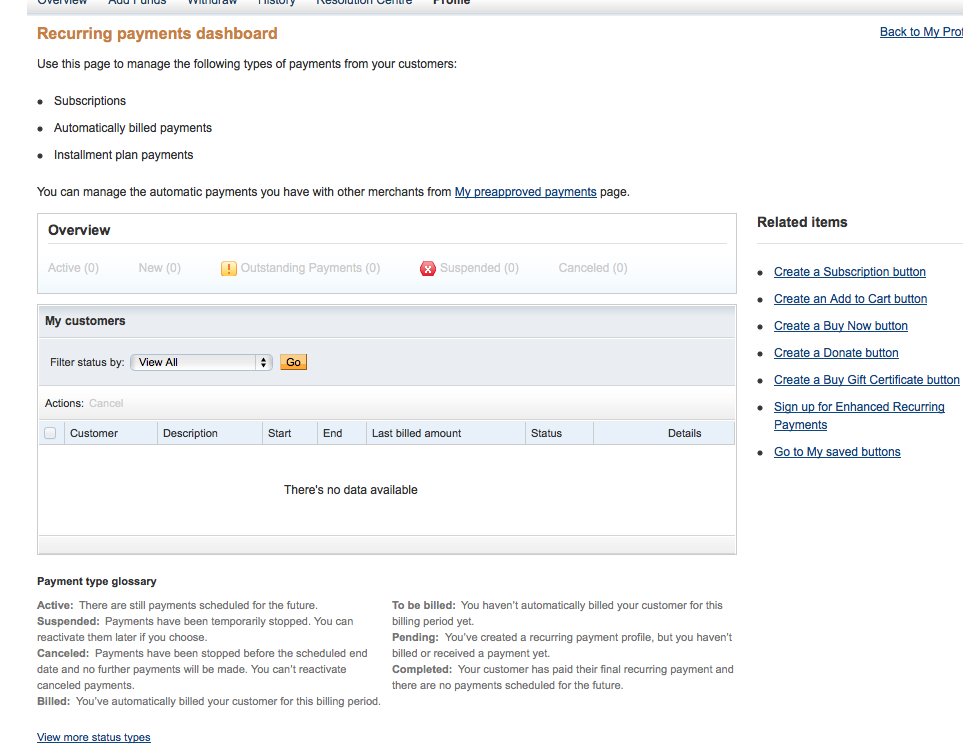
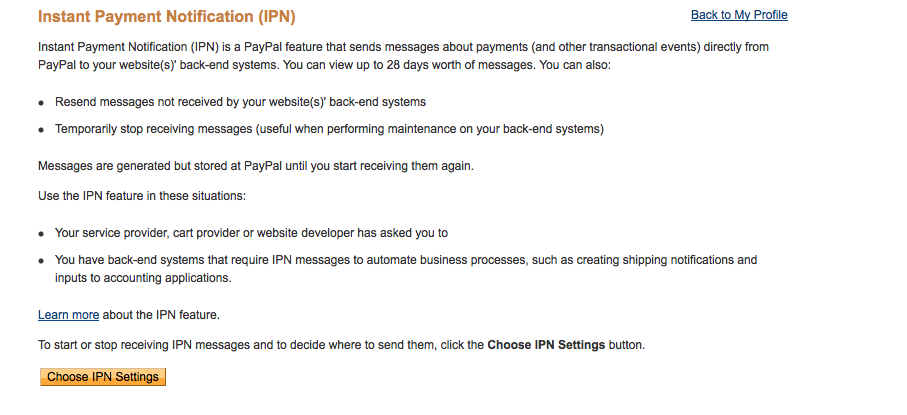
4/ In paypal, Where do you check the automatic validation activation? could you detail?
:dry: I have look but either it ask for IPN, return URL, ... I don't want to screw up everything. (screenshots)
I know you're not working for paypal but your help would be appreciated.
Phil.
-- HikaShop version -- : 2.3.2 Essentials
-- Joomla version -- : 3.3.3
-- PHP version -- : 5.4.32
-- Browser(s) name and version -- : safari 7.0.6
Hi,
When customers purchase on our site, we do get paid but the orders are never confirmed and we have to do it manually.
I went through all the posts about paypal notification problem, and your paypal issue page but I still have questions. :huh:
See my screenshot attached.
1/ Should "Enable validation mode" be activated?
2/ I have disable "send details of the order" to prevent 1 cent problems. Is it correct?
3/ Is there any settings I am missing?
4/ In paypal, Where do you check the automatic validation activation? could you detail?
:dry: I have look but either it ask for IPN, return URL, ... I don't want to screw up everything. (screenshots)
I know you're not working for paypal but your help would be appreciated.
Phil.
Please Log in or Create an account to join the conversation.

12 years 1 month ago #171194
by nicolas
Replied by nicolas on topic Paypal problem - No payment confirmation not sent
Hi,
1. If you activate it, the payments will require a validation in your PayPal account and thus won't be validated automatically. So you don't want to turn it on.
2. It doesn't matter in your case as the problem is not from that.
3. The settings in your PayPal plugin are fine.
4. If you don't know where that is, then you didn't change it and thus you still have the default value which is to validate automatically the payments, so it doesn't come from that.
5. What you need to do in your case is to check each point of that FAQ which is exactly about your problem:
www.hikashop.com/support/documentation/i...or.html#notification
As explained there, you'll want to check your menus, the payment log file, the access log of your server, in order to find the clues on why HikaShop is not receiving the payment notifications from PayPal.
1. If you activate it, the payments will require a validation in your PayPal account and thus won't be validated automatically. So you don't want to turn it on.
2. It doesn't matter in your case as the problem is not from that.
3. The settings in your PayPal plugin are fine.
4. If you don't know where that is, then you didn't change it and thus you still have the default value which is to validate automatically the payments, so it doesn't come from that.
5. What you need to do in your case is to check each point of that FAQ which is exactly about your problem:
www.hikashop.com/support/documentation/i...or.html#notification
As explained there, you'll want to check your menus, the payment log file, the access log of your server, in order to find the clues on why HikaShop is not receiving the payment notifications from PayPal.
Please Log in or Create an account to join the conversation.
12 years 1 month ago - 12 years 1 month ago #171883
by Phil
Replied by Phil on topic Paypal problem - No payment confirmation not sent
Ok, I went through all the possible solution you describe and I think I have pointed why my orders are not confirmed.
in the payment log file, all the info from paypal are there, the payment statut is completed, but at the very end of the file I have an 403 Forbidden.
See below:
(url has been reduced for customer privacy )
)
option=com_hikashop&ctrl=checkout&task=notify¬if_payment=paypal&tmpl=component&lang=en&Itemid=339&mc_gross=......&payment_status=Completed........&hikashop_front_end_main=1&view=checkout&cmd=_notify-validate
HTTP/1.1 403 Forbidden
Server: BigIP
Content-Length: 0
Date: Tue, 16 Sep 2014 18:34:08 GMT
Connection: close
Strict-Transport-Security: 63072000
invalid response
If I try to go to this URL shorten, I have the joomla 403 forbidden access. My menu link (Itemid 339 is my main product list page it is public access)
index.php?option=com_hikashop&ctrl=checkout&task=notify¬if_payment=paypal&tmpl=component&lang=en&Itemid=339
What is your suggestion to solve this problem? We bought the Essential version to support your work and have an automatic system so I hope you will have a way to bypass this issue, it would much appreciated.
(I can handle basic PHP hacking if needed)
- Could it be because component folder permission?
- Because of the thank you page?
in the payment log file, all the info from paypal are there, the payment statut is completed, but at the very end of the file I have an 403 Forbidden.
See below:
(url has been reduced for customer privacy
)option=com_hikashop&ctrl=checkout&task=notify¬if_payment=paypal&tmpl=component&lang=en&Itemid=339&mc_gross=......&payment_status=Completed........&hikashop_front_end_main=1&view=checkout&cmd=_notify-validate
HTTP/1.1 403 Forbidden
Server: BigIP
Content-Length: 0
Date: Tue, 16 Sep 2014 18:34:08 GMT
Connection: close
Strict-Transport-Security: 63072000
invalid response
If I try to go to this URL shorten, I have the joomla 403 forbidden access. My menu link (Itemid 339 is my main product list page it is public access)
index.php?option=com_hikashop&ctrl=checkout&task=notify¬if_payment=paypal&tmpl=component&lang=en&Itemid=339
What is your suggestion to solve this problem? We bought the Essential version to support your work and have an automatic system so I hope you will have a way to bypass this issue, it would much appreciated.
(I can handle basic PHP hacking if needed)
- Could it be because component folder permission?
- Because of the thank you page?
Last edit: 12 years 1 month ago by Phil.
Please Log in or Create an account to join the conversation.
12 years 1 month ago #171899
by nicolas
Replied by nicolas on topic Paypal problem - No payment confirmation not sent
Hi,
The payment log indicates that something is blocking PayPal for the IPN.
It could be indeed the menu that is not public (it's the first thing to check indeed), It could be a htaccess authentication that you set on the website. It could some kind of firewall/protection tool which blocks PayPal. For example, AdminTools from Akeeba can sometimes generates such problem if not configured properly:
www.akeebabackup.com/support/admin-tools...pal-ipn-failure.html
The payment log indicates that something is blocking PayPal for the IPN.
It could be indeed the menu that is not public (it's the first thing to check indeed), It could be a htaccess authentication that you set on the website. It could some kind of firewall/protection tool which blocks PayPal. For example, AdminTools from Akeeba can sometimes generates such problem if not configured properly:
www.akeebabackup.com/support/admin-tools...pal-ipn-failure.html
Please Log in or Create an account to join the conversation.
Less
More
- Posts: 5
- Thank you received: 0
12 years 1 month ago #171934
by woolly shepherd
Replied by woolly shepherd on topic Paypal problem - No payment confirmation not sent
I have this same problem. When you say check the menu, which menu do you mean?
Please Log in or Create an account to join the conversation.
Less
More
- Posts: 5
- Thank you received: 0
12 years 1 month ago - 12 years 1 month ago #171935
by woolly shepherd
Replied by woolly shepherd on topic Paypal problem - No payment confirmation not sent
This problem with emails from Paypal saying no payment can be made has always happened, but it has not been a problem before as we just ignored it and a confirmation email followed. However, today this has changed and no confirmation email has come. Plus I now get about 10 of the emails from paypal saying no payment can be made.
Any suggestions?
I haven't changed anything on the payment part of the site myself.
UPDATE
The final confirmation email came from paypal about an hour later.
Any suggestions?
I haven't changed anything on the payment part of the site myself.
UPDATE
The final confirmation email came from paypal about an hour later.
Last edit: 12 years 1 month ago by woolly shepherd. Reason: continuation of issue
Please Log in or Create an account to join the conversation.
12 years 1 month ago - 12 years 1 month ago #172010
by Phil
Replied by Phil on topic Paypal problem - No payment confirmation not sent
Actually, we used to have Akeeba admin tools but had uninstalled it a long time ago, I still use Akeeba subscription, paypal was working OK with it and use Akeeba backup (...maybe I should buy some stocks from Akeeba  )
)
I have checked the htaccess and I wonder if it could solve the problem to create a direct access or exception for paypal in the htaccess ?
:huh: Can I create an htaccess file in the admin> component>com_hikashop>extension>plg_hikashoppayment_paypal folder and allow paypal.com or the paypal IPs? What do you think would be best...or work?
)I have checked the htaccess and I wonder if it could solve the problem to create a direct access or exception for paypal in the htaccess ?
:huh: Can I create an htaccess file in the admin> component>com_hikashop>extension>plg_hikashoppayment_paypal folder and allow paypal.com or the paypal IPs? What do you think would be best...or work?
Last edit: 12 years 1 month ago by Phil.
Please Log in or Create an account to join the conversation.
Less
More
- Posts: 5
- Thank you received: 0
12 years 1 month ago #172067
by woolly shepherd
Replied by woolly shepherd on topic Paypal problem - No payment confirmation not sent
My problem has been sorted by inserting the IP address sent by paypal into the address box in the paypal module. Seems to be working. I didn't realise I had to remove the last ".1" from the end of the address as sent.
Please Log in or Create an account to join the conversation.
12 years 1 month ago #172078
by Phil
Replied by Phil on topic Paypal problem - No payment confirmation not sent
I have removed the end of paypal IPs ".*" and left the 3 first number of the IP. I hope This will work for me too.
my actual message is "Hello,
A paypal notification was refused because the response from the paypal server was invalid"
Please Hika support team, I need responses. I purchased your extension but it doesn't allow us to work correctly. I can work on solving the problem, but I need you to answer my questions.
1/ According to the message received, Is it more something with the content coming from paypal? or non reading of the data contained in the posted URL?
2/ If I must allow paypal access to a certain file to read the IPN, where is the file (directory, folder) where I must force the access (with htaccess)?
3/ Do you have any other suggestion?
my actual message is "Hello,
A paypal notification was refused because the response from the paypal server was invalid"
Please Hika support team, I need responses. I purchased your extension but it doesn't allow us to work correctly. I can work on solving the problem, but I need you to answer my questions.
1/ According to the message received, Is it more something with the content coming from paypal? or non reading of the data contained in the posted URL?
2/ If I must allow paypal access to a certain file to read the IPN, where is the file (directory, folder) where I must force the access (with htaccess)?
3/ Do you have any other suggestion?
Please Log in or Create an account to join the conversation.

12 years 1 month ago #172091
by Xavier
Replied by Xavier on topic Paypal problem - No payment confirmation not sent
Hi,
Have you read this documentation and tried everything ?
www.hikashop.com/support/documentation/i...or.html#notification
Do you have refreshed the IP addresses in the paypal payment method settings ?
Tried IP given by PayPal directly.
The error seems to indicate that it's PayPal which is not giving a correct answer.
It don't mention that the data we send is not correct.
To try, you can edit the htaccess file in the root folder of your website in order to allow the Paypal IPs.
Have you read this documentation and tried everything ?
www.hikashop.com/support/documentation/i...or.html#notification
Do you have refreshed the IP addresses in the paypal payment method settings ?
Tried IP given by PayPal directly.
The error seems to indicate that it's PayPal which is not giving a correct answer.
It don't mention that the data we send is not correct.
To try, you can edit the htaccess file in the root folder of your website in order to allow the Paypal IPs.
Please Log in or Create an account to join the conversation.
12 years 1 month ago - 12 years 1 month ago #172738
by Phil
Replied by Phil on topic Paypal problem - No payment confirmation not sent
:dry:
I've been through this paypal support document several time and I have expired all my idea where to search and what to do.
1- here is an extract of the payment
2- the message I receive from the system
3- the things I've done so far without success.
---> Please advise what else we could do. Do you provide private support?
:huh:
Our team has invest in the Essential version expecting no problem and some leading support. Everything works fine except for the paypal validation.
Please take consideration to our problem.
'......
[query] =>
[port] => 443
[host_socket] => ssl://www.paypal.com
)
POST /cgi-bin/webscr HTTP/1.1
User-Agent: PHP/5.4.32
Referer: www.frenchessentials.com/index.php?optio...t&lang=en&Itemid=339
Server: Apache
Host: www.paypal.com
Content-Type: application/x-www-form-urlencoded
Content-Length: 1070
Accept: */*
Connection: close
option=com_hikashop&ctrl=checkout&task=notify¬if_payment=paypal&tmpl=component&lang=en&Itemid=339&mc_gross=69.95&invoice=103&protection_eligibility=Ineligible&item_number1=FEB001&payer_id=HUF5GAS3TU8JE&tax=0.00&payment_date=08%3A09%3A21+Sep+23%2C+2014+PDT&payment_status=Completed&charset=windows-1252&mc_shipping=................blabla....................&tax1=0.00&txn_id=7E413120Y6575305K&payment_type=instant&last_name=Meyer&item_name1=French+Essentials+for+Homeschool+-+Vol.1&receiver_email=info%40frenchessentials.com&payment_fee=2.33&quantity1=1&receiver_id=C39ZMHMG5X4KS&txn_type=cart&mc_gross_1=69.95&mc_currency=USD&residence_country=US&receipt_id=4057-1432-4463-9060&transaction_subject=&payment_gross=69.95&ipn_track_id=398072d14263f&hikashop_front_end_main=1&view=checkout&cmd=_notify-validate
HTTP/1.1 403 Forbidden
Server: BigIP
Content-Length: 0
Date: Tue, 23 Sep 2014 15:09:50 GMT
Connection: close
Strict-Transport-Security: max-age=63072000
invalid response
....
'
MESSAGE FROM SYSTEM
'
Hello,
A paypal notification was refused because the response from the paypal server was invalid
Check the documentation concerning this issue at www.hikashop.com/index.php?option=com_up...rror#invalidresponse
This notification was for the order FE-O-00103 on the website www.frenchessentials.com/
You can access the order details directly by clicking on the link below after logging in your back end:
www.frenchessentials.com/administrator/i...sk=edit&order_id=103
'
WHAT I HAVE DONE:
- I have checked the the access of menu, checkout, ... everything is public, the only restricted access is the download area (obvious)
- I have set Paypal IPs from the payment plugin, I even took all IPs listed by paypal and made an 'allow from ...' to each IP in the main htaccess of our website and also in the Hikashop component directory in administrator > component > .... > plg_hikashoppayment_paypal> htaccess
- I forced menu on checkout
- In setting payment notification is allowed, return method ON
Nothing seems solved the problem. Help!
I've been through this paypal support document several time and I have expired all my idea where to search and what to do.
1- here is an extract of the payment
2- the message I receive from the system
3- the things I've done so far without success.
---> Please advise what else we could do. Do you provide private support?:huh:
Our team has invest in the Essential version expecting no problem and some leading support. Everything works fine except for the paypal validation.
Please take consideration to our problem.
'......
[query] =>
[port] => 443
[host_socket] => ssl://www.paypal.com
)
POST /cgi-bin/webscr HTTP/1.1
User-Agent: PHP/5.4.32
Referer: www.frenchessentials.com/index.php?optio...t&lang=en&Itemid=339
Server: Apache
Host: www.paypal.com
Content-Type: application/x-www-form-urlencoded
Content-Length: 1070
Accept: */*
Connection: close
option=com_hikashop&ctrl=checkout&task=notify¬if_payment=paypal&tmpl=component&lang=en&Itemid=339&mc_gross=69.95&invoice=103&protection_eligibility=Ineligible&item_number1=FEB001&payer_id=HUF5GAS3TU8JE&tax=0.00&payment_date=08%3A09%3A21+Sep+23%2C+2014+PDT&payment_status=Completed&charset=windows-1252&mc_shipping=................blabla....................&tax1=0.00&txn_id=7E413120Y6575305K&payment_type=instant&last_name=Meyer&item_name1=French+Essentials+for+Homeschool+-+Vol.1&receiver_email=info%40frenchessentials.com&payment_fee=2.33&quantity1=1&receiver_id=C39ZMHMG5X4KS&txn_type=cart&mc_gross_1=69.95&mc_currency=USD&residence_country=US&receipt_id=4057-1432-4463-9060&transaction_subject=&payment_gross=69.95&ipn_track_id=398072d14263f&hikashop_front_end_main=1&view=checkout&cmd=_notify-validate
HTTP/1.1 403 Forbidden
Server: BigIP
Content-Length: 0
Date: Tue, 23 Sep 2014 15:09:50 GMT
Connection: close
Strict-Transport-Security: max-age=63072000
invalid response
....
'
MESSAGE FROM SYSTEM
'
Hello,
A paypal notification was refused because the response from the paypal server was invalid
Check the documentation concerning this issue at www.hikashop.com/index.php?option=com_up...rror#invalidresponse
This notification was for the order FE-O-00103 on the website www.frenchessentials.com/
You can access the order details directly by clicking on the link below after logging in your back end:
www.frenchessentials.com/administrator/i...sk=edit&order_id=103
'
WHAT I HAVE DONE:
- I have checked the the access of menu, checkout, ... everything is public, the only restricted access is the download area (obvious)
- I have set Paypal IPs from the payment plugin, I even took all IPs listed by paypal and made an 'allow from ...' to each IP in the main htaccess of our website and also in the Hikashop component directory in administrator > component > .... > plg_hikashoppayment_paypal> htaccess
- I forced menu on checkout
- In setting payment notification is allowed, return method ON
Nothing seems solved the problem. Help!
Last edit: 12 years 1 month ago by Phil.
Please Log in or Create an account to join the conversation.
12 years 1 month ago #172925
by Phil
 SOLVED!
I have disable the 'return' setting in the bottom of paypal plugin setting. The orders that came after that, were confirmed!
I have been going crazy for 10 days reading and trying the suggestions in Hikashop paypal doc.
I hope this will help others.
:blink: But there is something somehow strange:
In the history of the order, I have all the array of all variable displayed. Is it normal?
Replied by Phil on topic Paypal problem - No payment confirmation not sent
SOLVED!I have disable the 'return' setting in the bottom of paypal plugin setting. The orders that came after that, were confirmed!
I have been going crazy for 10 days reading and trying the suggestions in Hikashop paypal doc.
I hope this will help others.
:blink: But there is something somehow strange:
In the history of the order, I have all the array of all variable displayed. Is it normal?
Please Log in or Create an account to join the conversation.

12 years 1 month ago - 12 years 1 month ago #172977
by Jerome
Jerome - Obsidev.com
HikaMarket & HikaSerial developer / HikaShop core dev team.
Replied by Jerome on topic Paypal problem - No payment confirmation not sent
Hi,
Right, we forgot this "return" option even if the paypal documentation page is pretty clear with it
www.hikashop.com/support/documentation/i...form.html#additional
In the history, you can have some debug data if you have activate the debug mode.
If you remove the debug mode in your plugin, the debug data won't be added in the order history anymore.
Thanks for the share !
Regards;
Right, we forgot this "return" option even if the paypal documentation page is pretty clear with it
www.hikashop.com/support/documentation/i...form.html#additional
Return method : In some cases, like when you have troubles receiving payment notifications from PayPal, you might need to disable that option. However, most of the time, you should leave that option turned on.
In the history, you can have some debug data if you have activate the debug mode.
If you remove the debug mode in your plugin, the debug data won't be added in the order history anymore.
Thanks for the share !
Regards;
Jerome - Obsidev.com
HikaMarket & HikaSerial developer / HikaShop core dev team.
Last edit: 12 years 1 month ago by Jerome.
Please Log in or Create an account to join the conversation.
Time to create page: 0.510 seconds